


- Posts: 54
- Thank you received: 6
3 Post Moderation Rule for New Boarders (25 Jan 2021)
New boarders will have their posts moderated - Don't worry if you cannot see your post immediately.
Client approval copies (again)
24 Mar 2014 13:40 #43308
by ffg
Client approval copies (again) was created by ffg
I need to give my client check copies of quite a large number of short programmes (48 x 8-10 minutes) so I'm looking for an efficient way to do this. I'm working with ProRes 422 in FCPX and so I can render the programmes pretty quickly from FCP into PR Proxy, onto a portable USB 2 HDD which I give the client.
The issue is that the client is watching the programmes on a Windows machine with QT installed, and lip-sync is not reliable (it's bang on in the original), I presume because their computer is struggling to keep up.
Is there a format which I could use which would be less likely to suffer from this? I don't really want to upload the whole thing to YouTube because I'm on a pretty slow broadband connection. Would one of the more compressed QT formats work better? I'm a bit surprised it's a problem, because I would have thought ProRes Proxy would be fairly easy for their computer to manage.
Thanks
The issue is that the client is watching the programmes on a Windows machine with QT installed, and lip-sync is not reliable (it's bang on in the original), I presume because their computer is struggling to keep up.
Is there a format which I could use which would be less likely to suffer from this? I don't really want to upload the whole thing to YouTube because I'm on a pretty slow broadband connection. Would one of the more compressed QT formats work better? I'm a bit surprised it's a problem, because I would have thought ProRes Proxy would be fairly easy for their computer to manage.
Thanks
Please Log in to join the conversation.
- ronny courtens
-

- Offline
- Moderator
-

Less
More
- Posts: 4455
- Thank you received: 962
24 Mar 2014 13:50 #43309
by ronny courtens
Replied by ronny courtens on topic Client approval copies (again)
Hi David,
What is the frame size of the videos you send to your client?
-Ronny
What is the frame size of the videos you send to your client?
-Ronny
Please Log in to join the conversation.
24 Mar 2014 13:52 #43310
by ffg
Replied by ffg on topic Client approval copies (again)
Thanks Ronnie
They are 1920x1080, but smaller would be fine for checking. I'm hoping not to waste too much time transcoding it all if I can avoid it... The picture quality doesn't matter too much but it needs to be in sync when the client watches it.
They are 1920x1080, but smaller would be fine for checking. I'm hoping not to waste too much time transcoding it all if I can avoid it... The picture quality doesn't matter too much but it needs to be in sync when the client watches it.
Please Log in to join the conversation.
- ronny courtens
-
- Offline
- Moderator
-
Less
More
- Posts: 4455
- Thank you received: 962
24 Mar 2014 14:37 - 24 Mar 2014 14:41 #43313
by ronny courtens
Replied by ronny courtens on topic Client approval copies (again)
ProRes proxies should be perfect for this, but they run at 38 Mbps and that could be too high for smooth playback on an older Wintel computer.
Of course if the client plays back the ProRes Proxy files from the USB2 drive the speed of this drive can be a huge bottleneck as well.
So there are two ways you can go:
1. You can tell the client to copy the 1920 x 1080 ProRes Proxy files over to his HDD and play them from the computer drive instead of from the slow USB2 drive. If the files play fine from the HDD your problem is solved.
2. If the Proxy files don't play fine from the HDD either you will have to send files with a lower data rate.
- If you want to stick with ProRes Proxy you can create 1280x720 proxies, which run at 23 Mbps.
- Or you can create 1280x720 MP4 files in FCPX, which will run at approximately 18 Mbps. To create these MP4 files in FCPX: select Share > Master File and press the Settings button. Then use the following settings:
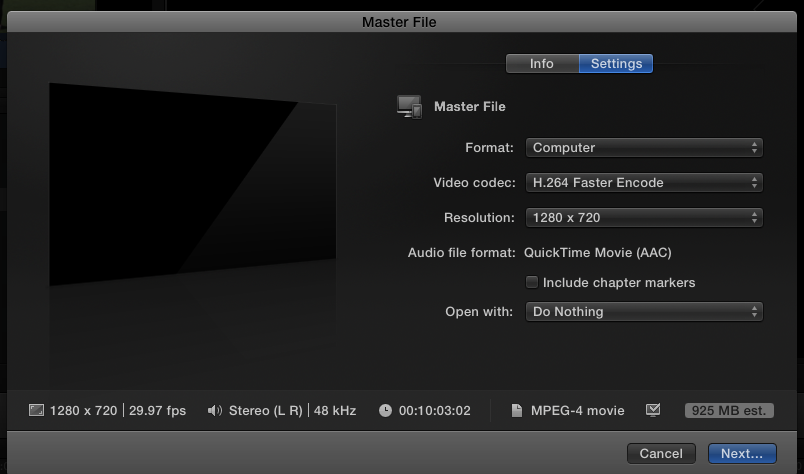
This will produce cross-platform H.264 files that the client will be able to view in the native windows media player.
Of course transcoding to MP4 will be longer than creating Proxy files. So anyway you proceed, first tell the client not to play your files from the USB2 drive. USB2 is only good for backups, not for playback or editing.
If he cannot play 18Mbps files from his HDD he really should get a decent computer instead of a Windows machine
All jokes aside: if you need to supply files at even lower data rates post back and I will give you some settings.
-Ronny
Of course if the client plays back the ProRes Proxy files from the USB2 drive the speed of this drive can be a huge bottleneck as well.
So there are two ways you can go:
1. You can tell the client to copy the 1920 x 1080 ProRes Proxy files over to his HDD and play them from the computer drive instead of from the slow USB2 drive. If the files play fine from the HDD your problem is solved.
2. If the Proxy files don't play fine from the HDD either you will have to send files with a lower data rate.
- If you want to stick with ProRes Proxy you can create 1280x720 proxies, which run at 23 Mbps.
- Or you can create 1280x720 MP4 files in FCPX, which will run at approximately 18 Mbps. To create these MP4 files in FCPX: select Share > Master File and press the Settings button. Then use the following settings:
This will produce cross-platform H.264 files that the client will be able to view in the native windows media player.
Of course transcoding to MP4 will be longer than creating Proxy files. So anyway you proceed, first tell the client not to play your files from the USB2 drive. USB2 is only good for backups, not for playback or editing.
If he cannot play 18Mbps files from his HDD he really should get a decent computer instead of a Windows machine
All jokes aside: if you need to supply files at even lower data rates post back and I will give you some settings.
-Ronny
Last edit: 24 Mar 2014 14:41 by ronny courtens.
Please Log in to join the conversation.
24 Mar 2014 14:40 #43314
by ffg
Replied by ffg on topic Client approval copies (again)
Thanks Ronny, very helpful. I didn't realise the data rate of PR Proxy is so high.
Please Log in to join the conversation.
- ronny courtens
-
- Offline
- Moderator
-
Less
More
- Posts: 4455
- Thank you received: 962
24 Mar 2014 14:46 #43315
by ronny courtens
Replied by ronny courtens on topic Client approval copies (again)
Prores Proxy is not to be underestimated: it is a high quality format at a relatively low data rate. When you use Proxy editing in FCPX it's sometimes hard to notice the difference between optimized and proxies.
ProRes Proxy @ 960x720 is about 19 Mbps, that could be another size to consider.
-Ronny
ProRes Proxy @ 960x720 is about 19 Mbps, that could be another size to consider.
-Ronny
Please Log in to join the conversation.
