


- Posts: 233
- Thank you received: 6
3 Post Moderation Rule for New Boarders (25 Jan 2021)
New boarders will have their posts moderated - Don't worry if you cannot see your post immediately.
Keyframe Bug?
- damiangrady
-
 Topic Author
- Offline
- Elite Member
-

Less
More
23 Mar 2014 18:28 #43259
by damiangrady
Keyframe Bug? was created by damiangrady
Hi there,
I am experiencing something very weird in FCP X 10.1.1
I have created keyframes at frame 1 on a clip in the timeline for transform values x=793, y=-403 and scale 200%.
Then at frame 10 added another set of keyframe with identical values and at 15 frames keyframes those values to 0,0 and 100%.
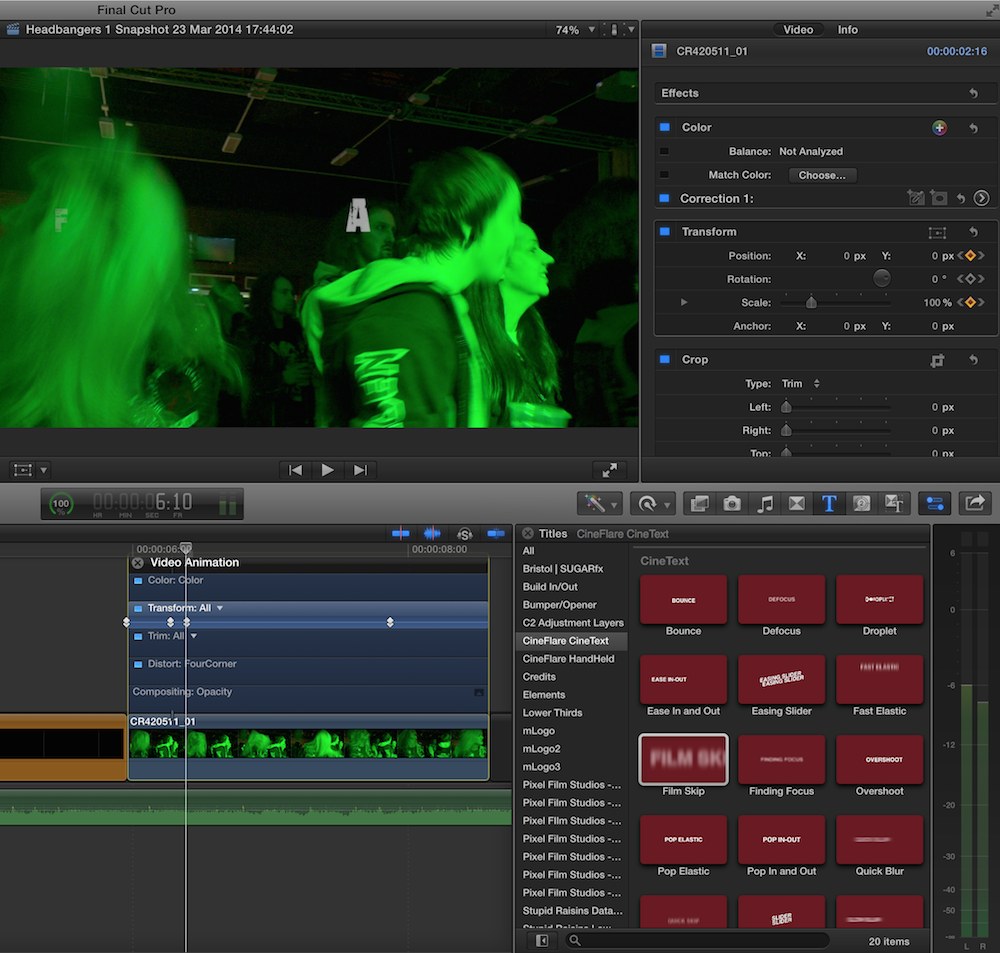
5seconds later I have added another set of keyframes of 0,0 and 100% but in the gap between these keyframes and the previous keyframes (of identical values) the clip animates off screen and then back on again. It's almost as if there are some phantom keyframes in the middle.
Am I doing something wrong here?
I am experiencing something very weird in FCP X 10.1.1
I have created keyframes at frame 1 on a clip in the timeline for transform values x=793, y=-403 and scale 200%.
Then at frame 10 added another set of keyframe with identical values and at 15 frames keyframes those values to 0,0 and 100%.
5seconds later I have added another set of keyframes of 0,0 and 100% but in the gap between these keyframes and the previous keyframes (of identical values) the clip animates off screen and then back on again. It's almost as if there are some phantom keyframes in the middle.
Am I doing something wrong here?


Please Log in to join the conversation.
23 Mar 2014 18:57 #43261
by Overturf
Replied by Overturf on topic Keyframe Bug?
Glad I'm not the only one. It happens to me every now and then. Plus I sometimes click the keyframe button and it gets placed some frames down the line instead of on the spot. Ugly.
Please Log in to join the conversation.
- Tom Wolsky
-

- Offline
- Moderator
-

23 Mar 2014 18:59 #43262
by Tom Wolsky
Replied by Tom Wolsky on topic Keyframe Bug?
What keyframe interpolation is being used on the position keyframes in the viewer?
Please Log in to join the conversation.
- damiangrady
-
Topic Author
- Offline
- Elite Member
-
Less
More
- Posts: 233
- Thank you received: 6
23 Mar 2014 19:03 #43264
by damiangrady
Replied by damiangrady on topic Keyframe Bug?
It's saying Linear interpolation but I'm struggling to understand what there is to interpolate between 0 and 0.
Please Log in to join the conversation.
- Tom Wolsky
-
- Offline
- Moderator
-
23 Mar 2014 19:19 #43265
by Tom Wolsky
Replied by Tom Wolsky on topic Keyframe Bug?
Are they all linear? That's exactly the problem if it's trying to interpolate motion where there isn't supposed to be any. You might try different settings. What are the clip sizes in relation to the project size? Is the scale value changing as well.
Please Log in to join the conversation.
- Jonathan Levin
-

- Offline
- Platinum Member
-

Less
More
- Posts: 786
- Thank you received: 21
23 Mar 2014 20:33 #43271
by Jonathan Levin
Replied by Jonathan Levin on topic Keyframe Bug?
Damian,
Is the last screen shot (#3) where the playhead is parked where there is no key frame, is that where you are getting the "phantom" keyframe?
If so, have you tried to click on the other effects in the video animation pop up, like color, trim all, distort, and so on. I've found that sometimes there is a wayward keyframe in one of the other options that needs to be deleted.
Other than that, I am of absolutely no use.
Jonathan
Is the last screen shot (#3) where the playhead is parked where there is no key frame, is that where you are getting the "phantom" keyframe?
If so, have you tried to click on the other effects in the video animation pop up, like color, trim all, distort, and so on. I've found that sometimes there is a wayward keyframe in one of the other options that needs to be deleted.
Other than that, I am of absolutely no use.
Jonathan
Please Log in to join the conversation.
- Tom Wolsky
-
- Offline
- Moderator
-
23 Mar 2014 20:57 #43272
by Tom Wolsky
Replied by Tom Wolsky on topic Keyframe Bug?
I don't know what's causing it. It's very strange. I can't see any reason for it to deviate and certainly not as far as it moves. It's interesting that it moves in the same linear path as the short five frame animation. If I do the same animation starting in the lower left it produces the same effect, again going in the same linear direction as the short animation. The first set of keyframes at frame 1 don't do anything, but it doesn't matter to the problem.
Try doing the same animation using the crop function and see if that works for you.
Try doing the same animation using the crop function and see if that works for you.
Please Log in to join the conversation.
- damiangrady
-
Topic Author
- Offline
- Elite Member
-
Less
More
- Posts: 233
- Thank you received: 6
23 Mar 2014 21:32 #43273
by damiangrady
Yeah J, I tried looking at that but there are only keyframes in the x,y and scale parameters.
Very odd.
Replied by damiangrady on topic Keyframe Bug?
Jonathan Levin wrote: Damian,
Is the last screen shot (#3) where the playhead is parked where there is no key frame, is that where you are getting the "phantom" keyframe?
If so, have you tried to click on the other effects in the video animation pop up, like color, trim all, distort, and so on. I've found that sometimes there is a wayward keyframe in one of the other options that needs to be deleted.
Other than that, I am of absolutely no use.
Jonathan
Yeah J, I tried looking at that but there are only keyframes in the x,y and scale parameters.
Very odd.
Please Log in to join the conversation.

23 Mar 2014 23:34 #43279
by rgilman
Replied by rgilman on topic Keyframe Bug?
I suspect you have a "smooth" keyframe in there somewhere -- at least that's what I usually find when I run into this. Especially when more than one keyframe has the same value, as your pair of 0,0 position keyframes do, it is hard to check for "smooth" on all of them. I suggest you offset your 0,0 pair in y to something like 0,10 and 0,-10, turn on transform in the viewer and check each (now separate) keyframe to see if any are "smooth".
BTW, I've been told – and it seems to work – that the way to make sure you get a linear transform keyframe is to first click the keyframe symbol in the inspector and then adjust values. If you adjust values first, it will create the keyframe for you but it will create a smooth keyframe. Fiddly extra step but it saves frustration later.
BTW, I've been told – and it seems to work – that the way to make sure you get a linear transform keyframe is to first click the keyframe symbol in the inspector and then adjust values. If you adjust values first, it will create the keyframe for you but it will create a smooth keyframe. Fiddly extra step but it saves frustration later.
Please Log in to join the conversation.

24 Mar 2014 04:27 - 24 Mar 2014 04:30 #43292
by Redifer
Replied by Redifer on topic Keyframe Bug?
Keyframing in Final Cut Pro X is extremely broken to the point of hilarity. I think monkeys programmed it. It's absolutely pathetic. Anyway here's a workaround:
Let's say you have keyframes 1, 2, 3 and 4. If you do not want any bizarre motion between keyframes 2 and 3 you must take additional steps. You must do this WHILE you're building your keyframes so you have to start from scratch. Put keyframe 1 and 2 as you normally would. Now after keyframe 2 advance the playhead a SINGLE FRAME and make another keyframe that is identical in value to keyframe 2. When the image is to start moving again you'd normally make another one at a later point. Do so. If you want to be REALLY safe you can go 1 frame BEFORE what would be keyframe 3 and make another identical keyframe. Now move your image for keyframe 4. I hope I have explained that clearly enough. If not I can make a video of it. Using this method you should only have movements where you want.
Apple doesn't care about keyframes otherwise this problem which has been with FCPX since the beginning would have been fixed by now.
Let's say you have keyframes 1, 2, 3 and 4. If you do not want any bizarre motion between keyframes 2 and 3 you must take additional steps. You must do this WHILE you're building your keyframes so you have to start from scratch. Put keyframe 1 and 2 as you normally would. Now after keyframe 2 advance the playhead a SINGLE FRAME and make another keyframe that is identical in value to keyframe 2. When the image is to start moving again you'd normally make another one at a later point. Do so. If you want to be REALLY safe you can go 1 frame BEFORE what would be keyframe 3 and make another identical keyframe. Now move your image for keyframe 4. I hope I have explained that clearly enough. If not I can make a video of it. Using this method you should only have movements where you want.
Apple doesn't care about keyframes otherwise this problem which has been with FCPX since the beginning would have been fixed by now.
Last edit: 24 Mar 2014 04:30 by Redifer.
Please Log in to join the conversation.
24 Mar 2014 08:34 #43298
by FvH
Replied by FvH on topic Keyframe Bug?
I agree with Redifer. When I encounter this problem, usually after keyframing Position and Scale, I follow this workaround: Let's assume you have two keyframes A and B with this funny behavior. Then first make sure that the keyframes are set to linear, then go to keyframe A, advance the playhead a couple of keyframes downstream between A and B. In the Inspector, generate a new keyframe for the Position, then click again to delete it, and repeat this three or four times until your keyframed item does no longer move in the viewer. I still find it strange that the Apple team is not capable of fixing this issue which to my experience only occurs when you add keyframes to both, Position and Scale. Let's hope for a future update.
Please Log in to join the conversation.
