


- Posts: 5
- Thank you received: 0
3 Post Moderation Rule for New Boarders (25 Jan 2021)
New boarders will have their posts moderated - Don't worry if you cannot see your post immediately.
Flipping 35mm adapter footage
- octavianus
-
 Topic Author
- Offline
- New Member
-

Less
More
22 Mar 2014 21:42 #43223
by octavianus
Flipping 35mm adapter footage was created by octavianus
Hay. I'm new here, and hope I post in the right part of the forum.
I'm new to tcp, and uses fcpx. I have been using fcp6 some years ago, and then I imported som HDV footage that was shot with a 35mm adapter. That makes the footage up side down. Now it's time to learn fcpx, so that I can edit my movie, that should have been done years ago.
So to the question, how do I easiest flip the footage thats up side down, so I can work whit it. It's quit many clips, so It should be easy. I tried to flip it in quicktime but realized it change the pixelrango, and compressed the footage.
So the best thing would bee, if I could do some thing whit the footage, that flipped it, before importing it, but with out any losses. Ore that I can flip al clips joust as I got it in fcpx, so that I always se the footage right.
I hope I got my question understandable (english is not my native language).
I'm new to tcp, and uses fcpx. I have been using fcp6 some years ago, and then I imported som HDV footage that was shot with a 35mm adapter. That makes the footage up side down. Now it's time to learn fcpx, so that I can edit my movie, that should have been done years ago.
So to the question, how do I easiest flip the footage thats up side down, so I can work whit it. It's quit many clips, so It should be easy. I tried to flip it in quicktime but realized it change the pixelrango, and compressed the footage.
So the best thing would bee, if I could do some thing whit the footage, that flipped it, before importing it, but with out any losses. Ore that I can flip al clips joust as I got it in fcpx, so that I always se the footage right.
I hope I got my question understandable (english is not my native language).
Please Log in to join the conversation.
- Nervebroke
-
- Offline
- Elite Member
-

Less
More
- Posts: 177
- Thank you received: 12
23 Mar 2014 07:27 #43233
by Nervebroke
Replied by Nervebroke on topic Flipping 35mm adapter footage
I will give this a shot. Ingest your media. Put your clip(s) in the timeline. Go to the effects browser and look for the "flipped"effect. Drag it onto your clip. In the inspector under effects you can flip the video horizontal, vertical or both. There is even an "amount" slider.
Hope this helps in some way
Dave
Hope this helps in some way
Dave
Please Log in to join the conversation.
- Andreas Kiel
-
- Offline
- Platinum Member
-

Less
More
- Posts: 1077
- Thank you received: 189
24 Mar 2014 08:11 #43297
by Andreas Kiel
Replied by Andreas Kiel on topic Flipping 35mm adapter footage
You have to flip both horizontal and vertical – don't touch the "Amount" slider.
You also can do it with QT Player 7 prior to import the same way.
-Andreas
You also can do it with QT Player 7 prior to import the same way.
-Andreas
Please Log in to join the conversation.
- octavianus
-
Topic Author
- Offline
- New Member
-
Less
More
- Posts: 5
- Thank you received: 0
24 Mar 2014 18:25 #43325
by octavianus
Replied by octavianus on topic Flipping 35mm adapter footage
the best would be if I could get the footage right flipped from the beginning, not doing it in the timeline, then I feel it's "to late", and makes the work harder.
How do I import the footage in quicktime and flipping it? As it is right now, if I take the already imported files and rotates them, and then saves them, they will be compressed and in the wrong pixel ratio.
How do I import the footage in quicktime and flipping it? As it is right now, if I take the already imported files and rotates them, and then saves them, they will be compressed and in the wrong pixel ratio.
Please Log in to join the conversation.
- Andreas Kiel
-
- Offline
- Platinum Member
-
Less
More
- Posts: 1077
- Thank you received: 189
24 Mar 2014 19:06 #43330
by Andreas Kiel
Replied by Andreas Kiel on topic Flipping 35mm adapter footage
In QT Player 7 open the files.
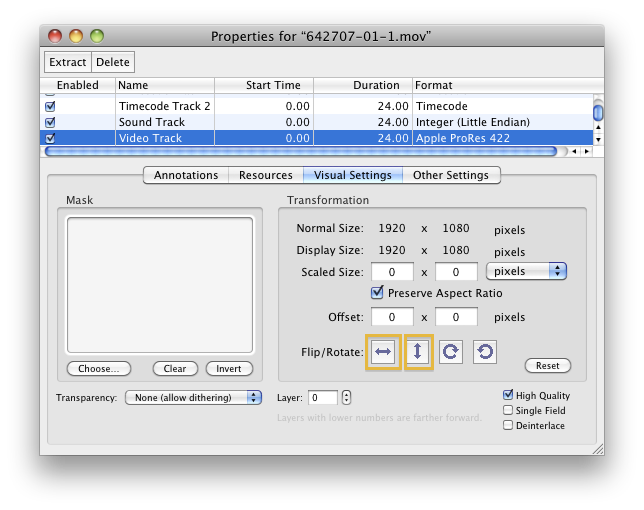
Press both buttons marked and save – no re-compression.
You can write an AppleScript or Automator action to do it in a batch process.
-Andreas
Press both buttons marked and save – no re-compression.
You can write an AppleScript or Automator action to do it in a batch process.
-Andreas
Please Log in to join the conversation.
24 Mar 2014 19:46 #43334
by Julian
Replied by Julian on topic Flipping 35mm adapter footage
Just right click each clip in the event browser and "open in timeline", then go to the inspector and under the transform area, just type in 180 for the rotation and it will flip the clip. That's the easiest and best way to do it in FCPX.
Please Log in to join the conversation.
- Andreas Kiel
-
- Offline
- Platinum Member
-
Less
More
- Posts: 1077
- Thank you received: 189
24 Mar 2014 21:06 - 24 Mar 2014 21:21 #43345
by Andreas Kiel
Replied by Andreas Kiel on topic Flipping 35mm adapter footage
With all respect clicking each single clip open it in a timeline and rotate it or flip-flop is not a good option.
It will blow up the data base and will cost performance – and its time consuming.
If the HDV files can be opened with QT Player 7 a small script can be way better especially when the files will be converted to ProRes on import.
Open the code in AppleScript Editor and save as Application (Stay Open, Startup Screen).
Drag the the .mov files to the app.
-Andreas
It will blow up the data base and will cost performance – and its time consuming.
If the HDV files can be opened with QT Player 7 a small script can be way better especially when the files will be converted to ProRes on import.
on open names
set theFilePathList to names
repeat with theFilePath in theFilePathList
my FlipFlop(theFilePath)
end repeat
end open
on FlipFlop(theFilePath)
try
tell application "QuickTime Player 7"
activate
open theFilePath
try
set theDoc to document 1
tell theDoc
tell last track -- assuming the video track is always the last one
rotate by 180
end tell
save
close
end tell
end try
end tell
end try
end FlipFlop
Open the code in AppleScript Editor and save as Application (Stay Open, Startup Screen).
Drag the the .mov files to the app.
-Andreas
Last edit: 24 Mar 2014 21:21 by Andreas Kiel.
Please Log in to join the conversation.
- Andreas Kiel
-
- Offline
- Platinum Member
-
Less
More
- Posts: 1077
- Thank you received: 189
25 Mar 2014 09:05 #43367
by Andreas Kiel
Replied by Andreas Kiel on topic Flipping 35mm adapter footage
If you are not familiar with AppleScript here a little app.
www.spherico.com/filmtools/xFlipFlop/XFF.dmg
-Andreas
www.spherico.com/filmtools/xFlipFlop/XFF.dmg
-Andreas
Please Log in to join the conversation.
- octavianus
-
Topic Author
- Offline
- New Member
-
Less
More
- Posts: 5
- Thank you received: 0
25 Mar 2014 15:06 - 25 Mar 2014 15:27 #43388
by octavianus
Replied by octavianus on topic Flipping 35mm adapter footage
Thanks Andreas, that was just what I was looking for. And thanks for making the program for me.
The problem is that it does not work. Ore, it works whit some files that I have saved whit quicktime and have the codec AAC, H.264
The problem is the files that I want to flipflop, are imported whit FCP6 some years ago, and have the codec MPEG-2 video, Linear PCM, timecode. And that don't seem to work.
Can you help me doing something whit the program so I can flipflop these files as well, ore do I need to import them again?
The problem is that it does not work. Ore, it works whit some files that I have saved whit quicktime and have the codec AAC, H.264
The problem is the files that I want to flipflop, are imported whit FCP6 some years ago, and have the codec MPEG-2 video, Linear PCM, timecode. And that don't seem to work.
Can you help me doing something whit the program so I can flipflop these files as well, ore do I need to import them again?
Last edit: 25 Mar 2014 15:27 by octavianus.
Please Log in to join the conversation.
- Andreas Kiel
-
- Offline
- Platinum Member
-
Less
More
- Posts: 1077
- Thank you received: 189
25 Mar 2014 15:36 #43389
by Andreas Kiel
Replied by Andreas Kiel on topic Flipping 35mm adapter footage
The app can't do any conversion for none QT formats.
BUT in your case you can use MPEG Streamclip.
Make a setup which save the clips to ProRes and rotates them 180 degrees.
Then you can batch convert them before ingesting into FCPX.
-Andreas
BUT in your case you can use MPEG Streamclip.
Make a setup which save the clips to ProRes and rotates them 180 degrees.
Then you can batch convert them before ingesting into FCPX.
-Andreas
Please Log in to join the conversation.
- octavianus
-
Topic Author
- Offline
- New Member
-
Less
More
- Posts: 5
- Thank you received: 0
25 Mar 2014 16:00 #43394
by octavianus
Replied by octavianus on topic Flipping 35mm adapter footage
Hmm, I tried the MPEG Streamclip. The problem is that the files are getting huge, like 4 times bigger then the original. Plus that the HDV ratio 1440*1080 makes the final movie clip in the wrong ratio.
So what are my alternatives now? To import the files again from the HDV tapes, but in an other format, so I easily can flip them, ore use them use flipped, and then flip them in the timeline? Ore is there an easier alternative so I can use the already existing files and just flip them?
So what are my alternatives now? To import the files again from the HDV tapes, but in an other format, so I easily can flip them, ore use them use flipped, and then flip them in the timeline? Ore is there an easier alternative so I can use the already existing files and just flip them?
Please Log in to join the conversation.
- Andreas Kiel
-
- Offline
- Platinum Member
-
Less
More
- Posts: 1077
- Thank you received: 189
26 Mar 2014 09:27 - 26 Mar 2014 09:29 #43442
by Andreas Kiel
Mpeg-2 is highly compressed so its normal that the files get big.
You can set the conversion size to 1920x1080
Thats another option - maybe a better one, but more time consuming. Then use the little app of mine to flipflop them instead doing it in the timeline.
For capturing use a codec with I-Frame only. This will speed up your editing in FCPX (or any other NLE).
-Andreas
Replied by Andreas Kiel on topic Flipping 35mm adapter footage
Hmm, I tried the MPEG Streamclip. The problem is that the files are getting huge, like 4 times bigger then the original. Plus that the HDV ratio 1440*1080 makes the final movie clip in the wrong ratio.
Mpeg-2 is highly compressed so its normal that the files get big.
You can set the conversion size to 1920x1080
So what are my alternatives now? To import the files again from the HDV tapes, but in an other format, ...
Thats another option - maybe a better one, but more time consuming. Then use the little app of mine to flipflop them instead doing it in the timeline.
For capturing use a codec with I-Frame only. This will speed up your editing in FCPX (or any other NLE).
-Andreas
Last edit: 26 Mar 2014 09:29 by Andreas Kiel.
Please Log in to join the conversation.
- octavianus
-
Topic Author
- Offline
- New Member
-
Less
More
- Posts: 5
- Thank you received: 0
26 Mar 2014 17:14 #43482
by octavianus
Replied by octavianus on topic Flipping 35mm adapter footage
I think I will import the footage again, so I can use your flipflop program. And get an not so compressing codec.
So how do I import it again in the best possible what, using qt player ore fcpx? And how do I do that, whit what settings (remember, I'm a total newbie).
So how do I import it again in the best possible what, using qt player ore fcpx? And how do I do that, whit what settings (remember, I'm a total newbie).
Please Log in to join the conversation.
