


- Posts: 2
- Thank you received: 0
3 Post Moderation Rule for New Boarders (25 Jan 2021)
New boarders will have their posts moderated - Don't worry if you cannot see your post immediately.
How to hide/close item in Final Cut Pro X?
22 Mar 2014 02:12 #43183
by FCXfox
How to hide/close item in Final Cut Pro X? was created by FCXfox
Hello, I want to know how to close that finder window on the far left and the audio bar on the far right
i.imgur.com/c9Ljoeq.png
I opened the finder/search window with command+ F while trying to close the other but now I cannot close either (command +F does not toggle it) :lol:
I opened the finder/search window with command+ F while trying to close the other but now I cannot close either (command +F does not toggle it) :lol:
Please Log in to join the conversation.
22 Mar 2014 04:52 - 22 Mar 2014 04:55 #43184
by ddixon
Replied by ddixon on topic How to hide/close item in Final Cut Pro X?
These are all under the Window Menu, but also:
Command-Shift-1 toggles the Libraries
Command-Shift-8 toggles Audio Meters
If you mean the clips window, or Browser, that's in that Menu also (but doesn't have a default keyboard command
Command-Shift-1 toggles the Libraries
Command-Shift-8 toggles Audio Meters
If you mean the clips window, or Browser, that's in that Menu also (but doesn't have a default keyboard command
Last edit: 22 Mar 2014 04:55 by ddixon.
Please Log in to join the conversation.
- ronny courtens
-

- Offline
- Moderator
-

Less
More
- Posts: 4455
- Thank you received: 962
22 Mar 2014 07:50 - 22 Mar 2014 08:03 #43188
by ronny courtens
Replied by ronny courtens on topic How to hide/close item in Final Cut Pro X?
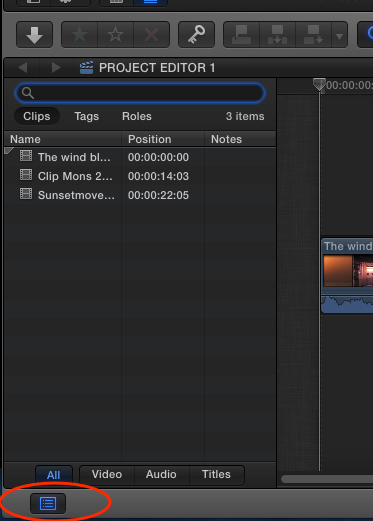
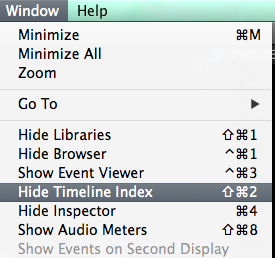
Adding to David's excellent reply, the image you have posted shows the Timeline Index. If you want to close or show this window:
- Press the Timeline Index button under the timeline
- Choose Window > Hide (or Show) Timeline Index
- Or press SHIFT+CMD+2 to toggle the Timeline Index on and off
As to the Audio Meters, there is also a third way to show or hide them: just click on the small audio meters next to the time code counter under the Viewer to toggle the big Audio Meters on or off.
-Ronny
- Press the Timeline Index button under the timeline
- Choose Window > Hide (or Show) Timeline Index
- Or press SHIFT+CMD+2 to toggle the Timeline Index on and off
As to the Audio Meters, there is also a third way to show or hide them: just click on the small audio meters next to the time code counter under the Viewer to toggle the big Audio Meters on or off.
-Ronny
Last edit: 22 Mar 2014 08:03 by ronny courtens.
Please Log in to join the conversation.
22 Mar 2014 22:09 #43224
by FCXfox
Replied by FCXfox on topic How to hide/close item in Final Cut Pro X?
thank you so much my saviors!!
Please Log in to join the conversation.

22 Mar 2014 22:14 #43225
by Seanus
Sean Lander - Editing since 1982 - AVID 1991 - FCP 1999 - FCPX 2011
Replied by Seanus on topic How to hide/close item in Final Cut Pro X?
On this subject I've never found a way to close all projects. Is this possible. I'd like to do so for recording voice overs that don't go into the timeline.
Sean Lander - Editing since 1982 - AVID 1991 - FCP 1999 - FCPX 2011
Please Log in to join the conversation.
- Russ Haskell
-

- Offline
- Elite Member
-

Less
More
- Posts: 176
- Thank you received: 24
24 Mar 2014 01:59 - 24 Mar 2014 02:00 #43283
by Russ Haskell
Replied by Russ Haskell on topic How to hide/close item in Final Cut Pro X?
Only way I've found is to close any library with an open project and create a new library.
Russ
Russ
Last edit: 24 Mar 2014 02:00 by Russ Haskell.
Please Log in to join the conversation.

26 Mar 2014 05:17 #43434
by dgwvideo
Creating history....one edit at a time !
Replied by dgwvideo on topic How to hide/close item in Final Cut Pro X?
Yes, this would be a good feature request to have a toggle option for closing projects. I currently use a dummy library with a blank project for this purpose.
Creating history....one edit at a time !
Please Log in to join the conversation.
