


- Posts: 730
- Thank you received: 26
3 Post Moderation Rule for New Boarders (25 Jan 2021)
New boarders will have their posts moderated - Don't worry if you cannot see your post immediately.
Date & Time issues (or pet peeve at least)
- DmitriZigany
-
 Topic Author
- Offline
- Platinum Member
-

Less
More
21 Mar 2014 15:58 #43146
by DmitriZigany
Date & Time issues (or pet peeve at least) was created by DmitriZigany
Hey!
A good 90% of the work I do is at evening/nights, crossing midnight. That means, because FCPX automatically sorts things by date, things that should be together end up in different days. And shots done after midnight are shown before shots done before midnight. Is there a way to tell FCPX that it's not a new day until 6 or 7am? I guess this would have to be a system wide change though. Which would be fine with me.
Also outside video work most things I do cross the midnight/new day border. I DJ, perform etc etc. it makes it impossible to use correct times in such things as calendars as it becomes a mess when every event shows up in two days.
I tend to say "it's not a new day until after you've slept". I just wish I could make my Mac understand that too.
Might sound like a silly thing, but since it's such a large part of my nocturnal life it's really annoying.
Sorry for the rant and any suggestions for solutions are welcome.
A good 90% of the work I do is at evening/nights, crossing midnight. That means, because FCPX automatically sorts things by date, things that should be together end up in different days. And shots done after midnight are shown before shots done before midnight. Is there a way to tell FCPX that it's not a new day until 6 or 7am? I guess this would have to be a system wide change though. Which would be fine with me.
Also outside video work most things I do cross the midnight/new day border. I DJ, perform etc etc. it makes it impossible to use correct times in such things as calendars as it becomes a mess when every event shows up in two days.
I tend to say "it's not a new day until after you've slept". I just wish I could make my Mac understand that too.
Might sound like a silly thing, but since it's such a large part of my nocturnal life it's really annoying.
Sorry for the rant and any suggestions for solutions are welcome.
Please Log in to join the conversation.
- ronny courtens
-

- Offline
- Moderator
-

Less
More
- Posts: 4455
- Thank you received: 962
21 Mar 2014 20:05 #43167
by ronny courtens
Replied by ronny courtens on topic Date & Time issues (or pet peeve at least)
Hey Dmitri,
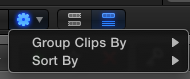
FCPX can sort clips in many ways, not only by date. You can reorganize your imported clips exactly the way you want by pressing the sort button under the Library Browser and selecting an appropriate way to group the clips and to sort the clips within each group.
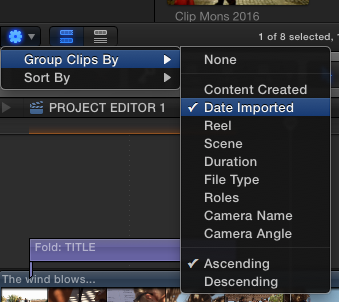
In your case grouping the clips "by Date Imported" would already put together all the clips that you have imported at a certain time, even if those clips were recorded at different days.
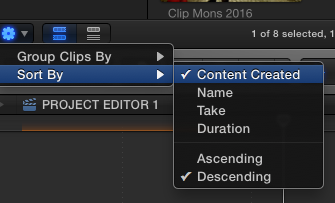
Then you could further sort the imported clips "by Content Created". If clips that span over two days don't appear in the right order just select "Descending" instead of "Ascending" and you will be fine.
-Ronny
FCPX can sort clips in many ways, not only by date. You can reorganize your imported clips exactly the way you want by pressing the sort button under the Library Browser and selecting an appropriate way to group the clips and to sort the clips within each group.
In your case grouping the clips "by Date Imported" would already put together all the clips that you have imported at a certain time, even if those clips were recorded at different days.
Then you could further sort the imported clips "by Content Created". If clips that span over two days don't appear in the right order just select "Descending" instead of "Ascending" and you will be fine.
-Ronny
Please Log in to join the conversation.
- DmitriZigany
-
Topic Author
- Offline
- Platinum Member
-
Less
More
- Posts: 730
- Thank you received: 26
23 Mar 2014 03:38 #43231
by DmitriZigany
Replied by DmitriZigany on topic Date & Time issues (or pet peeve at least)
Thanks! Will give that a go! Looks promising!
Please Log in to join the conversation.
- DmitriZigany
-
Topic Author
- Offline
- Platinum Member
-
Less
More
- Posts: 730
- Thank you received: 26
23 Mar 2014 03:40 #43232
by DmitriZigany
Replied by DmitriZigany on topic Date & Time issues (or pet peeve at least)
Thanks! Will give that a go! Looks promising!
Is there a way to change the "date imported"? Then I could change that to the actual date of the event and things would look correct
Is there a way to change the "date imported"? Then I could change that to the actual date of the event and things would look correct
Please Log in to join the conversation.
- ronny courtens
-
- Offline
- Moderator
-
Less
More
- Posts: 4455
- Thank you received: 962
23 Mar 2014 09:12 #43235
by ronny courtens
Replied by ronny courtens on topic Date & Time issues (or pet peeve at least)
You don't even need to modify date imported to do what you want 
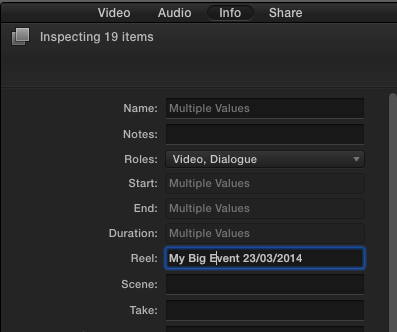
Select all your clips of the same event, go to the Inspector > Info tab and make sure your info view is set to Extended. Then in the Reel box enter the name and/or date of your event and press Return. In this example I have entered "My Big Event 23/03/2014" as the Reel name for all the clips of this event:
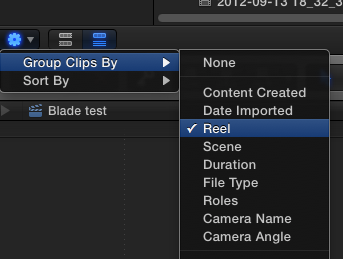
Now the only thing you need to do is to press the Sort button again and tell FCPX to group your clips by Reel name:
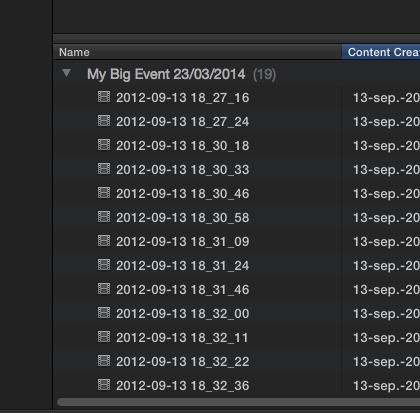
From now on all your clips will be sorted according to their Reel name, and each Reel name corresponds with a specific event you have recorded:
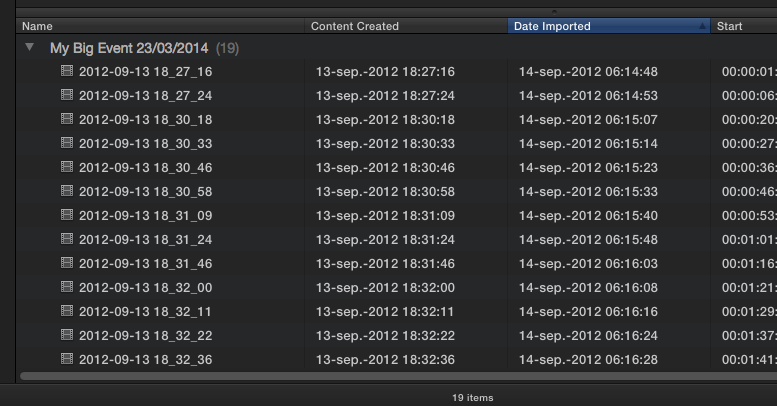
To sort your clips chronologically inside the Reel: click the Date imported header. Even though the clips have been recorded with different creation dates because the recording was spanned over a day and a night, they will we sorted according to the date and time you imported them:
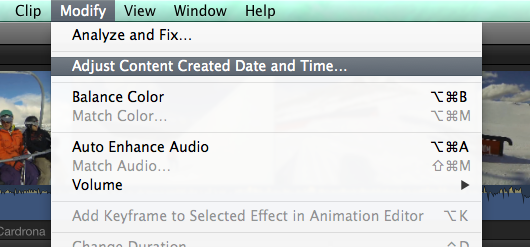
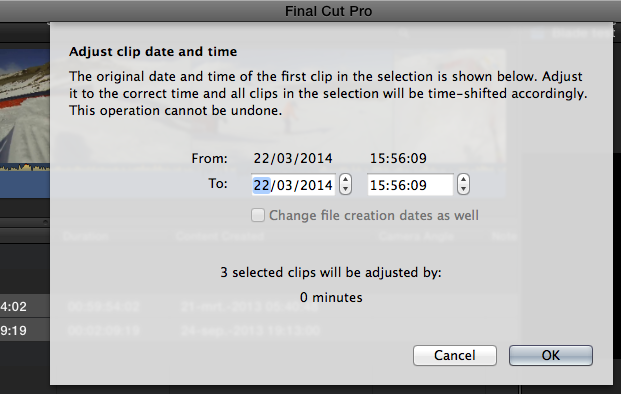
A completely different workflow would be to adjust the creation date and time of your clips to make FCPX think they have been recorded the same day and not overnight. You can do this right inside the app: select all the clips of a particular event and choose Modify > Adjust Content Created Date and Time:
In the window that opens you can enter a new date and time for the first clip of your selection and all the following clips in the selection will be time-shifted:
We all have different workflows and preferences and you might prefer doing things differently than how I have explained above. The good thing is that there are a gazillion ways you can organize your clips in FCPX, in fact no existing NLE can match the way this app handles and organizes clip metadata information. I really cannot go through all these options in a simple thread, but the video below summarizes some of them. I think it can give you even more ideas about setting up the organizing workflow that best suits your specific needs:
If you have any more questions feel free to ask.
-Ronny
Select all your clips of the same event, go to the Inspector > Info tab and make sure your info view is set to Extended. Then in the Reel box enter the name and/or date of your event and press Return. In this example I have entered "My Big Event 23/03/2014" as the Reel name for all the clips of this event:
Now the only thing you need to do is to press the Sort button again and tell FCPX to group your clips by Reel name:
From now on all your clips will be sorted according to their Reel name, and each Reel name corresponds with a specific event you have recorded:
To sort your clips chronologically inside the Reel: click the Date imported header. Even though the clips have been recorded with different creation dates because the recording was spanned over a day and a night, they will we sorted according to the date and time you imported them:
A completely different workflow would be to adjust the creation date and time of your clips to make FCPX think they have been recorded the same day and not overnight. You can do this right inside the app: select all the clips of a particular event and choose Modify > Adjust Content Created Date and Time:
In the window that opens you can enter a new date and time for the first clip of your selection and all the following clips in the selection will be time-shifted:
We all have different workflows and preferences and you might prefer doing things differently than how I have explained above. The good thing is that there are a gazillion ways you can organize your clips in FCPX, in fact no existing NLE can match the way this app handles and organizes clip metadata information. I really cannot go through all these options in a simple thread, but the video below summarizes some of them. I think it can give you even more ideas about setting up the organizing workflow that best suits your specific needs:
If you have any more questions feel free to ask.
-Ronny
Please Log in to join the conversation.
- DmitriZigany
-
Topic Author
- Offline
- Platinum Member
-
Less
More
- Posts: 730
- Thank you received: 26
23 Mar 2014 17:39 #43249
by DmitriZigany
Replied by DmitriZigany on topic Date & Time issues (or pet peeve at least)
Thanks for the great explanation.
My projects are usually fairly small so I haven't really delved into the various formes of sorting that much.
I knew about the possibility to change the date & time, but most of the time I want to keep the original time so I know at what time it was recorded.
But the reel thing looks very useful!
thanks again.
My projects are usually fairly small so I haven't really delved into the various formes of sorting that much.
I knew about the possibility to change the date & time, but most of the time I want to keep the original time so I know at what time it was recorded.
But the reel thing looks very useful!
thanks again.
Please Log in to join the conversation.
