


- Posts: 244
- Thank you received: 12
3 Post Moderation Rule for New Boarders (25 Jan 2021)
New boarders will have their posts moderated - Don't worry if you cannot see your post immediately.
Make Offline in FCPX?
- Doug Suiter
-
 Topic Author
- Offline
- Elite Member
-

Less
More
18 Mar 2014 03:19 #42885
by Doug Suiter
Make Offline in FCPX? was created by Doug Suiter
Anyone have any suggestions for making a project offline in FCPX?
I would like to send a library with events and keywords in tact to a client who already has all the footage...
XML would be a good way to send a single timeline but I would like to send the entire library.
What would be a good solution?
I would like to send a library with events and keywords in tact to a client who already has all the footage...
XML would be a good way to send a single timeline but I would like to send the entire library.
What would be a good solution?
Please Log in to join the conversation.
- haysoos123
-

- Offline
- Platinum Member
-

Less
More
- Posts: 402
- Thank you received: 72
18 Mar 2014 19:22 #42928
by haysoos123
Replied by haysoos123 on topic Make Offline in FCPX?
I take it you're using managed media? If you are, then make a new library on the same drive and copy the events to it. I believe the events in the new library will now only link to the media in your old library as long as the libraries are on the same drive. You can then send that new library to your client.
The other way is to export XMLs of the events and send those. You can make XMLs of events, not just timelines.
The other way is to export XMLs of the events and send those. You can make XMLs of events, not just timelines.
Please Log in to join the conversation.
18 Mar 2014 19:47 - 18 Mar 2014 19:48 #42932
by plysat
Can't sleep? Try this: fcpxpert.net ;-)
Replied by plysat on topic Make Offline in FCPX?
If you're using referenced media, just duplicate the library in the Finder and send the library... Use something like X-Wiper to get rid of all the renders and cache files in the duplicate to make it smaller.
If you're using managed media, you could consolidate the media out of the library to a folder, and then do the same as above.
And as haysoos says you can also export individual event XML, and they could import them into their own Library.
If you're using managed media, you could consolidate the media out of the library to a folder, and then do the same as above.
And as haysoos says you can also export individual event XML, and they could import them into their own Library.
Can't sleep? Try this: fcpxpert.net ;-)
Last edit: 18 Mar 2014 19:48 by plysat.
Please Log in to join the conversation.

18 Mar 2014 20:06 #42935
by BenB
Replied by BenB on topic Make Offline in FCPX?
"I believe the events in the new library will now only link to the media in your old library as long as the libraries are on the same drive."
No, Libraries are independent of each other, and will not share with each other. Copying Events over will copy Managed Media fully.
No, Libraries are independent of each other, and will not share with each other. Copying Events over will copy Managed Media fully.
Please Log in to join the conversation.
- ronny courtens
-

- Offline
- Moderator
-

Less
More
- Posts: 4455
- Thank you received: 962
19 Mar 2014 07:43 #42978
by ronny courtens
Replied by ronny courtens on topic Make Offline in FCPX?
When collaborating on FCPX productions it is best to keep all your actual media outside of the Library (= use external media).
If you have imported your footage into the Library (= managed media) you have two solutions:
1. Consolidate your media out of the library, then send a cleaned copy of your updated library to the other editor (as pointed out by plysat). Just remember that the other editor also must consolidate the media out of his library before opening any updated libraries you send to him. All collaborating systems must use the same external media to make this work, but this is the best way to exchange Libraries between editors.
2. If for some reason you absolutely want to keep the media inside the libraries on both systems you can exchange XMLs.
- Exchanging event XMLs works pretty flawlessly: select an Event and choose File > Export Event XML. Then send the XML to the second editor. Any keywords you have applied to the clips inside the Event will show on the other editor's system when he opens the Event XML in FCPX.
- Exchanging Project XMLs works with certain limitations: select a Project and choose File > Export project XML. Then send the XML to the second editor. When the other editor opens your Project XML in FCPX the Project you have created will open on his system.
At this time there are some issues with modified effects and title templates not being translated correctly in the XML. Especially templates with drop zones will not transfer correctly. But as long as your timelines only contain clips and simple effects (audio, stills, transitions, simple titles etc.. are not a problem, even very long timelines transfer correctly) you will be fine.
-Ronny
If you have imported your footage into the Library (= managed media) you have two solutions:
1. Consolidate your media out of the library, then send a cleaned copy of your updated library to the other editor (as pointed out by plysat). Just remember that the other editor also must consolidate the media out of his library before opening any updated libraries you send to him. All collaborating systems must use the same external media to make this work, but this is the best way to exchange Libraries between editors.
2. If for some reason you absolutely want to keep the media inside the libraries on both systems you can exchange XMLs.
- Exchanging event XMLs works pretty flawlessly: select an Event and choose File > Export Event XML. Then send the XML to the second editor. Any keywords you have applied to the clips inside the Event will show on the other editor's system when he opens the Event XML in FCPX.
- Exchanging Project XMLs works with certain limitations: select a Project and choose File > Export project XML. Then send the XML to the second editor. When the other editor opens your Project XML in FCPX the Project you have created will open on his system.
At this time there are some issues with modified effects and title templates not being translated correctly in the XML. Especially templates with drop zones will not transfer correctly. But as long as your timelines only contain clips and simple effects (audio, stills, transitions, simple titles etc.. are not a problem, even very long timelines transfer correctly) you will be fine.
-Ronny
Please Log in to join the conversation.
- Doug Suiter
-
Topic Author
- Offline
- Elite Member
-
Less
More
- Posts: 244
- Thank you received: 12
20 Mar 2014 00:06 #43019
by Doug Suiter
Replied by Doug Suiter on topic Make Offline in FCPX?
Thanks you so much for the detailed response Ronny! 
Please Log in to join the conversation.

22 Mar 2014 23:38 #43226
by joema
Thanks for this advice; I am looking for best practices in this area. I notice Larry Jordan says the opposite in a recent article:
www.larryjordan.biz/fcp-x-10-1-collaboration/
"A producer in a different location wants to do a rough-cut for an editor, then have the editor polish the cut.
Answer: Import all media so that it is copied into a single library, then duplicate that library onto a second hard disk and give it to the producer. Because the media is stored inside the library, you don’t need to worry about cloning drives or matching file path names, the library handles all of that."
The situation Larry mentions is exactly mine. Can you elaborate on why keeping all media external is the preferred approach? Are you thinking about concurrent multi-user collaboration (where a library can't be shared) vs. sequential collaboration (where main priority is transferring all the elements w/o missing media)?
Replied by joema on topic Make Offline in FCPX?
ronny courtens wrote: When collaborating on FCPX productions it is best to keep all your actual media outside of the Library (= use external media).
Thanks for this advice; I am looking for best practices in this area. I notice Larry Jordan says the opposite in a recent article:
www.larryjordan.biz/fcp-x-10-1-collaboration/
"A producer in a different location wants to do a rough-cut for an editor, then have the editor polish the cut.
Answer: Import all media so that it is copied into a single library, then duplicate that library onto a second hard disk and give it to the producer. Because the media is stored inside the library, you don’t need to worry about cloning drives or matching file path names, the library handles all of that."
The situation Larry mentions is exactly mine. Can you elaborate on why keeping all media external is the preferred approach? Are you thinking about concurrent multi-user collaboration (where a library can't be shared) vs. sequential collaboration (where main priority is transferring all the elements w/o missing media)?
Please Log in to join the conversation.
22 Mar 2014 23:56 #43227
by plysat
Can't sleep? Try this: fcpxpert.net ;-)
Replied by plysat on topic Make Offline in FCPX?
"Can you elaborate on why keeping all media external is the preferred approach?"
Ronny will chime in I'm sure, but I think it depends on how you plan to collaborate. Keeping media managed (in the library vs. external) lessens the possibility of missing media, but the resulting Library file can be very large. If you can store it on a HD, and transport that HD between locations, then it's fine. If you need to use some sort of file sharing to transport the Library, this can be a problem. Best case is that you're in a single location, and can access the same external media. If it's a remote sharing situation, the best case would be that both locations have a copy of the same media. That way, the Library file can be easily swapped back and for using the internet...
Ronny will chime in I'm sure, but I think it depends on how you plan to collaborate. Keeping media managed (in the library vs. external) lessens the possibility of missing media, but the resulting Library file can be very large. If you can store it on a HD, and transport that HD between locations, then it's fine. If you need to use some sort of file sharing to transport the Library, this can be a problem. Best case is that you're in a single location, and can access the same external media. If it's a remote sharing situation, the best case would be that both locations have a copy of the same media. That way, the Library file can be easily swapped back and for using the internet...
Can't sleep? Try this: fcpxpert.net ;-)
Please Log in to join the conversation.
- ronny courtens
-
- Offline
- Moderator
-
Less
More
- Posts: 4455
- Thank you received: 962
23 Mar 2014 12:53 - 23 Mar 2014 15:25 #43246
by ronny courtens
Replied by ronny courtens on topic Make Offline in FCPX?
Adding to Charlie's excellent reply: Larry Jordan forgot a "little" thing when he wrote this otherwise excellent article.
- When you import all media into the Library and you copy a Project into a new Transfer Library to send it to the second editor (which is the workflow he describes), all the physical media that have been used in the Project will also be copied over into the Transfer Library. Depending on the size of the Project the Transfer Libraries can get really huge with this workflow, even if the projects are only rough cuts. So you will need physical drives every time you send Projects between editors, which defeats the whole purpose of easy project collaboration.
- When you work with external media and you copy a Project into a new Transfer Library to send it to the second editor, only the symlinks to the external media that have been used in the Project will be copied over into the Transfer Library. This makes a big difference because these light Transfer Libraries can be sent over the internet, and the complexity or the length of the projects has no big impact on the size of the transfer libraries.
Let's illustrate this with a real-life example.
A Working with managed media inside the library
1. Editor 1 creates a new Library "EDITOR1_MAN" and copies all the media into the Library:
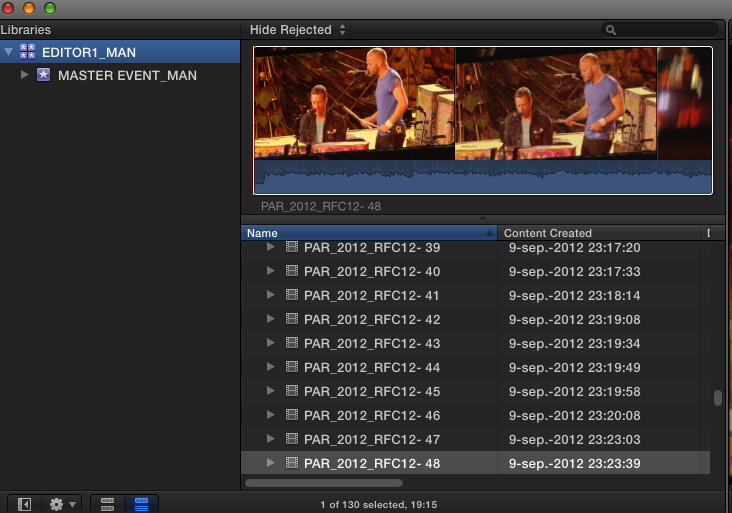
2. Editor 1 copies the library onto an external drive to send it to editor 2, and renames the copied library to "EDITOR2_MAN". Both libraries use managed (internal) media and have the same size:

3. Editor 1 creates a Project and when it's done he wants to send it to editor 2:
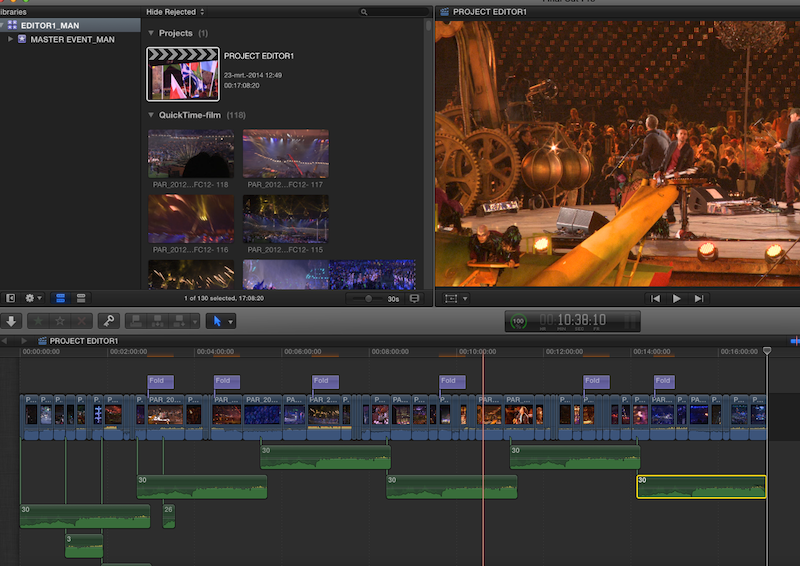
He copies the Project into a new transfer library, which he calls "TRANSFER1_MAN"
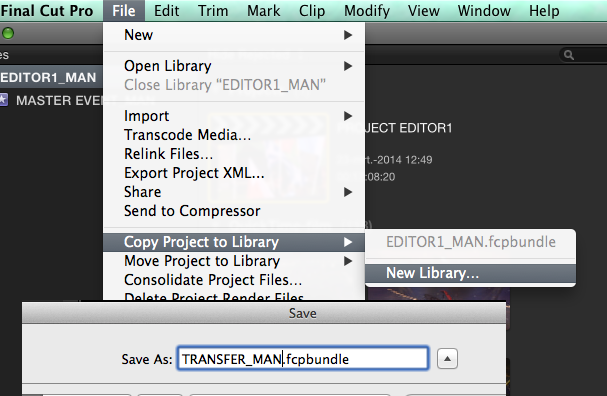
All media used in the project are physically copied over to the TRANSFER1_MAN library:
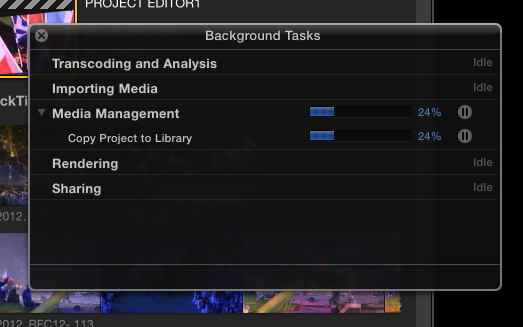
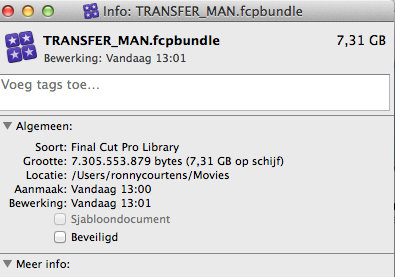
4. The resulting file size for the transfer library he will send to editor 2 is 7.31 GB:
B. Working with external media
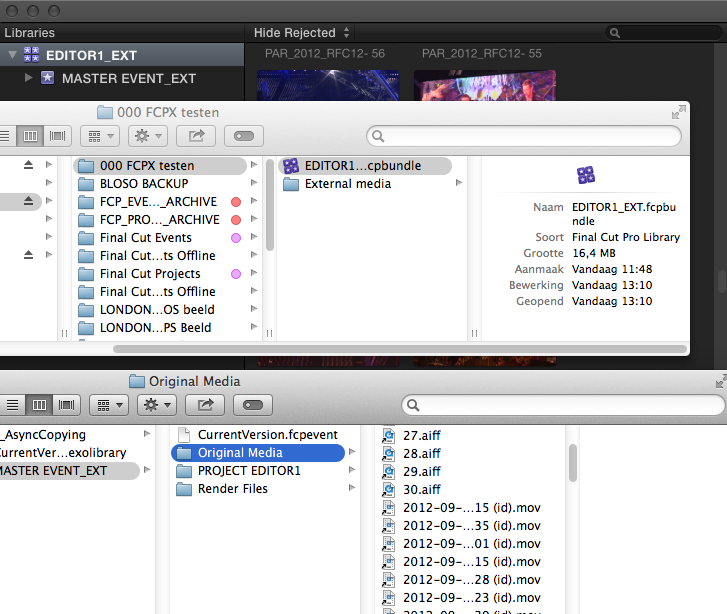
1. Editor 1 creates a new Library "EDITOR1_EXT" using exactly the same media as the example above but this time he leaves the physical media outside of the library, in an External Media folder. The Original Media folder in the library only contains symlinks that link to the physical media inside this folder:
He then copies the library and the External Media folder onto an external drive and sends it to editor 2.
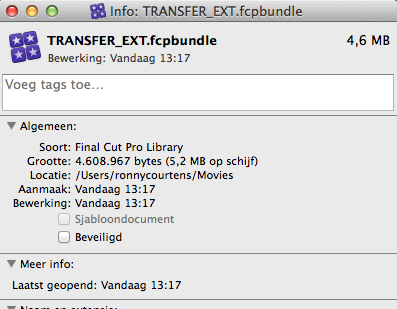
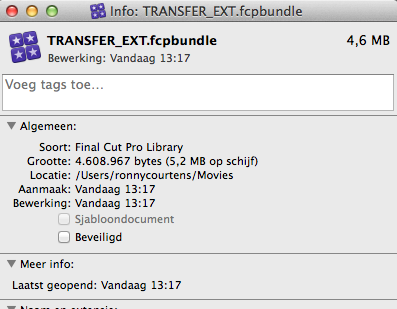
2. Editor 1 creates the same Project as above, and when it's done he copies the Project into a new transfer library, which he calls "TRANSFER_EXT". Only the symlinks of the media that were used in the Project get copied into the transfer library. The size of the transfer library he will send to editor 2 now only is 4.6 MB for exactly the same project using exactly the same media as in example A:
So yes, I would think using external media can make a big difference when you collaborate on FCPX projects
- Ronny
- When you import all media into the Library and you copy a Project into a new Transfer Library to send it to the second editor (which is the workflow he describes), all the physical media that have been used in the Project will also be copied over into the Transfer Library. Depending on the size of the Project the Transfer Libraries can get really huge with this workflow, even if the projects are only rough cuts. So you will need physical drives every time you send Projects between editors, which defeats the whole purpose of easy project collaboration.
- When you work with external media and you copy a Project into a new Transfer Library to send it to the second editor, only the symlinks to the external media that have been used in the Project will be copied over into the Transfer Library. This makes a big difference because these light Transfer Libraries can be sent over the internet, and the complexity or the length of the projects has no big impact on the size of the transfer libraries.
Let's illustrate this with a real-life example.
A Working with managed media inside the library
1. Editor 1 creates a new Library "EDITOR1_MAN" and copies all the media into the Library:
2. Editor 1 copies the library onto an external drive to send it to editor 2, and renames the copied library to "EDITOR2_MAN". Both libraries use managed (internal) media and have the same size:
3. Editor 1 creates a Project and when it's done he wants to send it to editor 2:
He copies the Project into a new transfer library, which he calls "TRANSFER1_MAN"
All media used in the project are physically copied over to the TRANSFER1_MAN library:
4. The resulting file size for the transfer library he will send to editor 2 is 7.31 GB:
B. Working with external media
1. Editor 1 creates a new Library "EDITOR1_EXT" using exactly the same media as the example above but this time he leaves the physical media outside of the library, in an External Media folder. The Original Media folder in the library only contains symlinks that link to the physical media inside this folder:
He then copies the library and the External Media folder onto an external drive and sends it to editor 2.
2. Editor 1 creates the same Project as above, and when it's done he copies the Project into a new transfer library, which he calls "TRANSFER_EXT". Only the symlinks of the media that were used in the Project get copied into the transfer library. The size of the transfer library he will send to editor 2 now only is 4.6 MB for exactly the same project using exactly the same media as in example A:
So yes, I would think using external media can make a big difference when you collaborate on FCPX projects
- Ronny
Last edit: 23 Mar 2014 15:25 by ronny courtens.
Please Log in to join the conversation.
23 Mar 2014 23:27 #43278
by joema
Replied by joema on topic Make Offline in FCPX?
Thanks to everyone, esp Ronny for the excellent and detailed answers. This is a big help and is greatly appreciated.
Please Log in to join the conversation.
04 Apr 2014 15:46 #44016
by joema
What about the case where Editor 1 adds additional media? Short of manually keeping track of which media files in what folder were added and sending those to editor 2, what's the best procedure for this?
Of course editor 2 must get those files. However is there any FCP method to identify and export only the added media files?
Replied by joema on topic Make Offline in FCPX?
ronny courtens wrote: ...Editor 1 creates the same Project as above, and when it's done he copies the Project into a new transfer library, which he calls "TRANSFER_EXT". Only the symlinks of the media that were used in the Project get copied into the transfer library. The size of the transfer library he will send to editor 2 now only is 4.6 MB for exactly the same project using exactly the same media as in example A:...
What about the case where Editor 1 adds additional media? Short of manually keeping track of which media files in what folder were added and sending those to editor 2, what's the best procedure for this?
Of course editor 2 must get those files. However is there any FCP method to identify and export only the added media files?
Please Log in to join the conversation.
- ronny courtens
-
- Offline
- Moderator
-
Less
More
- Posts: 4455
- Thank you received: 962
04 Apr 2014 17:10 #44020
by ronny courtens
Replied by ronny courtens on topic Make Offline in FCPX?
Any one of the editors can add media to their Library and then send the new media to the other editor without having to manually keep track of the added files.
There are different ways you can do this.
One way is to import the added media into a new Event inside the master Library and consolidate this Event's media to a new folder on the production's media drive. Then you only need to send the folder with the consolidated new media to the other editor who will copy the folder onto his media drive. When he opens the new Transfer Library you send him, the new clips will automatically relink.
If you don't want to create a new Event every time you add media you can manually put the new files you want to use inside a new folder on your production's media drive, then drag the folder from the Finder onto the FCP X Library to import the folder. FCPX will automatically create a new keyword collection for the new files (assuming you have enabled "Import folders as keyword collections" in your Import preferences). You can keep this keyword collection, or you can add the clips from this keyword collection to other keyword collections you have created in your Library. Then you send the folder containing the new media to the other editor, when he opens your new Transfer Library the new clips will appear in his Event(s) and Project(s).
- Ronny
There are different ways you can do this.
One way is to import the added media into a new Event inside the master Library and consolidate this Event's media to a new folder on the production's media drive. Then you only need to send the folder with the consolidated new media to the other editor who will copy the folder onto his media drive. When he opens the new Transfer Library you send him, the new clips will automatically relink.
If you don't want to create a new Event every time you add media you can manually put the new files you want to use inside a new folder on your production's media drive, then drag the folder from the Finder onto the FCP X Library to import the folder. FCPX will automatically create a new keyword collection for the new files (assuming you have enabled "Import folders as keyword collections" in your Import preferences). You can keep this keyword collection, or you can add the clips from this keyword collection to other keyword collections you have created in your Library. Then you send the folder containing the new media to the other editor, when he opens your new Transfer Library the new clips will appear in his Event(s) and Project(s).
- Ronny
Please Log in to join the conversation.
