


- Posts: 2
- Thank you received: 0
3 Post Moderation Rule for New Boarders (25 Jan 2021)
New boarders will have their posts moderated - Don't worry if you cannot see your post immediately.
How to change Audio fade shape between audio keyframes
17 Mar 2014 20:38 #42853
by elsen029
How to change Audio fade shape between audio keyframes was created by elsen029
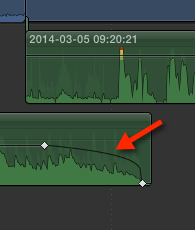
I can't find the function how to change the fade shape between audio keyframes; the fade shape of a fade at the beginning or at the end of an audio track has 4 possible shapes (linear, S-curve, +3dB and -3dB), an audio shape fade between keyframes seems to have the +3dB shape.
I'd like to change this shape but can't find where to change it, or isn't it possible? :dry:
I'd like to change this shape but can't find where to change it, or isn't it possible? :dry:
Please Log in to join the conversation.

20 Mar 2014 12:32 #43051
by BenB
Replied by BenB on topic How to change Audio fade shape between audio keyframes
You can't at this time. You'd have to use the Fade Handle on the edge of the clip to do this.
help.apple.com/finalcutpro/mac/10.1/#ver39580fed
help.apple.com/finalcutpro/mac/10.1/#ver39580fed
Please Log in to join the conversation.
- Jonathan Levin
-

- Offline
- Platinum Member
-

Less
More
- Posts: 786
- Thank you received: 21
20 Mar 2014 14:30 #43069
by Jonathan Levin
Replied by Jonathan Levin on topic How to change Audio fade shape between audio keyframes
Couldn't this be done by adding audio key frames between and manually adjust those?
If you are trying to do what I think you are trying to do.
If you are trying to do what I think you are trying to do.
Please Log in to join the conversation.
20 Mar 2014 14:52 #43074
by BenB
Replied by BenB on topic How to change Audio fade shape between audio keyframes
Looks like he's doing a simple fade out on the end of a clip. Fade Handle would be the fastest, easiest, most flexible way to do that.
Please Log in to join the conversation.
21 Mar 2014 10:38 #43118
by elsen029
Replied by elsen029 on topic How to change Audio fade shape between audio keyframes
Hi BenB,
I'm aware that at the end (and beginning) of a clip the fade shapes can be altered when the handles are selected. As I explained in my question, I tried to change the fade shape between audio keyframes somewhere in the middle of an audio clip.
I agree that the screendump I posted with the question might be misleading since the keyframes were placed near the end of the audio clip. In that case it's indeed easier to use the Fade Handles. Thanks anyway!
Erik
I'm aware that at the end (and beginning) of a clip the fade shapes can be altered when the handles are selected. As I explained in my question, I tried to change the fade shape between audio keyframes somewhere in the middle of an audio clip.
I agree that the screendump I posted with the question might be misleading since the keyframes were placed near the end of the audio clip. In that case it's indeed easier to use the Fade Handles. Thanks anyway!
Erik
Please Log in to join the conversation.
