


- Posts: 377
- Thank you received: 9
3 Post Moderation Rule for New Boarders (25 Jan 2021)
New boarders will have their posts moderated - Don't worry if you cannot see your post immediately.
eyedropper
17 Mar 2014 17:02 #42827
by dkag7
eyedropper was created by dkag7
Is there some setting that i am missing..?
FCPX.1 and Mavericks.
Everytime I use the eyedropper in fcpx, the color never matches correctly.
Is there some setting somplace or is this a bug?
thanks
kurt
FCPX.1 and Mavericks.
Everytime I use the eyedropper in fcpx, the color never matches correctly.
Is there some setting somplace or is this a bug?
thanks
kurt
Please Log in to join the conversation.
- ronny courtens
-

- Offline
- Moderator
-

Less
More
- Posts: 4455
- Thank you received: 962
17 Mar 2014 19:30 #42842
by ronny courtens
Replied by ronny courtens on topic eyedropper
Hey Kurt,
It's a bug. It's hardly noticeable with the naked eye, but a bug anyway. Send feedback to Apple and add a screenshot.
-Ronny
It's a bug. It's hardly noticeable with the naked eye, but a bug anyway. Send feedback to Apple and add a screenshot.
-Ronny
Please Log in to join the conversation.
- Tom Wolsky
-

- Offline
- Moderator
-
17 Mar 2014 19:45 #42846
by Tom Wolsky
Replied by Tom Wolsky on topic eyedropper
Could you post a screen shot of what you're seeing in the color shift. Are you using the default Color display in System Preferences?
Please Log in to join the conversation.
- ronny courtens
-
- Offline
- Moderator
-
Less
More
- Posts: 4455
- Thank you received: 962
17 Mar 2014 20:34 #42852
by ronny courtens
Replied by ronny courtens on topic eyedropper
Hi Tom, here are some screenshots:
Original title on a REC 709 monitor over HDMI:
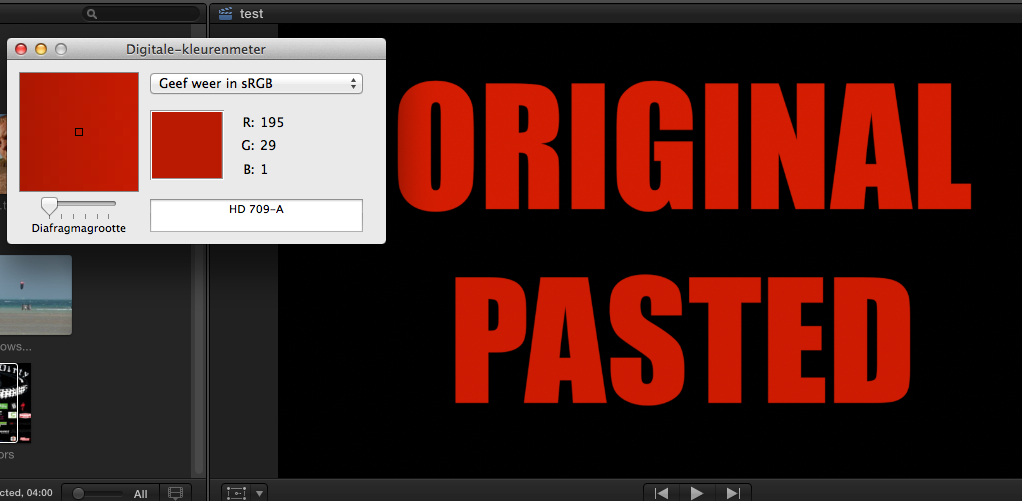
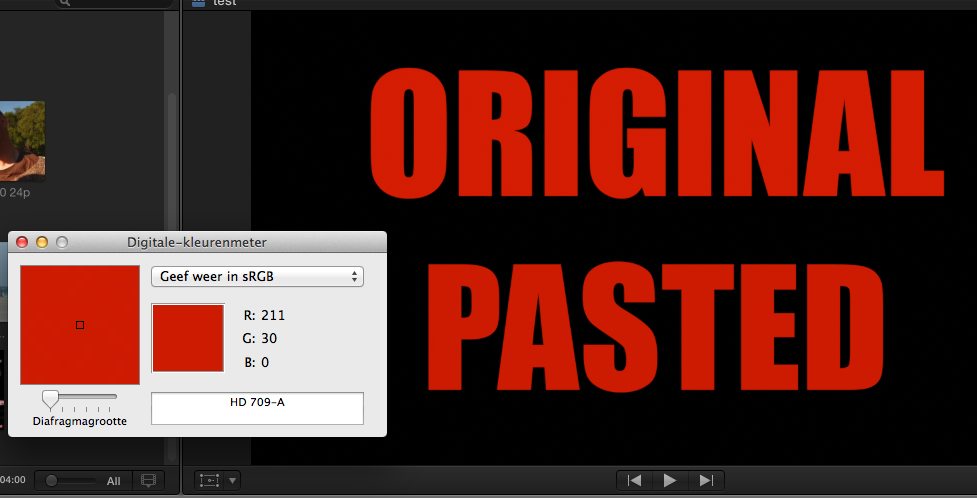
Pasted color onto lower title shows different values:
Original title on a calibrated 30" Apple Cinema Display:
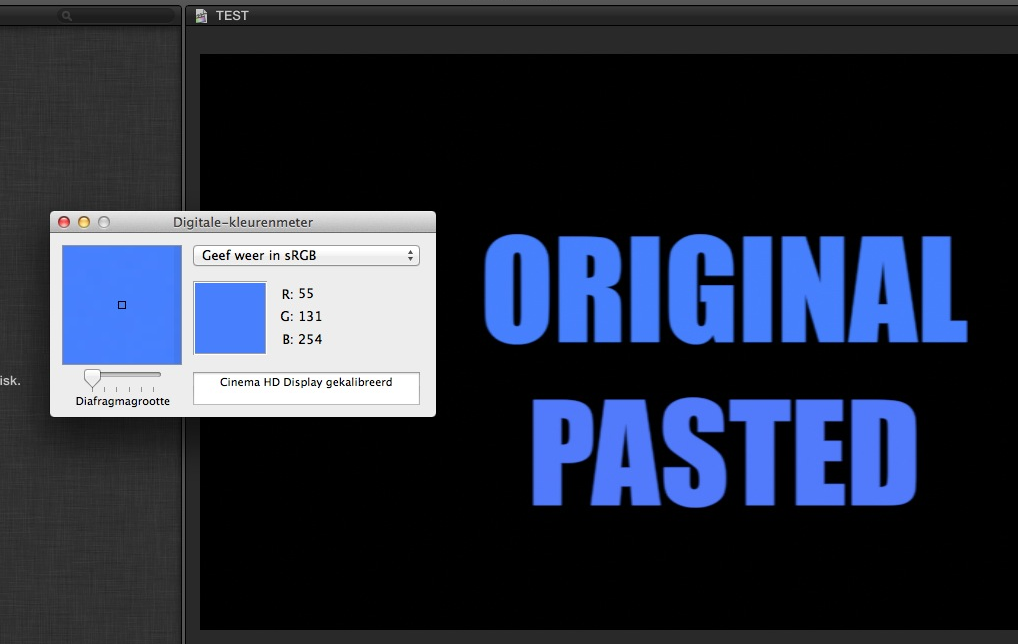
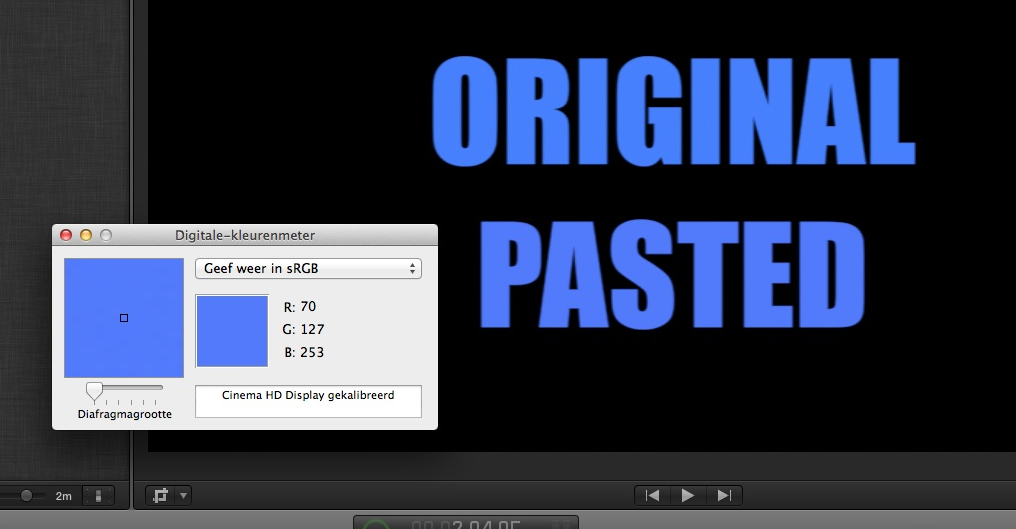
Pasted color onto lower title shows different values:
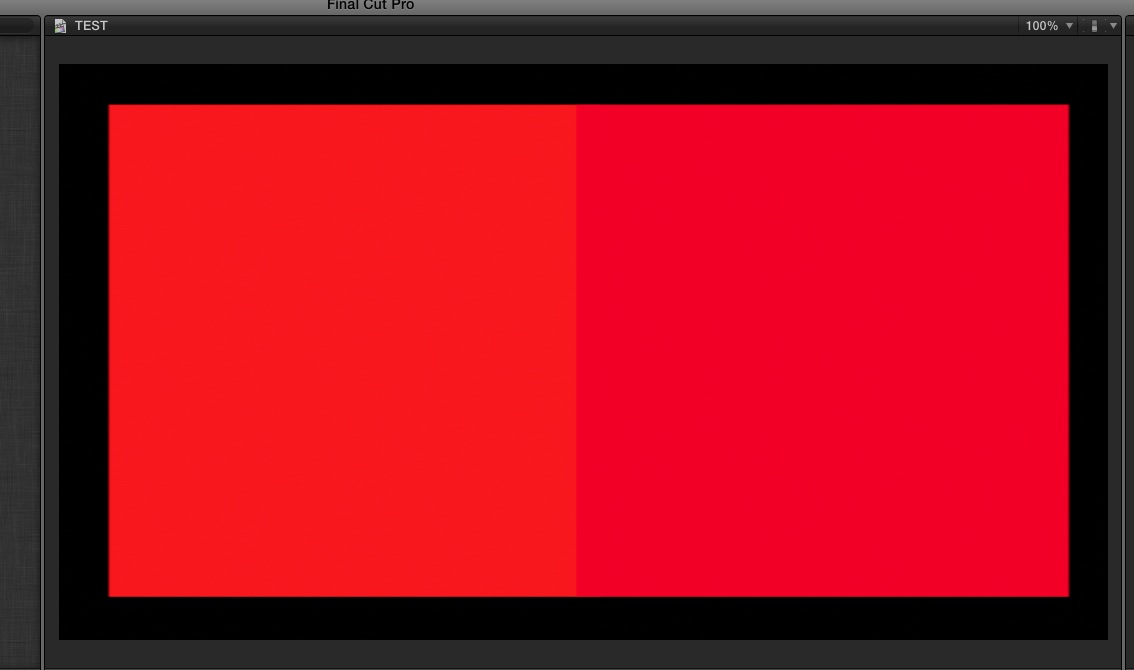
The colors in the titles seem the same to the naked eye, but when you put two squares side by side and you paste the color of the left square onto the right square using the color dropper you can see the difference:
Same results no matter what Color Display settings I use.
After Effects, Pixelmator and Photoshop do not have this issue on the same systems, the Color Meter values between the original color and the pasted one are perfect matches. Motion 5 does have the same issue.
-Ronny
Original title on a REC 709 monitor over HDMI:
Pasted color onto lower title shows different values:
Original title on a calibrated 30" Apple Cinema Display:
Pasted color onto lower title shows different values:
The colors in the titles seem the same to the naked eye, but when you put two squares side by side and you paste the color of the left square onto the right square using the color dropper you can see the difference:
Same results no matter what Color Display settings I use.
After Effects, Pixelmator and Photoshop do not have this issue on the same systems, the Color Meter values between the original color and the pasted one are perfect matches. Motion 5 does have the same issue.
-Ronny
Please Log in to join the conversation.
17 Mar 2014 21:07 #42858
by dkag7
Replied by dkag7 on topic eyedropper
im not at the system now but for me they are obvious with the naked eye..
i had a 4x3 solid color (light pink and also a grey one) to fill the screen on a 16x9 project.
i put a custom solid generator below the 4x3, then used the eye dropper on the custom solid generator and picked the grey upper clip.. the color difference is very obvious.. use an image that is one color with straight line edges..
kurt
i had a 4x3 solid color (light pink and also a grey one) to fill the screen on a 16x9 project.
i put a custom solid generator below the 4x3, then used the eye dropper on the custom solid generator and picked the grey upper clip.. the color difference is very obvious.. use an image that is one color with straight line edges..
kurt
Please Log in to join the conversation.
17 Mar 2014 21:53 - 17 Mar 2014 21:55 #42862
by plysat
Can't sleep? Try this: fcpxpert.net ;-)
Replied by plysat on topic eyedropper
Absolutely send feedback. here is a workaround though. Using the color picker:
Select the clip/text etc. that has the color to be copied/matched
Open the Color Picker from the inspector
Drag the Color displayed at the top of the Color Picker into an open swatch at the bottom (little squares)
Select the clip/text etc on which you want to change the color
Open the Color Picker from thee inspector
Drag the swatch you just saved to the color display at the top of the Color Picker
Doing this preserves the original color exactly...
Select the clip/text etc. that has the color to be copied/matched
Open the Color Picker from the inspector
Drag the Color displayed at the top of the Color Picker into an open swatch at the bottom (little squares)
Select the clip/text etc on which you want to change the color
Open the Color Picker from thee inspector
Drag the swatch you just saved to the color display at the top of the Color Picker
Doing this preserves the original color exactly...
Can't sleep? Try this: fcpxpert.net ;-)
Last edit: 17 Mar 2014 21:55 by plysat.
Please Log in to join the conversation.
- Tom Wolsky
-
- Offline
- Moderator
-
17 Mar 2014 22:40 #42865
by Tom Wolsky
Replied by Tom Wolsky on topic eyedropper
So the monitor isn't using the default color System Preferences. Only the default display will use Color Sync to maintain color in FCP.
Please Log in to join the conversation.
17 Mar 2014 22:44 #42866
by plysat
Can't speak for others here, but I get this color shift issue using the default monitor. It's not just FCP X though, try it with any app that uses the Color Picker...
Can't sleep? Try this: fcpxpert.net ;-)
Replied by plysat on topic eyedropper
Tom Wolsky wrote: So the monitor isn't using the default color System Preferences. Only the default display will use Color Sync to maintain color in FCP.
Can't speak for others here, but I get this color shift issue using the default monitor. It's not just FCP X though, try it with any app that uses the Color Picker...
Can't sleep? Try this: fcpxpert.net ;-)
Please Log in to join the conversation.
- Tom Wolsky
-
- Offline
- Moderator
-
17 Mar 2014 22:59 #42868
by Tom Wolsky
Replied by Tom Wolsky on topic eyedropper
I see a different color display in every device. This is Photoshop, with the Photoshop color picker showing the RGB values and the color meter showing different color values on the same image.
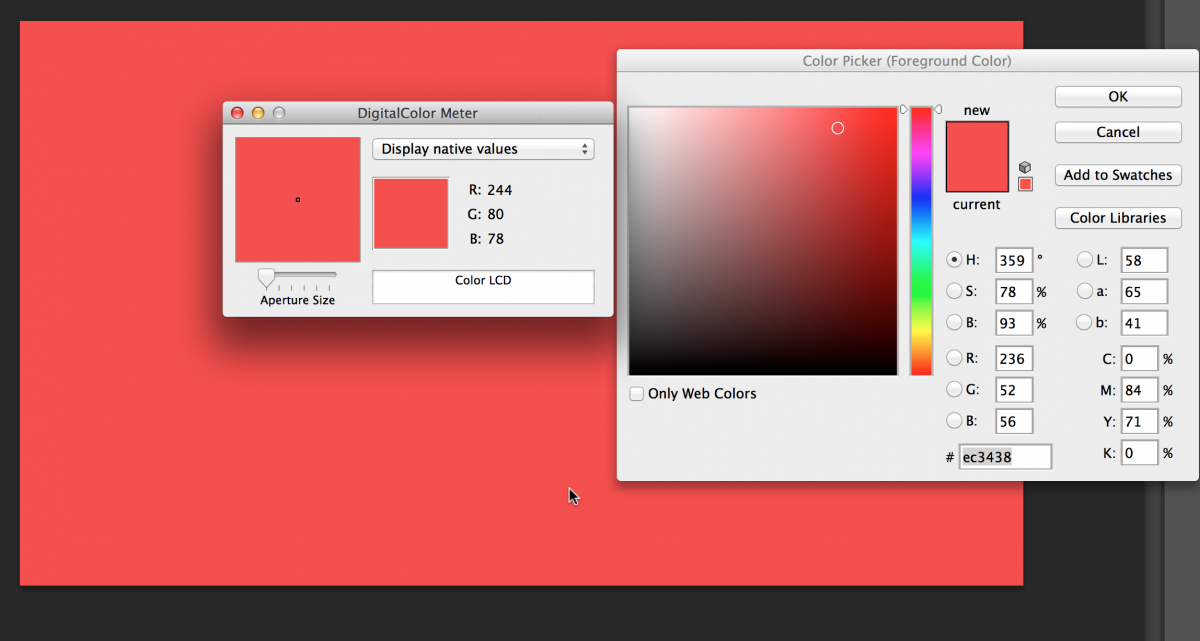
This is the PSD file in the FCP view using the Apple Color Picker
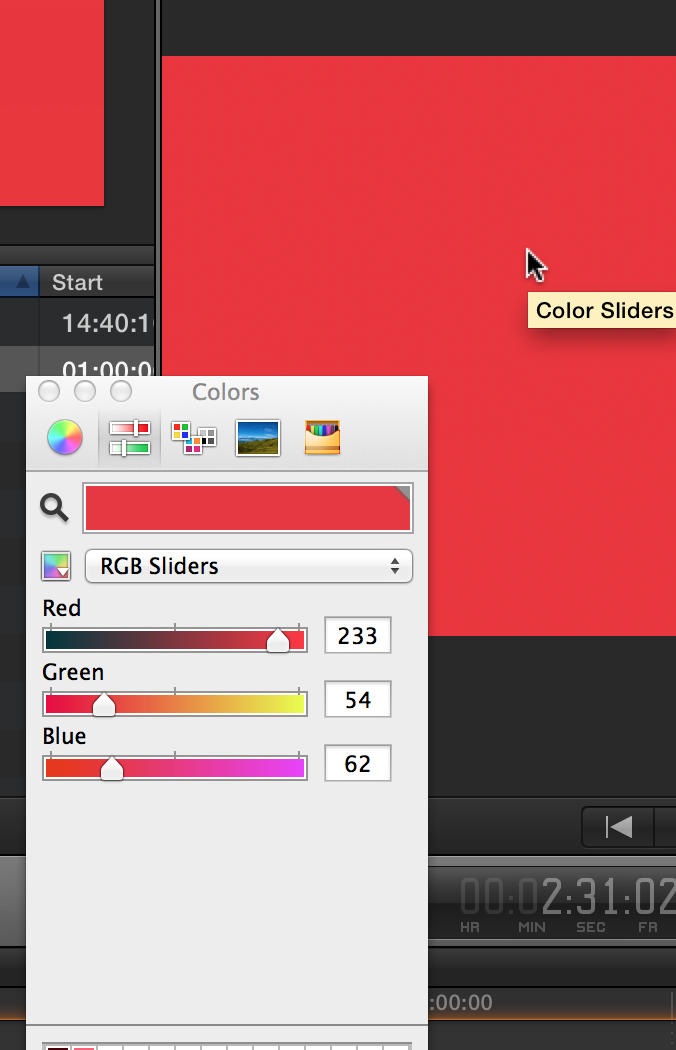
This is the color meter representation of the viewer
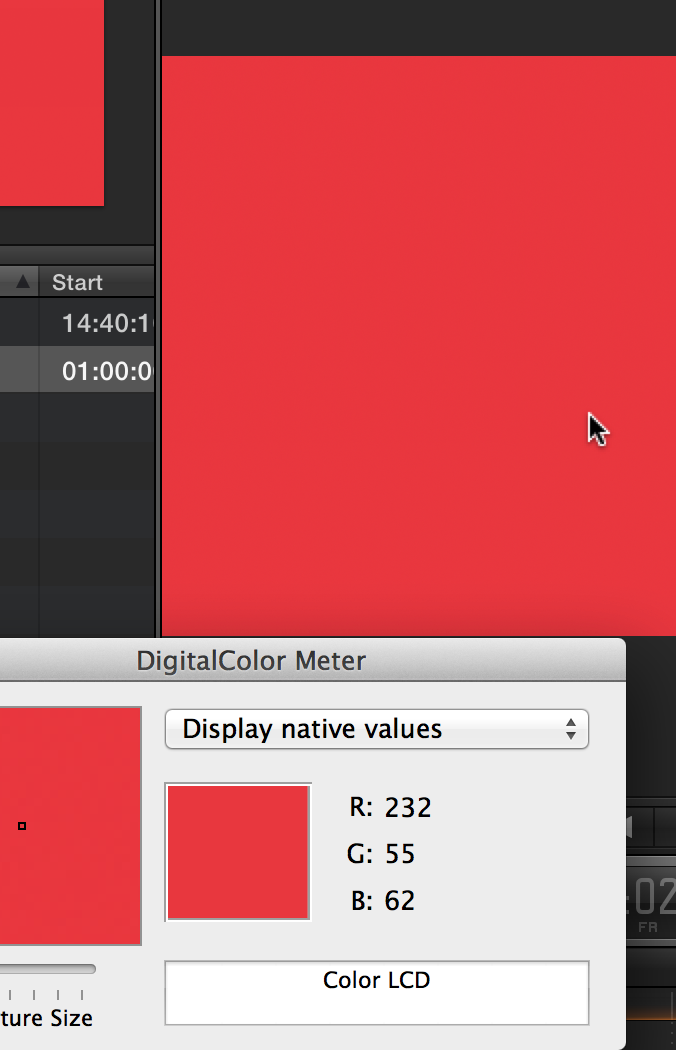
Take your pick.
This is the PSD file in the FCP view using the Apple Color Picker
This is the color meter representation of the viewer
Take your pick.
Please Log in to join the conversation.
17 Mar 2014 23:08 - 17 Mar 2014 23:20 #42869
by plysat
Can't sleep? Try this: fcpxpert.net ;-)
Replied by plysat on topic eyedropper
"Take your pick."
I see what you did there... Anyway, the only way I can get an exact color match with text, gfx, whatever, is to use the swatch. Open the Picker on the clip/text, whatever your source color is, and drag that color to a swatch and use that to set your "matching" colors... Try this..
...With a custom color solid in an app that uses the color picker. Open the picker and adjust the RGB sliders to get a color, any color. Then, select the eyedropper/magnifying glass and click on the color in the color picker. When I do this the RGB values change. without doing anything, click that color again, the values change again. Use the tool on the image, they change, do it again, they change. somethings messed up with that tool...
I see what you did there...
Anyway, the only way I can get an exact color match with text, gfx, whatever, is to use the swatch. Open the Picker on the clip/text, whatever your source color is, and drag that color to a swatch and use that to set your "matching" colors... Try this.....With a custom color solid in an app that uses the color picker. Open the picker and adjust the RGB sliders to get a color, any color. Then, select the eyedropper/magnifying glass and click on the color in the color picker. When I do this the RGB values change. without doing anything, click that color again, the values change again. Use the tool on the image, they change, do it again, they change. somethings messed up with that tool...
Can't sleep? Try this: fcpxpert.net ;-)
Last edit: 17 Mar 2014 23:20 by plysat.
Please Log in to join the conversation.
18 Mar 2014 03:52 #42887
by dkag7
Replied by dkag7 on topic eyedropper
Sorry.. I am not understanding the work around..
The clip that has the color that i want, is a 'clip', an image..
So where is the color picker in the inspector?
In the inspector I just see the normal stuff.. crop, transform etc... there is no color picker..
thanks
kurt
Select the clip/text etc. that has the color to be copied/matched
Open the Color Picker from the inspector
The clip that has the color that i want, is a 'clip', an image..
So where is the color picker in the inspector?
In the inspector I just see the normal stuff.. crop, transform etc... there is no color picker..
thanks
kurt
Please Log in to join the conversation.
18 Mar 2014 04:01 - 18 Mar 2014 05:05 #42888
by plysat
I should have been more clear I guess... This will work in the examples above, such as with text or a color solid. In those cases the (original) color selection would be in the "face" tab of text, or in the generator tab in the case of a solid. If you're trying to grab a color from a clip of video or something then you're stuck with the eyedropper/magnifying glass to get the original color... Does that make any sense? Sorry If I'm not explaining it well...
Can't sleep? Try this: fcpxpert.net ;-)
Replied by plysat on topic eyedropper
dkag7 wrote: Sorry.. I am not understanding the work around..
Select the clip/text etc. that has the color to be copied/matched
Open the Color Picker from the inspector
The clip that has the color that i want, is a 'clip', an image..
So where is the color picker in the inspector?
In the inspector I just see the normal stuff.. crop, transform etc... there is no color picker..
thanks
kurt
I should have been more clear I guess... This will work in the examples above, such as with text or a color solid. In those cases the (original) color selection would be in the "face" tab of text, or in the generator tab in the case of a solid. If you're trying to grab a color from a clip of video or something then you're stuck with the eyedropper/magnifying glass to get the original color... Does that make any sense? Sorry If I'm not explaining it well...
Can't sleep? Try this: fcpxpert.net ;-)
Last edit: 18 Mar 2014 05:05 by plysat.
Please Log in to join the conversation.
18 Mar 2014 04:14 #42890
by dkag7
Replied by dkag7 on topic eyedropper
Thanks..
Here is what I see when using the picker..
In your workaround, yes I guess it wount work in my case.
However I did find another..
Open Digital color meter in the utilities folder.
set it to 'display in generic rgb'
in the picker in fcpx, in the clor sliders, select rgb sliders.
copy and paste the values in digitalcolor meter (well you cant copy and paste them, you need to go back and forth and type in the values one at a time).
thanks
kurt
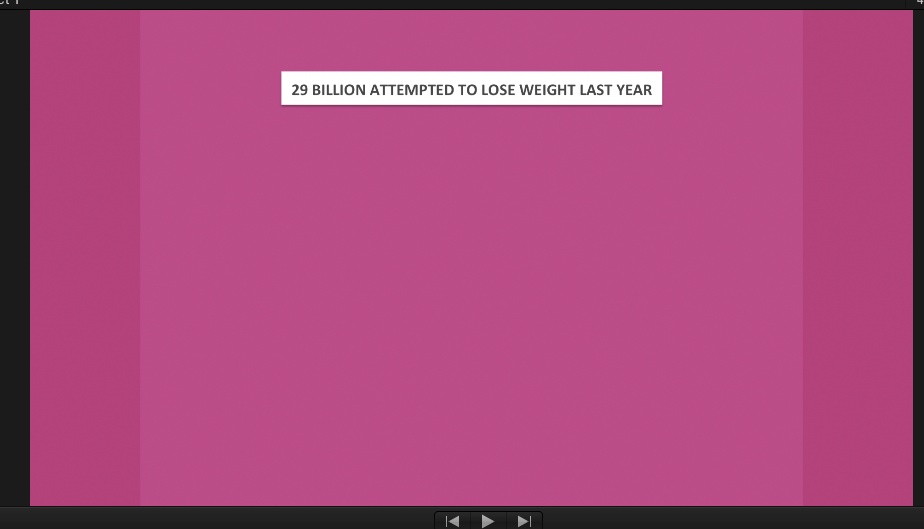
Here is what I see when using the picker..
In your workaround, yes I guess it wount work in my case.
However I did find another..
Open Digital color meter in the utilities folder.
set it to 'display in generic rgb'
in the picker in fcpx, in the clor sliders, select rgb sliders.
copy and paste the values in digitalcolor meter (well you cant copy and paste them, you need to go back and forth and type in the values one at a time).
thanks
kurt
Please Log in to join the conversation.
18 Mar 2014 04:25 #42891
by dkag7
Replied by dkag7 on topic eyedropper
i forgot to mention.. make sure that the picker is also selected to generic rgb (just to the left of where you select what sliders you want, there is an icon. Click it to setup there)
BTW.. how do you have so many rows of little white squares?
I only have one row, and I cant drag them up to make more... and cant figure out how to delete one of the colors in the little squares either.. they dont drag off an 'poof'
kurt
BTW.. how do you have so many rows of little white squares?
I only have one row, and I cant drag them up to make more... and cant figure out how to delete one of the colors in the little squares either.. they dont drag off an 'poof'
kurt
Please Log in to join the conversation.
18 Mar 2014 04:57 #42892
by plysat
Good workaround as well. As to the swatches (squares) you have to drag the bottom of the picker down, make it longer... And you're right, you can't delete the colors, just replace with another, or white if you want it to look cleared.
Can't sleep? Try this: fcpxpert.net ;-)
Replied by plysat on topic eyedropper
dkag7 wrote: i forgot to mention.. make sure that the picker is also selected to generic rgb (just to the left of where you select what sliders you want, there is an icon. Click it to setup there)
BTW.. how do you have so many rows of little white squares?
I only have one row, and I cant drag them up to make more... and cant figure out how to delete one of the colors in the little squares either.. they dont drag off an 'poof'
kurt
Good workaround as well.
As to the swatches (squares) you have to drag the bottom of the picker down, make it longer... And you're right, you can't delete the colors, just replace with another, or white if you want it to look cleared. Can't sleep? Try this: fcpxpert.net ;-)
Please Log in to join the conversation.
- ronny courtens
-
- Offline
- Moderator
-
Less
More
- Posts: 4455
- Thank you received: 962
18 Mar 2014 11:07 - 18 Mar 2014 11:10 #42901
by ronny courtens
Replied by ronny courtens on topic eyedropper
These are fine workarounds, but there definitely is something wrong with the color picker. Here's some screenshots I made on a 30" ACD with the standard Monitor Color Profile settings.
Photoshop color picker leads to perfectly matching colors:
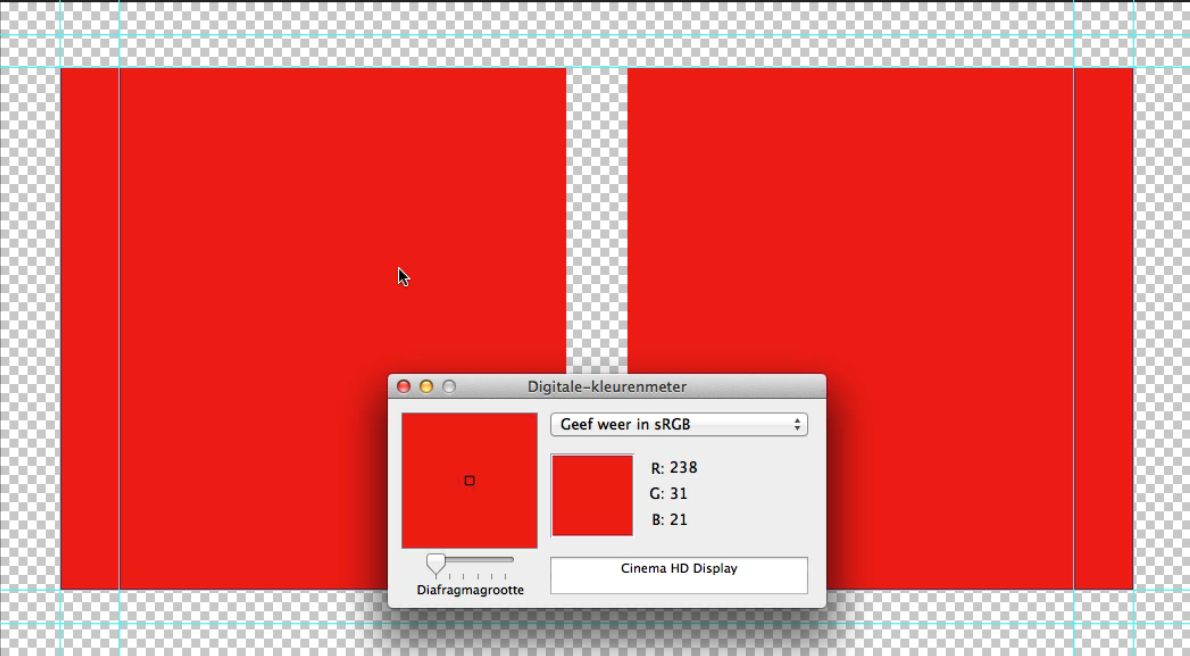
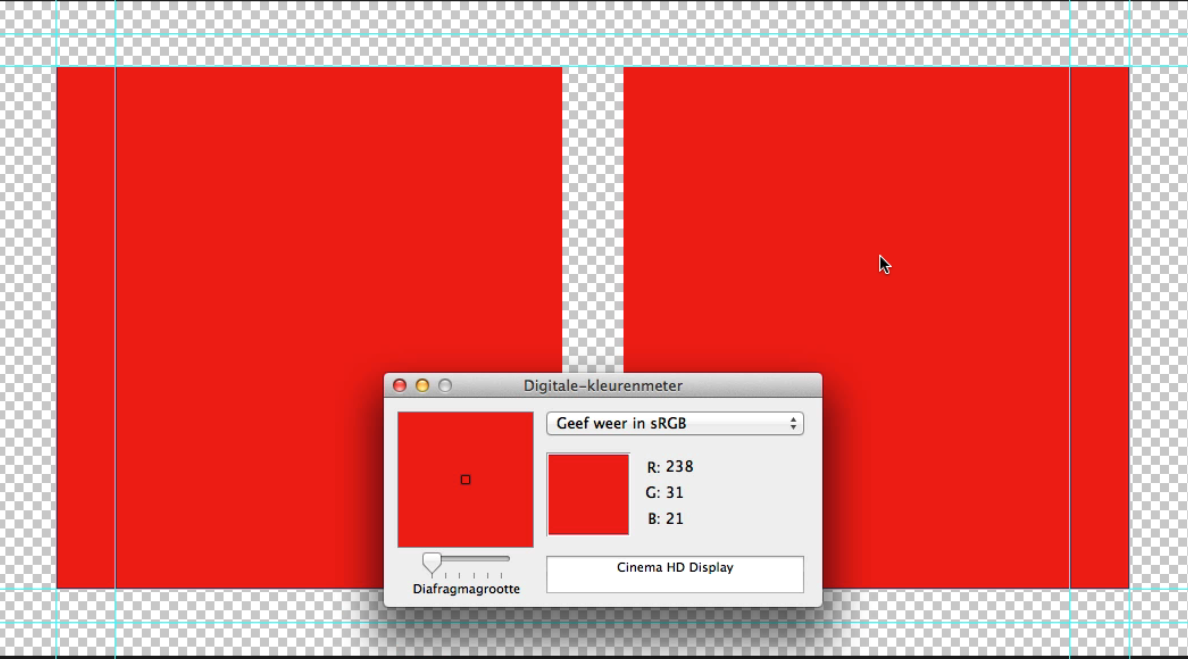
The FCPX (and the Motion) color picker shows differences between the original and the pasted color:
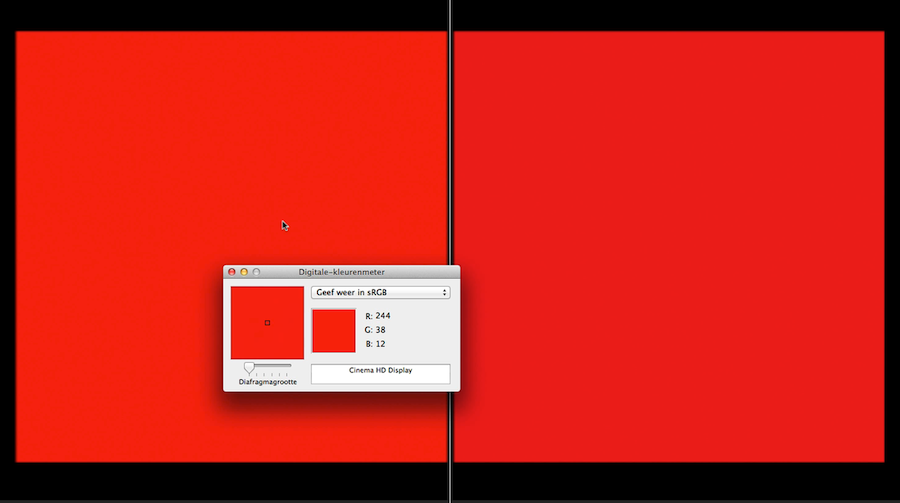
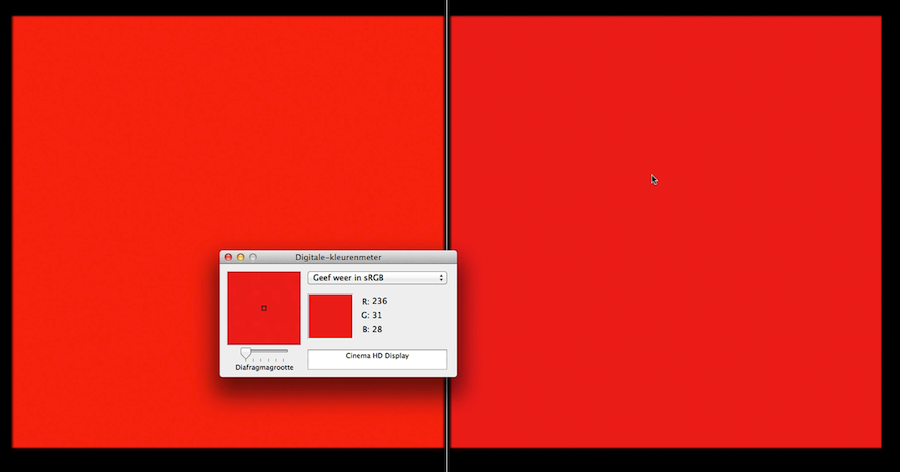
And this difference is clearly visible when you compare them side by side:
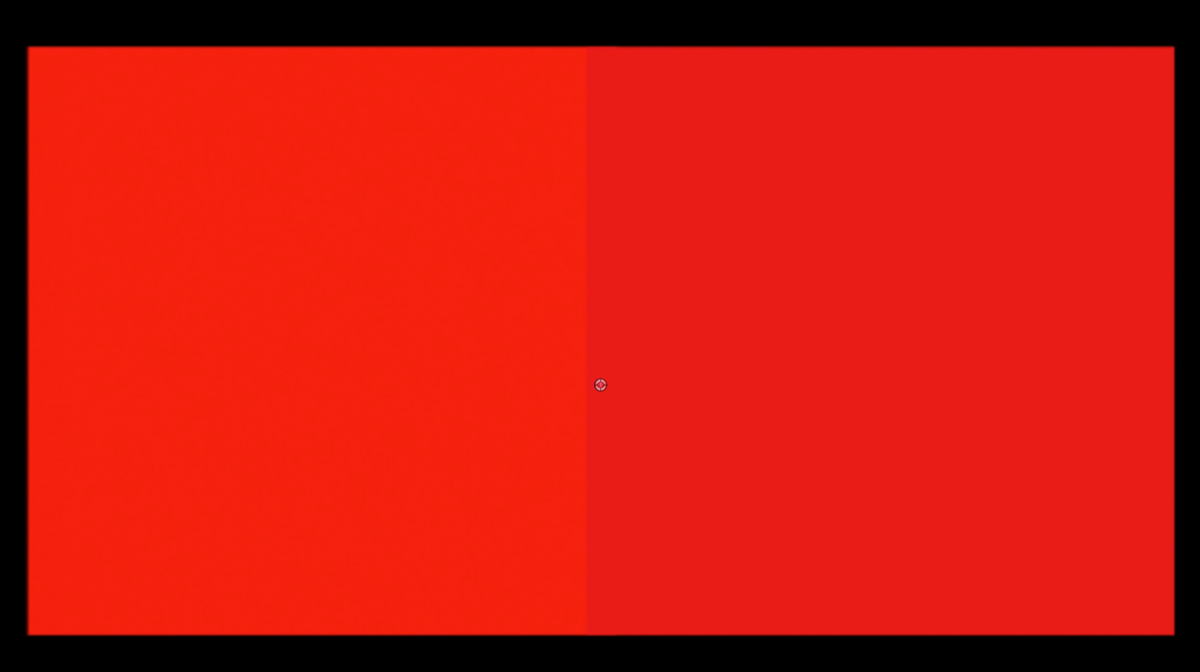
This not only happens with 10.1/Mavericks but also with earlier FCPX and OS versions. So I guess it's not related to FCPX or Motion: it's the old color picker that needs to be fixed.
-Ronny
Photoshop color picker leads to perfectly matching colors:
The FCPX (and the Motion) color picker shows differences between the original and the pasted color:
And this difference is clearly visible when you compare them side by side:
This not only happens with 10.1/Mavericks but also with earlier FCPX and OS versions. So I guess it's not related to FCPX or Motion: it's the old color picker that needs to be fixed.
-Ronny
Last edit: 18 Mar 2014 11:10 by ronny courtens.
Please Log in to join the conversation.
