


- Posts: 730
- Thank you received: 26
3 Post Moderation Rule for New Boarders (25 Jan 2021)
New boarders will have their posts moderated - Don't worry if you cannot see your post immediately.
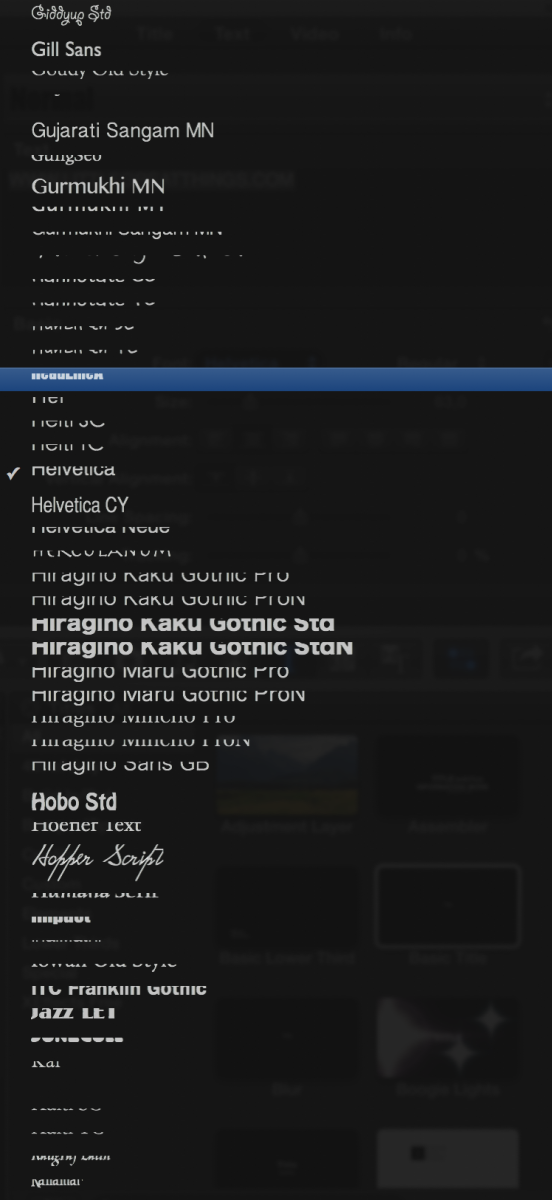
Garbled Fonts
- DmitriZigany
-
 Topic Author
- Offline
- Platinum Member
-

Less
More
16 Mar 2014 16:35 #42751
by DmitriZigany
Garbled Fonts was created by DmitriZigany
I can't remember but after 10.1 or 10.1.1 update my font list is all garbled... Anyone else seen this?
Please Log in to join the conversation.
- ronny courtens
-

- Offline
- Moderator
-

Less
More
- Posts: 4455
- Thank you received: 962
17 Mar 2014 07:06 #42803
by ronny courtens
Replied by ronny courtens on topic Garbled Fonts
Not seeing this, nor have I heard from anyone else having this problem.
Select Window > Restore to Original Layout.
If that does not solve the issue try refreshing your FCPX preferences.
-Ronny
Select Window > Restore to Original Layout.
If that does not solve the issue try refreshing your FCPX preferences.
-Ronny
Please Log in to join the conversation.
17 Mar 2014 14:39 #42821
by dkag7
Replied by dkag7 on topic Garbled Fonts
I have seen this as well.
But worse is that after you set a font line spacing, and render it, intermittently titles will get messed up on the timeline. In a title with 2 lines, they end up being on top of each other.. so it is not only a UI issue.. it happens on the timeline as well. I thought this was because i messed up making some titles in motion...(moving the line space in the wrong place, the publishing, or something..) but now I see others having this issue as well.
Kurt
But worse is that after you set a font line spacing, and render it, intermittently titles will get messed up on the timeline. In a title with 2 lines, they end up being on top of each other.. so it is not only a UI issue.. it happens on the timeline as well. I thought this was because i messed up making some titles in motion...(moving the line space in the wrong place, the publishing, or something..) but now I see others having this issue as well.
Kurt
Please Log in to join the conversation.
- DmitriZigany
-
Topic Author
- Offline
- Platinum Member
-
Less
More
- Posts: 730
- Thank you received: 26
17 Mar 2014 17:38 #42832
by DmitriZigany
Replied by DmitriZigany on topic Garbled Fonts
So far it looks like it should in the timeline which is why I haven't bothered trying to fix it yet.
I have done the restore to original layout etc (but for other reasons).
I was trashing all the prefs etc many times and reinstalled 10.1 when I tried to get FCPX to re-scan the audio units (without success). Maybe something got messed up then.
I'll try to trash the prefs again. Then I'll wait and see if 10.1.2 will fix it.
I have done the restore to original layout etc (but for other reasons).
I was trashing all the prefs etc many times and reinstalled 10.1 when I tried to get FCPX to re-scan the audio units (without success). Maybe something got messed up then.
I'll try to trash the prefs again. Then I'll wait and see if 10.1.2 will fix it.
Please Log in to join the conversation.
- OrlandMend
-
- Offline
- New Member
-

Less
More
- Posts: 1
- Thank you received: 0
07 Apr 2014 04:36 #44133
by OrlandMend
Replied by OrlandMend on topic Garbled Fonts
I have the same issue. Anyone have a solution? My macbook is running 10.1 and does have the issue but my iMac that has 10.1.1 does. What is going on here?
Please Log in to join the conversation.
07 Apr 2014 13:42 #44151
by dkag7
Replied by dkag7 on topic Garbled Fonts
if you have a custom made title, edit it in fcp by changing the tracking, line space etc... and see if the UI fonts now become 'less or un garbled'
If not, try the above steps with a native title..
editing a title sometimes causes the UI titles in the inspector to react to the changes in the title.. I seen this happen several times on custom titles I have made.''
kurt
If not, try the above steps with a native title..
editing a title sometimes causes the UI titles in the inspector to react to the changes in the title.. I seen this happen several times on custom titles I have made.''
kurt
Please Log in to join the conversation.
- DmitriZigany
-
Topic Author
- Offline
- Platinum Member
-
Less
More
- Posts: 730
- Thank you received: 26
09 Jun 2014 19:37 - 09 Jun 2014 19:38 #47553
by DmitriZigany
Replied by DmitriZigany on topic Garbled Fonts
I'm also having a LOT of crashes when trying to change fonts of titles etc.
10.1.2 can't come soon enough cause 10.1.1 is really the buggiest most crash prone version of FCPX so far for me
10.1.2 can't come soon enough cause 10.1.1 is really the buggiest most crash prone version of FCPX so far for me
Last edit: 09 Jun 2014 19:38 by DmitriZigany.
Please Log in to join the conversation.
- Prairieboy
-
- Offline
- New Member
-
Less
More
- Posts: 6
- Thank you received: 0
09 Jun 2014 19:54 #47554
by Prairieboy
Replied by Prairieboy on topic Garbled Fonts
Ah I am not the only one. I am getting this in FCPX, and motion. I tried the prefs route, but alas nothing.
Please Log in to join the conversation.
- DmitriZigany
-
Topic Author
- Offline
- Platinum Member
-
Less
More
- Posts: 730
- Thank you received: 26
09 Jun 2014 20:09 #47556
by DmitriZigany
Replied by DmitriZigany on topic Garbled Fonts
Are you getting crashes too?
Also glad I'm not the only one cause that should mean it really is a bug and not something with my system and should hopefully be fixed "soon".
Also glad I'm not the only one cause that should mean it really is a bug and not something with my system and should hopefully be fixed "soon".
Please Log in to join the conversation.
- Tom Wolsky
-

- Offline
- Moderator
-
09 Jun 2014 20:16 - 09 Jun 2014 20:17 #47557
by Tom Wolsky
Replied by Tom Wolsky on topic Garbled Fonts
Are you use the base system fonts or additional fonts? Have you looked through your font book for corrupted font files? What are your system specs? What display settings on what monitor are you using? What's the graphics card?
Last edit: 09 Jun 2014 20:17 by Tom Wolsky.
Please Log in to join the conversation.
- Prairieboy
-
- Offline
- New Member
-
Less
More
- Posts: 6
- Thank you received: 0
09 Jun 2014 20:19 #47558
by Prairieboy
Replied by Prairieboy on topic Garbled Fonts
No crashes, just having trouble reading the names of the fonts (very annoying, but less so than crashes.)
I have added fonts. I do so weekly with clients compliance needs.
Tom, I am not sure how to check for corrupted font files. Could you help a fella out.
I have added fonts. I do so weekly with clients compliance needs.
Tom, I am not sure how to check for corrupted font files. Could you help a fella out.
Please Log in to join the conversation.
- DmitriZigany
-
Topic Author
- Offline
- Platinum Member
-
Less
More
- Posts: 730
- Thank you received: 26
09 Jun 2014 20:22 #47559
by DmitriZigany
Replied by DmitriZigany on topic Garbled Fonts
Well, my last crashes comes when I try to change from bold to regular in one of the fonts that are standard in one of the lower thirds that came with FCPX...
Please Log in to join the conversation.
- Tom Wolsky
-
- Offline
- Moderator
-
09 Jun 2014 20:47 #47560
by Tom Wolsky
Replied by Tom Wolsky on topic Garbled Fonts
Look through the Font folder on your system and see if any fonts have genetic icons. Also look through the fonts in FontBook.
Please Log in to join the conversation.
09 Jun 2014 22:09 #47562
by cgbier
Replied by cgbier on topic Garbled Fonts
I install extra fonts only when I need them. When the project is over, the fonts get deleted again.
A messy Font Book had messed up my complete system once. Since then, I try to maintain it as original as possible.
A messy Font Book had messed up my complete system once. Since then, I try to maintain it as original as possible.
Please Log in to join the conversation.
- DmitriZigany
-
Topic Author
- Offline
- Platinum Member
-
Less
More
- Posts: 730
- Thank you received: 26
01 Jul 2014 01:02 #48973
by DmitriZigany
Replied by DmitriZigany on topic Garbled Fonts
The 10.1.2 update fixed my garbled font list! Yay!
Please Log in to join the conversation.
