


3 Post Moderation Rule for New Boarders (25 Jan 2021)
New boarders will have their posts moderated - Don't worry if you cannot see your post immediately.
Ease Transform in 10.1


12 Mar 2014 20:35 #42540
by foxytom
Ease Transform in 10.1 was created by foxytom
Has 10.1 removed the "dreaded" ease transform feature?
I say this as I want to move some text across the screen and get it to slow down before stopping, which it does not seem to be doing now.
Would the only way to ease in a movement be to add a couple of keyframes before?
I say this as I want to move some text across the screen and get it to slow down before stopping, which it does not seem to be doing now.
Would the only way to ease in a movement be to add a couple of keyframes before?
Please Log in to join the conversation.
12 Mar 2014 21:01 #42546
by dkag7
Replied by dkag7 on topic Ease Transform in 10.1
I have gotten fed up with alot of the keyframe work in fcp, so try the ken burns editor where ever you can..
Please Log in to join the conversation.
13 Mar 2014 00:22 - 13 Mar 2014 02:38 #42568
by Seanus
Sean Lander - Editing since 1982 - AVID 1991 - FCP 1999 - FCPX 2011
Replied by Seanus on topic Ease Transform in 10.1
Yes you can choose from Ease IN - OUT, Ease IN, Ease OUT and LINEAR.
So when you apply the Ken Burns effect right click on the screen to get the options to pop up.
It works really really well.
Love it.
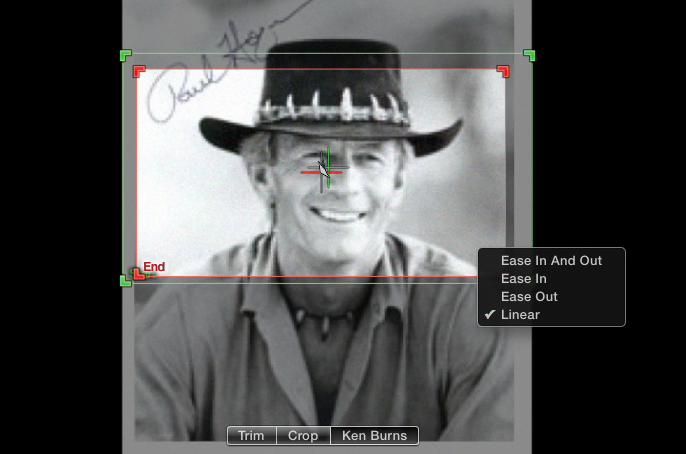
So when you apply the Ken Burns effect right click on the screen to get the options to pop up.
It works really really well.
Love it.
Sean Lander - Editing since 1982 - AVID 1991 - FCP 1999 - FCPX 2011
Last edit: 13 Mar 2014 02:38 by Seanus.
Please Log in to join the conversation.
- haysoos123
-

- Offline
- Platinum Member
-

Less
More
- Posts: 402
- Thank you received: 72
13 Mar 2014 01:18 #42574
by haysoos123
Replied by haysoos123 on topic Ease Transform in 10.1
Nope, keyframing position and scale are still broken in weird ways. This is mind-boggling to me, but I guess it was lower priority on their list. For example, a keyframe on position SAYS that it's linear, but in fact there is an ease. There is a workaround that involves adding keyframes before/after and doing some voodoo, but it's too much trouble. BUT, if you want the easing anyway, it should be ok.
For another workaround, use Ken Burns and then turn the clip into a compound clip so that you can do things like hold on the last frame after it comes to rest (shift-H). However, using Ken Burns to move a title is awkward at best because you have to use reframing (but it works).
For another workaround, use Ken Burns and then turn the clip into a compound clip so that you can do things like hold on the last frame after it comes to rest (shift-H). However, using Ken Burns to move a title is awkward at best because you have to use reframing (but it works).
Please Log in to join the conversation.
- Tom Wolsky
-

- Offline
- Moderator
-

13 Mar 2014 01:24 #42577
by Tom Wolsky
Replied by Tom Wolsky on topic Ease Transform in 10.1
What version are you using? I'm not seeing anything I'd call easing.
Please Log in to join the conversation.
- haysoos123
-
- Offline
- Platinum Member
-
Less
More
- Posts: 402
- Thank you received: 72
13 Mar 2014 01:47 #42579
by haysoos123
Replied by haysoos123 on topic Ease Transform in 10.1
I'm using 10.1.1. Yeah, I just tested it again just now, keyframing the position of the title, and there's definitely an ease out. If I go into transform mode, I can right-click on the keyframe, but the options it gives are "linear" and "smooth" which don't refer to the easing actually, but to the PATH (pretty misleading if you ask me). If you change the keyframe to smooth, it gives you bezier curve tools to change the path into a curved one, for example. And weirdly, if you change it to smooth, it seems to kill the easing! Basically, they need to add the same options for easing that they have in Ken Burns.
Please Log in to join the conversation.

13 Mar 2014 12:22 - 13 Mar 2014 12:25 #42595
by BenB
Replied by BenB on topic Ease Transform in 10.1
Actually, smooth is not just the path, but easing, also. Note there are Easing Handles, just like in Motion. These handles control the easing. Closer to the point, less, further away, more. Smoothing doesn't force you in to a curve, I do straight lines with smooth quite often.
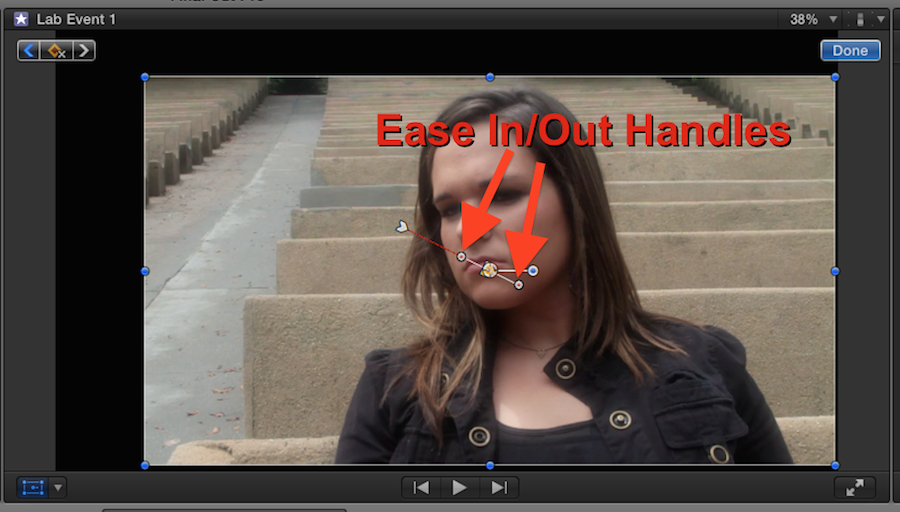
Last edit: 13 Mar 2014 12:25 by BenB.
Please Log in to join the conversation.
- Tom Wolsky
-
- Offline
- Moderator
-
13 Mar 2014 12:43 #42598
by Tom Wolsky
Replied by Tom Wolsky on topic Ease Transform in 10.1
I am not seeing those activate any kind of easing. Haysoos123 says there is easing, but for me if there is any easing it is so negligible and subtle as to be non-existent.
Please Log in to join the conversation.

13 Mar 2014 14:31 - 13 Mar 2014 14:35 #42604
by ddixon
Replied by ddixon on topic Ease Transform in 10.1
Re: simultaneous changes of Scale and Position with Easing In and Out...
• I agree, there is easing, but it is negligible.
• I agree that keyframing in this specific scenario will not get satisfactory results.
• Ken Burns gets the look that I want, but not the level of control (even with some workarounds).
Luckily, Motion does exactly what I want, so I rely on plugins created in Motion when I wish to Scale and Transform simultaneously with very smooth Easing In and Out.
Alex4D "Smooth Move" and FCPeffects "Quick and Easy Ken Burns" (the newer v.2) are two examples I recommend - there may be others. The Alex4D title is free. The FCPeffects one is inexpensive, but has different (and sometimes easier) configuration options.
• I agree, there is easing, but it is negligible.
• I agree that keyframing in this specific scenario will not get satisfactory results.
• Ken Burns gets the look that I want, but not the level of control (even with some workarounds).
Luckily, Motion does exactly what I want, so I rely on plugins created in Motion when I wish to Scale and Transform simultaneously with very smooth Easing In and Out.
Alex4D "Smooth Move" and FCPeffects "Quick and Easy Ken Burns" (the newer v.2) are two examples I recommend - there may be others. The Alex4D title is free. The FCPeffects one is inexpensive, but has different (and sometimes easier) configuration options.
Last edit: 13 Mar 2014 14:35 by ddixon.
Please Log in to join the conversation.
