


- Posts: 233
- Thank you received: 6
3 Post Moderation Rule for New Boarders (25 Jan 2021)
New boarders will have their posts moderated - Don't worry if you cannot see your post immediately.
Which RAID?
- damiangrady
-
 Topic Author
- Offline
- Elite Member
-

Less
More
12 Mar 2014 17:20 #42516
by damiangrady
Which RAID? was created by damiangrady
Ok, so my new Mac Pro arrived with the Promise R4 8TB TB2 Drive array.
It is currently set to RAID 5 but just wondered what the 'everything considered' best RAID type would be for me when using with FCP X. I know RAID 0 is the fastest but is it playing with fire a bit if one drive fails?
Your advice would be much appreciated.
It is currently set to RAID 5 but just wondered what the 'everything considered' best RAID type would be for me when using with FCP X. I know RAID 0 is the fastest but is it playing with fire a bit if one drive fails?
Your advice would be much appreciated.
Please Log in to join the conversation.
12 Mar 2014 17:45 #42519
by fcpguru
Replied by fcpguru on topic Which RAID?
I recommend a RAID 5. I think you'll find the speed more than adequate and the downtime you would experience having to reload all that data from another set of drives isn't worth it IMO. I made the mistake of running mine in a RAID 0 and a drive failed. Disaster. I didn't lose stuff because I had a backup, but the money I lost in the time it took me to dig out my backups, copy, reconnect, etc. Sheesh.
RAID 5.
RAID 5.
Please Log in to join the conversation.
- damiangrady
-
Topic Author
- Offline
- Elite Member
-
Less
More
- Posts: 233
- Thank you received: 6
12 Mar 2014 18:03 #42522
by damiangrady
Replied by damiangrady on topic Which RAID?
Hey fcpguru,
Thanks for the advice. One thing I forgot to mention is that we work almost exclusively with RED footage so fast read speeds are pretty essential. Still RAID 5?
Thanks for the advice. One thing I forgot to mention is that we work almost exclusively with RED footage so fast read speeds are pretty essential. Still RAID 5?
Please Log in to join the conversation.

12 Mar 2014 19:38 #42529
by BenB
Replied by BenB on topic Which RAID?
Well, RAID 1 would be safer, and "technically" squeeze out a tiny bit more speed, but, since it is SATA drives, even RAID 5 on Tbolt 2 will be getting the fastest read/write speed from the drives. I have a P2 RAID, I'm keeping it as default RAID 5, RED and BMD 4K footage all works just fine.
Please Log in to join the conversation.

12 Mar 2014 21:07 #42549
by dkag7
Replied by dkag7 on topic Which RAID?
Not sure about your setup, but with my raid I can make a raid 50, seems faster to me than 5. Also i can have 2 HDDs die and still rebuild (out of 8 hdds).
if you got the $, depending on how big your raid is, make a raid 0 and then carbon copy the raid as needed to a backup. I do this on my mac pro internal 4 HDDs... excellent speed at boot up and everything else..
kurt
if you got the $, depending on how big your raid is, make a raid 0 and then carbon copy the raid as needed to a backup. I do this on my mac pro internal 4 HDDs... excellent speed at boot up and everything else..
kurt
Please Log in to join the conversation.
- damiangrady
-
Topic Author
- Offline
- Elite Member
-
Less
More
- Posts: 233
- Thank you received: 6
13 Mar 2014 12:11 #42594
by damiangrady
Replied by damiangrady on topic Which RAID?
Ah I see, nice idea.
Blackmagic is reporting my Pegasus R4 at about 600MB/s both READ and WRITE with RAID 5. What would I expect from RAID 0 in terms of difference in speed?
Blackmagic is reporting my Pegasus R4 at about 600MB/s both READ and WRITE with RAID 5. What would I expect from RAID 0 in terms of difference in speed?
Please Log in to join the conversation.
13 Mar 2014 12:47 - 13 Mar 2014 12:51 #42599
by BenB
Replied by BenB on topic Which RAID?
I think dkag7 means RAID 6, not 50.
Here is the issue, you're using spinning platter drives. They have a physical limit to reading/writing data. Tbolt is potentially faster than they can do that. This is why a single spinning platter drive gives pretty much no extra performance with Tbolt. But a RAID is faster than a single drive, so you are getting pretty much the maximum those platters will give you anyway. I doubt you'll see a huge speed increase, in real world editing, going with RAID 0 or RAID 1. Again, I'm editing RED native and BMPCC files with no issues using RAID 5.
The only way to know for sure is edit and time various functions with RAID 5, wipe the RAID clean and make it RAID 0 or 1, test again. You'll lose all data reformatting the RAID levels.
It is rare that a RAID 0 will out perform RAID 1 in real world editing. The speed differences with Tbolt are very slight. But if you technically want every ounce of speed you can get, go with RAID 0 and have a twin for it to backup to. Also, if a drive dies with RAID 0, you have to rely on that backup, when ever it was done (did you lose 1 hour or 9 hours of work?). With RAID 1 or 5 (or 6 which takes up more parity space) and a drive dies, you don't lose a minute of work.
Oh yeah, there's that parity space, too. RAID 0 you wont' lose any storage space. RAID 1 & 5 you'll lose the equivalent of one drive. RAID 6, you'll lose more.
Here is the issue, you're using spinning platter drives. They have a physical limit to reading/writing data. Tbolt is potentially faster than they can do that. This is why a single spinning platter drive gives pretty much no extra performance with Tbolt. But a RAID is faster than a single drive, so you are getting pretty much the maximum those platters will give you anyway. I doubt you'll see a huge speed increase, in real world editing, going with RAID 0 or RAID 1. Again, I'm editing RED native and BMPCC files with no issues using RAID 5.
The only way to know for sure is edit and time various functions with RAID 5, wipe the RAID clean and make it RAID 0 or 1, test again. You'll lose all data reformatting the RAID levels.
It is rare that a RAID 0 will out perform RAID 1 in real world editing. The speed differences with Tbolt are very slight. But if you technically want every ounce of speed you can get, go with RAID 0 and have a twin for it to backup to. Also, if a drive dies with RAID 0, you have to rely on that backup, when ever it was done (did you lose 1 hour or 9 hours of work?). With RAID 1 or 5 (or 6 which takes up more parity space) and a drive dies, you don't lose a minute of work.
Oh yeah, there's that parity space, too. RAID 0 you wont' lose any storage space. RAID 1 & 5 you'll lose the equivalent of one drive. RAID 6, you'll lose more.
Last edit: 13 Mar 2014 12:51 by BenB.
Please Log in to join the conversation.
13 Mar 2014 14:40 #42606
by dkag7
Replied by dkag7 on topic Which RAID?
Please Log in to join the conversation.

13 Mar 2014 15:38 #42611
by joema
My main finding was you don't want a 128k stripe size (the default on my R4; don't know about now). My main focus was time to re-initialize the array, with less emphasis on actual runtime performance.
If you approximate your average I/O size as described in the below post, that may give some guidance on optimal stripe size for your workload.
forums.macrumors.com/showthread.php?t=16...ighlight=stripe+size
Replied by joema on topic Which RAID?
I use the R4 8TB Thunderbolt 1 on my 2013 iMac. See below link with performance tests. It is pretty fast in RAID 5, and I'd be afraid to use RAID 0 on a four-drive array.damiangrady wrote: Ok, so my new Mac Pro arrived with the Promise R4 8TB TB2 Drive array.
It is currently set to RAID 5 but just wondered what the 'everything considered' best RAID type would be for me when using with FCP X. I know RAID 0 is the fastest but is it playing with fire a bit if one drive fails?...
My main finding was you don't want a 128k stripe size (the default on my R4; don't know about now). My main focus was time to re-initialize the array, with less emphasis on actual runtime performance.
If you approximate your average I/O size as described in the below post, that may give some guidance on optimal stripe size for your workload.
forums.macrumors.com/showthread.php?t=16...ighlight=stripe+size
Please Log in to join the conversation.
13 Mar 2014 16:39 #42613
by BenB
Replied by BenB on topic Which RAID?
I stay as far away from RAID hybrids as possible, especially with small numbers of drives.
Please Log in to join the conversation.

13 Mar 2014 16:58 #42615
by anickt
Replied by anickt on topic Which RAID?
I did a test a while ago between RAID 5 and RAID 0 and didn't find a significant enough difference to warrant the chance of losing work. I have a Pegasus R4 that gives me 400-500 MB/sec. and never had any issues with it. However, some clients have the R4 and had a drive go down. Due to it being configured RAID 5 they were able to continue working until a replacement drive from Promise came in. They also had a backup on an external drive so were double-covered.
Please Log in to join the conversation.
13 Mar 2014 17:00 #42616
by fcpguru
Replied by fcpguru on topic Which RAID?
I'd stay away from RAID 1 because you will have a significant speed hit and also will owe 50% capacity of your raid.
Please Log in to join the conversation.
13 Mar 2014 21:50 #42635
by BenB
Replied by BenB on topic Which RAID?
I'm sorry, I have to disagree.
RAID 1 and RAID 5 both use up the equivalent of one drive for parity, not 50%.
RAID 1 should give better speeds than RAID 5, due to less parity writing, on paper, but in the real world you won't feel much difference.
RAID 1 and RAID 5 both use up the equivalent of one drive for parity, not 50%.
RAID 1 should give better speeds than RAID 5, due to less parity writing, on paper, but in the real world you won't feel much difference.
Please Log in to join the conversation.
13 Mar 2014 21:54 - 13 Mar 2014 21:59 #42636
by fcpguru
Replied by fcpguru on topic Which RAID?
Sorry Ben, you are mistaken. RAID 1 is mirroring which in the OP 8TB RAID would leave him with 4TB of usable space. And I believe RAID 1 is slower as well since it is limited by the speed of your fastest drive, but I can not confirm this.
en.wikipedia.org/wiki/RAID
en.wikipedia.org/wiki/RAID
Last edit: 13 Mar 2014 21:59 by fcpguru.
Please Log in to join the conversation.
13 Mar 2014 22:25 - 14 Mar 2014 15:33 #42638
by tpayton
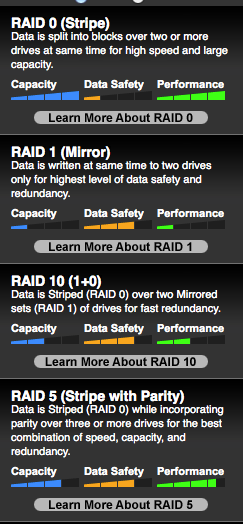
Ben - In my experience RAID 5 is still faster than [strike]a single drive or[/strike] RAID 0. I have a OWC RAID 5 box, with 4 spinning drives, on my iMac with a LaCie thunderbolt to esata connection and I'm getting about 250MB/sec transfer rate.
OWC has a little chart here that is pretty nice: eshop.macsales.com/shop/hard-drives/sata/RAID_Guide
Replied by tpayton on topic Which RAID?
BenB wrote: RAID 1 should give better speeds than RAID 5, due to less parity writing, on paper, but in the real world you won't feel much difference.
Ben - In my experience RAID 5 is still faster than [strike]a single drive or[/strike] RAID 0. I have a OWC RAID 5 box, with 4 spinning drives, on my iMac with a LaCie thunderbolt to esata connection and I'm getting about 250MB/sec transfer rate.
OWC has a little chart here that is pretty nice: eshop.macsales.com/shop/hard-drives/sata/RAID_Guide
Last edit: 14 Mar 2014 15:33 by tpayton.
Please Log in to join the conversation.
13 Mar 2014 23:12 #42641
by joema
Even if the write penalty was there, reads (which RAID 5 is good at) should be weighed more heavily.
Also hardware RAID systems like the R4 do sophisticated optimization and caching to minimize the RAID 5 write penalty. The 8TB R4 I have is very fast on both reads and writes. On BlackMagic I get 673 MB/sec write, 516 MB/sec read. On QuickBench Large, I get 698 MB/sec write, 858 MB/sec read.
Replied by joema on topic Which RAID?
While the conventional view is RAID 5 has a significant write penalty, on typical systems reads outnumber writes by 5:1. You can inspect this on Activity Monitor by comparing Data read vs data written (at bottom).BenB wrote: ...RAID 1 should give better speeds than RAID 5, due to less parity writing, on paper, but in the real world you won't feel much difference.
Even if the write penalty was there, reads (which RAID 5 is good at) should be weighed more heavily.
Also hardware RAID systems like the R4 do sophisticated optimization and caching to minimize the RAID 5 write penalty. The 8TB R4 I have is very fast on both reads and writes. On BlackMagic I get 673 MB/sec write, 516 MB/sec read. On QuickBench Large, I get 698 MB/sec write, 858 MB/sec read.
Please Log in to join the conversation.
14 Mar 2014 00:38 - 14 Mar 2014 00:50 #42644
by BenB
Replied by BenB on topic Which RAID?
I would never compare RAID anything to a single spinning disk drive on Tbolt.
I'd love to see a RAID 5 outperform a RAID 0 on the same hardware, "technically". And in real world performance, no noticeable difference.
And I did say you'd not notice much difference in real world performance.
To be clear, I'm a retied IT engineer and spent many years working, testing, benchmarking, so I firmly stand by my statements. But, to each his own. Not all RAID enclosures and not all hard drive make/models are created the same.
Again, I left my P2 R4 diskless 16TB at the default RAID 5 and have no issues with RED CODE RAW native. It blows away anything else I've used. I am a RAID 5 fan. If I went larger than 4 or 6 drives, I'd go RAID 6.
My one and only issue with P2 RAIDs is when they go to sleep, Mavericks loses all Spotlight metadata about them. Makes smart folders and such useless.
I'd love to see a RAID 5 outperform a RAID 0 on the same hardware, "technically". And in real world performance, no noticeable difference.
And I did say you'd not notice much difference in real world performance.
To be clear, I'm a retied IT engineer and spent many years working, testing, benchmarking, so I firmly stand by my statements. But, to each his own. Not all RAID enclosures and not all hard drive make/models are created the same.
Again, I left my P2 R4 diskless 16TB at the default RAID 5 and have no issues with RED CODE RAW native. It blows away anything else I've used. I am a RAID 5 fan. If I went larger than 4 or 6 drives, I'd go RAID 6.
My one and only issue with P2 RAIDs is when they go to sleep, Mavericks loses all Spotlight metadata about them. Makes smart folders and such useless.
Last edit: 14 Mar 2014 00:50 by BenB.
Please Log in to join the conversation.
