


- Posts: 786
- Thank you received: 21
3 Post Moderation Rule for New Boarders (25 Jan 2021)
New boarders will have their posts moderated - Don't worry if you cannot see your post immediately.
How to delete a compound clip?
- Jonathan Levin
-
 Topic Author
- Offline
- Platinum Member
-

Less
More
12 Mar 2014 16:52 #42509
by Jonathan Levin
How to delete a compound clip? was created by Jonathan Levin
I created a compound clip of a title sequence I made and now I can't delete that compound clip:
"Final Cut can't delete Multiclip or Compund clips that are in use."
What is even more bizarre, is if I delete the contents of the Compound from the timeline, it deletes the original NON-compound clip!!!!
I have this compound clip in no other libraries or timelines.
From what I can tell, if I open the original project project, it shows the un-expanded version of my logo project. If I double click that clip in the timeline, it expands, but it shows the compound clip that I am trying to get rid of.
Very frustrating.
Jonathan
"Final Cut can't delete Multiclip or Compund clips that are in use."
What is even more bizarre, is if I delete the contents of the Compound from the timeline, it deletes the original NON-compound clip!!!!
I have this compound clip in no other libraries or timelines.
From what I can tell, if I open the original project project, it shows the un-expanded version of my logo project. If I double click that clip in the timeline, it expands, but it shows the compound clip that I am trying to get rid of.
Very frustrating.
Jonathan
Please Log in to join the conversation.
- Tom Wolsky
-

- Offline
- Moderator
-

12 Mar 2014 17:14 #42515
by Tom Wolsky
Replied by Tom Wolsky on topic How to delete a compound clip?
Created a compound clip how and where? Inside a project? In the Browser?
What version of the software are you using?
What version of the software are you using?
Please Log in to join the conversation.
- Jonathan Levin
-
Topic Author
- Offline
- Platinum Member
-
Less
More
- Posts: 786
- Thank you received: 21
12 Mar 2014 17:54 #42521
by Jonathan Levin
Replied by Jonathan Levin on topic How to delete a compound clip?
Hi Tom,
Version 10.1.1
Original project has my music, a video background and two photoshop graphics. I then select all the clips in the timeline and went to make new compound clip.
My compound was made (little scroll icon on the clip) And this is what I now can't delete.
Thanks.
Jonathan
Version 10.1.1
Original project has my music, a video background and two photoshop graphics. I then select all the clips in the timeline and went to make new compound clip.
My compound was made (little scroll icon on the clip) And this is what I now can't delete.
Thanks.
Jonathan
Please Log in to join the conversation.
- Tom Wolsky
-
- Offline
- Moderator
-
12 Mar 2014 18:22 #42523
by Tom Wolsky
Replied by Tom Wolsky on topic How to delete a compound clip?
If you made everything in the the project a single compound clip you would have to delete the project before you delete the compound clip. Or delete the compound clip from the project, then quit the application, then delete the compound clip in the browser.
Please Log in to join the conversation.
- Jonathan Levin
-
Topic Author
- Offline
- Platinum Member
-
Less
More
- Posts: 786
- Thank you received: 21
12 Mar 2014 19:03 #42526
by Jonathan Levin
Replied by Jonathan Levin on topic How to delete a compound clip?
Tom my whole project is about 12 seconds long (title sequence)

I did as you suggested: Deleted clips in the Compound clip timeline, I then quit, and upon restart my ORIGINAL project time line was empty and the compound clip icon in the browser was a blue icon with a large scroll thing.

I have to then restore from a back up to get my project back.
I did as you suggested: Deleted clips in the Compound clip timeline, I then quit, and upon restart my ORIGINAL project time line was empty and the compound clip icon in the browser was a blue icon with a large scroll thing.
I have to then restore from a back up to get my project back.
Please Log in to join the conversation.
- Jonathan Levin
-
Topic Author
- Offline
- Platinum Member
-
Less
More
- Posts: 786
- Thank you received: 21
12 Mar 2014 19:24 #42528
by Jonathan Levin
Replied by Jonathan Levin on topic How to delete a compound clip?
OK. The only way I figured out how to solve this was to create a brand new Library, project, recreate my events, re-import my media. PITA.
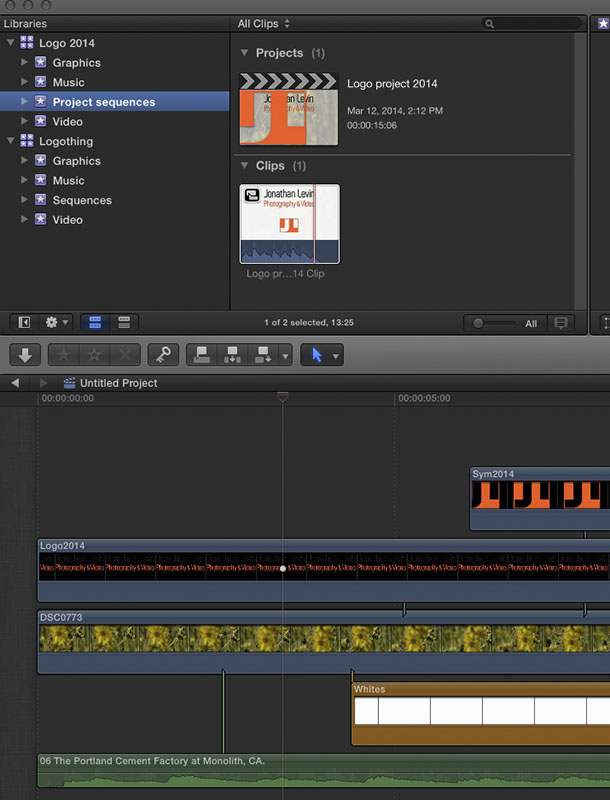
I then copied and pasted the expanded Compound clip from old project and pasted that into my new library/project.
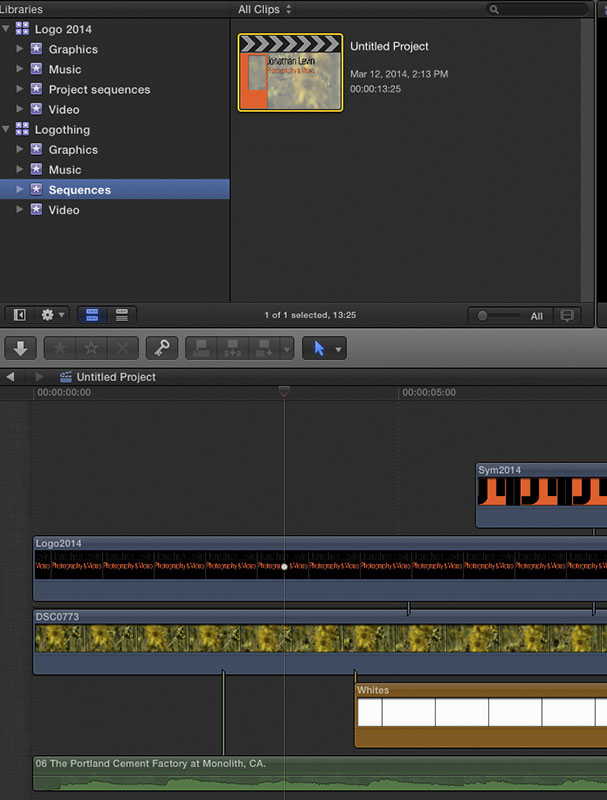
But now I am back to where I was prior to making that compound.
Somethings wrong here.....or am I making compound clips the wrong way. I am hesitant to deal with CC at this point.
I then copied and pasted the expanded Compound clip from old project and pasted that into my new library/project.
But now I am back to where I was prior to making that compound.
Somethings wrong here.....or am I making compound clips the wrong way. I am hesitant to deal with CC at this point.
Please Log in to join the conversation.
- Tom Wolsky
-
- Offline
- Moderator
-
12 Mar 2014 20:16 #42534
by Tom Wolsky
Replied by Tom Wolsky on topic How to delete a compound clip?
I'm sorry you did not read my message correctly. I did not say to delete the contents of the compound clip. You said that. I said you had to delete the project. Delete logo project that contains the compound clip as it's sole content.
Please Log in to join the conversation.
