


- Posts: 7
- Thank you received: 0
3 Post Moderation Rule for New Boarders (25 Jan 2021)
New boarders will have their posts moderated - Don't worry if you cannot see your post immediately.
After Effect file not transparant in FCP 10.1.1
12 Mar 2014 15:50 #42506
by Badaboom
After Effect file not transparant in FCP 10.1.1 was created by Badaboom
Hey Guys,
I'm trying to import a .mov created in After Effects into FCP 10.1.1, but it doesn't show the transparency.
I've tried this solution:
And it's working fine on a older version of FCPX. But on my new mac mini 10.1.1 was installed. Edited the whole project on this machine so don't want to migrate back.
Alpha Handling settings are Straight. So I'm running out of options.
thnx in advance
I'm trying to import a .mov created in After Effects into FCP 10.1.1, but it doesn't show the transparency.
I've tried this solution:
And it's working fine on a older version of FCPX. But on my new mac mini 10.1.1 was installed. Edited the whole project on this machine so don't want to migrate back.
Alpha Handling settings are Straight. So I'm running out of options.
thnx in advance
Please Log in to join the conversation.
- Tom Wolsky
-

- Offline
- Moderator
-

12 Mar 2014 17:13 #42513
by Tom Wolsky
Replied by Tom Wolsky on topic After Effect file not transparant in FCP 10.1.1
Open the QuickTime file in the QuickTime player and post a screen shot of the inspector. Need the complete specs of the media. Is it Animation or ProRes 4444 codec or uncompressed or what?
Please Log in to join the conversation.
12 Mar 2014 19:21 #42527
by Badaboom
Replied by Badaboom on topic After Effect file not transparant in FCP 10.1.1
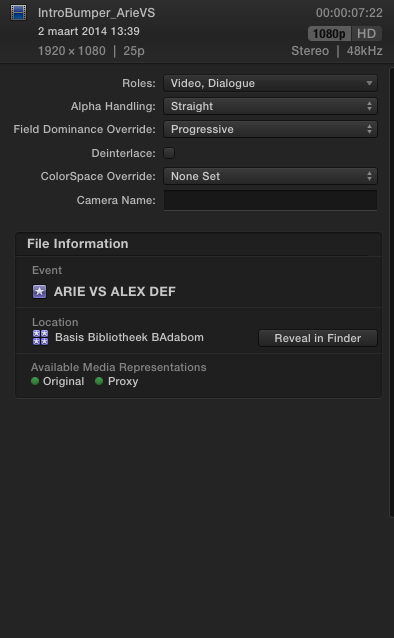
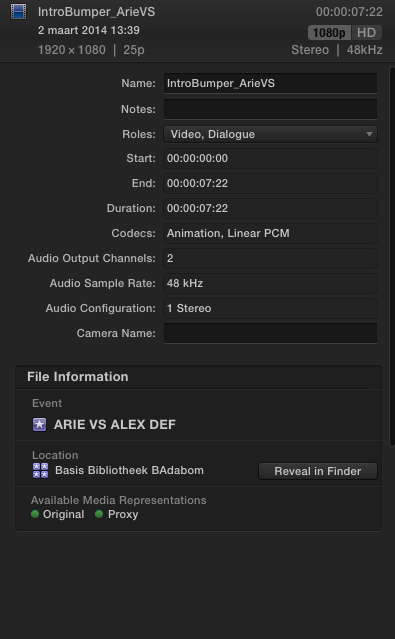
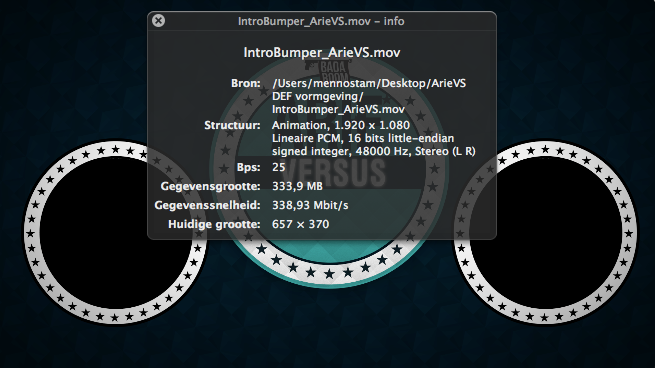
Are these the specs you are talking about. Using the Dutch QT there is no equivalent of Inspector.
It's called Movie info.
Also added info from FCP inspector. How it should look and the layered crappy work around in the timeline.

It's called Movie info.
Also added info from FCP inspector. How it should look and the layered crappy work around in the timeline.
Please Log in to join the conversation.
- Tom Wolsky
-
- Offline
- Moderator
-
12 Mar 2014 20:20 #42535
by Tom Wolsky
Replied by Tom Wolsky on topic After Effect file not transparant in FCP 10.1.1
Sorry movie info in the QuickTime player. Nothing here gives the codec which is the most important factor in carrying transparency. What is the codec?
Please Log in to join the conversation.
- haysoos123
-

- Offline
- Platinum Member
-

Less
More
- Posts: 402
- Thank you received: 72
12 Mar 2014 20:37 #42541
by haysoos123
Replied by haysoos123 on topic After Effect file not transparant in FCP 10.1.1
I see that it's Animation codec, and I see that you also have proxies. So the question is: are you in proxy mode? Proxies created by FCPX can't have alpha, and this is a feature that many including myself have asked for. Please fill out the feedback form.
In the meantime, we have worked around this by overwriting the generated proxy file with the original file. This way, we can still have alpha while in proxy mode.
In the meantime, we have worked around this by overwriting the generated proxy file with the original file. This way, we can still have alpha while in proxy mode.
Please Log in to join the conversation.
12 Mar 2014 20:58 #42545
by dkag7
Replied by dkag7 on topic After Effect file not transparant in FCP 10.1.1
Also I have found that you need to make sure fcp does not optimize media on import if you want alpha
kurt
kurt
Please Log in to join the conversation.
- Tom Wolsky
-
- Offline
- Moderator
-
12 Mar 2014 21:06 #42548
by Tom Wolsky
Replied by Tom Wolsky on topic After Effect file not transparant in FCP 10.1.1
FCP should not optimize media in an I-frame codec. I don't seem optimize as an available option with Animation.
Please Log in to join the conversation.
12 Mar 2014 21:19 #42550
by Badaboom
Replied by Badaboom on topic After Effect file not transparant in FCP 10.1.1
Sorry missed the QT version
Please Log in to join the conversation.
12 Mar 2014 21:22 #42551
by Badaboom
Replied by Badaboom on topic After Effect file not transparant in FCP 10.1.1
Please Log in to join the conversation.
12 Mar 2014 21:28 #42552
by Badaboom
Replied by Badaboom on topic After Effect file not transparant in FCP 10.1.1
I am indeed in Proxy mode.
So basically way to go is this:
1. Do not optimize media
2. Do not work in proxy mode
Or 3 overwrite files with original media. Don't know how to do that
Will fill in the feedback form for sure, cause in the 10.08 version it works when you select Optimized media. Bi
So basically way to go is this:
1. Do not optimize media
2. Do not work in proxy mode
Or 3 overwrite files with original media. Don't know how to do that
Will fill in the feedback form for sure, cause in the 10.08 version it works when you select Optimized media. Bi
Please Log in to join the conversation.
12 Mar 2014 21:39 #42555
by dkag7
Replied by dkag7 on topic After Effect file not transparant in FCP 10.1.1
One of the few things i keep an eye on is before i import, always check to see what import media preferences are.. It would be nice if it detected alpha clips, or some setting where it will not change alpha into 422.
If you turn off optimize media, you can just drag and drop your files and replace media ... if of course the media on the timeline isn't edited too much..
If you turn off optimize media, you can just drag and drop your files and replace media ... if of course the media on the timeline isn't edited too much..
Please Log in to join the conversation.
- Tom Wolsky
-
- Offline
- Moderator
-
12 Mar 2014 21:40 #42556
by Tom Wolsky
Replied by Tom Wolsky on topic After Effect file not transparant in FCP 10.1.1
It's a little difficult in 10.1 or later. You have to right-click on the library in the Finder and use show package contents. Inside find the event with media. Inside that folder will be Transcoded Media/Proxy Media. Replace the file in there with the Animation file or with a copy of it. Be warned though if you delete the proxy files than original Animation file will disappear as well unless you use a copy.
Please Log in to join the conversation.
12 Mar 2014 21:43 #42557
by dkag7
Replied by dkag7 on topic After Effect file not transparant in FCP 10.1.1
thats a good idea.. will all the timeline edits remain when you replace the clip in finders library?
Filters, cuts, etc...
Filters, cuts, etc...
Please Log in to join the conversation.
12 Mar 2014 21:49 #42558
by Badaboom
Replied by Badaboom on topic After Effect file not transparant in FCP 10.1.1
I can see why everybody I talk to is switching to Premiere. If you can't import a simple transition without dancing The Workaround. pffff. Then again, whilst sitting behind your computer for multiple hours a bit of dancing is good for the circulation. Thnx everyone! Hope I allocated Thank you's and karma points in the appropriate fashion. This was my first action on this forum. Probably not the last :woohoo:
Please Log in to join the conversation.
- Tom Wolsky
-
- Offline
- Moderator
-
12 Mar 2014 22:01 #42559
by Tom Wolsky
Replied by Tom Wolsky on topic After Effect file not transparant in FCP 10.1.1
Yes all the cuts will be the same.
Please Log in to join the conversation.
- haysoos123
-
- Offline
- Platinum Member
-
Less
More
- Posts: 402
- Thank you received: 72
12 Mar 2014 22:05 #42560
by haysoos123
Replied by haysoos123 on topic After Effect file not transparant in FCP 10.1.1
Despite a few shortcomings, FCPX is really good in a lot of ways. Once you've done a few projects from beginning to end, you'll see that it's easier and faster in a lot of the most important ways (namely, clip organization and the magnetic timeline, if used properly is VERY powerful). This one particular problem you have with proxies isn't even something that Premiere can do. You have to manually relink everything if you want to do proxies. Premiere is a good program also, but it has its share of issues.
Please Log in to join the conversation.
12 Mar 2014 22:12 #42561
by Badaboom
Replied by Badaboom on topic After Effect file not transparant in FCP 10.1.1
I know, I'm using FCP for a year now and very happy with the way it works. This is just me taking it to the next level and running into all kinds of new problems. Nothing to do with software. But tell me, what is this magnetic time line you are talking about
Please Log in to join the conversation.
