


- Posts: 5
- Thank you received: 0
3 Post Moderation Rule for New Boarders (25 Jan 2021)
New boarders will have their posts moderated - Don't worry if you cannot see your post immediately.
No Data
12 Mar 2014 03:33 #42480
by cavmusic
Hi. I'm pretty new to Final Cut X (Used FCP 6 before) and I'm having some trouble. I'm pretty confused with the new way of managing media. If I erase a clip on the timeline, it erases it in the event window. Very confused. I keep creating new compound clips trying not to lose my data. Even now, some of my Clips that I'm using are coming up under "no data" at the bottom. But I'm still able to use some of them. So confused. I'm already so far into this project and I'm afraid of deleting important files 
Any help would be much appreciated
Thanks!
Michael
Any help would be much appreciated
Thanks!
Michael
Please Log in to join the conversation.
- Tom Wolsky
-

- Offline
- Moderator
-

12 Mar 2014 11:39 #42489
by Tom Wolsky
Replied by Tom Wolsky on topic No Data
Are you opening a clip into the timeline? Don't. Edit the clip into a project. Never open a clip into the timeline useless you know what you're doing it for. It's not sure editing.
Please Log in to join the conversation.
12 Mar 2014 14:29 #42497
by cavmusic
Also, Once a clip is listed under "no data", how do I get it out? I have some clips that are listed under no data, but yet they have data and I still can work with them. Don't know why they are listed under no data. Anyone know why? Thanks
Please Log in to join the conversation.
- Tom Wolsky
-
- Offline
- Moderator
-
12 Mar 2014 17:04 #42511
by Tom Wolsky
Replied by Tom Wolsky on topic No Data
Just go back to the browser or open a project.
No Data simply means the application doesn't know the creation date. If you switch off group by content created it will disappear.
No Data simply means the application doesn't know the creation date. If you switch off group by content created it will disappear.
Please Log in to join the conversation.
12 Mar 2014 22:14 #42562
by cavmusic
That is good news thanks
I think a few times while working with compound clips. I've somehow gotten out of a project and mistakingly opened clips in the timeline.
I treat the compound clips as little projects or segments. Then I arrange the order of them after in a project timeline. So I guess I just need to make sure there a is an ACTUAL project open while working inside of compound clips?
I think a few times while working with compound clips. I've somehow gotten out of a project and mistakingly opened clips in the timeline.
I treat the compound clips as little projects or segments. Then I arrange the order of them after in a project timeline. So I guess I just need to make sure there a is an ACTUAL project open while working inside of compound clips?
Please Log in to join the conversation.

12 Mar 2014 22:33 - 12 Mar 2014 22:35 #42565
by BenB
Look at the top left of your Timeline pane. That is where you can keep track. It will show you the path your in. My example blow shows an Event icon, going to a Compound Clip icon. I can also click and hold on the left Timeline Navigation button to see a list of what I've had open during my edit session.
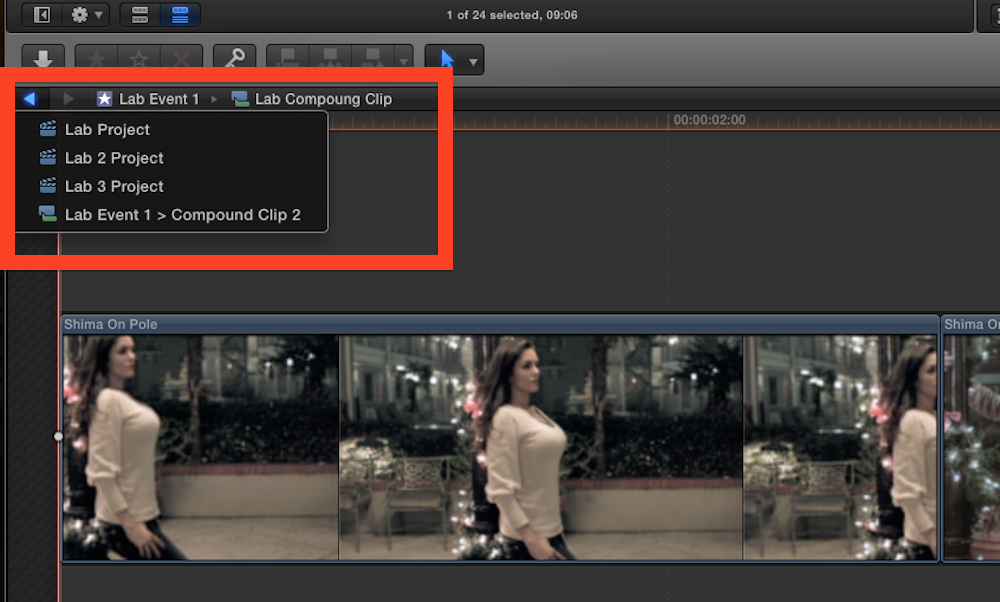
Last edit: 12 Mar 2014 22:35 by BenB.
Please Log in to join the conversation.
12 Mar 2014 23:48 #42567
by cavmusic
Thanks Ben so I want to make sure I'm understanding correctly. If I'm looking at a view like your's which is a compound clip inside of an event, then any changes (like erasing certain clip) I make on that timeline are happening at the event level. That would mean that if I erase a clip inside of the compound clip, then it's really gone.
But I'f I'm looking at a compound clip inside of a project and I make a change on the timeline, it doesn't make that change in the compound clip in the event.
does that sound right?
But I'f I'm looking at a compound clip inside of a project and I make a change on the timeline, it doesn't make that change in the compound clip in the event.
does that sound right?
Please Log in to join the conversation.
13 Mar 2014 12:33 - 13 Mar 2014 12:36 #42596
by BenB
If you remove a clip from inside of a Compound Clip, it is gone from the CC, not from the Event. It will still be listed in the Browser. Do this, before deleting a clip from a CC, right-click it, select Reveal In Browser. You'll see the Master Clip for it in the Browser.
When you make a change to any copy of a Compound Clip, anywhere, it is reflected in ALL copies, everywhere. PERIOD.
In order to break the connection between all copies, select a Compound Clip inside of a Project timeline, go to the Clip menu, select "Reference New Parent Clip". FCPX will create a new Parent copy in the Browser.
help.apple.com/finalcutpro/mac/10.1/#verca9e8d33
help.apple.com/finalcutpro/mac/10.1/#verca9e8672
When you make a change to any copy of a Compound Clip, anywhere, it is reflected in ALL copies, everywhere. PERIOD.
In order to break the connection between all copies, select a Compound Clip inside of a Project timeline, go to the Clip menu, select "Reference New Parent Clip". FCPX will create a new Parent copy in the Browser.
help.apple.com/finalcutpro/mac/10.1/#verca9e8d33
help.apple.com/finalcutpro/mac/10.1/#verca9e8672
Last edit: 13 Mar 2014 12:36 by BenB.
Please Log in to join the conversation.

- Tom Wolsky
-
- Offline
- Moderator
-
30 Apr 2021 17:54 #114244
by Tom Wolsky
Replied by Tom Wolsky on topic No Data
Switch off Content Created in the browser settings at the top. Set it to None.
Please Log in to join the conversation.
