


- Posts: 1077
- Thank you received: 189
3 Post Moderation Rule for New Boarders (25 Jan 2021)
New boarders will have their posts moderated - Don't worry if you cannot see your post immediately.
Some fun from the weekend
- Andreas Kiel
-
 Topic Author
- Offline
- Platinum Member
-

Less
More
09 Mar 2014 16:24 #42350
by Andreas Kiel
Some fun from the weekend was created by Andreas Kiel
Here is a little app which creates a screenshot of the Canvas. The screenshot will be saved to a user defined folder. The file name is either time of day or the TC from timeline.
-Andreas
www.spherico.com/filmtools/X-Files/X-Can...re/XCC%20Install.dmg
-Andreas
www.spherico.com/filmtools/X-Files/X-Can...re/XCC%20Install.dmg
Please Log in to join the conversation.
- ronny courtens
-

- Offline
- Moderator
-

Less
More
- Posts: 4455
- Thank you received: 962
09 Mar 2014 17:24 #42355
by ronny courtens
Replied by ronny courtens on topic Some fun from the weekend
Hey Andreas,
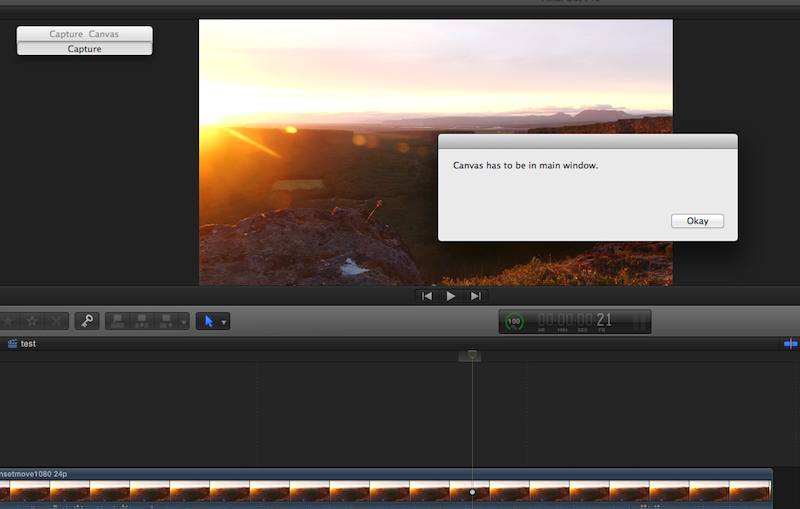
Thank you for this. I have installed it, but when I press "Capture" I get a message saying "Canvas must be in main window". I'm only using one monitor on this machine and I only have the main viewer open. Can you clarify that message?
-Ronny
Thank you for this. I have installed it, but when I press "Capture" I get a message saying "Canvas must be in main window". I'm only using one monitor on this machine and I only have the main viewer open. Can you clarify that message?
-Ronny
Please Log in to join the conversation.
- ronny courtens
-
- Offline
- Moderator
-
Less
More
- Posts: 4455
- Thank you received: 962
09 Mar 2014 17:29 #42356
by ronny courtens
Replied by ronny courtens on topic Some fun from the weekend
Okay, found it 
I had forgotten to set my custom Destination folder in Preferences :whistle:
Now it works fine. Thank you.
-Ronny
I had forgotten to set my custom Destination folder in Preferences :whistle:
Now it works fine. Thank you.
-Ronny
Please Log in to join the conversation.
- Andreas Kiel
-
Topic Author
- Offline
- Platinum Member
-
Less
More
- Posts: 1077
- Thank you received: 189
09 Mar 2014 18:40 #42360
by Andreas Kiel
Replied by Andreas Kiel on topic Some fun from the weekend
Ronny,
My bad.
I will make a new version which will ask for the destination folder on first launch.
Also will add a prefix function for the names and a 3rd option for file names.
One thing I forgot to mention: you can capture while FCPX plays the timeline.
-Andreas
My bad.
I will make a new version which will ask for the destination folder on first launch.
Also will add a prefix function for the names and a 3rd option for file names.
One thing I forgot to mention: you can capture while FCPX plays the timeline.
-Andreas
Please Log in to join the conversation.
- ronny courtens
-
- Offline
- Moderator
-
Less
More
- Posts: 4455
- Thank you received: 962
09 Mar 2014 18:43 #42361
by ronny courtens
Replied by ronny courtens on topic Some fun from the weekend
Great idea, Andreas. Thank you.
-Ronny
-Ronny
Please Log in to join the conversation.
- Andreas Kiel
-
Topic Author
- Offline
- Platinum Member
-
Less
More
- Posts: 1077
- Thank you received: 189
10 Mar 2014 14:33 #42398
by Andreas Kiel
Replied by Andreas Kiel on topic Some fun from the weekend
I've uploaded a new version.
www.spherico.com/filmtools/X-Files/X-Can...re/XCC%20Install.dmg
It will ask on first launch for the destination folder.
Some more naming options are included.
There are capture regions now: Canvas, Timeline, Full Interface.
-Andreas
P.S.
The reason I created the app was that I had to review a project from last summer.
I had to sent many screenshots to compare the old to new ideas.
Using "cmd-crtl-shift-4" then go to Preview and press "cmd-N" and save the file was way to time consuming.
www.spherico.com/filmtools/X-Files/X-Can...re/XCC%20Install.dmg
It will ask on first launch for the destination folder.
Some more naming options are included.
There are capture regions now: Canvas, Timeline, Full Interface.
-Andreas
P.S.
The reason I created the app was that I had to review a project from last summer.
I had to sent many screenshots to compare the old to new ideas.
Using "cmd-crtl-shift-4" then go to Preview and press "cmd-N" and save the file was way to time consuming.
Please Log in to join the conversation.
- Nervebroke
-
- Offline
- Elite Member
-

Less
More
- Posts: 177
- Thank you received: 12
10 Mar 2014 18:34 #42412
by Nervebroke
Replied by Nervebroke on topic Some fun from the weekend
Andreas
Thanks for this app and the update!
Dave
Thanks for this app and the update!
Dave
Please Log in to join the conversation.
- Beeldcomponist
-
- Offline
- Junior Member
-

Less
More
- Posts: 33
- Thank you received: 8
10 Mar 2014 19:54 #42416
by Beeldcomponist
Replied by Beeldcomponist on topic Some fun from the weekend
Hi Andreas,
I have on my MacPro FCPX and FCP7, when I use your app it will refer to FCP 7 and have to quit FCPX.
The same issue I had with the new app Final Cut Library Manager and they fix it.
Any ideas?
I have on my MacPro FCPX and FCP7, when I use your app it will refer to FCP 7 and have to quit FCPX.
The same issue I had with the new app Final Cut Library Manager and they fix it.
Any ideas?
Please Log in to join the conversation.
- Andreas Kiel
-
Topic Author
- Offline
- Platinum Member
-
Less
More
- Posts: 1077
- Thank you received: 189
10 Mar 2014 21:25 #42419
by Andreas Kiel
Replied by Andreas Kiel on topic Some fun from the weekend
Hi,
Not sure what can cause that.
What OS version are you using and how FCP7 and FCPX are intstallled (file path)
-Andreas
Not sure what can cause that.
What OS version are you using and how FCP7 and FCPX are intstallled (file path)
-Andreas
Please Log in to join the conversation.
- Beeldcomponist
-
- Offline
- Junior Member
-
Less
More
- Posts: 33
- Thank you received: 8
11 Mar 2014 08:00 #42425
by Beeldcomponist
Replied by Beeldcomponist on topic Some fun from the weekend
Hi Andreas,
OS is 10.9.1
FCPX in Applications folder and FCP7 in Finalcut Studio folder in Applications.
Hans
OS is 10.9.1
FCPX in Applications folder and FCP7 in Finalcut Studio folder in Applications.
Hans
Please Log in to join the conversation.
- Andreas Kiel
-
Topic Author
- Offline
- Platinum Member
-
Less
More
- Posts: 1077
- Thank you received: 189
11 Mar 2014 08:31 #42427
by Andreas Kiel
Replied by Andreas Kiel on topic Some fun from the weekend
Hi Hans,
I had a look at the code.
Only thing what could happen is that FCPx is not located at "/Applications/Final Cut Pro"
I changed that. The updated version just will look whether any version of FCP is active and what version number it has. If the version is > 10.0.9 the app will proceed.
www.spherico.com/filmtools/X-Files/X-Can...re/XCC%20Install.dmg
-Andreas
I had a look at the code.
Only thing what could happen is that FCPx is not located at "/Applications/Final Cut Pro"
I changed that. The updated version just will look whether any version of FCP is active and what version number it has. If the version is > 10.0.9 the app will proceed.
www.spherico.com/filmtools/X-Files/X-Can...re/XCC%20Install.dmg
-Andreas
Please Log in to join the conversation.
- Beeldcomponist
-
- Offline
- Junior Member
-
Less
More
- Posts: 33
- Thank you received: 8
11 Mar 2014 08:45 - 11 Mar 2014 08:56 #42429
by Beeldcomponist
Replied by Beeldcomponist on topic Some fun from the weekend
Hi Andreas,
what now happens is that I have to quit FCPX and FCP7 opens and got the message to run FCPXI
Put also FCPX in folder Final Cut Pro, same messages.
Hans
what now happens is that I have to quit FCPX and FCP7 opens and got the message to run FCPXI
Put also FCPX in folder Final Cut Pro, same messages.
Hans
Last edit: 11 Mar 2014 08:56 by Beeldcomponist.
Please Log in to join the conversation.
- Andreas Kiel
-
Topic Author
- Offline
- Platinum Member
-
Less
More
- Posts: 1077
- Thank you received: 189
11 Mar 2014 09:03 #42433
by Andreas Kiel
Replied by Andreas Kiel on topic Some fun from the weekend
Hi Hans
That is more than weird.
Could you send me an email about that to kiel at spherico dot com?
-Andreas
That is more than weird.
Could you send me an email about that to kiel at spherico dot com?
-Andreas
Please Log in to join the conversation.
11 Mar 2014 13:19 #42438
by parkerhqj
Replied by parkerhqj on topic Some fun from the weekend
Andreas - I love this. It worked for me once and now teems me FCPX isn't running when it is. Have I set it up wrong? thx
Please Log in to join the conversation.
- Andreas Kiel
-
Topic Author
- Offline
- Platinum Member
-
Less
More
- Posts: 1077
- Thank you received: 189
11 Mar 2014 13:57 - 11 Mar 2014 14:34 #42441
by Andreas Kiel
Replied by Andreas Kiel on topic Some fun from the weekend
Bill,
You probably didn't anything wrong.
The app looks very primitive but there is a lot under the hood.
As most lovers of FCPX claim its dynamic. And it is very dynamic with it's interface.
Have a look at the screenshots below.
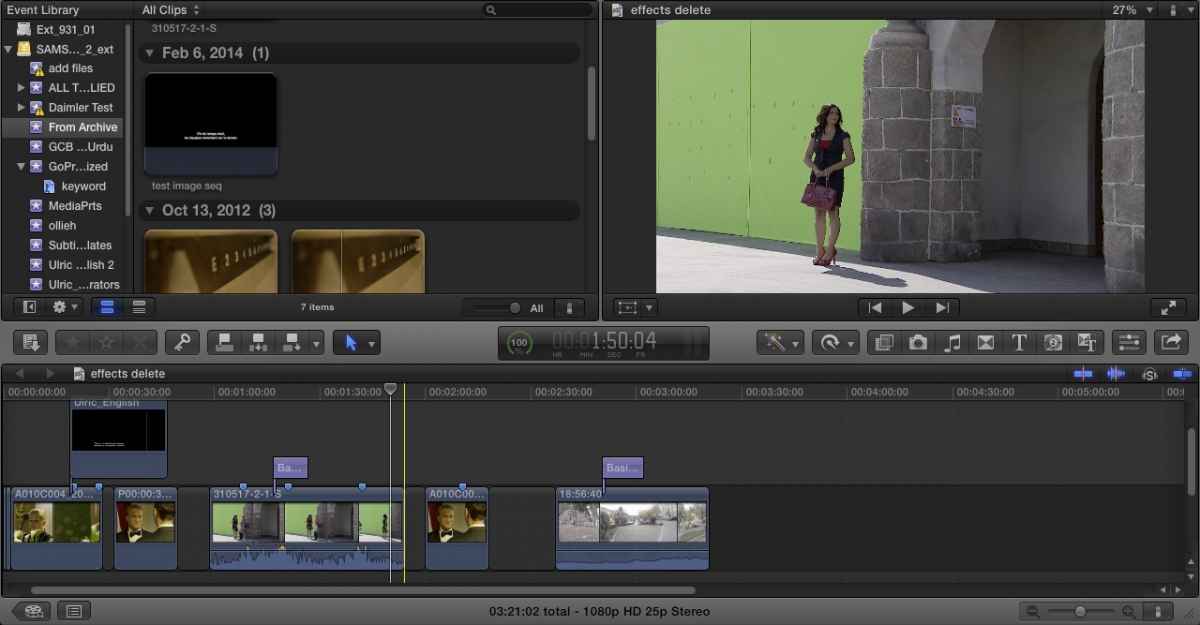
and
These look pretty much the same finally identical.
But there is a big non visible difference.
FCPX randomly replaces the numbers or IDs of the splitscreens inside the main window (I don't mean a video effect).
So if you quit FCPX and relaunch and the main window looks the same as that one you saw on quit it might be a different one.
I think it is a bit odd, but that is the way FCPX works (and may be it is the reason why you can't save window layouts).
So my app scans as much as possible combination of split of the main window and once it found one which might make sense it takes a screenshot of that region.
The error message you got obviously is wrong.
What kind of region did you want to capture. Let me know so can check the "loops".
-Andreas
P.S.
Screenshots are from 10.0.9. Reason: Im trying to write a small help file in Pages and Pages on Mavericks is really crap - I wasted money for that.
You probably didn't anything wrong.
The app looks very primitive but there is a lot under the hood.
As most lovers of FCPX claim its dynamic. And it is very dynamic with it's interface.
Have a look at the screenshots below.
and
These look pretty much the same finally identical.
But there is a big non visible difference.
FCPX randomly replaces the numbers or IDs of the splitscreens inside the main window (I don't mean a video effect).
So if you quit FCPX and relaunch and the main window looks the same as that one you saw on quit it might be a different one.
I think it is a bit odd, but that is the way FCPX works (and may be it is the reason why you can't save window layouts).
So my app scans as much as possible combination of split of the main window and once it found one which might make sense it takes a screenshot of that region.
The error message you got obviously is wrong.
What kind of region did you want to capture. Let me know so can check the "loops".
-Andreas
P.S.
Screenshots are from 10.0.9. Reason: Im trying to write a small help file in Pages and Pages on Mavericks is really crap - I wasted money for that.
Last edit: 11 Mar 2014 14:34 by Andreas Kiel.
Please Log in to join the conversation.
11 Mar 2014 14:08 #42442
by parkerhqj
Replied by parkerhqj on topic Some fun from the weekend
It's working now. Not sure why I was getting that message before.
Quick question - can you upload png files to this forum or would we need to convert these to JPEGs? It's usually when I use them - to show off all my bone-headed mistakes!
thx
Quick question - can you upload png files to this forum or would we need to convert these to JPEGs? It's usually when I use them - to show off all my bone-headed mistakes!
thx
Please Log in to join the conversation.
- Andreas Kiel
-
Topic Author
- Offline
- Platinum Member
-
Less
More
- Posts: 1077
- Thank you received: 189
11 Mar 2014 14:32 #42443
by Andreas Kiel
Replied by Andreas Kiel on topic Some fun from the weekend
Regarding Beeldcomponist's (Hans')
We have solved it.
What happened is not an app specific problem – it's an OS specific problem.
So just imagine you want to update FCP or FCPX the System will search for this app's name in the Application folder first and then update.
If you make a copy of that app and rename it this copy the copy won't be touched.
If you make the copy to another folder it might not be touched.
BUT: if you try to open a document – or in my case address an app - the System will search for the first best app which matches the name and tries to open the document with that app.
Some application (also some of mine) do say that they can open files like fcpxml – means if the System finds for example my app first. It will not open this file by double click with FCPX.
Similar happened with XCC in Hans' case. The app is looking for application processes and if Final Cut Pro is running it proceeds.
Then the app will tell this process (Final Cut Pro) to activate. The System did find first his legacy version of Final Cut Pro and so it did use that one. My app did found the right one, but there is no way to tell the System to use a specific rather than running a shell script.
So the solution was(is) to rename the legacy version of Final Cut Pro.
-Andreas
We have solved it.
What happened is not an app specific problem – it's an OS specific problem.
So just imagine you want to update FCP or FCPX the System will search for this app's name in the Application folder first and then update.
If you make a copy of that app and rename it this copy the copy won't be touched.
If you make the copy to another folder it might not be touched.
BUT: if you try to open a document – or in my case address an app - the System will search for the first best app which matches the name and tries to open the document with that app.
Some application (also some of mine) do say that they can open files like fcpxml – means if the System finds for example my app first. It will not open this file by double click with FCPX.
Similar happened with XCC in Hans' case. The app is looking for application processes and if Final Cut Pro is running it proceeds.
Then the app will tell this process (Final Cut Pro) to activate. The System did find first his legacy version of Final Cut Pro and so it did use that one. My app did found the right one, but there is no way to tell the System to use a specific rather than running a shell script.
So the solution was(is) to rename the legacy version of Final Cut Pro.
-Andreas
Please Log in to join the conversation.
- Andreas Kiel
-
Topic Author
- Offline
- Platinum Member
-
Less
More
- Posts: 1077
- Thank you received: 189
11 Mar 2014 14:41 #42444
by Andreas Kiel
I think the size matters.
Probably one of the moderators knows more.
I'll try to figure out to do JPEG captures as well.
-Andreas
Replied by Andreas Kiel on topic Some fun from the weekend
parkerhqj wrote: It's working now. Not sure why I was getting that message before.
Quick question - can you upload png files to this forum or would we need to convert these to JPEGs? It's usually when I use them - to show off all my bone-headed mistakes!
thx
I think the size matters.
Probably one of the moderators knows more.
I'll try to figure out to do JPEG captures as well.
-Andreas
Please Log in to join the conversation.
- Andreas Kiel
-
Topic Author
- Offline
- Platinum Member
-
Less
More
- Posts: 1077
- Thank you received: 189
11 Mar 2014 15:34 #42448
by Andreas Kiel
Replied by Andreas Kiel on topic Some fun from the weekend
Please Log in to join the conversation.
