


- Posts: 3
- Thank you received: 0
3 Post Moderation Rule for New Boarders (25 Jan 2021)
New boarders will have their posts moderated - Don't worry if you cannot see your post immediately.
Newbie Help with Letterbox Transition
09 Mar 2014 09:48 #42330
by MimUK
Newbie Help with Letterbox Transition was created by MimUK
Hi All,
Ive just started using FCPX and I could do with some help.
I am trying to create what I think is a simple effect and have looked everywhere for guidance.
I have some 16x9 footage that I would like to transition into 2.35:1 during the clip.
I have added the letterbox effect and created a keyframe with 0 border size then a few frames later increased to 10 and added a new keyframe.
This kinda works, however if I add any transitions (lens flares etc) they are within the full frame, not the pseudo widescreen area.
Am I trying to achieve this look the right way or is there a better method. The same occurs if I use Alex4D or Andy's Letterbox effect.
Cheers in advance.
Mim
Ive just started using FCPX and I could do with some help.
I am trying to create what I think is a simple effect and have looked everywhere for guidance.
I have some 16x9 footage that I would like to transition into 2.35:1 during the clip.
I have added the letterbox effect and created a keyframe with 0 border size then a few frames later increased to 10 and added a new keyframe.
This kinda works, however if I add any transitions (lens flares etc) they are within the full frame, not the pseudo widescreen area.
Am I trying to achieve this look the right way or is there a better method. The same occurs if I use Alex4D or Andy's Letterbox effect.
Cheers in advance.
Mim
Please Log in to join the conversation.
- ronny courtens
-

- Offline
- Moderator
-

Less
More
- Posts: 4455
- Thank you received: 962
09 Mar 2014 11:04 - 09 Mar 2014 11:05 #42331
by ronny courtens
Replied by ronny courtens on topic Newbie Help with Letterbox Transition
Hey Mim,
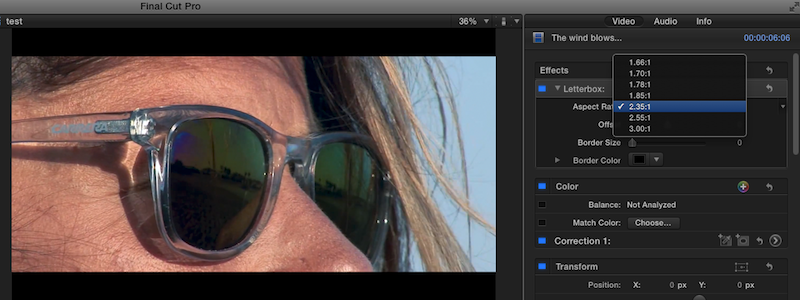
Blade the clip (CMD+ B ), then add the Letterbox effect to the part of the clip you want to letterbox. To add the 2:35:1 letterbox just use the "2:35:1" preset in the Aspect Ratio options:
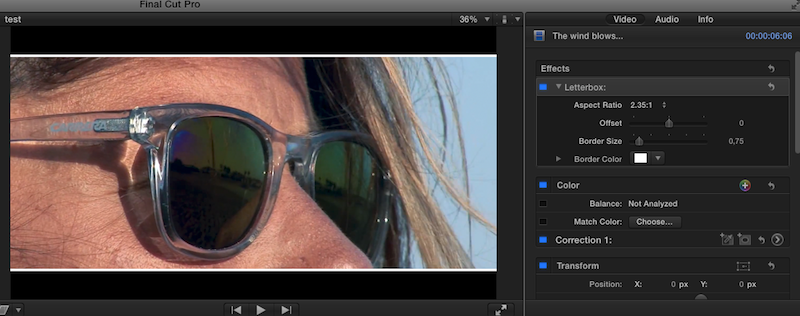
Of course you can also use the Border Size to add a white or colored border to the letterbox:
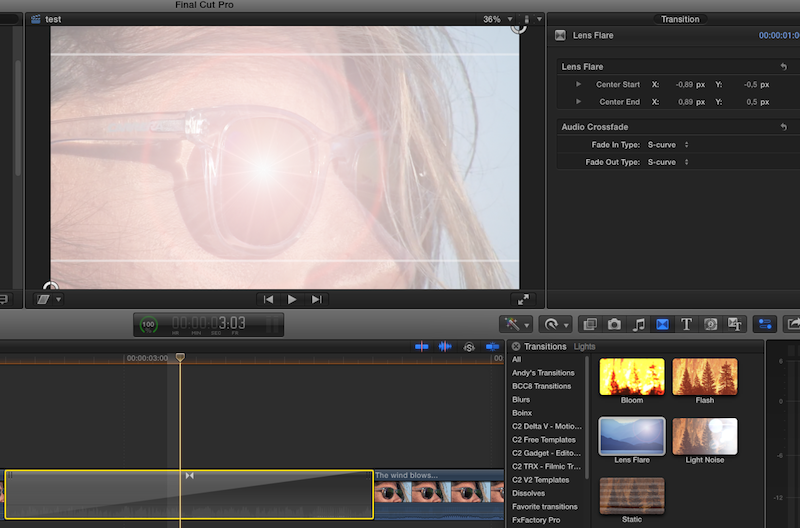
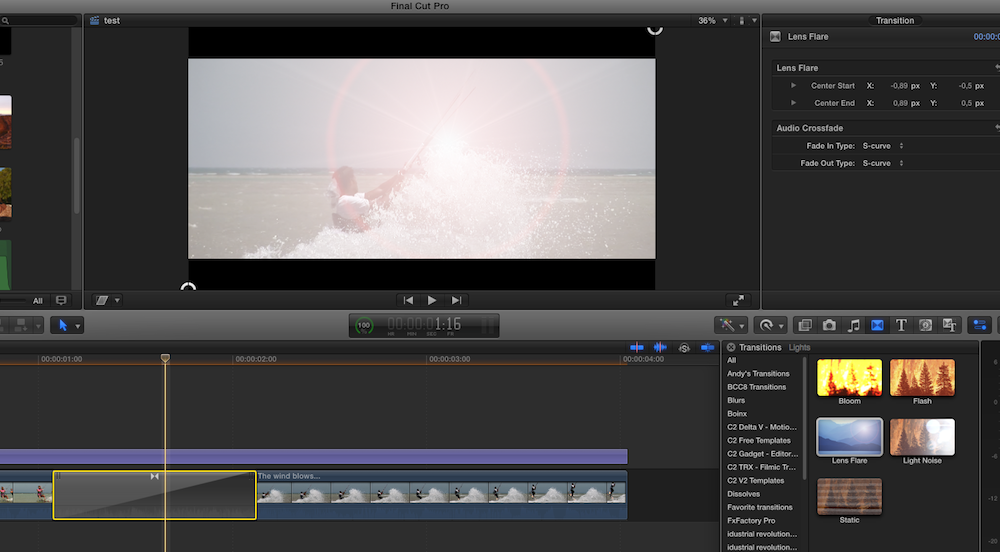
Now when you want to add a transition between the full-frame part and the letterboxed part of the clip and you use use a flare transition that does not cover the image entirely in the middle of the transition (such as the Lens Flare transition) you will see the transition happening on both sides, which may not be what you want:
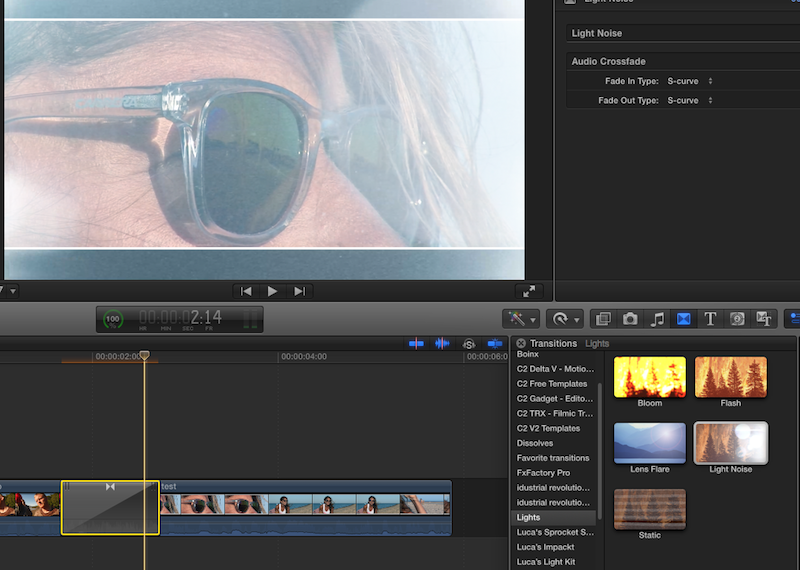
You can avoid this by selecting a transition that does overlap both sides of the clip, such as the Light Noise transition:
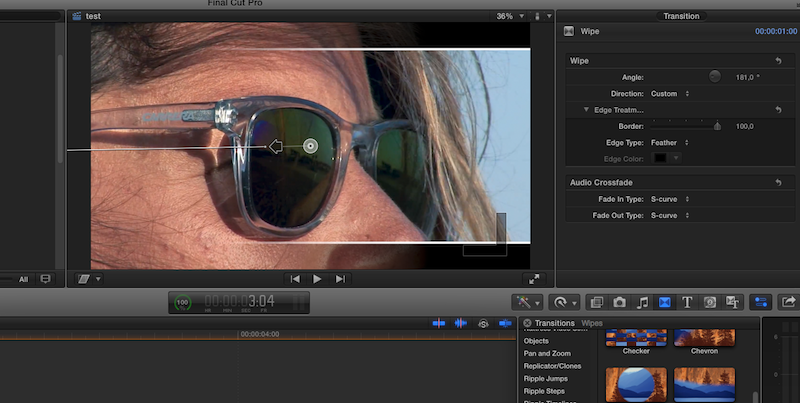
Or you can use a soft wipe between the clips:
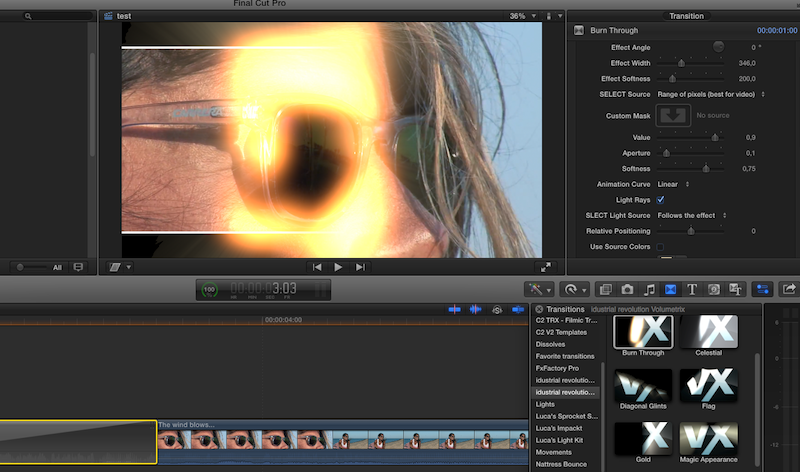
Or for more dramatic results you can use a dedicated light sweep effect, such as Idustrial Revolution's Volumetrix package (a great set of effects and transitions, BTW):
Hope this helps.
-Ronny
Blade the clip (CMD+ B ), then add the Letterbox effect to the part of the clip you want to letterbox. To add the 2:35:1 letterbox just use the "2:35:1" preset in the Aspect Ratio options:
Of course you can also use the Border Size to add a white or colored border to the letterbox:
Now when you want to add a transition between the full-frame part and the letterboxed part of the clip and you use use a flare transition that does not cover the image entirely in the middle of the transition (such as the Lens Flare transition) you will see the transition happening on both sides, which may not be what you want:
You can avoid this by selecting a transition that does overlap both sides of the clip, such as the Light Noise transition:
Or you can use a soft wipe between the clips:
Or for more dramatic results you can use a dedicated light sweep effect, such as Idustrial Revolution's Volumetrix package (a great set of effects and transitions, BTW):
Hope this helps.
-Ronny
Last edit: 09 Mar 2014 11:05 by ronny courtens.
Please Log in to join the conversation.
09 Mar 2014 11:31 #42333
by MimUK
Replied by MimUK on topic Newbie Help with Letterbox Transition
Thanks for this Ronny,
The effect I am trying to achieve is 16x9 then black bars drop down from top and up from bottom to transition into 2.35:1, then later on in the clip any effects are confined to the aspect ratio and not the letterbox borders
The effect I am trying to achieve is 16x9 then black bars drop down from top and up from bottom to transition into 2.35:1, then later on in the clip any effects are confined to the aspect ratio and not the letterbox borders
Please Log in to join the conversation.
- ronny courtens
-
- Offline
- Moderator
-
Less
More
- Posts: 4455
- Thank you received: 962
09 Mar 2014 12:13 #42335
by ronny courtens
Replied by ronny courtens on topic Newbie Help with Letterbox Transition
Ah, I see. Give me a few minutes to create some screenshots and I will guide you through this.
- Ronny
- Ronny
Please Log in to join the conversation.
- ronny courtens
-
- Offline
- Moderator
-
Less
More
- Posts: 4455
- Thank you received: 962
09 Mar 2014 12:50 #42337
by ronny courtens
Replied by ronny courtens on topic Newbie Help with Letterbox Transition
Okay, here we go.
This can easily be done in FCPX, using an Adjustment Layer. You can download one for free from this site: www.rippletraining.com/using-the-adjustm...final-cut-pro-x.html
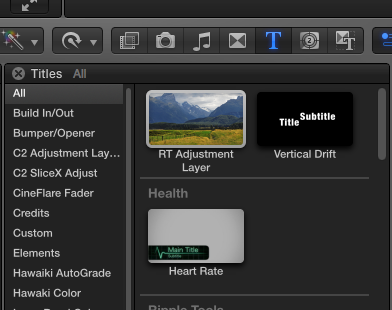
1. Close FCPX, download the RT Adjustment Layer and install it. Then launch FCPX and in the Title Browser find the RT Adjustment Layer (it should be under "Custom"):
2. Double-click the RT Adjustment Layer to place it above the clips in your FCPX timeline. Place the Adjustment Layer right above the spot where you want to start the letter boxing effect.
Then apply the Letterbox Effect to the adjustment layer and keyframe the Border Size to make the clip under the Adjustment Layer animate from Full to Letterbox:
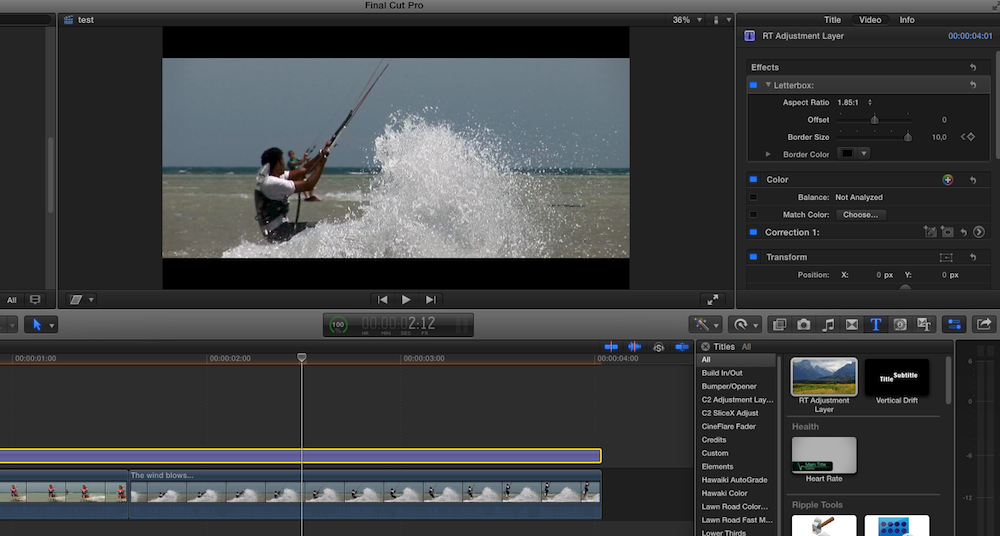
Stretch the Adjustment Layer so it covers all the clips that need to be letterboxed. Any clip under the Adjustment Layer will automatically be letterboxed.
3. Finally add any transitions you like to the letterboxed clips under the Adjustment Layer: the transitions will only affect the letterbox frame and not the full frame:
-Ronny
This can easily be done in FCPX, using an Adjustment Layer. You can download one for free from this site: www.rippletraining.com/using-the-adjustm...final-cut-pro-x.html
1. Close FCPX, download the RT Adjustment Layer and install it. Then launch FCPX and in the Title Browser find the RT Adjustment Layer (it should be under "Custom"):
2. Double-click the RT Adjustment Layer to place it above the clips in your FCPX timeline. Place the Adjustment Layer right above the spot where you want to start the letter boxing effect.
Then apply the Letterbox Effect to the adjustment layer and keyframe the Border Size to make the clip under the Adjustment Layer animate from Full to Letterbox:
Stretch the Adjustment Layer so it covers all the clips that need to be letterboxed. Any clip under the Adjustment Layer will automatically be letterboxed.
3. Finally add any transitions you like to the letterboxed clips under the Adjustment Layer: the transitions will only affect the letterbox frame and not the full frame:
-Ronny
Please Log in to join the conversation.
09 Mar 2014 12:54 #42338
by MimUK
Replied by MimUK on topic Newbie Help with Letterbox Transition
Thank you so much Ronny,
I really appreciate your detailed response.
Enjoy the rest of your weekend.
I really appreciate your detailed response.
Enjoy the rest of your weekend.
Please Log in to join the conversation.
