


- Posts: 164
- Thank you received: 0
3 Post Moderation Rule for New Boarders (25 Jan 2021)
New boarders will have their posts moderated - Don't worry if you cannot see your post immediately.
60 fps slow motion
09 Mar 2014 09:26 #42327
by Neil P
60 fps slow motion was created by Neil P
Hi gang
I shot some basketball set ups today at 60 fps so that I can get some decent slow motion footage (in FCPX).
Basically I changed frame rate from 1920x1080, 25 fps to 1280x720, 60 fps (have I reduced the quality of my film by doing this ?)
I now need to load it into FXPX and timeline and slow part of the clip down.
A tutorial from a chap using Premier pro suggests you need to re interparate the footage. In Premier pro and is able to manually assign the frame rate (using modify) down to 23.976 (real number for 24p)
This obviously makes the film longer.
How to I do this in FCPX 10.1 ?
Also how do I Check the initial properties of the Clip in FCPX to confirm, ie frame rate etc when first creating a protect etc ?
Would really be grateful for any help.
Many thanks
Neil
Neil
I shot some basketball set ups today at 60 fps so that I can get some decent slow motion footage (in FCPX).
Basically I changed frame rate from 1920x1080, 25 fps to 1280x720, 60 fps (have I reduced the quality of my film by doing this ?)
I now need to load it into FXPX and timeline and slow part of the clip down.
A tutorial from a chap using Premier pro suggests you need to re interparate the footage. In Premier pro and is able to manually assign the frame rate (using modify) down to 23.976 (real number for 24p)
This obviously makes the film longer.
How to I do this in FCPX 10.1 ?
Also how do I Check the initial properties of the Clip in FCPX to confirm, ie frame rate etc when first creating a protect etc ?
Would really be grateful for any help.
Many thanks
Neil
Neil
Please Log in to join the conversation.
- ronny courtens
-

- Offline
- Moderator
-

Less
More
- Posts: 4455
- Thank you received: 962
09 Mar 2014 09:46 #42329
by ronny courtens
Replied by ronny courtens on topic 60 fps slow motion
Hi Neil,
I'm not quite getting this.
Have you shot your video at 60fps or 50fps in the camera (which is the way to go for smooth slow-motion) ?
Or have you recorded at 25fps and then you have converted the recorded clip to 60fps?
-Ronny
I'm not quite getting this.
Have you shot your video at 60fps or 50fps in the camera (which is the way to go for smooth slow-motion) ?
Or have you recorded at 25fps and then you have converted the recorded clip to 60fps?
-Ronny
Please Log in to join the conversation.
09 Mar 2014 11:26 #42332
by Neil P
Replied by Neil P on topic 60 fps slow motion
Hi Ronnie,
I shot it at 60 fps in the camera. I think I need to converted it to 25 fps when it's on the timeline in FCP
Here is the tutorial that i was following but the guy is editing it in Premmier pro sohe is using different jargon ( a good tutorial though)
Neil
I shot it at 60 fps in the camera. I think I need to converted it to 25 fps when it's on the timeline in FCP
Here is the tutorial that i was following but the guy is editing it in Premmier pro sohe is using different jargon ( a good tutorial though)
Neil
Please Log in to join the conversation.
- ronny courtens
-
- Offline
- Moderator
-
Less
More
- Posts: 4455
- Thank you received: 962
09 Mar 2014 12:11 #42334
by ronny courtens
Replied by ronny courtens on topic 60 fps slow motion
So the footage has been shot @60fps, this is good. I see you are in the UK, so you probably will be editing in a 25fps timeline.
FCPX is much more user-friendly when it come to using overcranked video. No need for interpreting the footage or any other technical brouhaha, it just works.
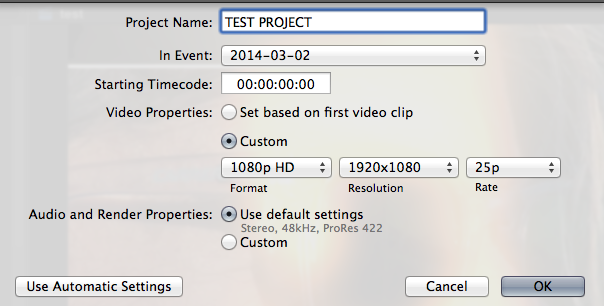
In FCPX 10.1.1 create a new Project. Use Custom Settings in the Project settings window. Select a preset that matches the Format and the Resolution of your recorded footage. Just make sure your Frame Rate is 25p. For 1920x1080 the settings should be like this:
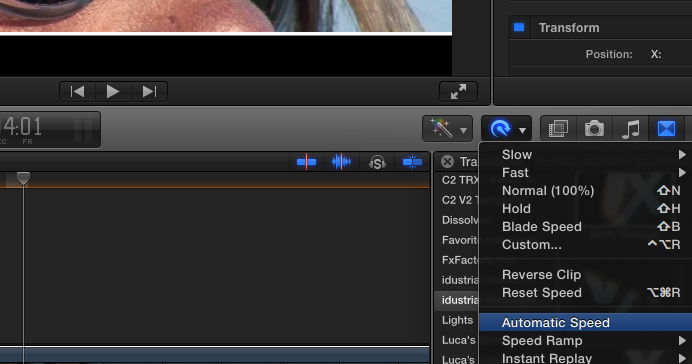
Then drop your 60p video onto the 25p timeline, select the clip and in the Retiming menu select Automatic Speed:
Your clip will instantly play in slow-motion while using every frame of your 60p video, resulting in a fluent slow-motion.
-Ronny
FCPX is much more user-friendly when it come to using overcranked video. No need for interpreting the footage or any other technical brouhaha, it just works.
In FCPX 10.1.1 create a new Project. Use Custom Settings in the Project settings window. Select a preset that matches the Format and the Resolution of your recorded footage. Just make sure your Frame Rate is 25p. For 1920x1080 the settings should be like this:
Then drop your 60p video onto the 25p timeline, select the clip and in the Retiming menu select Automatic Speed:
Your clip will instantly play in slow-motion while using every frame of your 60p video, resulting in a fluent slow-motion.
-Ronny
Please Log in to join the conversation.
09 Mar 2014 13:20 #42339
by Neil P
Replied by Neil P on topic 60 fps slow motion
Big thanks Ronnie,
I'll have a go at it and report back,
much karma to you
Nei
I'll have a go at it and report back,
much karma to you
Nei
Please Log in to join the conversation.
09 Mar 2014 14:22 #42341
by Neil P
Replied by Neil P on topic 60 fps slow motion
Also,
I use a nikon D800 and for some reason at 60fps will only give me a resolution of 1280x720. I'm not sure why ?.
Will this effect the overall quality of the film. I normally shoot in 1920x1080.
thanks
Neil
I use a nikon D800 and for some reason at 60fps will only give me a resolution of 1280x720. I'm not sure why ?.
Will this effect the overall quality of the film. I normally shoot in 1920x1080.
thanks
Neil
Please Log in to join the conversation.

09 Mar 2014 14:59 #42343
by BenB
Replied by BenB on topic 60 fps slow motion
Some cameras will only do higher speeds at lower resolutions. Has to do with the limits of its internal processors. Blowing 720 up to 1080 size will loose some image quality, how much will depend. Not nearly as bad as blowing SD up to HD. I've seen 720 put in 1080 Timelines and look good, I've seen it look horrible. How sharp and clear was the original image shot? What was the quality of the camera's processing? What codec is the original in? Lots can effect that equation. Give it a shot and see what happens.
Please Log in to join the conversation.
- ronny courtens
-
- Offline
- Moderator
-
Less
More
- Posts: 4455
- Thank you received: 962
09 Mar 2014 15:10 - 09 Mar 2014 15:11 #42346
by ronny courtens
Replied by ronny courtens on topic 60 fps slow motion
As Ben says that's the case with many DSLRs. The D800 records 1920x1080 @24p and @25/30p, but 1280x720 @50p/60p.
When you mix the 60p footage with 1080p video in a 1080p timeline your 60p clip(s) will be automatically upscaled in FCPX. This will indeed slightly affect the original quality, but going from 720p to 1080p is not too bad if your original 720p footage quality is good enough. To effectively judge the difference you should render the upscaled clip, set your Viewer Quality to "Better Quality" and the Viewer size to 100%. For action footage I don't think there will be a huge difference.
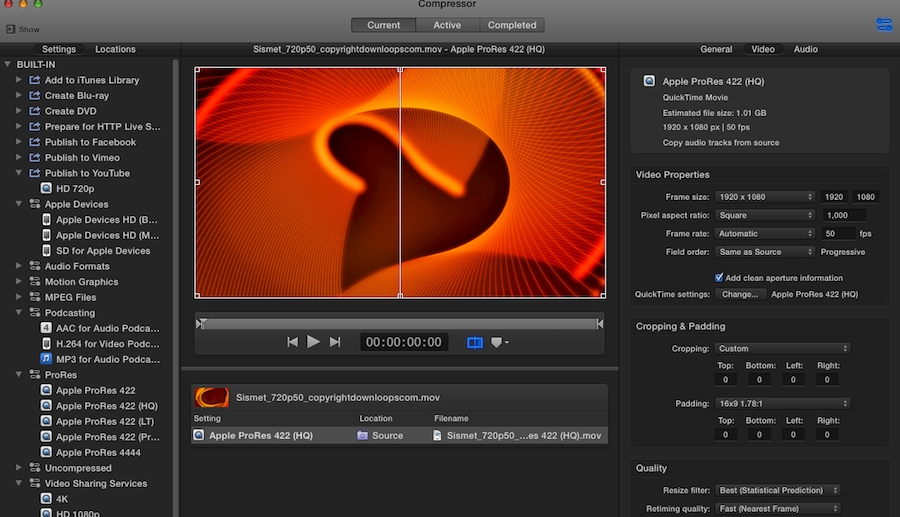
If you do notice a significant quality difference between the original and the upscaled clip in FCPX you can import the 1280x720 clips in Compressor, set the frame size to 1920x1080, resize using the Statistical Prediction option, export as ProRes 422 (or 422HQ) and import the resized ProRes 60p clips in FCPX to do the slo-mo effect. Depending on how long your clips are this can take some (or really a whole lot of) time, but the resizing quality using statistical prediction is great.
Here's the settings in Compressor. The footage in the screenshot is 50p but that doesn't matter, just leave everything unaltered except the Frame Size and the Resize Filter quality:
But I honestly think the 60p video will look good enough in FCPX.
-Ronny
When you mix the 60p footage with 1080p video in a 1080p timeline your 60p clip(s) will be automatically upscaled in FCPX. This will indeed slightly affect the original quality, but going from 720p to 1080p is not too bad if your original 720p footage quality is good enough. To effectively judge the difference you should render the upscaled clip, set your Viewer Quality to "Better Quality" and the Viewer size to 100%. For action footage I don't think there will be a huge difference.
If you do notice a significant quality difference between the original and the upscaled clip in FCPX you can import the 1280x720 clips in Compressor, set the frame size to 1920x1080, resize using the Statistical Prediction option, export as ProRes 422 (or 422HQ) and import the resized ProRes 60p clips in FCPX to do the slo-mo effect. Depending on how long your clips are this can take some (or really a whole lot of) time, but the resizing quality using statistical prediction is great.
Here's the settings in Compressor. The footage in the screenshot is 50p but that doesn't matter, just leave everything unaltered except the Frame Size and the Resize Filter quality:
But I honestly think the 60p video will look good enough in FCPX.
-Ronny
Last edit: 09 Mar 2014 15:11 by ronny courtens.
Please Log in to join the conversation.

11 Mar 2014 15:29 #42447
by joema
The Canon 5D Mark III is similar. Originally the two high-def ATSC broadcast standards were 720p/60 and 1080p/30 (actually 29.97). I think satellite and cable provider also distribute only these two formats (25/50 fps in Europe). Also Blu-Ray originally did not support 1080p/60. So there was no great incentive to record in a format which could not be distributed, plus it was technically difficult. For years networks which supposedly broadcast 1920x1080p/30 actually recorded a cut-down 1440x1080 because the technology couldn't handle 1920x1080.
Although 720p/60 has less static resolution than 1080p/30, it has better temporal resolution so you quickly reach a crossover point during subject/camera movement where it has better effective resolution. This is why ABC, FOX, and ESPN record and broadcast only in 720p/60.
720p is 16:9 aspect ratio so a straight scale up works well to 1080p with no composition problems. I have often shot and intermixed 720p and 1080p; it typically works well.
Replied by joema on topic 60 fps slow motion
Neil P wrote: Also,
I use a nikon D800 and for some reason at 60fps will only give me a resolution of 1280x720. I'm not sure why ?...
The Canon 5D Mark III is similar. Originally the two high-def ATSC broadcast standards were 720p/60 and 1080p/30 (actually 29.97). I think satellite and cable provider also distribute only these two formats (25/50 fps in Europe). Also Blu-Ray originally did not support 1080p/60. So there was no great incentive to record in a format which could not be distributed, plus it was technically difficult. For years networks which supposedly broadcast 1920x1080p/30 actually recorded a cut-down 1440x1080 because the technology couldn't handle 1920x1080.
Although 720p/60 has less static resolution than 1080p/30, it has better temporal resolution so you quickly reach a crossover point during subject/camera movement where it has better effective resolution. This is why ABC, FOX, and ESPN record and broadcast only in 720p/60.
720p is 16:9 aspect ratio so a straight scale up works well to 1080p with no composition problems. I have often shot and intermixed 720p and 1080p; it typically works well.
Please Log in to join the conversation.
11 Mar 2014 16:39 #42452
by Neil P
Replied by Neil P on topic 60 fps slow motion
Thanks Joe,
Footage is now with my editor and he is going to scale up to 1080
Thanks for you clarification
Best wishes
Neil
Footage is now with my editor and he is going to scale up to 1080
Thanks for you clarification
Best wishes
Neil
Please Log in to join the conversation.
- bradywurtz
-

- Offline
- Elite Member
-

Less
More
- Posts: 265
- Thank you received: 7
11 Mar 2014 20:13 #42459
by bradywurtz
Replied by bradywurtz on topic 60 fps slow motion
how come when I watch ABC or FOX, it doesn't seem like I'm watching typical 60p footage? I swear it looks just like 30p. does it have to do with some way that the television actually displays it on TV?
Please Log in to join the conversation.
11 Mar 2014 21:59 #42466
by joema
Replied by joema on topic 60 fps slow motion
BTW my previous statement about 1080p was wrong, I meant 1080i/30 (30 frames/sec as two interlaced 60/sec fields).
If the ABC/Fox/ESPN broadcast material is from a 1080i source (say another network or freelance provider) or has been generated from 24 frame/sec film, the original content is a lower frame rate. Some material is still shot on film today, and a great deal of archival movie and TV programming is originally film-based, whether later digitized or not. It will be conformed to 720p/60 for broadcast but you cannot create more temporal resolution from nothing. Motion interpolation (aka optical flow) can fake that but I don't know if ABC and Fox do that before broadcast.
Content originating at a lower frame rate may not look exactly the same as that captured at 720p/60.
A live broadcast or content captured by ABC/Fox/ESPN at 720p/60 should look a little smoother from a motion standpoint.
Also your playback device may alter this. If you watch it on a DVR that may not capture and play back at a native 60 fps.
If the ABC/Fox/ESPN broadcast material is from a 1080i source (say another network or freelance provider) or has been generated from 24 frame/sec film, the original content is a lower frame rate. Some material is still shot on film today, and a great deal of archival movie and TV programming is originally film-based, whether later digitized or not. It will be conformed to 720p/60 for broadcast but you cannot create more temporal resolution from nothing. Motion interpolation (aka optical flow) can fake that but I don't know if ABC and Fox do that before broadcast.
Content originating at a lower frame rate may not look exactly the same as that captured at 720p/60.
A live broadcast or content captured by ABC/Fox/ESPN at 720p/60 should look a little smoother from a motion standpoint.
Also your playback device may alter this. If you watch it on a DVR that may not capture and play back at a native 60 fps.
Please Log in to join the conversation.
- haysoos123
-
- Offline
- Platinum Member
-

Less
More
- Posts: 402
- Thank you received: 72
11 Mar 2014 23:42 #42472
by haysoos123
Replied by haysoos123 on topic 60 fps slow motion
joema,
While it's good to know a few details about broadcast standards, it doesn't really have much to do with your shooting format which is mostly dictated by your aesthetic and technical choices. The network DOES typically lay out shooting standards, but that mostly has to do with obtaining a minimum standard of picture quality, the look of the show, etc., and it all has to be approved.
Broadcast is either 1080i 60 or 720p 60 in the US, but again that has very little to do with why a DSLR can only do 720p 60. Your show might be 30p, 24p, 60i, etc, but you have to deliver in one of those two formats, and in some markets an SD version. Any of those delivery formats will not change the "look" of your program in regard to your shooting framerate.
While it's good to know a few details about broadcast standards, it doesn't really have much to do with your shooting format which is mostly dictated by your aesthetic and technical choices. The network DOES typically lay out shooting standards, but that mostly has to do with obtaining a minimum standard of picture quality, the look of the show, etc., and it all has to be approved.
Broadcast is either 1080i 60 or 720p 60 in the US, but again that has very little to do with why a DSLR can only do 720p 60. Your show might be 30p, 24p, 60i, etc, but you have to deliver in one of those two formats, and in some markets an SD version. Any of those delivery formats will not change the "look" of your program in regard to your shooting framerate.
Please Log in to join the conversation.
12 Mar 2014 03:28 - 12 Mar 2014 03:30 #42479
by joema
The fact that in very recent years distribution has expanded to include web methods doesn't change this. Nor does the ability to transcode to different formats. A DSLR has a several year design cycle, which for the D800 and 5D3 probably started before 2010. The chipsets and technologies in broad use at that time -- not today -- determined those capabilities. That in turn was heavily influenced by the ATSC broadcast standards of 1920x1080 at 30 fps and 1280x720 at 60 fps at 16:9 AR.
Even today there is no broad distribution format for 1080p/60 -- whether by web or physical media. There was certainly no compelling reason years ago when the D800 was designed to burden the design with capability that would not be usable for years. The fact that broadcast cameras costing $50,000 could not even do full 1920x1080/30 until recent years -- yet they *could* do 720p/60 from the outset -- shows the difference in implementation cost.
There is an implementation cost to every technology feature which must be weighed against the benefit. Doubling the frame rate at a given resolution doubles the codec input bit rate and has a knock-on effect for the entire image processing chain. The OP was not asking why would you shoot in different formats from an aesthetic standpoint. Rather he wanted to know why his D800 could only do 720p/60, not 1080/60. The ATSC broadcast standard, history, and associated ecosystem significantly explains this.
Replied by joema on topic 60 fps slow motion
It has everything to do with why the OP's D800 can only shoot 720p/60, not 1080p/60 -- that was his question. It is no coincidence the DSLR frame rates and aspect ratios are identical to the ATSC broadcast standard. That standard produced a distribution and display infrastructure which dictates access to viewers, and which drove investment in image processing chipsets and technologies.haysoos123 wrote: joema,
While it's good to know a few details about broadcast standards...that has very little to do with why a DSLR can only do 720p 60...
The fact that in very recent years distribution has expanded to include web methods doesn't change this. Nor does the ability to transcode to different formats. A DSLR has a several year design cycle, which for the D800 and 5D3 probably started before 2010. The chipsets and technologies in broad use at that time -- not today -- determined those capabilities. That in turn was heavily influenced by the ATSC broadcast standards of 1920x1080 at 30 fps and 1280x720 at 60 fps at 16:9 AR.
Even today there is no broad distribution format for 1080p/60 -- whether by web or physical media. There was certainly no compelling reason years ago when the D800 was designed to burden the design with capability that would not be usable for years. The fact that broadcast cameras costing $50,000 could not even do full 1920x1080/30 until recent years -- yet they *could* do 720p/60 from the outset -- shows the difference in implementation cost.
There is an implementation cost to every technology feature which must be weighed against the benefit. Doubling the frame rate at a given resolution doubles the codec input bit rate and has a knock-on effect for the entire image processing chain. The OP was not asking why would you shoot in different formats from an aesthetic standpoint. Rather he wanted to know why his D800 could only do 720p/60, not 1080/60. The ATSC broadcast standard, history, and associated ecosystem significantly explains this.
Last edit: 12 Mar 2014 03:30 by joema.
Please Log in to join the conversation.
- haysoos123
-
- Offline
- Platinum Member
-
Less
More
- Posts: 402
- Thank you received: 72
12 Mar 2014 18:37 #42524
by haysoos123
Replied by haysoos123 on topic 60 fps slow motion
All I'm saying is that the designers of his DSLR had a budget they were going for, and they decided at that price point they didn't want to put in a processor/sensor system that will do higher than 720p 60. Certainly it's much easier for everyone that it's a broadcast standard, but the primary motivator for not being able to do 1080p 60 or 120 or whatever is that they decided not to do it for that price/market.
Also, someone did have a question about aesthetics because they wondered about how watching certain shows on FOX or ABC didn't look like 60 fps footage. I was trying to make a distinction between what you shoot at and what you deliver to the network, which are two different things.
Also, someone did have a question about aesthetics because they wondered about how watching certain shows on FOX or ABC didn't look like 60 fps footage. I was trying to make a distinction between what you shoot at and what you deliver to the network, which are two different things.
Please Log in to join the conversation.
