


- Posts: 66
- Thank you received: 2
3 Post Moderation Rule for New Boarders (25 Jan 2021)
New boarders will have their posts moderated - Don't worry if you cannot see your post immediately.
Moving Clips
09 Mar 2014 04:58 #42318
by pwillis
Moving Clips was created by pwillis
I'm trying to move a single clip but when I do, several clips move all at once. I've never had this problem before and am guessing I've accidentally clicked something that's enabled this option. How do I disable it?
Many thanks in advance!
Many thanks in advance!
Please Log in to join the conversation.
- ronny courtens
-

- Offline
- Moderator
-

Less
More
- Posts: 4455
- Thank you received: 962
09 Mar 2014 07:32 #42322
by ronny courtens
Replied by ronny courtens on topic Moving Clips
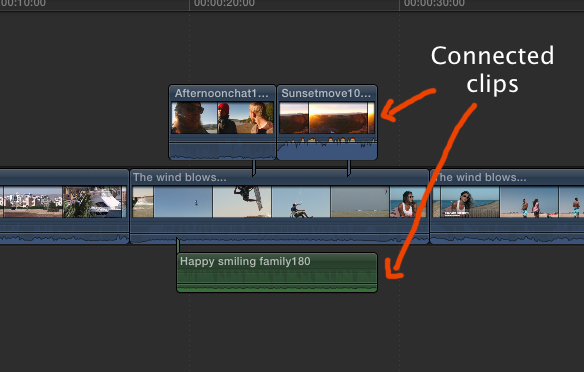
If the clip is in your storyline and you have connected clips above or under it, they will move together with the clip in the storyline:
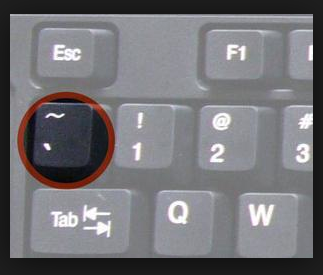
You can disable this by pressing the tilde (Grave) key while you move the clip.
If you have a different problem, please post a screenshot so we can see what is happening.
-Ronny
You can disable this by pressing the tilde (Grave) key while you move the clip.
If you have a different problem, please post a screenshot so we can see what is happening.
-Ronny
Please Log in to join the conversation.
10 Mar 2014 16:05 #42401
by pwillis
Replied by pwillis on topic Moving Clips
Thanks so much for your reply Ronnie. That did the trick!
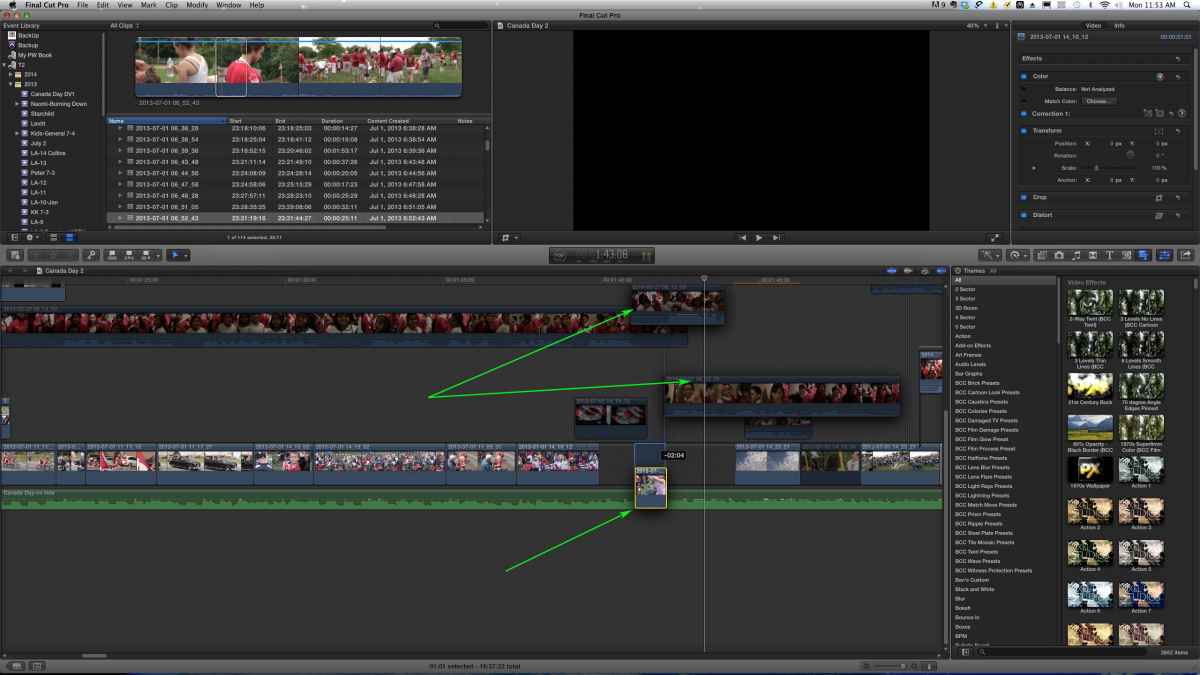
Do the vertical blue lines have anything to do with this? I've never noticed them before.
Do the vertical blue lines have anything to do with this? I've never noticed them before.
Please Log in to join the conversation.

10 Mar 2014 16:29 - 10 Mar 2014 16:30 #42406
by BenB
Replied by BenB on topic Moving Clips
Those verticle blue lines are the connection stems, where the clip physically connects to the Primary Storyline clip. Option-Command-Click is how you mannually change where that stem is located.
Last edit: 10 Mar 2014 16:30 by BenB.
Please Log in to join the conversation.
10 Mar 2014 17:16 #42409
by pwillis
Replied by pwillis on topic Moving Clips
Hi Ben!
Thanks for chiming in on this. I appreciate it very much.
Stupid questions: Why would I want to change where the stem is located? What's the purpose of having a "pin point" per se where the clip connects to a Storyline? Is there a tutorial you know of that would explain this (so you don't have to go into it) ?
Thanks again!
Thanks for chiming in on this. I appreciate it very much.
Stupid questions: Why would I want to change where the stem is located? What's the purpose of having a "pin point" per se where the clip connects to a Storyline? Is there a tutorial you know of that would explain this (so you don't have to go into it) ?
Thanks again!
Please Log in to join the conversation.
11 Mar 2014 21:24 #42462
by BenB
Replied by BenB on topic Moving Clips
I've changed them a lot for a variety of reasons. I want them sync'd to a different clip, I want it visually to not interfere with something else, etc. There are many reasons to change it, but the big one is to connect it to a neighboring clip without moving where it physically is.
Please Log in to join the conversation.
12 Mar 2014 02:30 #42476
by pwillis
Replied by pwillis on topic Moving Clips
Thanks for that Ben but it's obviously way above my pay grade. LOL. With my limited experience and the 5-6 full length videos I've made I've never been aware of how syncing clips together works or why I would want to do that. I'm not saying I wouldn't want it, I just don't understand the basic idea of it. I drag my clips into the window at the point that I want them to appear and it seems to work. This is the first time I actually grabbed one clip and several others went a long for the ride.
I have much to learn!
Thanks so much for helping me out on my journey!
I have much to learn!
Thanks so much for helping me out on my journey!
Please Log in to join the conversation.
