


- Posts: 8
- Thank you received: 0
3 Post Moderation Rule for New Boarders (25 Jan 2021)
New boarders will have their posts moderated - Don't worry if you cannot see your post immediately.
FCPX multicam audio issues
06 Mar 2014 23:04 #42189
by Claude
FCPX multicam audio issues was created by Claude
Hello everyone
(English is not my native language so I hope I'll be able to explain my predicament clearly.) Since I upgraded from FCPX 10.0.9 to 10.1, whenever I edit multicam videos (usually 2-3 cameras and one microphone), every time I cut to another angle, the sound gets commuted to that camera, instead of remaining on the original source (microphone). Can’t understand why and it drives me crazy… plus, it takes quite a lot of time to manually deselect the camera’s audio and select the mic’s audio on each angle…
If anyone has any ideas on how to fix this issue, I’d appreciate it very much. Thank you!
(English is not my native language so I hope I'll be able to explain my predicament clearly.) Since I upgraded from FCPX 10.0.9 to 10.1, whenever I edit multicam videos (usually 2-3 cameras and one microphone), every time I cut to another angle, the sound gets commuted to that camera, instead of remaining on the original source (microphone). Can’t understand why and it drives me crazy… plus, it takes quite a lot of time to manually deselect the camera’s audio and select the mic’s audio on each angle…
If anyone has any ideas on how to fix this issue, I’d appreciate it very much. Thank you!
Please Log in to join the conversation.
- ronny courtens
-

- Offline
- Moderator
-

Less
More
- Posts: 4455
- Thank you received: 962
07 Mar 2014 07:13 #42197
by ronny courtens
Replied by ronny courtens on topic FCPX multicam audio issues
Hi Claude,
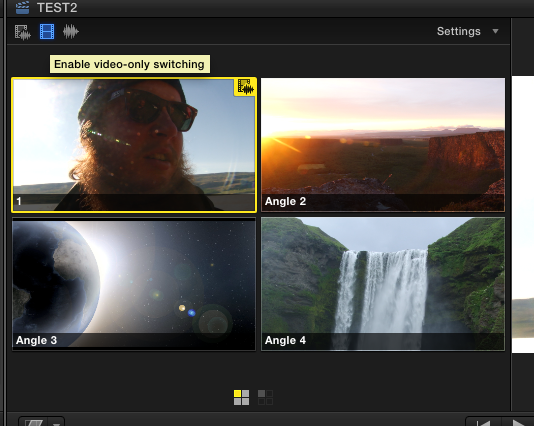
Sorry for stating the obvious, but are you sure you have "Enable video-only switching" turned on?
Drop your multi cam clip onto the timeline, select the microphone angle in your Angle Viewer, then press the blue "Enable video-only switching" button and cut the video angles over your microphone audio.
- Ronny
Sorry for stating the obvious, but are you sure you have "Enable video-only switching" turned on?
Drop your multi cam clip onto the timeline, select the microphone angle in your Angle Viewer, then press the blue "Enable video-only switching" button and cut the video angles over your microphone audio.
- Ronny
Please Log in to join the conversation.
07 Mar 2014 22:31 #42246
by Claude
Replied by Claude on topic FCPX multicam audio issues
Video-only switching was enabled. A friend suggested trashing the preferences - that seems to have solved the issue.
But thanks anyway, Ronny - I'm not a real pro, just an aspiring one, so no worries about stating the obvious, sometimes things can be overlooked, I've been there
But thanks anyway, Ronny - I'm not a real pro, just an aspiring one, so no worries about stating the obvious, sometimes things can be overlooked, I've been there
Please Log in to join the conversation.

08 Mar 2014 13:57 #42263
by BenB
Replied by BenB on topic FCPX multicam audio issues
You did not have to trash prefs, just click the mode of switching you want.
Please Log in to join the conversation.
11 Mar 2014 13:19 #42437
by Claude
Replied by Claude on topic FCPX multicam audio issues
I did, Ben - it wasn't working properly though: the app would switch back to audio+video cutting every time.
Please Log in to join the conversation.
11 Mar 2014 21:32 #42464
by BenB
Replied by BenB on topic FCPX multicam audio issues
That is odd, I've never seen that before...
Please Log in to join the conversation.
