


- Posts: 267
- Thank you received: 24
3 Post Moderation Rule for New Boarders (25 Jan 2021)
New boarders will have their posts moderated - Don't worry if you cannot see your post immediately.
Faster exports with Compressor or Direct?
06 Mar 2014 22:28 #42185
by fcpguru
Faster exports with Compressor or Direct? was created by fcpguru
Wondering if anybody has experience or has timed out what the export times via "Send to Compressor" are vs. Sharing direct from FCPX? I'm exporting 25 videos today and wondering which is going to eat up the least amount of machine time (they are all between 10-25 minutes each)
One of the features I miss most from FCP7 and want back is the ability to batch export. I thought with the ability now to select several projects at once we'd get this, but sadly no.
One of the features I miss most from FCP7 and want back is the ability to batch export. I thought with the ability now to select several projects at once we'd get this, but sadly no.
Please Log in to join the conversation.
- ronny courtens
-

- Offline
- Moderator
-

Less
More
- Posts: 4455
- Thank you received: 962
07 Mar 2014 10:19 - 07 Mar 2014 10:29 #42204
by ronny courtens
Replied by ronny courtens on topic Faster exports with Compressor or Direct?
Hey Matthew,
As with every encoding job the answer is: it depends on your project. FCPX and Compressor share the same render engine. This means that for the same project and the same destination format you will have exactly the same conversion time. Only when you send to Compressor and you start tweaking the Compressor settings will the conversion times get longer than when you export using the standard destination formats in FCPX.
For complex encoding (needing lots of tweaking and Frame Controls manipulation that cannot be done when sharing with FCPX's default settings) the fastest way is to export your Projects as Master Files and batch-convert them in Compressor.
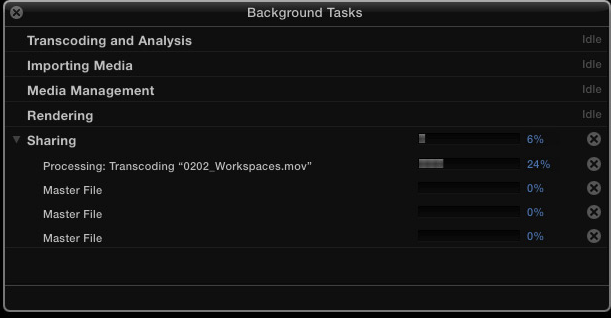
For standard encoding jobs I would share straight from within FCPX. If you have multiple Projects you want to share and you want to batch-convert them in FCPX: select Project 1 and Share. Don't wait for Project 1 to finish, immediately select Project 2 and share, a.s.o. For 25 projects this will take you 75 seconds. Then you go grab yourself a coffee (or two), and your Projects will be shared one by one. Or if you have a fast system you even can start another job while the sharing runs in the background. Better than FCP7
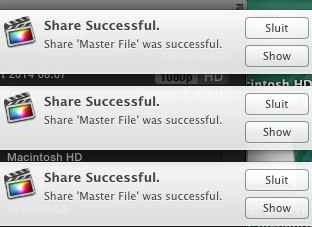
When the files have been shared you will receive a notification
This kind of batch-exporting has been available in FCPX since version 1, you only had to do it differently using the Project Library in pre-10.1 versions. I agree: now that we can select multiple Projects, being able to create a batch-export for the group would even be faster. Fill in the feedback page.
One question remains: is exporting a rendered timeline faster than exporting an unrendered timeline?
After many tests we have done this is my conclusion:
- When you don't use many motion templates (titles, custom effects...) in your timeline it is much faster to export the unrendered timeline than to first render and then export.
- When you do have many motion templates in your timeline exporting the unrendered timeline takes about the same amount of time as when you render first and then export.
-Ronny
As with every encoding job the answer is: it depends on your project. FCPX and Compressor share the same render engine. This means that for the same project and the same destination format you will have exactly the same conversion time. Only when you send to Compressor and you start tweaking the Compressor settings will the conversion times get longer than when you export using the standard destination formats in FCPX.
For complex encoding (needing lots of tweaking and Frame Controls manipulation that cannot be done when sharing with FCPX's default settings) the fastest way is to export your Projects as Master Files and batch-convert them in Compressor.
For standard encoding jobs I would share straight from within FCPX. If you have multiple Projects you want to share and you want to batch-convert them in FCPX: select Project 1 and Share. Don't wait for Project 1 to finish, immediately select Project 2 and share, a.s.o. For 25 projects this will take you 75 seconds. Then you go grab yourself a coffee (or two), and your Projects will be shared one by one. Or if you have a fast system you even can start another job while the sharing runs in the background. Better than FCP7
When the files have been shared you will receive a notification
This kind of batch-exporting has been available in FCPX since version 1, you only had to do it differently using the Project Library in pre-10.1 versions. I agree: now that we can select multiple Projects, being able to create a batch-export for the group would even be faster. Fill in the feedback page.
One question remains: is exporting a rendered timeline faster than exporting an unrendered timeline?
After many tests we have done this is my conclusion:
- When you don't use many motion templates (titles, custom effects...) in your timeline it is much faster to export the unrendered timeline than to first render and then export.
- When you do have many motion templates in your timeline exporting the unrendered timeline takes about the same amount of time as when you render first and then export.
-Ronny
Last edit: 07 Mar 2014 10:29 by ronny courtens.
Please Log in to join the conversation.
07 Mar 2014 15:25 #42211
by fcpguru
Replied by fcpguru on topic Faster exports with Compressor or Direct?
Thanks Ronny for your detailed reply! I must have something funny going on with Compressor, since in my case, the stuff I "Send to Compressor" takes much much longer than by creating a custom share with my compressor preset and sharing directly from FCPX. A 20 minute video was taking about 4.5 hours to share via compressor. Perhaps it's taxing my machine too heavily and the computer is throttling itself due to heat (my 2011 iMac seems to have cooling issues and has been to Apple 3 times for heat related repairs). I would have thought compressor would be faster direct from FCPX because it can segment the job and work on 4 parts simultaneously. Perhaps master files and then compressor would be the way to go since the direct route seems to cause my computer to want to die - I'll have to do more tests.
Yes, I know I can start the exports immediately, but it is quite a pain to have to select and share it 25 times
Yes, I know I can start the exports immediately, but it is quite a pain to have to select and share it 25 times
Please Log in to join the conversation.
