


- Posts: 197
- Thank you received: 27
3 Post Moderation Rule for New Boarders (25 Jan 2021)
New boarders will have their posts moderated - Don't worry if you cannot see your post immediately.
FCP X 10.1 Libraries Are Bumming Me Out
06 Mar 2014 19:18 - 07 Mar 2014 16:47 #42173
by smg669
FCP X 10.1 Libraries Are Bumming Me Out was created by smg669
Well, a bit late to the party I just upgraded to 10.1.1... was waiting for my shiny new MacPro to arrive. And I have to admit I don't like the new Libraries deal. It has totally messed up the workflow I had worked long and hard on developing for a large ongoing project.
So, the project will end up being scores (maybe hundreds) of individual videos that all pull somewhat randomly from a large collection of footage shot over several years. The current count is 5.54TB of media/events and counting (that includes the original media and proxy media, a mix of RED 4K, Canon C300, Canon 5D, AVC and GoPro). There are multiple editors working on these videos in disparate locations.
The plan was to create a massive master set of events containing all of the footage on a fast RAID 0 Thunderbolt 8TB device. The events were painstakingly logged, organized, keyworded and notes added. Then the plan was to replicate these events onto several other identical drives so that all the editors would have access to all the project's footage. They would create projects for each video that access the footage from the footage drives and would create separate events for each project containing project specific media (music, graphics, etc.) These projects (and project-specific events) would be stored on more robust (and redundant) RAID5 arrays.
I did a test migration of that massive collection of events on the footage drive to a 10.1 library. Created a separate library on my edit drive (Pegasus R6 RAID 5) and created a project in this library. Sure enough, when I went to add the first clip from the "footage library" into the project, I get a "you are editing clips between libraries" dialog that I cannot skip/disable. And the original and proxy media for that clip gets copied from one library to another. And the clip gets copied into the root of the event containing my project.
I have three problems with this:
First, the need to physically duplicate the media from one drive to another. I understand that if I switch from managed media for the original media to external I can cut down on the copying/storage issues. But if I'm working with proxies (or optimized media) I'm forced to copy these files. Not insignificant. I'll put in a feature request to let FCP X store proxy/optimized media outside of the event, but that's a major change and I won't hold my breath.
Second, this is just plain messy. When I'm editing in this fashion, every time I edit a clip into a project, that clip gets copied to the second library/event. If I decide against using that shot, the clip remains in the event. I know that later I can consolidate and get rid of the chaff, but that's a pain.
Third, if you're going to force me to copy these clips and their accompanying footage files into the second event, at least allow me a preference to not warn me with a dialog box every freaking time. A simple "don't show this in the future" checkbox would be nice. Another feature request to submit.
Sorry for venting. As per my title, this has totally bummed me out.
So, the project will end up being scores (maybe hundreds) of individual videos that all pull somewhat randomly from a large collection of footage shot over several years. The current count is 5.54TB of media/events and counting (that includes the original media and proxy media, a mix of RED 4K, Canon C300, Canon 5D, AVC and GoPro). There are multiple editors working on these videos in disparate locations.
The plan was to create a massive master set of events containing all of the footage on a fast RAID 0 Thunderbolt 8TB device. The events were painstakingly logged, organized, keyworded and notes added. Then the plan was to replicate these events onto several other identical drives so that all the editors would have access to all the project's footage. They would create projects for each video that access the footage from the footage drives and would create separate events for each project containing project specific media (music, graphics, etc.) These projects (and project-specific events) would be stored on more robust (and redundant) RAID5 arrays.
I did a test migration of that massive collection of events on the footage drive to a 10.1 library. Created a separate library on my edit drive (Pegasus R6 RAID 5) and created a project in this library. Sure enough, when I went to add the first clip from the "footage library" into the project, I get a "you are editing clips between libraries" dialog that I cannot skip/disable. And the original and proxy media for that clip gets copied from one library to another. And the clip gets copied into the root of the event containing my project.
I have three problems with this:
First, the need to physically duplicate the media from one drive to another. I understand that if I switch from managed media for the original media to external I can cut down on the copying/storage issues. But if I'm working with proxies (or optimized media) I'm forced to copy these files. Not insignificant. I'll put in a feature request to let FCP X store proxy/optimized media outside of the event, but that's a major change and I won't hold my breath.
Second, this is just plain messy. When I'm editing in this fashion, every time I edit a clip into a project, that clip gets copied to the second library/event. If I decide against using that shot, the clip remains in the event. I know that later I can consolidate and get rid of the chaff, but that's a pain.
Third, if you're going to force me to copy these clips and their accompanying footage files into the second event, at least allow me a preference to not warn me with a dialog box every freaking time. A simple "don't show this in the future" checkbox would be nice. Another feature request to submit.
Sorry for venting. As per my title, this has totally bummed me out.
Last edit: 07 Mar 2014 16:47 by smg669.
Please Log in to join the conversation.
- haysoos123
-

- Offline
- Platinum Member
-

Less
More
- Posts: 402
- Thank you received: 72
06 Mar 2014 20:13 #42176
by haysoos123
Replied by haysoos123 on topic FCP X 10.1 Libraries Are Bumming Me Out
Hm, interesting. You are a good case study for why we need to be able to specify the location of proxy/optimized media. I've run into this myself, and I'm not sure you can reliably make aliases for proxy/optimized media. Someone will chime in on that, but I haven't tested it because of tight deadlines.
I think your best compromise is to just put your projects in a separate event in the same libraries as your media, which is on your RAID 0 drives. You can then set up a nightly backup of your projects to your RAID 5 for redundancy. To be honest, you guys should consider making your media drives RAID 5 because it's more of a pain to replace large amounts of media than it is to swap out a drive should things go bad. Thunderbolt with RAID 5 is plenty fast for your media (I get though that you've probably already set it up and it would be a pain to switch).
For your workflow, managed media seems OK, but if there's going to be a lot of library swapping between editors, external is a lot easier.
I think your best compromise is to just put your projects in a separate event in the same libraries as your media, which is on your RAID 0 drives. You can then set up a nightly backup of your projects to your RAID 5 for redundancy. To be honest, you guys should consider making your media drives RAID 5 because it's more of a pain to replace large amounts of media than it is to swap out a drive should things go bad. Thunderbolt with RAID 5 is plenty fast for your media (I get though that you've probably already set it up and it would be a pain to switch).
For your workflow, managed media seems OK, but if there's going to be a lot of library swapping between editors, external is a lot easier.
Please Log in to join the conversation.
06 Mar 2014 20:29 #42177
by smg669
Replied by smg669 on topic FCP X 10.1 Libraries Are Bumming Me Out
In a perfect world I'd buy each of the editors a sweet Thunderbolt RAID 5... but I can't afford that. The point of using RAID 0 striped pairs is that it's relatively cheap while providing decent performance for content that is readily backed up elsewhere and (relatively) easy to restore in the event of a drive failure and doesn't change often.
I get what Apple is trying to do here - from a housekeeping standpoint you can argue that it makes sense to keep copies of all project media in the same library. But there really is no logical reason that I can think of that a project in one library cannot reference the media/events/clips of another.
I get what Apple is trying to do here - from a housekeeping standpoint you can argue that it makes sense to keep copies of all project media in the same library. But there really is no logical reason that I can think of that a project in one library cannot reference the media/events/clips of another.
Please Log in to join the conversation.

06 Mar 2014 21:48 #42182
by anickt
Replied by anickt on topic FCP X 10.1 Libraries Are Bumming Me Out
smg
You should check out the free Ripple Training videos about libraries and organizing media. You may find that things are not as bad as you think.
You should check out the free Ripple Training videos about libraries and organizing media. You may find that things are not as bad as you think.
Please Log in to join the conversation.
06 Mar 2014 22:30 #42186
by smg669
I've looked at all of Steve's tutorials on 10.1 and I think I have a pretty good handle on how things work. I have a pretty specific complaint that probably most people wouldn't have, but it's still a drawback in my opinion.
Replied by smg669 on topic FCP X 10.1 Libraries Are Bumming Me Out
anickt wrote: smg
You should check out the free Ripple Training videos about libraries and organizing media. You may find that things are not as bad as you think.
I've looked at all of Steve's tutorials on 10.1 and I think I have a pretty good handle on how things work. I have a pretty specific complaint that probably most people wouldn't have, but it's still a drawback in my opinion.
Please Log in to join the conversation.
07 Mar 2014 02:39 #42191
by plysat
Can't sleep? Try this: fcpxpert.net ;-)
Replied by plysat on topic FCP X 10.1 Libraries Are Bumming Me Out
" A simple "don't show this in the future" checkbox would be nice. Another feature request to submit."
I agree, I've asked for that, so the more the merrier!
I agree, I've asked for that, so the more the merrier!
Can't sleep? Try this: fcpxpert.net ;-)
Please Log in to join the conversation.

07 Mar 2014 16:38 #42213
by BenB
Replied by BenB on topic FCP X 10.1 Libraries Are Bumming Me Out
In your situation, you should be keeping the media as External, so that all that copies over are links. Simple.
Please Log in to join the conversation.
07 Mar 2014 16:46 #42215
by smg669
I mentioned in my OP that I realize that this will be a better option - it will reduce the amount of data being duplicated/copied. And I plan to do that anyhow, just because it makes sense within the new 10.1 paradigm...
However, it doesn't solve the problem of the proxy/optimized media being copied over. And it doesn't solve the problem of that alert dialog intrusively crippling my edit workflow. And it doesn't solve the problem of FCP X unceremoniously dumping footage that I had already nicely organized into separate events into an event that I would prefer just contain projects and non-footage assets (music, gfx, etc.)
S
Replied by smg669 on topic FCP X 10.1 Libraries Are Bumming Me Out
BenB wrote: In your situation, you should be keeping the media as External, so that all that copies over are links. Simple.
I mentioned in my OP that I realize that this will be a better option - it will reduce the amount of data being duplicated/copied. And I plan to do that anyhow, just because it makes sense within the new 10.1 paradigm...
However, it doesn't solve the problem of the proxy/optimized media being copied over. And it doesn't solve the problem of that alert dialog intrusively crippling my edit workflow. And it doesn't solve the problem of FCP X unceremoniously dumping footage that I had already nicely organized into separate events into an event that I would prefer just contain projects and non-footage assets (music, gfx, etc.)
S
Please Log in to join the conversation.
07 Mar 2014 19:31 - 07 Mar 2014 19:53 #42229
by BenB
Replied by BenB on topic FCP X 10.1 Libraries Are Bumming Me Out
You are given the option of copying Optimized/Proxy between Libraries on different drives. On the same drive, they live in the original Library, and are linked.
And I know I'll get hated on for this, but if you are copying between Libraries that much, I'd rethink my workflow. Don't force it into what older systems did, work with the new system.
A dialog box, simply hitting the return key, honestly, not a huge problem for me. But I understand the convenience of a don't show checkbox.
Yes, there could be some nice things added to Libraries, and I'm sure we'll see some coming over time. But for now, rethinking workflow is the most productive thing to do. External media. That way you can have your other editors add/subtract media super easy on a Finder level.
Fill out the feedback form.
And I know I'll get hated on for this, but if you are copying between Libraries that much, I'd rethink my workflow. Don't force it into what older systems did, work with the new system.
A dialog box, simply hitting the return key, honestly, not a huge problem for me. But I understand the convenience of a don't show checkbox.
Yes, there could be some nice things added to Libraries, and I'm sure we'll see some coming over time. But for now, rethinking workflow is the most productive thing to do. External media. That way you can have your other editors add/subtract media super easy on a Finder level.
Fill out the feedback form.
Last edit: 07 Mar 2014 19:53 by BenB.
Please Log in to join the conversation.
07 Mar 2014 20:36 #42239
by smg669
That would be a step in the right direction. Could you please elaborate on that? I've looked and I cannot find that option anywhere.
If you had to do it every single time you added a clip to your timeline it would be become a big problem I 'd bet.
And that's just what it looks like I'll have to do now. Keep our project files on the same RAID 0 drives as our media and step up the frequency of backups. And, as you said, keep media external. It's all fine and good to say "don't force into what older systems did" but I still will complain to my last breath when I see something that is fundamentally flawed. And in the world of video editing, I would argue that forcing media and project data to be on the same physical volume is a fundamental flaw.
Replied by smg669 on topic FCP X 10.1 Libraries Are Bumming Me Out
BenB wrote: You are given the option of copying Optimized/Proxy between Libraries on different drives.
That would be a step in the right direction. Could you please elaborate on that? I've looked and I cannot find that option anywhere.
BenB wrote: A dialog box, simply hitting the return key, honestly, not a huge problem for me. But I understand the convenience of a don't show checkbox.
If you had to do it every single time you added a clip to your timeline it would be become a big problem I 'd bet.
BenB wrote: And I know I'll get hated on for this, but if you are copying between Libraries that much, I'd rethink my workflow. Don't force it into what older systems did, work with the new system.... But for now, rethinking workflow is the most productive thing to do. External media. That way you can have your other editors add/subtract media super easy on a Finder level.
And that's just what it looks like I'll have to do now. Keep our project files on the same RAID 0 drives as our media and step up the frequency of backups. And, as you said, keep media external. It's all fine and good to say "don't force into what older systems did" but I still will complain to my last breath when I see something that is fundamentally flawed. And in the world of video editing, I would argue that forcing media and project data to be on the same physical volume is a fundamental flaw.
Please Log in to join the conversation.
08 Mar 2014 06:42 #42250
by marchyman
Replied by marchyman on topic FCP X 10.1 Libraries Are Bumming Me Out
When an event is copied to another library you get this pop-up:
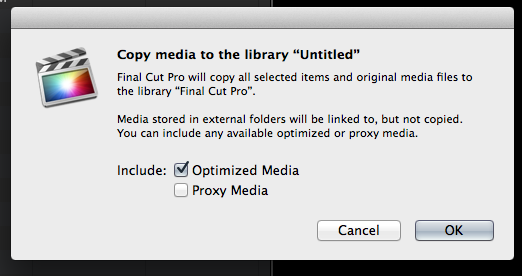
The check boxes let you select if the optimized or proxy media also get copied.
The check boxes let you select if the optimized or proxy media also get copied.
Please Log in to join the conversation.
08 Mar 2014 13:54 #42262
by BenB
Replied by BenB on topic FCP X 10.1 Libraries Are Bumming Me Out
"... I would argue that forcing media and project data to be on the same physical volume is a fundamental flaw."
You are not forced to put both on the same drive at all.
I don't see the issues with External Media. What am I missing with that?
Also, all NLE's have their media management systems you will be forced into working within the confines of.
You are not forced to put both on the same drive at all.
I don't see the issues with External Media. What am I missing with that?
Also, all NLE's have their media management systems you will be forced into working within the confines of.
Please Log in to join the conversation.
08 Mar 2014 16:00 #42273
by smg669
That's for when you're manually copying clips from one event to another. When you edit a clip from one library into a project in another library it does not give you those options. I just copies the supplemental media for you without asking... along with the original media if it is external media.
Replied by smg669 on topic FCP X 10.1 Libraries Are Bumming Me Out
marchyman wrote: When an event is copied to another library you get this pop-up:
The check boxes let you select if the optimized or proxy media also get copied.
That's for when you're manually copying clips from one event to another. When you edit a clip from one library into a project in another library it does not give you those options. I just copies the supplemental media for you without asking... along with the original media if it is external media.
Please Log in to join the conversation.
08 Mar 2014 16:11 #42274
by BenB
Replied by BenB on topic FCP X 10.1 Libraries Are Bumming Me Out
Partially correct. If it is external media, it is only linked. If you do edit across Libraries, External Media is the way to go, and works great.
Only if it is Managed Media do physical files get copied.
Only if it is Managed Media do physical files get copied.
Please Log in to join the conversation.
08 Mar 2014 16:16 - 08 Mar 2014 16:18 #42275
by smg669
I'm sorry, but I disagree. Just because proxy and optimized media are not "original media", that doesn't mean that they're not media. And in the instance I'm describing, FCP X is forcing you to store that media on the same physical volume as you project/sequence data. So, you are correct that you are not forced to put all media on the same drive - just some of it. Unless you are able to expand on your statement "You are given the option of copying Optimized/Proxy between Libraries on different drives" within the framework of what we're discussing here.
I get that External Media will not be copied (which I've stated three times now in this thread)... that is not the issue. So to answer your question, you are missing the fact that I've already agreed (several times) that the issue is not with External Media. While the project I was using as an example did employ managed media, I already stated that external media makes more sense for the project in question in a 10.1 environment.
Again, that's all fine and good. But why should that stop me from raising what I think is a valid point? Especially when the NLE in question operated in a certain way from its inception and I am making a reasonable argument that the change was not necessary. If you have a valid technolgy-based argument why they made it work this way, then have at it. In the mean time "Suck it up, buttercup" is not a particularly productive stance.
Replied by smg669 on topic FCP X 10.1 Libraries Are Bumming Me Out
BenB wrote: You are not forced to put both on the same drive at all.
I'm sorry, but I disagree. Just because proxy and optimized media are not "original media", that doesn't mean that they're not media. And in the instance I'm describing, FCP X is forcing you to store that media on the same physical volume as you project/sequence data. So, you are correct that you are not forced to put all media on the same drive - just some of it. Unless you are able to expand on your statement "You are given the option of copying Optimized/Proxy between Libraries on different drives" within the framework of what we're discussing here.
BenB wrote: I don't see the issues with External Media. What am I missing with that?
I get that External Media will not be copied (which I've stated three times now in this thread)... that is not the issue. So to answer your question, you are missing the fact that I've already agreed (several times) that the issue is not with External Media. While the project I was using as an example did employ managed media, I already stated that external media makes more sense for the project in question in a 10.1 environment.
BenB wrote: Also, all NLE's have their media management systems you will be forced into working within the confines of.
Again, that's all fine and good. But why should that stop me from raising what I think is a valid point? Especially when the NLE in question operated in a certain way from its inception and I am making a reasonable argument that the change was not necessary. If you have a valid technolgy-based argument why they made it work this way, then have at it. In the mean time "Suck it up, buttercup" is not a particularly productive stance.
Last edit: 08 Mar 2014 16:18 by smg669.
Please Log in to join the conversation.
08 Mar 2014 16:34 #42276
by smg669
No, I was fully correct. The supplemental media (proxy media and optimized media) is copied over to the event that contains the project even if the original media is external and not managed. You are not given a choice what to do with the proxy/optimized media. I just ran a test a second ago, and while you are correct that original media that is stored externally is not copied over, proxies and optimized are.
Replied by smg669 on topic FCP X 10.1 Libraries Are Bumming Me Out
BenB wrote: Partially correct. If it is external media, it is only linked. If you do edit across Libraries, External Media is the way to go, and works great.
Only if it is Managed Media do physical files get copied.
No, I was fully correct. The supplemental media (proxy media and optimized media) is copied over to the event that contains the project even if the original media is external and not managed. You are not given a choice what to do with the proxy/optimized media. I just ran a test a second ago, and while you are correct that original media that is stored externally is not copied over, proxies and optimized are.
Please Log in to join the conversation.
08 Mar 2014 16:49 #42277
by smg669
You are incorrect on your second point here. I just tested this and the fact that both libraries are located on the same physical volume has no effect on what FCP X does with the proxy/optimized media.
Steps to reproduce:
1 - Create LIBRARY1A on DRIVE1 and import SHOT1 and SHOT2 into it. Tell FCP X to store the media externally in MEDIAFOLDER1 on DRIVE1 and set it to create optimized and proxy media.
2 - Create LIBRARY1B on DRIVE1. Create a project called PROJECT1B in LIBRARY1B. Edit SHOT1 and SHOT2 from LIBRARY1A into this project.
The original media files for SHOT1 and SHOT2 remain in the MEDIAFOLDER1 folder. And if you explore the .fcbundle for PROJECT1B, the Original Media folder contains only symlinks pointing to the original media in MEDIAFOLDER1. However, in the Transcoded Media folder in LIBRARY1B you will see that FCPX has copied (duplicated) the full movie files of the proxies and optimized for SHOT1 and SHOT2.
Replied by smg669 on topic FCP X 10.1 Libraries Are Bumming Me Out
BenB wrote: You are given the option of copying Optimized/Proxy between Libraries on different drives. On the same drive, they live in the original Library, and are linked.
You are incorrect on your second point here. I just tested this and the fact that both libraries are located on the same physical volume has no effect on what FCP X does with the proxy/optimized media.
Steps to reproduce:
1 - Create LIBRARY1A on DRIVE1 and import SHOT1 and SHOT2 into it. Tell FCP X to store the media externally in MEDIAFOLDER1 on DRIVE1 and set it to create optimized and proxy media.
2 - Create LIBRARY1B on DRIVE1. Create a project called PROJECT1B in LIBRARY1B. Edit SHOT1 and SHOT2 from LIBRARY1A into this project.
The original media files for SHOT1 and SHOT2 remain in the MEDIAFOLDER1 folder. And if you explore the .fcbundle for PROJECT1B, the Original Media folder contains only symlinks pointing to the original media in MEDIAFOLDER1. However, in the Transcoded Media folder in LIBRARY1B you will see that FCPX has copied (duplicated) the full movie files of the proxies and optimized for SHOT1 and SHOT2.
Please Log in to join the conversation.
08 Mar 2014 17:00 - 08 Mar 2014 17:01 #42278
by plysat
You are correct. Though - based on where Apple seems to be heading with libraries and media storage - I wouldn't be surprised if that were to change at some point. Just seems logical given the way other media is handled now.
And I'd also like the ability to either select "don't warn me again" in the copying between libraries warning, Or designate a "source" library. It could even reset with a relaunch if they're worried about people not being aware what's happening. I get why the warning is there, average users probably have only a cursory understanding of media management.
Can't sleep? Try this: fcpxpert.net ;-)
Replied by plysat on topic FCP X 10.1 Libraries Are Bumming Me Out
smg669 wrote:
BenB wrote: Partially correct. If it is external media, it is only linked. If you do edit across Libraries, External Media is the way to go, and works great.
Only if it is Managed Media do physical files get copied.
No, I was fully correct. The supplemental media (proxy media and optimized media) is copied over to the event that contains the project even if the original media is external and not managed. You are not given a choice what to do with the proxy/optimized media. I just ran a test a second ago, and while you are correct that original media that is stored externally is not copied over, proxies and optimized are.
You are correct. Though - based on where Apple seems to be heading with libraries and media storage - I wouldn't be surprised if that were to change at some point. Just seems logical given the way other media is handled now.
And I'd also like the ability to either select "don't warn me again" in the copying between libraries warning, Or designate a "source" library. It could even reset with a relaunch if they're worried about people not being aware what's happening. I get why the warning is there, average users probably have only a cursory understanding of media management.
Can't sleep? Try this: fcpxpert.net ;-)
Last edit: 08 Mar 2014 17:01 by plysat.
Please Log in to join the conversation.
08 Mar 2014 17:10 - 08 Mar 2014 17:11 #42279
by smg669
It's all about finding a happy medium between "smart" media tracking and the wild west that was FCP 7. If a library can have a UUID that identifies it as an entity regardless of which volume it is stored on, then you should be able to access media from that library within a project in another library - no matter where that second library is located. Of course, both libraries would need to be "open" and the editor needs to be aware of the performance implications of having both libraries open.
It's clear that this whole strategy on Apple's part is geared towards performance improvements. Libraries are simply a built-in, Apple-sanctioned version of what we were all already doing with EventManagerX. It's a method of taking chunks of media/data "offline" when you're not working with them - so that they don't bog down the system. They built a system in 10.0.0 that had a fatal flaw, and they're trying to correct it. My opinion is that this is an overcorrection.
Replied by smg669 on topic FCP X 10.1 Libraries Are Bumming Me Out
plysat wrote: You are correct. Though - based on where Apple seems to be heading with libraries and media storage - I wouldn't be surprised if that were to change at some point. Just seems logical given the way other media is handled now.
And I'd also like the ability to either select "don't warn me again" in the copying between libraries warning, Or designate a "source" library. It could even reset with a relaunch if they're worried about people not being aware what's happening. I get why the warning is there, average users probably have only a cursory understanding of media management.
It's all about finding a happy medium between "smart" media tracking and the wild west that was FCP 7. If a library can have a UUID that identifies it as an entity regardless of which volume it is stored on, then you should be able to access media from that library within a project in another library - no matter where that second library is located. Of course, both libraries would need to be "open" and the editor needs to be aware of the performance implications of having both libraries open.
It's clear that this whole strategy on Apple's part is geared towards performance improvements. Libraries are simply a built-in, Apple-sanctioned version of what we were all already doing with EventManagerX. It's a method of taking chunks of media/data "offline" when you're not working with them - so that they don't bog down the system. They built a system in 10.0.0 that had a fatal flaw, and they're trying to correct it. My opinion is that this is an overcorrection.
Last edit: 08 Mar 2014 17:11 by smg669.
Please Log in to join the conversation.
08 Mar 2014 18:18 #42287
by plysat
Can't sleep? Try this: fcpxpert.net ;-)
Replied by plysat on topic FCP X 10.1 Libraries Are Bumming Me Out
" Libraries are simply a built-in, Apple-sanctioned version of what we were all already doing with EventManagerX."
Actually, Libraries work like SAN locations or attached drives used to work. In the olden days (lol) if you dragged a file from an Event on one Drive to another a similar warning popped up. I get why it's there, there just should be a way to say "yes, I know, stop telling me". Or the ability to designate a "source" library so it wouldn't warn you every time.
Actually, Libraries work like SAN locations or attached drives used to work. In the olden days (lol) if you dragged a file from an Event on one Drive to another a similar warning popped up. I get why it's there, there just should be a way to say "yes, I know, stop telling me". Or the ability to designate a "source" library so it wouldn't warn you every time.
Can't sleep? Try this: fcpxpert.net ;-)
Please Log in to join the conversation.
