


- Posts: 68
- Thank you received: 3
3 Post Moderation Rule for New Boarders (25 Jan 2021)
New boarders will have their posts moderated - Don't worry if you cannot see your post immediately.
Marker’s Notes on Timeline
- willypimentel
-
 Topic Author
- Offline
- Senior Member
-

Less
More
05 Mar 2014 22:10 - 05 Mar 2014 22:11 #42115
by willypimentel
Marker’s Notes on Timeline was created by willypimentel
I wished there was a solution for Markers Notes to show on Timeline. It would be very helpful to notate instructions from producer’s and would be a good guide to edit with.
See a rough example below …
what are your thoughts

See a rough example below …
what are your thoughts

Last edit: 05 Mar 2014 22:11 by willypimentel.
Please Log in to join the conversation.
- Andreas Kiel
-
- Offline
- Platinum Member
-

Less
More
- Posts: 1077
- Thank you received: 189
06 Mar 2014 09:16 #42127
by Andreas Kiel
Replied by Andreas Kiel on topic Marker’s Notes on Timeline
I have a small experimental basic app which uses GUI scripting.
It allows to retrieve all markers and clip names from the current timeline.
Within the app you see the marker's TC and text in table view and you can jump to the marker. So finally the same thing like in FCPX with the tags view enabled. The difference is that once you have the markers retrieved you can switch to the clips view again and still have full access to the markers.
You can export the markers as text or import them fomat is (TC tab TEXT).
You also can make notes at a current TC and import or export them in the same text format.
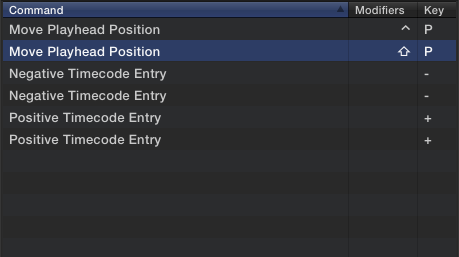
To make the app work enable Universal Access and add a custom shift-P command to your command set.
-Andreas
www.spherico.com/filmtools/X-Files/X-TCNotes/XTC%20Install.dmg
It allows to retrieve all markers and clip names from the current timeline.
Within the app you see the marker's TC and text in table view and you can jump to the marker. So finally the same thing like in FCPX with the tags view enabled. The difference is that once you have the markers retrieved you can switch to the clips view again and still have full access to the markers.
You can export the markers as text or import them fomat is (TC tab TEXT).
You also can make notes at a current TC and import or export them in the same text format.
To make the app work enable Universal Access and add a custom shift-P command to your command set.
-Andreas
www.spherico.com/filmtools/X-Files/X-TCNotes/XTC%20Install.dmg
Please Log in to join the conversation.

06 Mar 2014 11:23 - 06 Mar 2014 11:24 #42137
by BenB
Replied by BenB on topic Marker’s Notes on Timeline
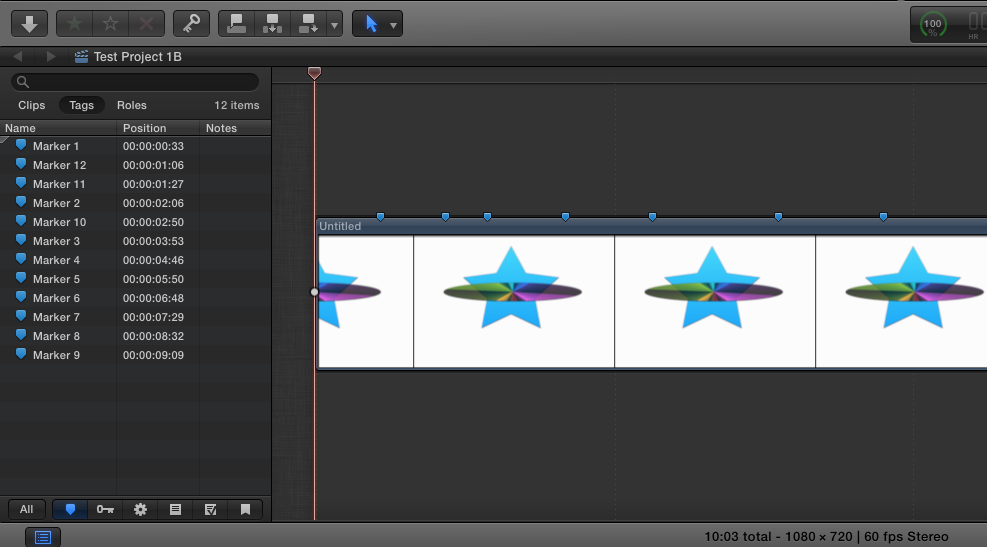
You can just use the Timeline Index, which makes things really easy to see at a glance and find in the Timeline. Plus you get to see/add additional production notes, sort by name or TC, etc.
Last edit: 06 Mar 2014 11:24 by BenB.
Please Log in to join the conversation.
- willypimentel
-
Topic Author
- Offline
- Senior Member
-
Less
More
- Posts: 68
- Thank you received: 3
06 Mar 2014 17:13 #42165
by willypimentel
Replied by willypimentel on topic Marker’s Notes on Timeline
HI Ben, I know i can use the timeline index but wished i had the option to show producers notes or markers notes on the timeline for guides while editing. those blue dots are so unexplained and unless you have the index tab opened, they are all the same..
Please Log in to join the conversation.
