


- Posts: 4
- Thank you received: 0
3 Post Moderation Rule for New Boarders (25 Jan 2021)
New boarders will have their posts moderated - Don't worry if you cannot see your post immediately.
corrupt font preview in inspector drop down display
03 Mar 2014 13:55 #41985
by KevinS
corrupt font preview in inspector drop down display was created by KevinS
Hi,
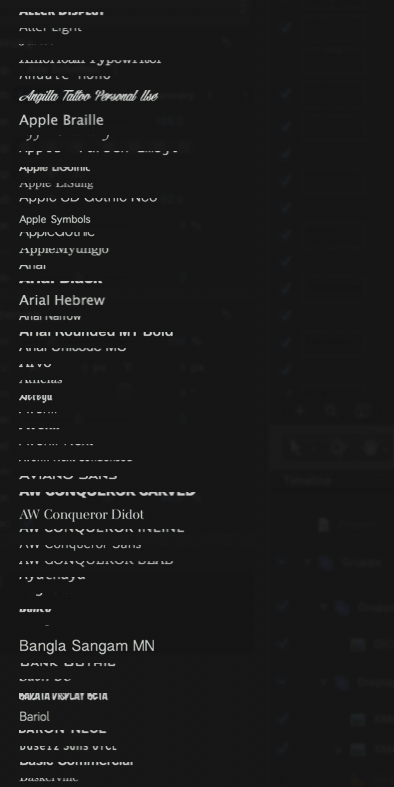
I have a strange issue with the way fonts are displayed in the inspector drop down preview menu. You can see they are there and they display fine in the viewer, but most of them in the drop down menu display as corrupt and unintelligible.
I thought it might be a corrupt font issues and I have validated all the fonts in Font Book, but the issue still persists. I am running FCP X 10.1.1 on Macbook Pro Retina 2.7 GHz with 16GB ram with Mavericks 10.9.1.
I was wondering if anyone else has experienced a similar issue and what the fix might be as I'm finding very difficult to select the fonts I want to use. The font drop down menu in Motion 5.1 works fine.
I have tried trashing FCP X preferences and run disk utily and OnX resetting preferences and trashing font cache, all to no avail.
Thanks in advance for a light you might be able to shed on this.
Cheers,
Kevin
I have a strange issue with the way fonts are displayed in the inspector drop down preview menu. You can see they are there and they display fine in the viewer, but most of them in the drop down menu display as corrupt and unintelligible.
I thought it might be a corrupt font issues and I have validated all the fonts in Font Book, but the issue still persists. I am running FCP X 10.1.1 on Macbook Pro Retina 2.7 GHz with 16GB ram with Mavericks 10.9.1.
I was wondering if anyone else has experienced a similar issue and what the fix might be as I'm finding very difficult to select the fonts I want to use. The font drop down menu in Motion 5.1 works fine.
I have tried trashing FCP X preferences and run disk utily and OnX resetting preferences and trashing font cache, all to no avail.
Thanks in advance for a light you might be able to shed on this.
Cheers,
Kevin
Please Log in to join the conversation.
- Tom Wolsky
-

- Offline
- Moderator
-

03 Mar 2014 14:08 #41986
by Tom Wolsky
Replied by Tom Wolsky on topic corrupt font preview in inspector drop down display
Can you post a screen shot of this? Thanks.
Please Log in to join the conversation.
03 Mar 2014 15:26 #41991
by KevinS
Replied by KevinS on topic corrupt font preview in inspector drop down display
Hi Tom,
Thanks for the quick reply. After switching off everything last night I thought I'd take a screen shot for you and now it is working perfectly again. It must have been connected to a corrupted font. If it happens again I'll definitely take a screen shot first before posting.
Thanks,
Kevin
Thanks for the quick reply. After switching off everything last night I thought I'd take a screen shot for you and now it is working perfectly again. It must have been connected to a corrupted font. If it happens again I'll definitely take a screen shot first before posting.
Thanks,
Kevin
Please Log in to join the conversation.
18 Mar 2014 11:16 - 18 Mar 2014 11:34 #42902
by denis
Replied by denis on topic corrupt font preview in inspector drop down display
Hi everybody - this is my first post here because I have the same trouble which really really annoys me since even Apple Support doesn't know how to patch this issue...
You'll find a Screenshot attached - I deleted and re-installed Motion 5 for the 34th time in total. This helped the first few times but doesn't seem to work anymore.
What I experienced is that this seems to happen as soon as you go and empty the MacBook's caches but thats just a noobish assumption...
You'll find a Screenshot attached - I deleted and re-installed Motion 5 for the 34th time in total. This helped the first few times but doesn't seem to work anymore.
What I experienced is that this seems to happen as soon as you go and empty the MacBook's caches but thats just a noobish assumption...
Last edit: 18 Mar 2014 11:34 by denis.
Please Log in to join the conversation.
18 Mar 2014 19:46 #42931
by KevinS
Replied by KevinS on topic corrupt font preview in inspector drop down display
Hi Denis,
This is exactly what I saw when I viewed fonts using the inspector. Does this happen in both Motion 5 and FCP X? I would say it is a font issue and would recommend restoring font book to the default fonts and download and install Onyx, then reset the preferences and trash the font cache and see what happens. Once you get it back working slowly reintroduce non standard fonts. I hope this helps.
Kevin
This is exactly what I saw when I viewed fonts using the inspector. Does this happen in both Motion 5 and FCP X? I would say it is a font issue and would recommend restoring font book to the default fonts and download and install Onyx, then reset the preferences and trash the font cache and see what happens. Once you get it back working slowly reintroduce non standard fonts. I hope this helps.
Kevin
Please Log in to join the conversation.
