


- Posts: 141
- Thank you received: 3
3 Post Moderation Rule for New Boarders (25 Jan 2021)
New boarders will have their posts moderated - Don't worry if you cannot see your post immediately.
Rewrap ProRes from 24fps to 25fps
02 Mar 2014 14:24 #41942
by FCPGuy
Rewrap ProRes from 24fps to 25fps was created by FCPGuy
is there away to rewrap ProRes clips from 24fps to 25fps in Final Cut Pro X or even better in Compressor?
Re-wrapping not confusing with converting or re-transcoding.
Thank you
Re-wrapping not confusing with converting or re-transcoding.
Thank you
Please Log in to join the conversation.

02 Mar 2014 16:01 #41948
by innlens
Replied by innlens on topic Rewrap ProRes from 24fps to 25fps
AFAIK Compressor would always transcode.
In FCPX you simply reconform the file (since FCPX 10.1 this is called Autospeed).
So if you put a 24fps into a 25fps timeline you have the option to leave it or conform it to 25fps. This process will lead to rendering (transcoding), but it is effortless.
In FCPX you simply reconform the file (since FCPX 10.1 this is called Autospeed).
So if you put a 24fps into a 25fps timeline you have the option to leave it or conform it to 25fps. This process will lead to rendering (transcoding), but it is effortless.
Please Log in to join the conversation.
- ronny courtens
-

- Offline
- Moderator
-

Less
More
- Posts: 4455
- Thank you received: 962
02 Mar 2014 17:30 #41955
by ronny courtens
Replied by ronny courtens on topic Rewrap ProRes from 24fps to 25fps
Rewrapping is a process where you take a video sample that is wrapped into a specific container and you wrap it into a different container (e.g. from MXF into MOV). The video properties are unchanged when rewrapping, only the wrapper data are rewritten. I guess in this case you don't want to rewrap your ProRes file, you just want to convert it from 24fps to 25fps.
To do this in the FCP days you would open the ProRes file in Cinema Tools and change the frame rate in CT. This would convert your 24fps ProRes file into a 25fps one without any quality loss.
As Alban said the same thing can be done in FCPX, because Cinema Tools is integrated with this application:
Import the ProRes video in FCPX, conform the 24fps video to 25 fps on the timeline and export the timeline using current settings. This is a transparent conversion process (no transcoding is involved) that will not affect the video quality at all. You could do the same thing in Compressor or another transcoding application, but this will be slower and not better.
-Ronny
To do this in the FCP days you would open the ProRes file in Cinema Tools and change the frame rate in CT. This would convert your 24fps ProRes file into a 25fps one without any quality loss.
As Alban said the same thing can be done in FCPX, because Cinema Tools is integrated with this application:
Import the ProRes video in FCPX, conform the 24fps video to 25 fps on the timeline and export the timeline using current settings. This is a transparent conversion process (no transcoding is involved) that will not affect the video quality at all. You could do the same thing in Compressor or another transcoding application, but this will be slower and not better.
-Ronny
Please Log in to join the conversation.
02 Mar 2014 18:56 #41957
by FCPGuy
Replied by FCPGuy on topic Rewrap ProRes from 24fps to 25fps
Thanks, but I like to change the ProRes files from 24fps to 25fps without converting or anything in this directions. I hear there are two ways where it added a extra frame every seconds vs another process which is not so good.
Compress would be good, there are many files that I need to change from 24fps to 25fps.
These files will not go into Final Cut Pro X so I would need these in 25fps so I can pass them down.
Thank you
Compress would be good, there are many files that I need to change from 24fps to 25fps.
These files will not go into Final Cut Pro X so I would need these in 25fps so I can pass them down.
Thank you
Please Log in to join the conversation.
03 Mar 2014 10:30 #41968
by cgbier
Replied by cgbier on topic Rewrap ProRes from 24fps to 25fps
There is no other than adding a frame every second to 25p and keep the speed.
The suggestions above are the best solution.
The suggestions above are the best solution.
Please Log in to join the conversation.
- ronny courtens
-
- Offline
- Moderator
-
Less
More
- Posts: 4455
- Thank you received: 962
03 Mar 2014 10:36 #41971
by ronny courtens
Replied by ronny courtens on topic Rewrap ProRes from 24fps to 25fps
As stated above: yes you can easily convert 24fps to 25fps in Compressor. You can batch-import the original files, convert their frame rate to 25fps and then export the files as new ProRes files running @25fps.
-Ronny
-Ronny
Please Log in to join the conversation.
03 Mar 2014 10:54 #41973
by FCPGuy
Replied by FCPGuy on topic Rewrap ProRes from 24fps to 25fps
But wouldn't this transcode the file to lower quality?
Why I'em asking... I gave it a try and the file size are a bit smaller.
I like to keep the quality up for color correction since these files a flat from a Alexa.
Why I'em asking... I gave it a try and the file size are a bit smaller.
I like to keep the quality up for color correction since these files a flat from a Alexa.
Please Log in to join the conversation.

03 Mar 2014 11:21 #41974
by Seamusvfx
Replied by Seamusvfx on topic Rewrap ProRes from 24fps to 25fps
The quality loss by transcoding to 25fps ProRes will be so tiny as to be non existent. Theres a
few ways to go to 25 fps from 24 in Compressor.
You can video frame rate in your settings, which will add a frame a second as mentioned above. This will cause a noticeable skip once a second as a frame repeats. You can mitigate this by using optical flow in compressor which interpolates a new frame.
You can also run the 24fps clip at 25fps which will result in the whole thing being slightly sped up. Compressor will let you do this in the retiming section. This is my preferred option as the increase in speed is not really noticeable and you don't have any interpolation artefacts.
I think the best way though, if it's been shot in 24 is to work in 24 and then conform the final edit.
few ways to go to 25 fps from 24 in Compressor.
You can video frame rate in your settings, which will add a frame a second as mentioned above. This will cause a noticeable skip once a second as a frame repeats. You can mitigate this by using optical flow in compressor which interpolates a new frame.
You can also run the 24fps clip at 25fps which will result in the whole thing being slightly sped up. Compressor will let you do this in the retiming section. This is my preferred option as the increase in speed is not really noticeable and you don't have any interpolation artefacts.
I think the best way though, if it's been shot in 24 is to work in 24 and then conform the final edit.
Please Log in to join the conversation.
03 Mar 2014 11:54 #41975
by cgbier
Replied by cgbier on topic Rewrap ProRes from 24fps to 25fps
Depending on the ProRes flavor, you won't see a noticeable generation loss before the 5th generation. IIRC Apple has some documentation to that.
Please Log in to join the conversation.
- Tom Wolsky
-

- Offline
- Moderator
-
03 Mar 2014 12:02 #41976
by Tom Wolsky
Replied by Tom Wolsky on topic Rewrap ProRes from 24fps to 25fps
Why don't you just edit in 24 and convert the master file to 25 when you're done?
Please Log in to join the conversation.
- Darren Roark
-

- Offline
- Platinum Member
-

03 Mar 2014 17:24 #41994
by Darren Roark
Replied by Darren Roark on topic Rewrap ProRes from 24fps to 25fps
I'm with Tom. Or if you have mixed footage as in some 25 and some 24fps footage, you can make a 25p timeline and for the 24 fps footage by clicking 'automatic speed' FCPX will conform the 24 to 25 and do a great job of pitch correcting your audio, something Compressor won't do.
When you import your footage that is 24, make a keyword collection to make it easier to do the conform all at once.
When you import your footage that is 24, make a keyword collection to make it easier to do the conform all at once.
Please Log in to join the conversation.
04 Mar 2014 09:12 #42026
by FCPGuy
Replied by FCPGuy on topic Rewrap ProRes from 24fps to 25fps
The reason for this is it will not be edited in Final Cut Pro but in Premiere besides that this is something that has been requested.
Please Log in to join the conversation.
- Tom Wolsky
-
- Offline
- Moderator
-
04 Mar 2014 10:43 #42030
by Tom Wolsky
Replied by Tom Wolsky on topic Rewrap ProRes from 24fps to 25fps
It is an ill-considered request if the original media is 24 or 23.976. Is this the original media, like ProRes 4444 from an Alexa? If they really want you to do that, don't worry about it, just do it. Batch convert in Compressor or Episode or the encoding tool of your choice. Or you can use, if you have it and it still works, use Cinema Tools to change the timebase, which will slightly change the speed of the files.
Please Log in to join the conversation.
04 Mar 2014 15:25 - 04 Mar 2014 15:29 #42039
by BenB
Replied by BenB on topic Rewrap ProRes from 24fps to 25fps
"...do a great job of pitch correcting your audio, something Compressor won't do."
Um, yeah, Compressor does a great job at conforming audio. I've transcoded 60fps to 24fps and the audio is spot on and super clean. I've gone the opposite direction, and the audio is great.
Going from 24fps to 25fps, or vise-verse, is not a big deal. Batch it all in Compressor, very fast, easy workflow. PPro will read the ProRes files.
Um, yeah, Compressor does a great job at conforming audio. I've transcoded 60fps to 24fps and the audio is spot on and super clean. I've gone the opposite direction, and the audio is great.
Going from 24fps to 25fps, or vise-verse, is not a big deal. Batch it all in Compressor, very fast, easy workflow. PPro will read the ProRes files.
Last edit: 04 Mar 2014 15:29 by BenB.
Please Log in to join the conversation.
- Scrubelicious
-

- Offline
- Platinum Member
-
Less
More
- Posts: 1228
- Thank you received: 114
15 Mar 2014 20:39 - 15 Mar 2014 20:40 #42722
by Scrubelicious
Replied by Scrubelicious on topic Rewrap ProRes from 24fps to 25fps
I think what you are looking for it convert the files from 24 to 25 with getting the famous "ghosting" effect.
When you add you files to Compressor under Video settings set the following:
Retiming quality to Reverse Telecine this give you the 3:2 pull-down.
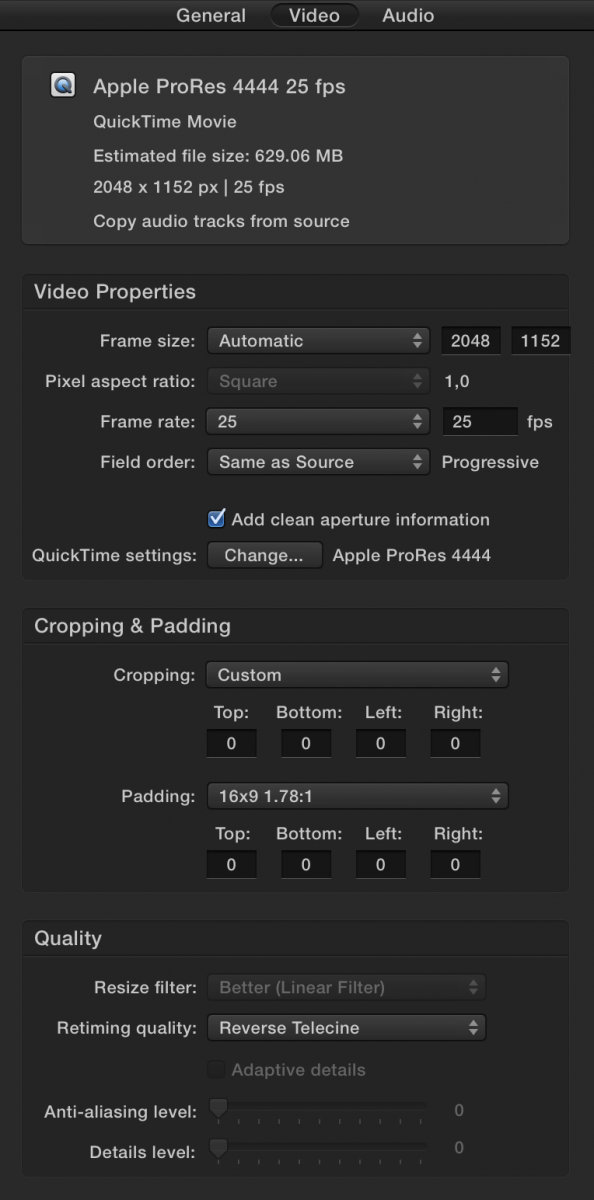
Is this what you are looking for?
When you add you files to Compressor under Video settings set the following:
Retiming quality to Reverse Telecine this give you the 3:2 pull-down.
Is this what you are looking for?
Last edit: 15 Mar 2014 20:40 by Scrubelicious.
Please Log in to join the conversation.
16 Mar 2014 10:36 #42737
by FCPGuy
Replied by FCPGuy on topic Rewrap ProRes from 24fps to 25fps
Yes thank you this what I was looking for.
This should be a standard option in Compressor!
This should be a standard option in Compressor!
Please Log in to join the conversation.
- Tom Wolsky
-
- Offline
- Moderator
-
16 Mar 2014 11:26 #42740
by Tom Wolsky
Replied by Tom Wolsky on topic Rewrap ProRes from 24fps to 25fps
No, this isn't what reverse telecine does. The purpose of reverse TK is to pull 23.976fps material from a 29.97 recording.
Please Log in to join the conversation.
16 Mar 2014 11:42 - 16 Mar 2014 11:46 #42741
by FCPGuy
Could you then please post a step by step solution to create 25fps footage from 24fps footage with out the ghosting?
I did the option that Scrublicious suggested and it did create a 25fps file without having "ghosting".
Thank you
Replied by FCPGuy on topic Rewrap ProRes from 24fps to 25fps
Tom Wolsky wrote: No, this isn't what reverse telecine does. The purpose of reverse TK is to pull 23.976fps material from a 29.97 recording.
Could you then please post a step by step solution to create 25fps footage from 24fps footage with out the ghosting?
I did the option that Scrublicious suggested and it did create a 25fps file without having "ghosting".
Thank you
Last edit: 16 Mar 2014 11:46 by FCPGuy.
Please Log in to join the conversation.
- Tom Wolsky
-
- Offline
- Moderator
-
16 Mar 2014 12:41 #42744
by Tom Wolsky
Replied by Tom Wolsky on topic Rewrap ProRes from 24fps to 25fps
I don't know why it would, but I suspect it's dropping frames.
Please Log in to join the conversation.
