


- Posts: 1077
- Thank you received: 189
3 Post Moderation Rule for New Boarders (25 Jan 2021)
New boarders will have their posts moderated - Don't worry if you cannot see your post immediately.
A question to the experts around here…
- Andreas Kiel
-
 Topic Author
- Offline
- Platinum Member
-

Less
More
26 Feb 2014 11:43 - 26 Feb 2014 11:59 #41773
by Andreas Kiel
A question to the experts around here… was created by Andreas Kiel
This question still makes me a bit of nervous since 10.0.0. Apple hasn't replied or commented officially.
So here what happens. I have a custom app which syncs video and external audio based on TC or LTC in a batch.
It creates either reference or self contained movies way faster than any NLE can do.
The created movies can be used in any NLE (except FCPX) including the metadata given by the audio guy.
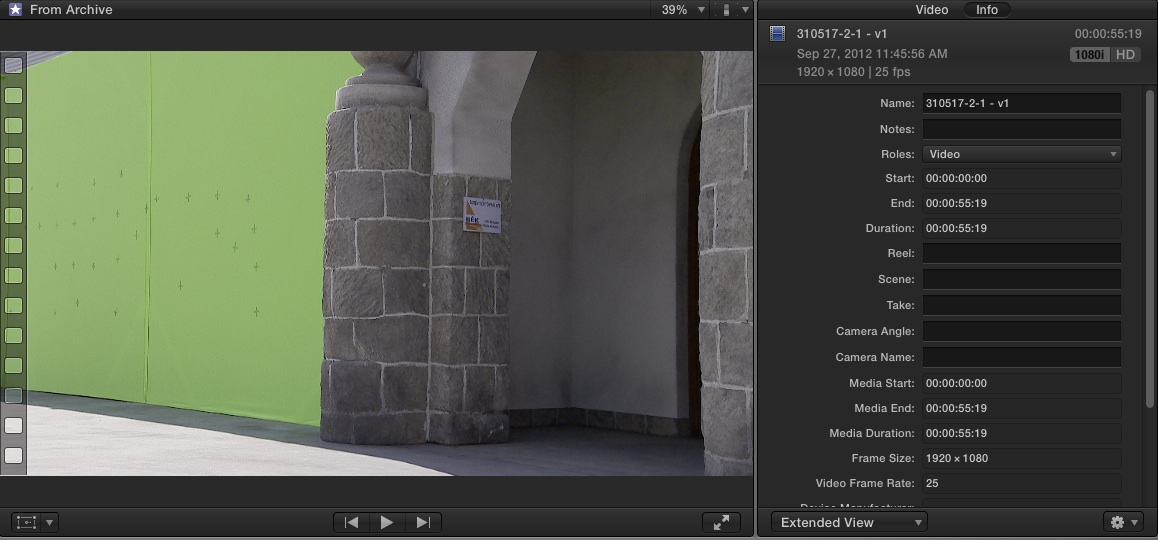
With FCPX the referenced movies don't have any TC label – means they start at 00:00:00:00.
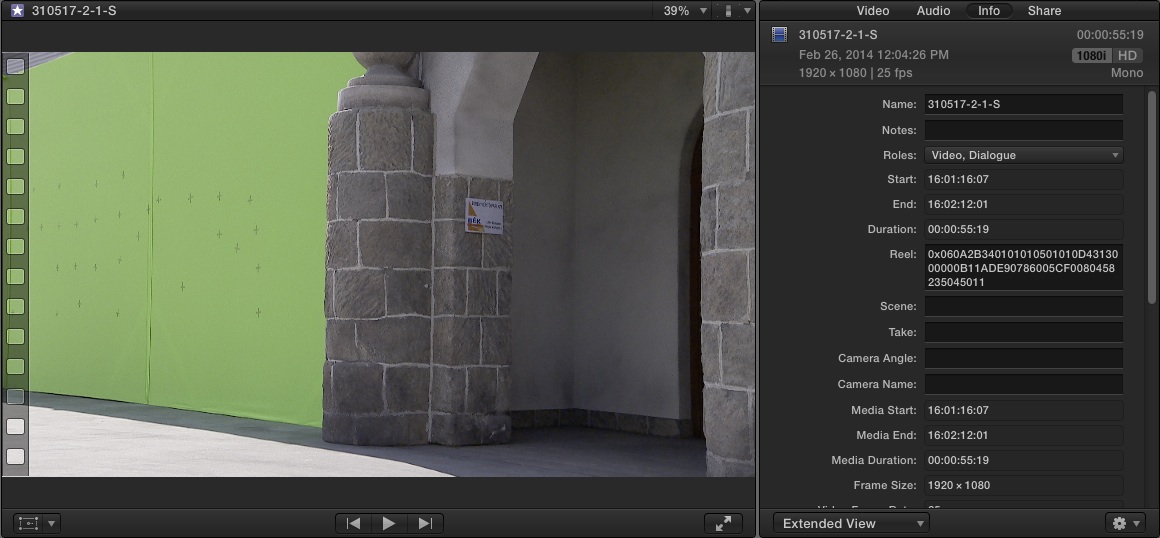
A self contained one keeps the original TC.
With both versions the meta data are lost.
-Andreas
So here what happens. I have a custom app which syncs video and external audio based on TC or LTC in a batch.
It creates either reference or self contained movies way faster than any NLE can do.
The created movies can be used in any NLE (except FCPX) including the metadata given by the audio guy.
With FCPX the referenced movies don't have any TC label – means they start at 00:00:00:00.
A self contained one keeps the original TC.
With both versions the meta data are lost.
-Andreas
Last edit: 26 Feb 2014 11:59 by Andreas Kiel.
Please Log in to join the conversation.
- peteramwiggins
-

- Offline
- Administrator
-

- The Administrator :)
Less
More
- Posts: 1049
- Thank you received: 404
27 Feb 2014 00:19 #41805
by peteramwiggins
Administrator
Replied by peteramwiggins on topic A question to the experts around here…
I believe you need to write the AVFoundation side of things for FCPX to read timecode.
EVS suffers from this problem with reference files.
Peter
EVS suffers from this problem with reference files.
Peter
Administrator
Please Log in to join the conversation.

27 Feb 2014 00:38 #41806
by PaulG
Replied by PaulG on topic A question to the experts around here…
@Andreas I know you have custom app, but you might try using Davinci Resolve Lite 10 (free) which can regenerate the TC from LTC. From there, you can render out ungraded (or graded) movies to use for your edit.
Also, my sound person pointed me toward a new box from Mozgear ( www.mozegear.com/#!tig/clmn ) which can be useful in putting Audio Timecode on DSLR and Black Magic Cameras which just have TOD code.
Also, my sound person pointed me toward a new box from Mozgear ( www.mozegear.com/#!tig/clmn ) which can be useful in putting Audio Timecode on DSLR and Black Magic Cameras which just have TOD code.
Please Log in to join the conversation.
- Andreas Kiel
-
Topic Author
- Offline
- Platinum Member
-
Less
More
- Posts: 1077
- Thank you received: 189
27 Feb 2014 08:49 #41815
by Andreas Kiel
Replied by Andreas Kiel on topic A question to the experts around here…
Thanks Paul and Peter.
I don't think its actually a problem with the AVFoundation nor the TC.
Cameras are synched with TOD using a Lockit (either LTC or TC depending on cam type).
The BWAV files are not polyphonic which might cause the missing metadata problem. If you take a recording with multiple tracks (monophonic) inside FCPX and merge them they lose the metadata as well.
Resolve is not an option as it can't do a batch processing.
My app had been great (or some how still is) just to drop video and audio files to it and the app does the rest.
With FCPVII it was very handy since the app can do a background wrapping to self-contained movies while you were editing with the reference files.
A thing I'm missing in FCPX that it can't handle TC and AUX TC nor allows to change the TC.
-Andreas
I don't think its actually a problem with the AVFoundation nor the TC.
Cameras are synched with TOD using a Lockit (either LTC or TC depending on cam type).
The BWAV files are not polyphonic which might cause the missing metadata problem. If you take a recording with multiple tracks (monophonic) inside FCPX and merge them they lose the metadata as well.
Resolve is not an option as it can't do a batch processing.
My app had been great (or some how still is) just to drop video and audio files to it and the app does the rest.
With FCPVII it was very handy since the app can do a background wrapping to self-contained movies while you were editing with the reference files.
A thing I'm missing in FCPX that it can't handle TC and AUX TC nor allows to change the TC.
-Andreas
Please Log in to join the conversation.
- Beeldcomponist
-
- Offline
- Junior Member
-

Less
More
- Posts: 33
- Thank you received: 8
27 Feb 2014 11:01 #41818
by Beeldcomponist
Replied by Beeldcomponist on topic A question to the experts around here…
Hi Andreas,
perhaps this app can help you to change TC
www.fcp.co/forum/4-final-cut-pro-x-fcpx/...change-for-evs-files
perhaps this app can help you to change TC
www.fcp.co/forum/4-final-cut-pro-x-fcpx/...change-for-evs-files
Please Log in to join the conversation.

27 Feb 2014 15:03 #41821
by Direktor
It actually can.
Regardless of how the timeline is arranged, there are options in the output panel to output each camera clip individually, and also keep the original clip file name, essentially making it a batch clip transcoder.
I've also used it once solely to sync sound for dailies.
Replied by Direktor on topic A question to the experts around here…
Andreas Kiel wrote: Resolve is not an option as it can't do a batch processing.
It actually can.
Regardless of how the timeline is arranged, there are options in the output panel to output each camera clip individually, and also keep the original clip file name, essentially making it a batch clip transcoder.
I've also used it once solely to sync sound for dailies.
Please Log in to join the conversation.
27 Feb 2014 15:39 #41825
by PaulG
Replied by PaulG on topic A question to the experts around here…
Direktor is correct. in Resolve 10's Media Pool, put all of your external audio in the same folder as your videos. Select your videos, right click and choose sync audio based on LTC. Put your clips In a timeline and batch render.
Please Log in to join the conversation.
- Andreas Kiel
-
Topic Author
- Offline
- Platinum Member
-
Less
More
- Posts: 1077
- Thank you received: 189
28 Feb 2014 15:11 #41872
by Andreas Kiel
Replied by Andreas Kiel on topic A question to the experts around here…
Thanks all.
I obviously have a lack of knowledge regarding Resolve. My bad.
I will give it a try again (and some more learning about it) next week.
I will let you know about my results - and probably get some comments about what I did wrong.
-Andreas
I obviously have a lack of knowledge regarding Resolve. My bad.
I will give it a try again (and some more learning about it) next week.
I will let you know about my results - and probably get some comments about what I did wrong.
-Andreas
Please Log in to join the conversation.
