


- Posts: 582
- Thank you received: 5
3 Post Moderation Rule for New Boarders (25 Jan 2021)
New boarders will have their posts moderated - Don't worry if you cannot see your post immediately.
FCPX(10.1.1) automatically quits every time
24 Feb 2014 19:39 #41659
by Neguah
FCPX(10.1.1) automatically quits every time was created by Neguah
Every time I try to open a library FCPX quits. I have tried moving the library to another drive without luck. It quits when it's loading curves(from Natress). Never happened before. How do I get the library up and running again?
Please Log in to join the conversation.
- ronny courtens
-

- Offline
- Moderator
-

Less
More
- Posts: 4455
- Thank you received: 962
24 Feb 2014 20:23 #41664
by ronny courtens
Replied by ronny courtens on topic FCPX(10.1.1) automatically quits every time
Quit FCPX.
Open your FX Factory app (in your Applications folder), press the Catalog tab, scroll down to Nattress and disable Levels and Curves. Then try launching the Library again.
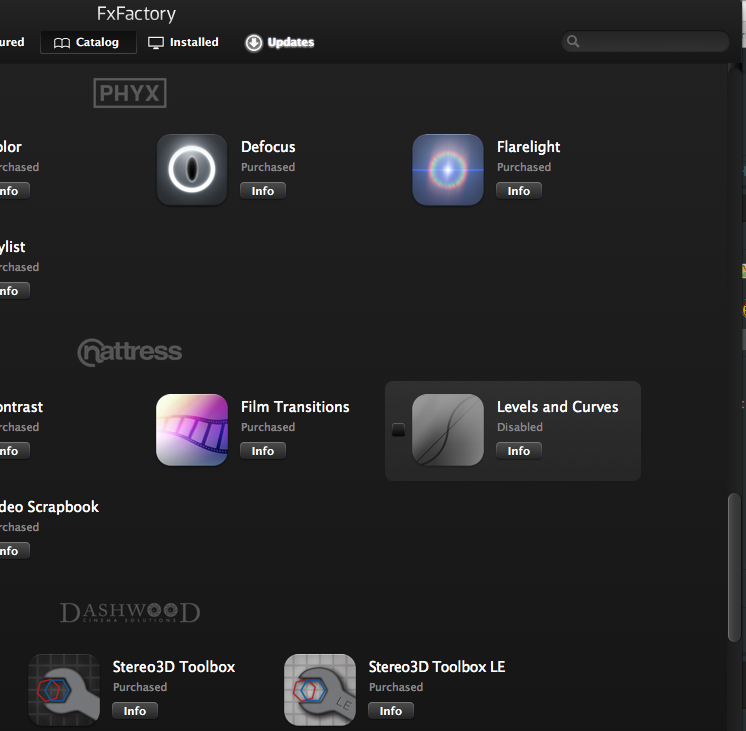
-Ronny
Open your FX Factory app (in your Applications folder), press the Catalog tab, scroll down to Nattress and disable Levels and Curves. Then try launching the Library again.
-Ronny
Please Log in to join the conversation.
24 Feb 2014 20:55 #41666
by Neguah
Replied by Neguah on topic FCPX(10.1.1) automatically quits every time
Yep, problem lies within Natress. However, when disabling Natress every clips turned red. It was not only curves that disappeared. Everything disappeared. Might run into problems with Natress again. Any suggestions?
Please Log in to join the conversation.
- ronny courtens
-
- Offline
- Moderator
-
Less
More
- Posts: 4455
- Thank you received: 962
24 Feb 2014 21:04 #41669
by ronny courtens
Replied by ronny courtens on topic FCPX(10.1.1) automatically quits every time
When you disable an effect that has been applied to multiple clips and you open FCPX again the clips that have then effect applied to will be red, indicating that the plugin is missing.
If the plugin is giving you problems, leave it disabled. Then launch your Project, select all the red clips and in the Inspector > Video tab delete the Levels and Curves effect. The clips will become normal again once the effect has been removed.
-Ronny
If the plugin is giving you problems, leave it disabled. Then launch your Project, select all the red clips and in the Inspector > Video tab delete the Levels and Curves effect. The clips will become normal again once the effect has been removed.
-Ronny
Please Log in to join the conversation.
24 Feb 2014 21:27 #41672
by Neguah
Replied by Neguah on topic FCPX(10.1.1) automatically quits every time
Thanks for that, Ronny!
But it'll take forever to delete the curve effect. No matter what I do, I can only delete the effect on one clip at the time. Have group selected them, and marked the curve effect and then delete. Only one clip is deleted. Copy and paste from a clip without effect doesn't work either. Is it possible to delete the effect from all clips at once?
But it'll take forever to delete the curve effect. No matter what I do, I can only delete the effect on one clip at the time. Have group selected them, and marked the curve effect and then delete. Only one clip is deleted. Copy and paste from a clip without effect doesn't work either. Is it possible to delete the effect from all clips at once?
Please Log in to join the conversation.
- ronny courtens
-
- Offline
- Moderator
-
Less
More
- Posts: 4455
- Thank you received: 962
24 Feb 2014 21:54 #41677
by ronny courtens
Replied by ronny courtens on topic FCPX(10.1.1) automatically quits every time
You are correct, that's been a long-standing lack in FCPX: no "delete attributes" feature. I thought I had found a solution once, but I cannot seem to recall what it was (or it's just my imagination  )
)
I'm afraid I don't know of any way to delete an effect from multiple clips at once. Feedback time again.
-Ronny
)I'm afraid I don't know of any way to delete an effect from multiple clips at once. Feedback time again.
-Ronny
Please Log in to join the conversation.
24 Feb 2014 22:19 #41681
by Neguah
Replied by Neguah on topic FCPX(10.1.1) automatically quits every time
Grateful for your help, Ronny!
I'll give feedback to FCPX, and I will give feedback to Natress as well. Have to apply the curve effect again to every clip, hoping FCPX won't crash this time.
I'll give feedback to FCPX, and I will give feedback to Natress as well. Have to apply the curve effect again to every clip, hoping FCPX won't crash this time.
Please Log in to join the conversation.
- ronny courtens
-
- Offline
- Moderator
-
Less
More
- Posts: 4455
- Thank you received: 962
24 Feb 2014 22:23 #41682
by ronny courtens
Replied by ronny courtens on topic FCPX(10.1.1) automatically quits every time
We have had issues with Nattress Curves before, I thought this had been solved with the latest update. Check in the FxFactory app to see if you don't have any updates listed for this plugin.
-Ronny
-Ronny
Please Log in to join the conversation.
25 Feb 2014 06:08 #41707
by Neguah
Replied by Neguah on topic FCPX(10.1.1) automatically quits every time
Everything is updated, but I updated recently and after I have had applied curves to my clips. Perhaps something happened while updating?
Starting the process of applying curves again during this week. Let's hope it's going to work this time.
Thanks again for you your help!
Starting the process of applying curves again during this week. Let's hope it's going to work this time.
Thanks again for you your help!
Please Log in to join the conversation.
