


3 Post Moderation Rule for New Boarders (25 Jan 2021)
New boarders will have their posts moderated - Don't worry if you cannot see your post immediately.
Chroma Key Accidental Leak!
- sonictimbo
-
 Topic Author
- Offline
- Senior Member
-

Less
More
22 Feb 2014 18:34 #41583
by sonictimbo
Chroma Key Accidental Leak! was created by sonictimbo
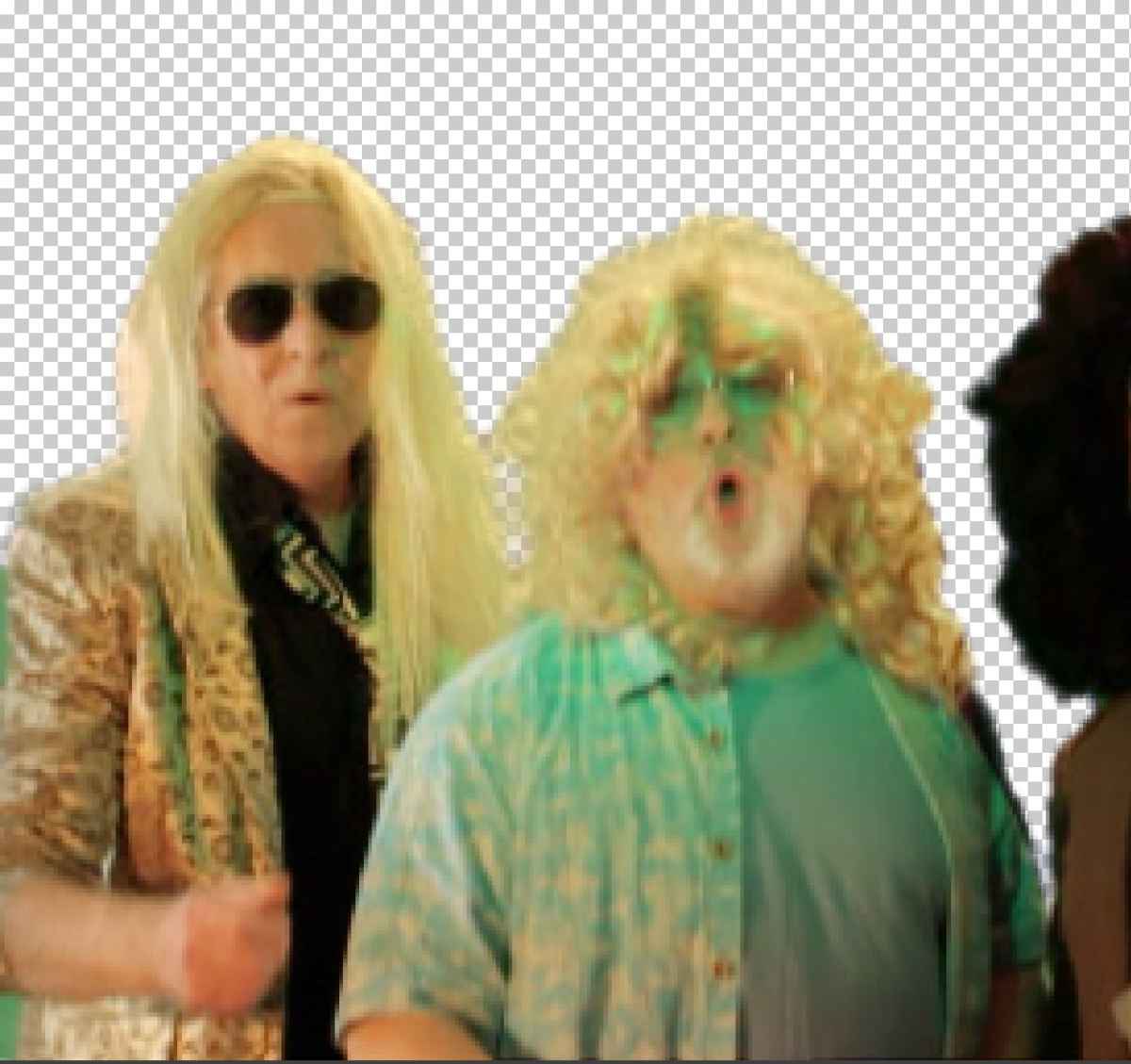
I was doing some green screening stuff recently, and by accident used a sequential flashing 4 colour LED light. I totally forgot one of the lamps was green!!
Now I have transparent blobs of leakage
Apart from re-shooting can anything be done??
Now I have transparent blobs of leakage
Apart from re-shooting can anything be done??
Please Log in to join the conversation.
- ronny courtens
-

- Offline
- Moderator
-

Less
More
- Posts: 4455
- Thank you received: 962
23 Feb 2014 08:49 #41599
by ronny courtens
Replied by ronny courtens on topic Chroma Key Accidental Leak!
Hi Tim,
It's hard hard to say if there's anything you can do without actually seeing the problem. Could you post a screenshot of the green screen footage?
-Ronny
It's hard hard to say if there's anything you can do without actually seeing the problem. Could you post a screenshot of the green screen footage?
-Ronny
Please Log in to join the conversation.
- sonictimbo
-
Topic Author
- Offline
- Senior Member
-
23 Feb 2014 10:09 #41605
by sonictimbo
Replied by sonictimbo on topic Chroma Key Accidental Leak!
Don't be concerned with the content, just look at the bleed!!
Please Log in to join the conversation.
- ronny courtens
-
- Offline
- Moderator
-
Less
More
- Posts: 4455
- Thank you received: 962
23 Feb 2014 10:22 #41606
by ronny courtens
Replied by ronny courtens on topic Chroma Key Accidental Leak!
I think your screenshot of the bleed has not been attached 
- Ronny
- Ronny
Please Log in to join the conversation.
- sonictimbo
-
Topic Author
- Offline
- Senior Member
-
23 Feb 2014 10:54 #41608
by sonictimbo
Replied by sonictimbo on topic Chroma Key Accidental Leak!
I can't get it to upload - I've had this problem before
I press 'add file', select my JPEG (which is only 255k) press 'insert' then 'submit' but it doesn't show up in the preview
I'll try attaching it ti this message...
I press 'add file', select my JPEG (which is only 255k) press 'insert' then 'submit' but it doesn't show up in the preview
I'll try attaching it ti this message...

Please Log in to join the conversation.
- ronny courtens
-
- Offline
- Moderator
-
Less
More
- Posts: 4455
- Thank you received: 962
23 Feb 2014 11:04 #41609
by ronny courtens
Replied by ronny courtens on topic Chroma Key Accidental Leak!
Thank you for the screenshot. But to know if this can be fixed or not we really would need as screenshot of the original green screen video, without the keyer applied to it.
- Ronny
- Ronny
Please Log in to join the conversation.
- sonictimbo
-
Topic Author
- Offline
- Senior Member
-
23 Feb 2014 11:07 #41610
by sonictimbo
Replied by sonictimbo on topic Chroma Key Accidental Leak!
Ah OK, here it is....

As you can see, the green light was a BIG mistake!!
As you can see, the green light was a BIG mistake!!
Please Log in to join the conversation.
- ronny courtens
-
- Offline
- Moderator
-
Less
More
- Posts: 4455
- Thank you received: 962
23 Feb 2014 11:30 #41611
by ronny courtens
Replied by ronny courtens on topic Chroma Key Accidental Leak!
Ouch, I have to admit this is looking really, really bad. I had hoped the foreground green would not be so widespread that you could be able to fix this with some masking.
You can always use different tricks or even rotoscoping, but all this will take so much time and effort that I don't think it is even worth trying. So unless someone comes up with a miracle solution I would say a re-shoot will be necessary.
-Ronny
You can always use different tricks or even rotoscoping, but all this will take so much time and effort that I don't think it is even worth trying. So unless someone comes up with a miracle solution I would say a re-shoot will be necessary.
-Ronny
Please Log in to join the conversation.
- sonictimbo
-
Topic Author
- Offline
- Senior Member
-
23 Feb 2014 11:36 #41612
by sonictimbo
Replied by sonictimbo on topic Chroma Key Accidental Leak!
Poo!
I thought as much, no worries though it was only a novelty piece I just wondered if there was some miracle plugin that I'd missed
Thanks anyway Ronny!
I thought as much, no worries though it was only a novelty piece I just wondered if there was some miracle plugin that I'd missed
Thanks anyway Ronny!
Please Log in to join the conversation.

23 Feb 2014 14:53 - 23 Feb 2014 15:03 #41617
by BenB
Yeah, that's pretty bad. Band-Aid it, but it'll never be perfect. Good practice in some useful skills, though!
Replied by BenB on topic Chroma Key Accidental Leak!
- Place a copy of it above it self (hold Option while dragging it above itself).
- Key the bottom original copy as you originally did.
- Apply a mask to the top copy to mask out the guys face. TrackX or SliceX would help if he moves around too much for manual keyframing the mask.
- Color correct as much as possible, but you won't be able to fix the green too much.
Yeah, that's pretty bad. Band-Aid it, but it'll never be perfect. Good practice in some useful skills, though!
Last edit: 23 Feb 2014 15:03 by BenB.
Please Log in to join the conversation.
- sonictimbo
-
Topic Author
- Offline
- Senior Member
-
23 Feb 2014 14:58 #41619
by sonictimbo
Replied by sonictimbo on topic Chroma Key Accidental Leak!
Great suggestion!
Thanks for that!
Thanks for that!
Please Log in to join the conversation.
- damiangrady
-
- Offline
- Elite Member
-

Less
More
- Posts: 233
- Thank you received: 6
23 Feb 2014 15:36 - 23 Feb 2014 15:37 #41620
by damiangrady
Replied by damiangrady on topic Chroma Key Accidental Leak!
As per BenB's suggestion.
Last edit: 23 Feb 2014 15:37 by damiangrady.
Please Log in to join the conversation.
