


- Posts: 1
- Thank you received: 0
3 Post Moderation Rule for New Boarders (25 Jan 2021)
New boarders will have their posts moderated - Don't worry if you cannot see your post immediately.
Imported video has "frame mismatch" tendency
21 Feb 2014 15:10 #41529
by scisport
Imported video has "frame mismatch" tendency was created by scisport
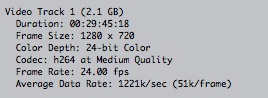
This does not happen on all video elements, so therein lies the mystery. The imported clip is an MOV shot HD at 24 FPS, 1280X720, H.264compression.
After importing, it is placed into the viewer. Right there you can see the issue. Audio good, but the video is almost a "stutter stop" quality, as if there's a frame mismatch. Note that when the clip is played in QT, perfect. I have gone thru all the sequence settings as instructed and changed them numerous times testing other settings. When placed on the timeline, makes no difference if I use what the video is at or when the system prompts me to change the settings, same thing. Even when rendered, same thing.
There are numerous other videos from the same project with no issue. The original files were all exported into MOV format for editing. I have attached a screen shot with the analysis box on the video.
Happy to provide other info for the assist. This one has me completely baffled. Thank you.
After importing, it is placed into the viewer. Right there you can see the issue. Audio good, but the video is almost a "stutter stop" quality, as if there's a frame mismatch. Note that when the clip is played in QT, perfect. I have gone thru all the sequence settings as instructed and changed them numerous times testing other settings. When placed on the timeline, makes no difference if I use what the video is at or when the system prompts me to change the settings, same thing. Even when rendered, same thing.
There are numerous other videos from the same project with no issue. The original files were all exported into MOV format for editing. I have attached a screen shot with the analysis box on the video.
Happy to provide other info for the assist. This one has me completely baffled. Thank you.
Please Log in to join the conversation.
- haysoos123
-

- Offline
- Platinum Member
-

Less
More
- Posts: 402
- Thank you received: 72
21 Feb 2014 19:49 #41543
by haysoos123
Replied by haysoos123 on topic Imported video has "frame mismatch" tendency
It should be 23.976 fps unless there's a specific reason why this clip was shot in 24 fps. Of course if it was intentionally 24 fps you probably wouldn't be asking this question.
Try clicking on the clip in the timeline and pressing the retime button and selecting "automatic speed" to see if it will conform to your 23.976 fps timeline which I'm almost certain is your timeline settings (and what the fps of your other clips are). Another thing is if you have Cinema Tools from the old final cut studio, you can reconform the clip to 23.976 fps and then import it. And yet another thing you can do is reexport it from Compressor to 23.976 fps ProRes.
Try clicking on the clip in the timeline and pressing the retime button and selecting "automatic speed" to see if it will conform to your 23.976 fps timeline which I'm almost certain is your timeline settings (and what the fps of your other clips are). Another thing is if you have Cinema Tools from the old final cut studio, you can reconform the clip to 23.976 fps and then import it. And yet another thing you can do is reexport it from Compressor to 23.976 fps ProRes.
Please Log in to join the conversation.

21 Feb 2014 19:55 #41544
by Redifer
Replied by Redifer on topic Imported video has "frame mismatch" tendency
Do you mean like it looks like it has a lower frame rate even though the original looks fine? I encounter videos which are transcoded into ProRes 422 that exhibit this feature sometimes in the timeline. Take the original movie (not the ProRes) and export it through Quicktime 7 and make sure you choose NONE as the codec. Then import that giant file into FCPX. It should be fine.
Please Log in to join the conversation.
