


- Posts: 9
- Thank you received: 0
3 Post Moderation Rule for New Boarders (25 Jan 2021)
New boarders will have their posts moderated - Don't worry if you cannot see your post immediately.
Motion Template folder disconnects after the update
- sirdavidhay
-
 Topic Author
- Offline
- New Member
-

- I try and please everybody!
Less
More
20 Feb 2014 08:17 #41468
by sirdavidhay
Motion Template folder disconnects after the update was created by sirdavidhay
I used the subtitle file for my FCPX old version as it works. it was stored in motion template folder but once it is updated, t just doesn`t work at all. Even it doesn't show in the Titles menu.
Any suggestions how to fix this?
Thanks
Any suggestions how to fix this?
Thanks
Please Log in to join the conversation.
- ronny courtens
-

- Offline
- Moderator
-

Less
More
- Posts: 4455
- Thank you received: 962
20 Feb 2014 10:03 #41469
by ronny courtens
Replied by ronny courtens on topic Motion Template folder disconnects after the update
Hi David,
Can you give some more information?
- Which template is this exactly?
- When you open the Motion Template folder do you see the template inside this folder?
-Ronny
Can you give some more information?
- Which template is this exactly?
- When you open the Motion Template folder do you see the template inside this folder?
-Ronny
Please Log in to join the conversation.
- sirdavidhay
-
Topic Author
- Offline
- New Member
-
- I try and please everybody!
Less
More
- Posts: 9
- Thank you received: 0
20 Feb 2014 10:13 #41470
by sirdavidhay
Replied by sirdavidhay on topic Motion Template folder disconnects after the update
This is the plugin I am talking about:
www.fcp.co/forum/9-free-fcpx-plugins-and...-tky-subtitle-banner
And I do see the folder in the Motion Template...
Hope there's a solution.
www.fcp.co/forum/9-free-fcpx-plugins-and...-tky-subtitle-banner
And I do see the folder in the Motion Template...
Hope there's a solution.
Please Log in to join the conversation.
- ronny courtens
-
- Offline
- Moderator
-
Less
More
- Posts: 4455
- Thank you received: 962
20 Feb 2014 10:51 - 20 Feb 2014 10:54 #41471
by ronny courtens
Replied by ronny courtens on topic Motion Template folder disconnects after the update
Okay, I have downloaded the effect and it seems to work here.
Open your FCPX Titles browser, select All and scroll down until you see "TKY Subtitler Effect" (see screenshot).
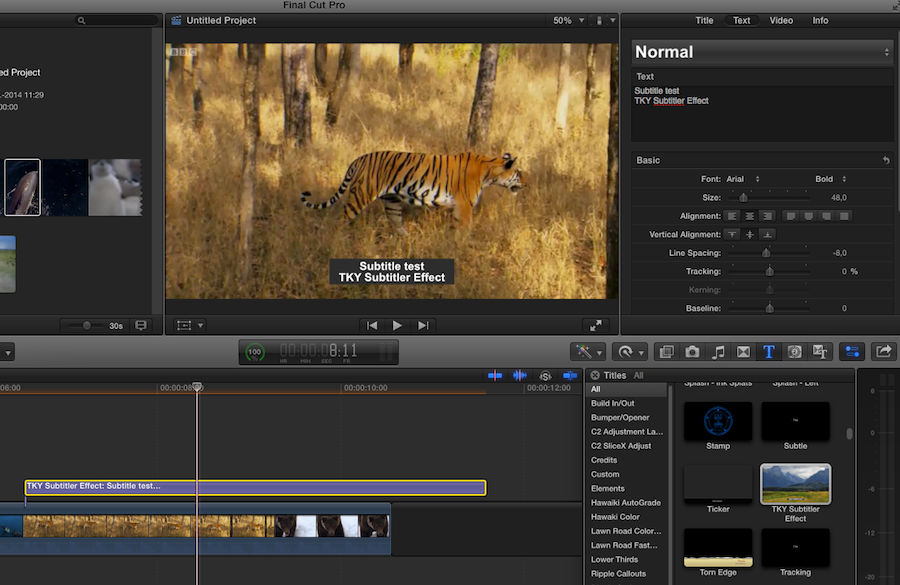
If you don't find this template in your Titles browser: quit FCPX, delete the TKY Subtitler Effect folder inside your Motion Templates folder, download it again from the link and put it back inside your Motion Templates folder. This should work.
-Ronny
Open your FCPX Titles browser, select All and scroll down until you see "TKY Subtitler Effect" (see screenshot).
If you don't find this template in your Titles browser: quit FCPX, delete the TKY Subtitler Effect folder inside your Motion Templates folder, download it again from the link and put it back inside your Motion Templates folder. This should work.
-Ronny
Last edit: 20 Feb 2014 10:54 by ronny courtens. Reason: added screenshot
Please Log in to join the conversation.
- sirdavidhay
-
Topic Author
- Offline
- New Member
-
- I try and please everybody!
Less
More
- Posts: 9
- Thank you received: 0
20 Feb 2014 12:19 #41478
by sirdavidhay
Replied by sirdavidhay on topic Motion Template folder disconnects after the update
I have tried that, it made no difference. Perhaps i put it in wrong folder....
It is in /Users/EUDEdit/Movies/Motion Templates
Is that correct?
It is in /Users/EUDEdit/Movies/Motion Templates
Is that correct?
Please Log in to join the conversation.
- ronny courtens
-
- Offline
- Moderator
-
Less
More
- Posts: 4455
- Thank you received: 962
20 Feb 2014 12:23 #41480
by ronny courtens
Replied by ronny courtens on topic Motion Template folder disconnects after the update
My bad. You should put it in /Users/EUDEdit/Movies/Motion Templates/Titles

-Ronny
-Ronny
Please Log in to join the conversation.
- sirdavidhay
-
Topic Author
- Offline
- New Member
-
- I try and please everybody!
Less
More
- Posts: 9
- Thank you received: 0
20 Feb 2014 15:58 #41492
by sirdavidhay
Replied by sirdavidhay on topic Motion Template folder disconnects after the update
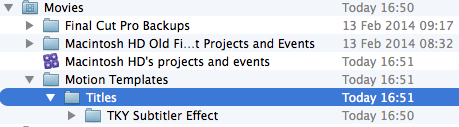
You have sub folders of Compositions, Effects etc...whist my folder was just Motion Template and pretty much empty as I just created Titles as you can see the attached...It didn't work either.
I tried this on two macs and didn't work.
I tried this on two macs and didn't work.
Please Log in to join the conversation.
- ronny courtens
-
- Offline
- Moderator
-
Less
More
- Posts: 4455
- Thank you received: 962
20 Feb 2014 17:06 #41496
by ronny courtens
Replied by ronny courtens on topic Motion Template folder disconnects after the update
Aha, I see. Have you by any chance created a new user after updating FCPX? Anyway, this can be solved.
Andreas Kiel has developed a little tool that will re-create the correct folder structure for FCPX Motion Templates on your hard drive. You can download it here:
www.spherico.com/filmtools/xTemplateStru...emplateStructure.dmg
Just follow the instructions and in two clicks you will have the appropriate folders on your system.
Once you have these folders you can drag the Subtitler template into the Motion templates >Titles folder and it should appear in FCPX.
If this still doesn't work Andreas has also created a brilliant utility called Motion Template Tool that will correctly install any free Motion Templates for you. You can download it here:
www.spherico.com/filmtools/MTT/index.html
Read the instructions, download the installer, drag the application icon into your Applications folder and use this app to correctly install any free templates. And if you have any questions Andreas is regularly on this forum.
- Ronny
Andreas Kiel has developed a little tool that will re-create the correct folder structure for FCPX Motion Templates on your hard drive. You can download it here:
www.spherico.com/filmtools/xTemplateStru...emplateStructure.dmg
Just follow the instructions and in two clicks you will have the appropriate folders on your system.
Once you have these folders you can drag the Subtitler template into the Motion templates >Titles folder and it should appear in FCPX.
If this still doesn't work Andreas has also created a brilliant utility called Motion Template Tool that will correctly install any free Motion Templates for you. You can download it here:
www.spherico.com/filmtools/MTT/index.html
Read the instructions, download the installer, drag the application icon into your Applications folder and use this app to correctly install any free templates. And if you have any questions Andreas is regularly on this forum.
- Ronny
Please Log in to join the conversation.
- Nervebroke
-
- Offline
- Elite Member
-

Less
More
- Posts: 177
- Thank you received: 12
21 Feb 2014 03:30 #41509
by Nervebroke
Replied by Nervebroke on topic Motion Template folder disconnects after the update
As for what Ronny said: I works and it works well.
Dave
Dave
Please Log in to join the conversation.
- sirdavidhay
-
Topic Author
- Offline
- New Member
-
- I try and please everybody!
Less
More
- Posts: 9
- Thank you received: 0
26 Feb 2014 07:25 #41764
by sirdavidhay
Replied by sirdavidhay on topic Motion Template folder disconnects after the update
The last link finally triggered the effect to work! Many thanks!!! Now i can return to work!
Please Log in to join the conversation.
- willypimentel
-
- Offline
- Senior Member
-

Less
More
- Posts: 68
- Thank you received: 3
09 Mar 2014 07:35 #42323
by willypimentel
Replied by willypimentel on topic Motion Template folder disconnects after the update
Love this pluggin
Please Log in to join the conversation.
- sirdavidhay
-
Topic Author
- Offline
- New Member
-
- I try and please everybody!
Less
More
- Posts: 9
- Thank you received: 0
14 Mar 2016 13:58 #74294
by sirdavidhay
Replied by sirdavidhay on topic Motion Template folder disconnects after the update
It is happening again. Those template folders wouldn't work at all on Version 10.2.3.
The actual folder is at Motion Template via User/Movies/Motion Template
That's it. I couldn't figure it out, I really need this to work, I have used the subtitles effect almost every day. Is there something I can rely without facing the problem every time FCPX get updated.
Hope you can help me out.
The actual folder is at Motion Template via User/Movies/Motion Template
That's it. I couldn't figure it out, I really need this to work, I have used the subtitles effect almost every day. Is there something I can rely without facing the problem every time FCPX get updated.
Hope you can help me out.
Please Log in to join the conversation.
14 Mar 2016 19:30 #74312
by Pielle
Replied by Pielle on topic Motion Template folder disconnects after the update
Hi ! I've download the filter, and in fact placed where Simon says it does not appear in FCP and can not be opened in motion. I solved the problem by double-clicking on filter so it is opened in Motion then click on save and the program. He told me that having been done with an old version and would be unable to be opened with previous versions. So the problem is incompatibility. The new version appears in FCP under titles/custom/TKY Subtitler Effect.
In attachment the new version
Enjoy Pielle
In attachment the new version
Enjoy Pielle
Please Log in to join the conversation.
- Andreas Kiel
-
- Offline
- Platinum Member
-

Less
More
- Posts: 1077
- Thank you received: 189
14 Mar 2016 20:36 #74321
by Andreas Kiel
Replied by Andreas Kiel on topic Motion Template folder disconnects after the update
Hi,
Simon created this template many many years ago with Motion.
So there is no reason it shouldn't work in an actual version of FCPX.
The path to it is the way to search.
If you can read "/Users/EUDEdit/Movies/Motion Templates" in Finder it doesn't mean that is the real path - it's the path displayed in Finder.
Take an XML and look for the real path there.
If you need more help drop me an email - kiel (at) spherico (dot) com.
- Andreas
Simon created this template many many years ago with Motion.
So there is no reason it shouldn't work in an actual version of FCPX.
The path to it is the way to search.
If you can read "/Users/EUDEdit/Movies/Motion Templates" in Finder it doesn't mean that is the real path - it's the path displayed in Finder.
Take an XML and look for the real path there.
If you need more help drop me an email - kiel (at) spherico (dot) com.
- Andreas
Please Log in to join the conversation.
- sirdavidhay
-
Topic Author
- Offline
- New Member
-
- I try and please everybody!
Less
More
- Posts: 9
- Thank you received: 0
29 Mar 2016 18:50 #74755
by sirdavidhay
Replied by sirdavidhay on topic Motion Template folder disconnects after the update
It is now working  Especially the new zip file.
Thanks so much
Especially the new zip file.Thanks so much
Please Log in to join the conversation.

30 Mar 2016 03:54 #74770
by dgwvideo
Creating history....one edit at a time !
Replied by dgwvideo on topic Motion Template folder disconnects after the update
What was the fix to your problem?
Creating history....one edit at a time !
Please Log in to join the conversation.
- sirdavidhay
-
Topic Author
- Offline
- New Member
-
- I try and please everybody!
Less
More
- Posts: 9
- Thank you received: 0
31 May 2016 11:19 #77276
by sirdavidhay
Replied by sirdavidhay on topic Motion Template folder disconnects after the update
I did the process again with MTT (Motion Template Tool) with the new zip file. It just worked perfectly.
Please Log in to join the conversation.
