


- Posts: 16
- Thank you received: 1
3 Post Moderation Rule for New Boarders (25 Jan 2021)
New boarders will have their posts moderated - Don't worry if you cannot see your post immediately.
Paste Attributes and Paste Visual Effects not working
16 Feb 2014 03:18 - 16 Feb 2014 03:21 #41221
by MrDenis
Paste Attributes and Paste Visual Effects not working was created by MrDenis
Hello dear gurus.
First off, I won't lie: I'm not the most experienced at FCPX so I might just not understand a mechanic, but I've used Paste Attributes hundreds of times on versions prior to 10.1 without an issue.
However, now when I try, even if the attributes paste the result is wonky. I've included screenies to make it simple but essentially, same clips, same dimensions and formats, but different events/projects.
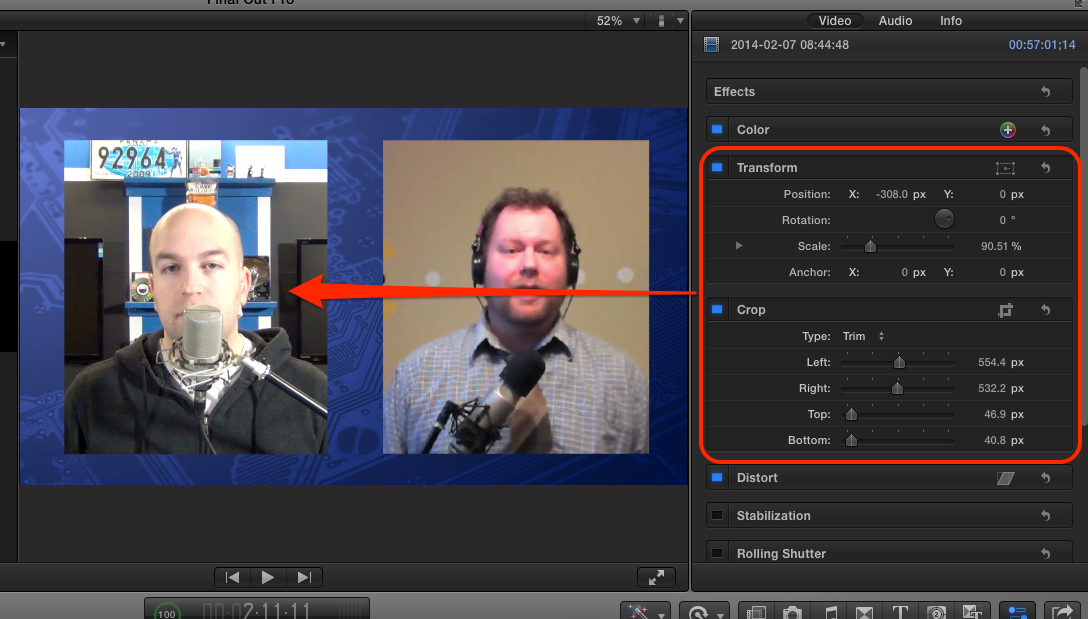
This is the original event with what I'm copying:
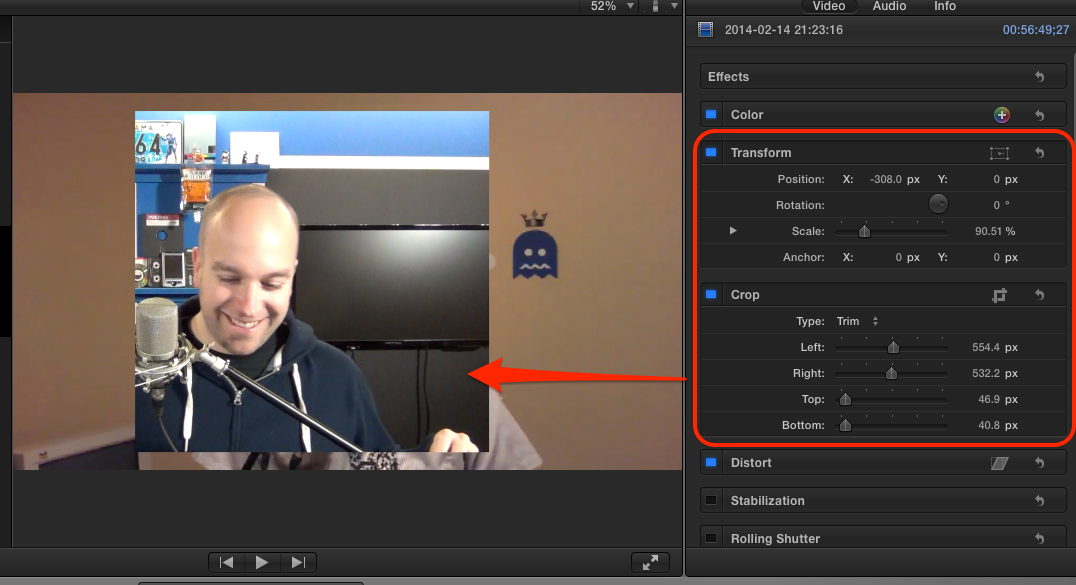
Here is the result when I Paste:
Also, Paste Effects just plane doesn't work... as in it doesn't change anything after pasting.
This is the latest hair pulling moment in 10.1 for me; the behaviour of some keys, notably Tab and Delete, have been very erratic for some oddball reason, and general performance has gone down the drain... I'm also on Mavericks.
Any help would be good as my searches on this forum and the big G have not yielded anything.
Thanks.
First off, I won't lie: I'm not the most experienced at FCPX so I might just not understand a mechanic, but I've used Paste Attributes hundreds of times on versions prior to 10.1 without an issue.
However, now when I try, even if the attributes paste the result is wonky. I've included screenies to make it simple but essentially, same clips, same dimensions and formats, but different events/projects.
This is the original event with what I'm copying:
Here is the result when I Paste:
Also, Paste Effects just plane doesn't work... as in it doesn't change anything after pasting.
This is the latest hair pulling moment in 10.1 for me; the behaviour of some keys, notably Tab and Delete, have been very erratic for some oddball reason, and general performance has gone down the drain... I'm also on Mavericks.
Any help would be good as my searches on this forum and the big G have not yielded anything.
Thanks.
Last edit: 16 Feb 2014 03:21 by MrDenis. Reason: More info
Please Log in to join the conversation.
- ronny courtens
-

- Offline
- Moderator
-

Less
More
- Posts: 4455
- Thank you received: 962
16 Feb 2014 09:23 #41231
by ronny courtens
Replied by ronny courtens on topic Paste Attributes and Paste Visual Effects not working
You are not alone. More FCPX users are reporting different problems with FCPX after updating to 10.1 or 10.1.1. Most of these problems happen to people who have installed Mavericks over an older OS.
There are some temporarily fixes, but you really should be posting feedback to Apple using the FCPX feedback page (Final Cut Pro > Provide Final Cut Pro Feedback). In the meantime you can try this:
Quit FCPX.
Then go to your user Library (press ALT and select Go from your menu bar, then choose Library).
In you user Library Open the Preferences folder. In this folder you will find a ByHost folder, open it.
- If inside the ByHost folder you find a "com.apple.FinalCut (with some random characters at the end)" file: delete it. Then launch FCPX again and see if it runs better.
- If you don't find such a file in the ByHost folder: close your Library again. Then create a new admin user account and see if FCPX runs better using this account.
-Ronny
There are some temporarily fixes, but you really should be posting feedback to Apple using the FCPX feedback page (Final Cut Pro > Provide Final Cut Pro Feedback). In the meantime you can try this:
Quit FCPX.
Then go to your user Library (press ALT and select Go from your menu bar, then choose Library).
In you user Library Open the Preferences folder. In this folder you will find a ByHost folder, open it.
- If inside the ByHost folder you find a "com.apple.FinalCut (with some random characters at the end)" file: delete it. Then launch FCPX again and see if it runs better.
- If you don't find such a file in the ByHost folder: close your Library again. Then create a new admin user account and see if FCPX runs better using this account.
-Ronny
Please Log in to join the conversation.
23 Mar 2014 00:13 #43228
by MrDenis
Replied by MrDenis on topic Paste Attributes and Paste Visual Effects not working
Thanks for the tips Ronny and sorry for the late reply,
First off, what kind of boggle me is that I am on a fresh Mavericks install (which I did exactly for this reason)...
In any case I've tried your tips, but as you guessed I don't have the named file, but when I created the second profile, not only did it behave in the same way but the pref file didn't appear in this users Library either. Is this to be expected?
What if I reinstalled FCP? I've also noticed that even if the downloaded content is present on my machine, it doesn't appear in FCP file browser...
This thing is full of holes and it's starting to get on my nerves...
First off, what kind of boggle me is that I am on a fresh Mavericks install (which I did exactly for this reason)...
In any case I've tried your tips, but as you guessed I don't have the named file, but when I created the second profile, not only did it behave in the same way but the pref file didn't appear in this users Library either. Is this to be expected?
What if I reinstalled FCP? I've also noticed that even if the downloaded content is present on my machine, it doesn't appear in FCP file browser...
This thing is full of holes and it's starting to get on my nerves...
Please Log in to join the conversation.
- ronny courtens
-
- Offline
- Moderator
-
Less
More
- Posts: 4455
- Thank you received: 962
23 Mar 2014 19:23 - 23 Mar 2014 19:29 #43266
by ronny courtens
Replied by ronny courtens on topic Paste Attributes and Paste Visual Effects not working
Hi Denis,
You are correct: this specific issue does not only happen on systems where Mavs has been installed over the old OS. I am testing a similar issue on a new MP with fresh installs of FCPX 10.1.1 and the latest OS right now.
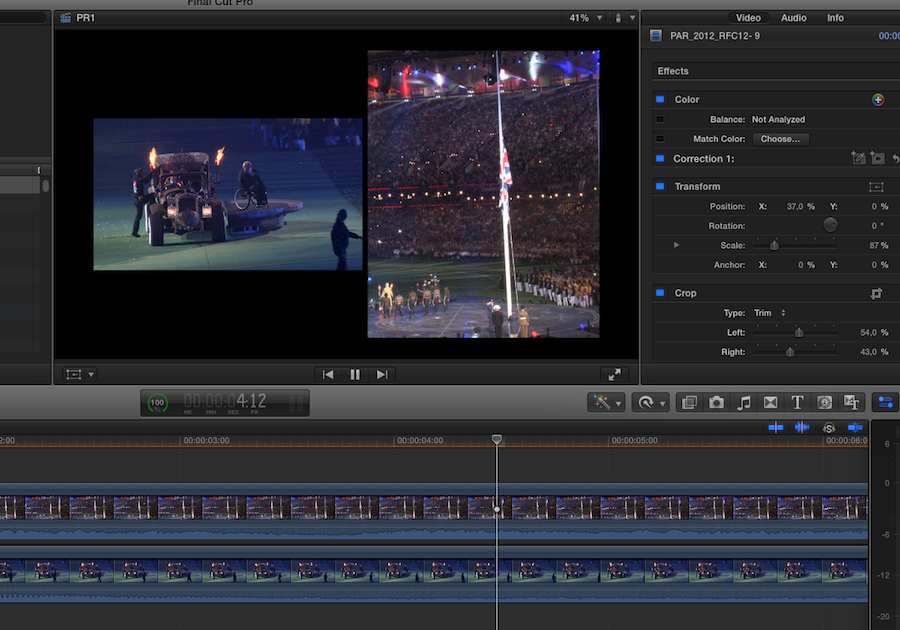
Here's two overlapping clips with modified position, scale and crop (Trim) parameters:
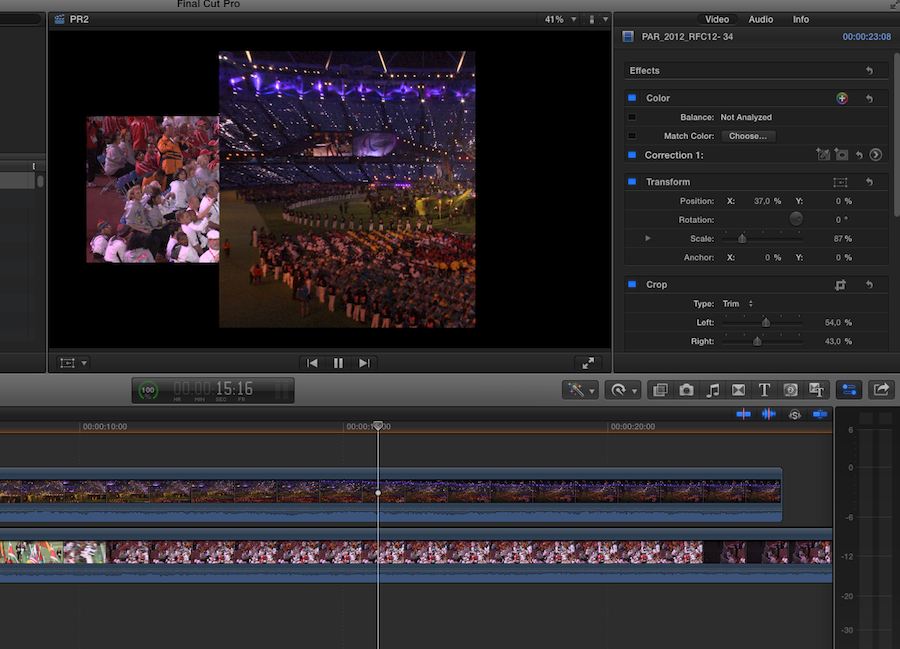
Here's the result when you paste these changes onto two other clips in a different project (project settings are identical, clips in both projects have exactly the same formats and size):
And what's strange is that when you press the Transform button on the clip with the incorrectly pasted position parameter, the Transform overlay shows the correct position while the actual image is completely off:
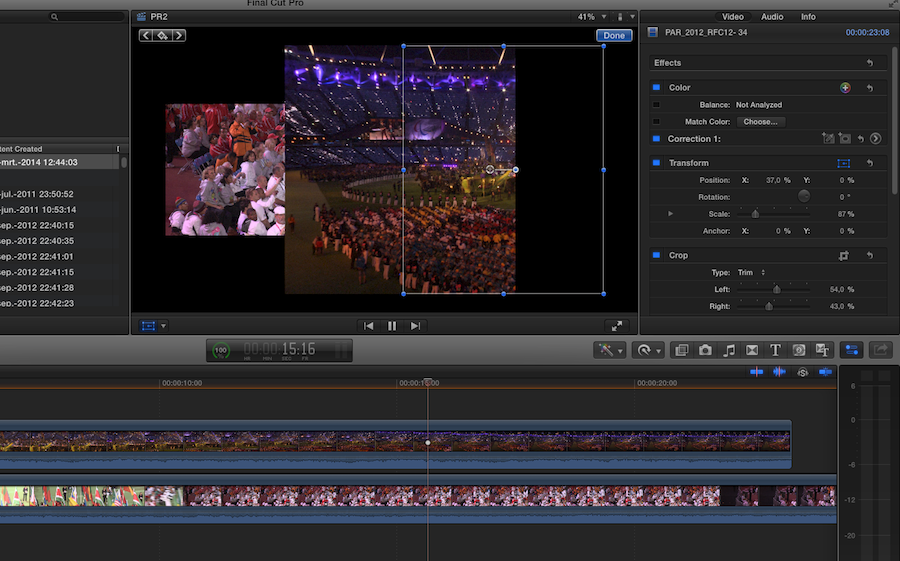
The problems stays the same wether you use Paste Effects or Paste Attributes. Reinstalling the app or refreshing the prefs, even with a computer restart, does not help. The issue also occurs when just copy/pasting attributes from one clip onto the other on the same timeline. The exact same procedure using FCPX 10.0.9 on the same system with the same media works flawlessly.
Reading the many reports of different users on this subject I'm sure that Apple is fully aware of this issue. FCPX is a wonderful NLE and it's sad that the 10.1 update together with Mavericks seem to have broken many things that worked very well before. A bug fix update for FCPX and Mavericks is coming, let's hope these annoying things get sorted out before anything else.
- Ronny
You are correct: this specific issue does not only happen on systems where Mavs has been installed over the old OS. I am testing a similar issue on a new MP with fresh installs of FCPX 10.1.1 and the latest OS right now.
Here's two overlapping clips with modified position, scale and crop (Trim) parameters:
Here's the result when you paste these changes onto two other clips in a different project (project settings are identical, clips in both projects have exactly the same formats and size):
And what's strange is that when you press the Transform button on the clip with the incorrectly pasted position parameter, the Transform overlay shows the correct position while the actual image is completely off:
The problems stays the same wether you use Paste Effects or Paste Attributes. Reinstalling the app or refreshing the prefs, even with a computer restart, does not help. The issue also occurs when just copy/pasting attributes from one clip onto the other on the same timeline. The exact same procedure using FCPX 10.0.9 on the same system with the same media works flawlessly.
Reading the many reports of different users on this subject I'm sure that Apple is fully aware of this issue. FCPX is a wonderful NLE and it's sad that the 10.1 update together with Mavericks seem to have broken many things that worked very well before. A bug fix update for FCPX and Mavericks is coming, let's hope these annoying things get sorted out before anything else.
- Ronny
Last edit: 23 Mar 2014 19:29 by ronny courtens.
Please Log in to join the conversation.
- augustheat
-

- Offline
- Senior Member
-

Less
More
- Posts: 46
- Thank you received: 2
25 Mar 2014 02:26 #43354
by augustheat
Replied by augustheat on topic Paste Attributes and Paste Visual Effects not working
I had this same problem with the first couple of projects I edited in FCPX. Tried all kinds of fixes and could not get it to work. Then one day it started working correctly, and it hasn't happened since.
Please Log in to join the conversation.
25 Mar 2014 02:41 #43355
by MrDenis
Replied by MrDenis on topic Paste Attributes and Paste Visual Effects not working
Thanks Ronny, that is exactly what's going on here as well. At least I know it's not me doing something off...
augustheat, do you have any idea what you might have done differently? Do you house your libraries on an external drive (thinking out loud here)?
Thanks guys
augustheat, do you have any idea what you might have done differently? Do you house your libraries on an external drive (thinking out loud here)?
Thanks guys
Please Log in to join the conversation.
- augustheat
-
- Offline
- Senior Member
-
Less
More
- Posts: 46
- Thank you received: 2
25 Mar 2014 02:53 #43357
by augustheat
Replied by augustheat on topic Paste Attributes and Paste Visual Effects not working
Always used an external drive. I really didn't do anything different. I used it once or twice before it stopped working. Was pretty frustrating when it was going on. I tried everything; shut down, reboots, etc., to no avail. Like I said, one day I started a new project and everything was working fine again. Just one of those weird bugs that corrected itself. Now I'm worried that my talking about it will screw it all up again! It's definitely a feature you need to have working correctly...
Please Log in to join the conversation.
- haysoos123
-
- Offline
- Platinum Member
-

Less
More
- Posts: 402
- Thank you received: 72
25 Mar 2014 19:23 #43407
by haysoos123
Replied by haysoos123 on topic Paste Attributes and Paste Visual Effects not working
Does this have anything to do with the paste attributes bug that happens on clips with Audio Enhancements or a panning mode? I've had the problem when pasting attributes to/from clips with any sort of Audio Enhancement turned on. The paste attributes dialogue box never even appears. If I remove the Audio Enhancements, I can paste attributes again.
Please Log in to join the conversation.
25 Mar 2014 22:56 - 25 Mar 2014 22:57 #43419
by Zemzil
Replied by Zemzil on topic Paste Attributes and Paste Visual Effects not working
Same residual bug, but it's unpredictable for any clip, or I did not find any pattern to reproduce it.
And I still miss a way to copy-past selected layers on a same clip, as it's not even possible with all the "color" effect like on another clip. When you do precise motion-tracking with mask it could be really usefull, for now I have to tweak multiple clip with opacity to achieve some effects.
And I still miss a way to copy-past selected layers on a same clip, as it's not even possible with all the "color" effect like on another clip. When you do precise motion-tracking with mask it could be really usefull, for now I have to tweak multiple clip with opacity to achieve some effects.
Last edit: 25 Mar 2014 22:57 by Zemzil.
Please Log in to join the conversation.
- augustheat
-
- Offline
- Senior Member
-
Less
More
- Posts: 46
- Thank you received: 2
08 Apr 2014 19:21 #44237
by augustheat
Replied by augustheat on topic Paste Attributes and Paste Visual Effects not working
Just an FYI...
I'm back to having the same problem again. I can paste attributes with the shortcut or menu item, but no more "right click" option. It's there, and then it's gone. Depends on nothing but chance...
I'm back to having the same problem again. I can paste attributes with the shortcut or menu item, but no more "right click" option. It's there, and then it's gone. Depends on nothing but chance...
Please Log in to join the conversation.
- ronny courtens
-
- Offline
- Moderator
-
Less
More
- Posts: 4455
- Thank you received: 962
08 Apr 2014 19:26 #44240
by ronny courtens
Replied by ronny courtens on topic Paste Attributes and Paste Visual Effects not working
I would wait for the coming update and see if this fixes things with copy/pasting. I think it will, and I guess it won't be much longer now.
- Ronny
- Ronny
Please Log in to join the conversation.

10 Apr 2014 05:13 #44335
by dgwvideo
Creating history....one edit at a time !
Replied by dgwvideo on topic Paste Attributes and Paste Visual Effects not working
I have found that more times than not, if the spatial conform of the clip is set to NONE, then the cropping and transform attributes will paste correctly. It will not work properly when set to FILL or FIT. This solution may not work for all computers.
Creating history....one edit at a time !
Please Log in to join the conversation.
