


- Posts: 1080
- Thank you received: 106
3 Post Moderation Rule for New Boarders (25 Jan 2021)
New boarders will have their posts moderated - Don't worry if you cannot see your post immediately.
Deinterlacing 480i videos in a 1080p project
15 Feb 2014 22:36 - 16 Feb 2014 21:09 #41216
by Redifer
Deinterlacing 480i videos in a 1080p project was created by Redifer
I edit a show about retro video games that plays on Youtube and there is something that Final Cut Pro X simply cannot do that FCP7 does easily. I hope you all can understand my problem but I'm doubtful. Here's the scenario.
1 - The show itself is in 1080p 30. We cover games from most generations and have video skits, etc.
2 - The video games we cover are often 240p. I record the gameplay footage myself. It, of course, records as a 480i file.
3 - Usually editing is pretty simple. Only a single field is shown and that represents all of the visual game data. There is no other visual information in the other field except that it's just a different moment in time (these games run at 240p, 60 frames per second). When only one field is shown everything looks fine.
4 - HOWEVER there are some games that require both fields to be shown at the same time. And example of this would be where a game flashes an object on and off rapidly (at 60fps) to simulate transparency. So with a single field shown I either get the object there 100% of the time or not there at all. In FCP7 I just put a flicker filter on it and adjust the blending to max. That way both fields are onscreen at 50% opacity. It looks a little blurry but it's better than not having it at all.
5 - FCPX natively has NOTHING like this, but there is a filter called PHYX Deinterlacer that does the job I need. It looks even better than FCP7.
6 - OK so it seems like I have my bases covered, right? WRONG! The games that I need this applied to do not necessarily need it applied all the time. I don't want to apply it if I don't need it to keep the visual quality high. There may be a single part of the game that needs it but the rest of it does not. I can't just apply the filter to one clip and not the others. In order to get the PHYX Deinterlacer to work, I must tell the clip that it's progressive. When I do this, it applies to ALL the clips from that same source. For example if I have a game recorded, ALL instances of that game will be adjusted if I change anything in the INFO tab either on the timeline or the BIN or whatever FCPX calls that area now. I'd literally need two copies of any video I wanted to do this with. I also like being able to choose which field gets shown so I can't just shut off the blending in the PHXY Deinterlace filter because that defaults a particular field and I can't change it if I wanted to.
Are there any workarounds to this conundrum so I don't have to rely on FCP7 forever?
1 - The show itself is in 1080p 30. We cover games from most generations and have video skits, etc.
2 - The video games we cover are often 240p. I record the gameplay footage myself. It, of course, records as a 480i file.
3 - Usually editing is pretty simple. Only a single field is shown and that represents all of the visual game data. There is no other visual information in the other field except that it's just a different moment in time (these games run at 240p, 60 frames per second). When only one field is shown everything looks fine.
4 - HOWEVER there are some games that require both fields to be shown at the same time. And example of this would be where a game flashes an object on and off rapidly (at 60fps) to simulate transparency. So with a single field shown I either get the object there 100% of the time or not there at all. In FCP7 I just put a flicker filter on it and adjust the blending to max. That way both fields are onscreen at 50% opacity. It looks a little blurry but it's better than not having it at all.
5 - FCPX natively has NOTHING like this, but there is a filter called PHYX Deinterlacer that does the job I need. It looks even better than FCP7.
6 - OK so it seems like I have my bases covered, right? WRONG! The games that I need this applied to do not necessarily need it applied all the time. I don't want to apply it if I don't need it to keep the visual quality high. There may be a single part of the game that needs it but the rest of it does not. I can't just apply the filter to one clip and not the others. In order to get the PHYX Deinterlacer to work, I must tell the clip that it's progressive. When I do this, it applies to ALL the clips from that same source. For example if I have a game recorded, ALL instances of that game will be adjusted if I change anything in the INFO tab either on the timeline or the BIN or whatever FCPX calls that area now. I'd literally need two copies of any video I wanted to do this with. I also like being able to choose which field gets shown so I can't just shut off the blending in the PHXY Deinterlace filter because that defaults a particular field and I can't change it if I wanted to.
Are there any workarounds to this conundrum so I don't have to rely on FCP7 forever?
Last edit: 16 Feb 2014 21:09 by Redifer.
Please Log in to join the conversation.
- Russ Haskell
-

- Offline
- Elite Member
-

Less
More
- Posts: 176
- Thank you received: 24
16 Feb 2014 04:25 #41222
by Russ Haskell
Replied by Russ Haskell on topic Deinterlacing 480i videos in a 1080p project
You could select a clip in the browser that you want to de-interlace and send it to Compressor. Then reimport the de-interlaced file and replace the original on the Timeline with the new clip.
Russ
Russ
Please Log in to join the conversation.
- Bretwilliams
-

- Offline
- Senior Member
-

Less
More
- Posts: 74
- Thank you received: 28
16 Feb 2014 05:03 #41225
by Bretwilliams
Replied by Bretwilliams on topic Deinterlacing 480i videos in a 1080p project
You deinterlace in the inspector. It's much higher quality than using a filter in FCP 7.
An even better idea would be to work in a 60p sequence. Each field will get mapped to a frame. That's the reason 720p is broadcast at 60p - for perfect backward compatibility with interlaced footage. It also handles 24p perfectly by adding the right pull down cadence.
An even better idea would be to work in a 60p sequence. Each field will get mapped to a frame. That's the reason 720p is broadcast at 60p - for perfect backward compatibility with interlaced footage. It also handles 24p perfectly by adding the right pull down cadence.
Please Log in to join the conversation.
16 Feb 2014 05:47 #41226
by Redifer
Replied by Redifer on topic Deinterlacing 480i videos in a 1080p project
Unfortunately the problem with a 60p sequence is that my target video is 30fps and Youtube is also 30fps. Youtube would just hack half of it away, so I need to be able to decide what to blend and what not to. The very large majority of the show looks fine at 30p.
Please Log in to join the conversation.
16 Feb 2014 07:00 #41227
by marchyman
Replied by marchyman on topic Deinterlacing 480i videos in a 1080p project
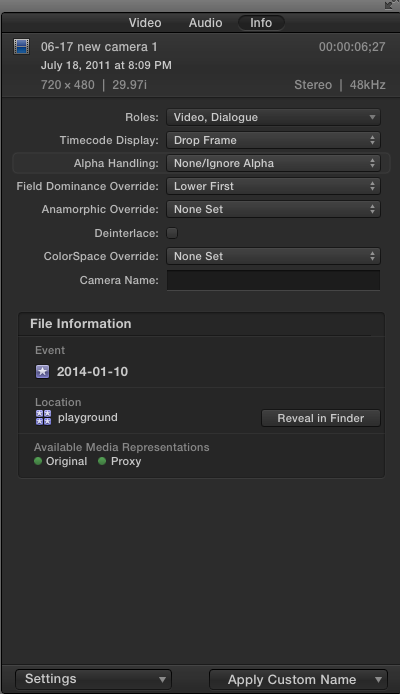
What are the results when you click on the "Deinterlace" box under setting in the info tab of the inspector?
Please Log in to join the conversation.
16 Feb 2014 20:55 #41252
by Redifer
Replied by Redifer on topic Deinterlacing 480i videos in a 1080p project
When the clip is set to progressive it does nothing. When it is set to Lower Field First (as the video is) it shows some graphical garbage which almost looks like glitches. Not proper combing or anything like that. And again when I check it is applies to all instances of the imported clip instead of just the segment on the timeline that I checked. It appears FCPX does not offer the flexibility to adjust parameters int he INFO window on one part of the clip and not the rest like FCP7 does. This would solve my issue. Maybe someone should show Apple what FCP7 can do.
Please Log in to join the conversation.
