


- Posts: 379
- Thank you received: 6
3 Post Moderation Rule for New Boarders (25 Jan 2021)
New boarders will have their posts moderated - Don't worry if you cannot see your post immediately.
Sluggish
- Marc Lucas
-
 Topic Author
- Offline
- Platinum Member
-

Less
More
14 Feb 2014 17:35 #41168
by Marc Lucas
Sluggish was created by Marc Lucas
Currently working on a project but noticed this over the past few months to be fair. FCPX 10.1.1 is running quite sluggish. I'm on a MBPr with SSD internal drive (top spec) I have all my media and Libraries on a G-Tech Raid (4TB) So I really shouldn't be getting any problems playing back a couple of tracks!
Along with sluggish behavious i.e moving the playhead isn't instant like it was before 10.1.1 is sometimes take a sec to move which just isn't right because of the system I'm running. I am also getting freezes where FCPX stalls for about 5-7sec and kind of locks up then jumps back to kind of normal.
When I first got my G-Raid I tested and was getting about 270MB/s if I recall correctly I have just done a speed test of the disk and now getting only 160MB/s read & write now I can't explain that drop but even though it wouldn't be enough to make FCPX slow down as much as it is??
I can only think it was the last update that has done this anyone else having these same issues?
Along with sluggish behavious i.e moving the playhead isn't instant like it was before 10.1.1 is sometimes take a sec to move which just isn't right because of the system I'm running. I am also getting freezes where FCPX stalls for about 5-7sec and kind of locks up then jumps back to kind of normal.
When I first got my G-Raid I tested and was getting about 270MB/s if I recall correctly I have just done a speed test of the disk and now getting only 160MB/s read & write now I can't explain that drop but even though it wouldn't be enough to make FCPX slow down as much as it is??
I can only think it was the last update that has done this anyone else having these same issues?
Please Log in to join the conversation.
- Darren Roark
-

- Offline
- Platinum Member
-
14 Feb 2014 18:58 #41170
by Darren Roark
Replied by Darren Roark on topic Sluggish
Two things:
First, did you update to Mavericks over a Mountain Lion install? If so, trashing your prefs and doing a system cleaning (which is addressed in another thread) could help a lot. Most people having your symptoms have been from not doing a fresh install of Mavericks.
Second, how full is your g-raid? Drives get exponentially slower the more full they get. Depending on what you are cutting, 160MB/s usually wouldn't grind FCP X to a halt like that.
Hope that helps.
First, did you update to Mavericks over a Mountain Lion install? If so, trashing your prefs and doing a system cleaning (which is addressed in another thread) could help a lot. Most people having your symptoms have been from not doing a fresh install of Mavericks.
Second, how full is your g-raid? Drives get exponentially slower the more full they get. Depending on what you are cutting, 160MB/s usually wouldn't grind FCP X to a halt like that.
Hope that helps.
Please Log in to join the conversation.

14 Feb 2014 19:57 #41173
by eliashuch
I am having the same issue. Just talked to a FCP X rock star from Apple and he recommended I delete and redownload FCP. He said the "Patch" to upgrade to 10.1.1 could be the issue. Stand by, I will holler back after testing.
Please Log in to join the conversation.
15 Feb 2014 03:59 #41187
by tpayton
I've got the same thing happening here, but it is only with my heavily upgraded 2006 Mac Pro, so I thought perhaps it was just a problem running on unsupported hardware. I'm trying the reinstall myself.
The funny thing that is happening also is the entire system is freezing up for 5-10 seconds, not just Final Cut.
The funny thing that is happening also is the entire system is freezing up for 5-10 seconds, not just Final Cut.
Please Log in to join the conversation.
15 Feb 2014 04:31 #41191
by tpayton
I was doing a bit more investigation. I opened up the Console App and looked at system messages. It turns out that I am getting i/o errors on my startup drive. Ouch! Specifically this:
2/14/14 9:22:23.000 PM kernel[0]: disk0s4: I/O error.
2/14/14 9:22:23.000 PM kernel[0]: disk0s4: I/O error.
2/14/14 9:29:34.000 PM kernel[0]: disk0s4: I/O error.
Nothing is showing up wrong with the drive in Disk Utility, but from what I've googled and others have said, it is a significant issue. So I'm cloning my startup drive to another drive and hopefully I can save things.
Therefore you might want to check your Console Logs, and see if you see any strange errors.
2/14/14 9:22:23.000 PM kernel[0]: disk0s4: I/O error.
2/14/14 9:22:23.000 PM kernel[0]: disk0s4: I/O error.
2/14/14 9:29:34.000 PM kernel[0]: disk0s4: I/O error.
Nothing is showing up wrong with the drive in Disk Utility, but from what I've googled and others have said, it is a significant issue. So I'm cloning my startup drive to another drive and hopefully I can save things.
Therefore you might want to check your Console Logs, and see if you see any strange errors.
Please Log in to join the conversation.
15 Feb 2014 18:46 - 15 Feb 2014 18:47 #41209
by tpayton
An update on my progress. I cloned my startup drive with Carbon Copy Cloner and sure enough there were several files that were on bad areas of the disk and couldn't be read. Specifically I'm sure this one gave all sorts of trouble:
02/15 10:29:47 rsync: send_files: read errors mapping "/Library/Audio/Apple Loops/Apple/Final Cut Pro Sound Effects/Sci-Fi/Jet Pack Start-Stop.caf": Input/output error (5)
This is very interesting because Disk Utility showed no errors when trying to repair the startup disk. Only Carbon Copy Cloner reported the errors (besides the All Messages log in Console). Carbon Copy Cloner also has a window called "Disk Center" that reported the errors. I'm not sure if this was only during the CCC operation itself or if it is general use.
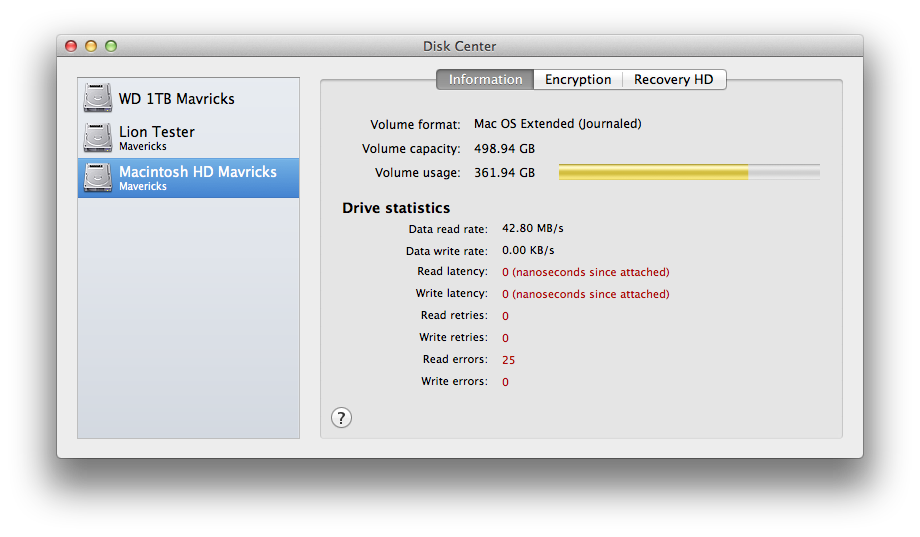
02/15 10:29:47 rsync: send_files: read errors mapping "/Library/Audio/Apple Loops/Apple/Final Cut Pro Sound Effects/Sci-Fi/Jet Pack Start-Stop.caf": Input/output error (5)
This is very interesting because Disk Utility showed no errors when trying to repair the startup disk. Only Carbon Copy Cloner reported the errors (besides the All Messages log in Console). Carbon Copy Cloner also has a window called "Disk Center" that reported the errors. I'm not sure if this was only during the CCC operation itself or if it is general use.
Last edit: 15 Feb 2014 18:47 by tpayton.
Please Log in to join the conversation.
15 Feb 2014 21:25 #41214
by plysat
Can't sleep? Try this: fcpxpert.net ;-)
In addition to anything else, and I think this has been mentioned on another thread, keeping the inspector window open adversely affects performance, sometimes significantly. Kind of a drag having to keep opening and closing it, but it definitely helps...
Can't sleep? Try this: fcpxpert.net ;-)
Please Log in to join the conversation.
- Duncan Craig
-
- Offline
- Senior Member
-

- duncancraig.co.uk
16 Feb 2014 19:33 #41245
by Duncan Craig
Replied by Duncan Craig on topic Sluggish
I expect this is related directly to the sluggish behaviour seen with the finder in Mavericks.
I'm getting short pauses and hanging in FCPX on Hackintoshes and 'proper' Macs.
And they all seem to exhibit a delay when opening some finder windows, networked macs and so on.
This has been documented widely on the internet.
I'm getting short pauses and hanging in FCPX on Hackintoshes and 'proper' Macs.
And they all seem to exhibit a delay when opening some finder windows, networked macs and so on.
This has been documented widely on the internet.
Please Log in to join the conversation.
- Marc Lucas
-
Topic Author
- Offline
- Platinum Member
-
Less
More
- Posts: 379
- Thank you received: 6
17 Feb 2014 23:31 #41335
by Marc Lucas
Replied by Marc Lucas on topic Sluggish
Thanks for the replies on this! It was a new MBPr so Mavericks was pre-install. After actually speaking with Duncan today I don't think its a drive situation it is most probably a Mavericks issue so lets see if things change when Mavericks gets an update.
Please Log in to join the conversation.
- Darren Roark
-
- Offline
- Platinum Member
-
18 Feb 2014 00:47 #41341
by Darren Roark
Replied by Darren Roark on topic Sluggish
Did you update your projects from 10.0.9 or older by chance?
If so maybe try this, export your project via XML, then reimport. See if it helps. I have been having a heck of a time getting certain old projects to play nice in 10.1.1. The XML round trip helped me.
If so maybe try this, export your project via XML, then reimport. See if it helps. I have been having a heck of a time getting certain old projects to play nice in 10.1.1. The XML round trip helped me.
Please Log in to join the conversation.
