


- Posts: 25
- Thank you received: 0
3 Post Moderation Rule for New Boarders (25 Jan 2021)
New boarders will have their posts moderated - Don't worry if you cannot see your post immediately.
Having trouble exporting project
14 Feb 2014 14:11 #41151
by stoffer2
Having trouble exporting project was created by stoffer2
I sure I caused the problem as when i was importing events from a sd card, I was creating project as usual
but i took the card out to early and even though i have edited project ,i can only see all files with the card in iMac . I have imported twice since and still on exporting to you tube or dvd get a message box to say i can't .
Any ideas or help greatly appreciated.
but i took the card out to early and even though i have edited project ,i can only see all files with the card in iMac . I have imported twice since and still on exporting to you tube or dvd get a message box to say i can't .
Any ideas or help greatly appreciated.
Please Log in to join the conversation.
- ronny courtens
-

- Offline
- Moderator
-

Less
More
- Posts: 4455
- Thank you received: 962
14 Feb 2014 21:27 #41180
by ronny courtens
Replied by ronny courtens on topic Having trouble exporting project
Never have had a similar issue like this before, but this is what I would do:
1. First make sure App Nap is deselected for FCPX. App Nap can cause exporting problems, especially on longer projects. If App Nap is already deselected and you cannot export your project to Youtube or DVD:
2. Export your edit as a Master File, then import that file back into FCPX and share it to Youtube or DVD from the Browser. If you cannot export your edit as a Master File either:
3. Optimize your clips to ProRes 422, then try exporting again. If this still doesn't work:
4. Re-import your media, making sure that "Copy files to Final Cut Events folder" is checked in your import preferences.
- Ronny
1. First make sure App Nap is deselected for FCPX. App Nap can cause exporting problems, especially on longer projects. If App Nap is already deselected and you cannot export your project to Youtube or DVD:
2. Export your edit as a Master File, then import that file back into FCPX and share it to Youtube or DVD from the Browser. If you cannot export your edit as a Master File either:
3. Optimize your clips to ProRes 422, then try exporting again. If this still doesn't work:
4. Re-import your media, making sure that "Copy files to Final Cut Events folder" is checked in your import preferences.
- Ronny
Please Log in to join the conversation.
14 Feb 2014 22:54 #41184
by stoffer2
Replied by stoffer2 on topic Having trouble exporting project
Ronny, thanks for the reply with so many suggestions , i can't or can i import while currently exporting to the tube ?, i am not game to try as are doing 2nd try to upload a footy game at present and 1st attempt dropped out after 14 hours. Forgive my silly questions but what is App Nap?
Thanks again,
Chris
Thanks again,
Chris
Please Log in to join the conversation.
14 Feb 2014 23:05 #41185
by stoffer2
Replied by stoffer2 on topic Having trouble exporting project
Another issue is after not loading previous game to tube i used a DVD+RDL Dual Layer 8.5 GB disc to burn to blu-ray as had previously done and it doesn't play on our XBOX 1 ?
Thanks
Chris
Thanks
Chris
Please Log in to join the conversation.
- ronny courtens
-
- Offline
- Moderator
-
Less
More
- Posts: 4455
- Thank you received: 962
15 Feb 2014 09:29 #41192
by ronny courtens
Replied by ronny courtens on topic Having trouble exporting project
Hi Chris,
App Nap is a feature in Mavericks OS that will put programs to sleep if they are not actively used for a certain time. App Nap can stop FCPX from rendering or exporting, so it is better to disable it. This is how:
Go to your Applications folder, R-click the FCPX icon and select "Show Info".
In the Info window that opens put a checkmark in the "Prevent App Nap" box.
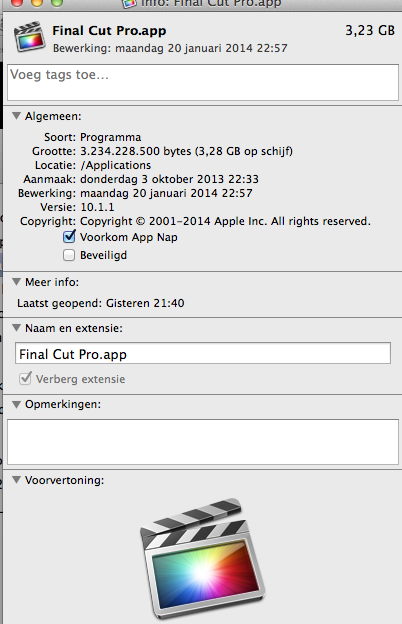
Now App Nap is disabled for FCPX.
No you cannot import while sharing to Youtube. Wait until the export is finished or until it stops again, then try the suggestions I have proposed.
To prevent any future issues just disable App Nap, and next time you import from a card make sure that "Copy files to Final Cut Events folder" is always checked in your import preferences.
A DVD+R DL disc is a double-layer DVD disc, not a Blu-Ray disc.
- Ronny
App Nap is a feature in Mavericks OS that will put programs to sleep if they are not actively used for a certain time. App Nap can stop FCPX from rendering or exporting, so it is better to disable it. This is how:
Go to your Applications folder, R-click the FCPX icon and select "Show Info".
In the Info window that opens put a checkmark in the "Prevent App Nap" box.
Now App Nap is disabled for FCPX.
No you cannot import while sharing to Youtube. Wait until the export is finished or until it stops again, then try the suggestions I have proposed.
To prevent any future issues just disable App Nap, and next time you import from a card make sure that "Copy files to Final Cut Events folder" is always checked in your import preferences.
A DVD+R DL disc is a double-layer DVD disc, not a Blu-Ray disc.
- Ronny
Please Log in to join the conversation.
15 Feb 2014 10:47 #41195
by stoffer2
Replied by stoffer2 on topic Having trouble exporting project
When i right click on fcp in applications, there is no show info see screen shot, i all ready always " copy files to final cut folders". I have previously burnt a blu-ray with the same duel layer only 5gb not 7.8gb so may be its to big as only 8.5 disc. My system is 10.7.5 and have 12GBRam and fcp 10.0.9. I might try the Master file route as 2nd go at reload dropped out at 92%.
Please Log in to join the conversation.
- ronny courtens
-
- Offline
- Moderator
-
Less
More
- Posts: 4455
- Thank you received: 962
15 Feb 2014 10:54 #41196
by ronny courtens
Replied by ronny courtens on topic Having trouble exporting project
Ah okay, I though you were working with Mavericks OS. In 10.7.5 App Nap does not exist, so never mind.
It seems to be quite a long program you are trying to export. So yes, try exporting as a Master File instead. This will make things much easier. Long uploads straight from your timeline to Youtube can be risky.
- Ronny
It seems to be quite a long program you are trying to export. So yes, try exporting as a Master File instead. This will make things much easier. Long uploads straight from your timeline to Youtube can be risky.
- Ronny
Please Log in to join the conversation.
15 Feb 2014 11:12 #41199
by stoffer2
Replied by stoffer2 on topic Having trouble exporting project
Can you give me a run down about master file export as my search has not shown me how to, also with the other problem with the Missing camera files in events and my project which I didn't notice till i completed the rough edit and then remover the card.
Can follow the Apple help solutions, can I delete and them reimport I know i will have to reedit to fix the drama.
Thanks for the help.
Chris
Can follow the Apple help solutions, can I delete and them reimport I know i will have to reedit to fix the drama.
Thanks for the help.
Chris
Please Log in to join the conversation.
15 Feb 2014 13:58 #41203
by stoffer2
Replied by stoffer2 on topic Having trouble exporting project
I don't have compressor, do I need that.
Please Log in to join the conversation.
- ronny courtens
-
- Offline
- Moderator
-
Less
More
- Posts: 4455
- Thank you received: 962
15 Feb 2014 14:59 #41205
by ronny courtens
Replied by ronny courtens on topic Having trouble exporting project
I think you haven't used FCPX quite often, so the best thing you can do with this is to start fresh.
1. First delete everything you have done so far: delete your Event and your Project, then close FCPX.
2. Insert the card in your card reader and launch FCPX again.
3. Create a new Event, then select Import to open the Import window. Select the card in your Import window and press Import. The Import settings window will open.
4. In the Import Settings window make sure "Copy files to Final Cut Events folder" is always checked, then click OK to start importing.
5. Wait until all your clips are imported and certainly do not attempt to remove the card until all clips have been imported.
6. When the importing is done create a new Project, then add the clips to your Timeline and edit them.
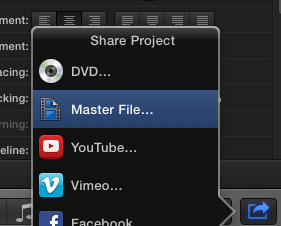
7. When the edit is completed press the Share button, the Share Project window will open. In the Share Project window select Master File:
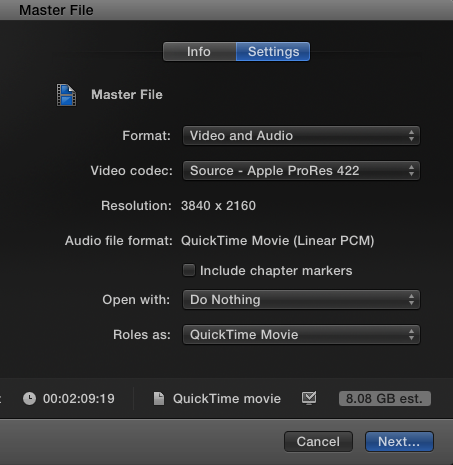
8. When you select Master File te Master File settings window will open. Click the Settings tab and make sure Video and Audio is selected and your Video Codec is set to Source:
Press Next, give your file a name and a destination and press Save to start exporting your edit.
9. When your export is finished re-open the Import File window in FCPX and import the exported movie into FCPX.
10. Select the imported movie in your Event Browser, press the Share button and export to Youtube.
I don't use Youtube, so I don't know if there are any file size limitations for uploading or even if uploading to Youtube really works. Perhaps someone else can chime in to give you better advice on this part.
- Ronny
1. First delete everything you have done so far: delete your Event and your Project, then close FCPX.
2. Insert the card in your card reader and launch FCPX again.
3. Create a new Event, then select Import to open the Import window. Select the card in your Import window and press Import. The Import settings window will open.
4. In the Import Settings window make sure "Copy files to Final Cut Events folder" is always checked, then click OK to start importing.
5. Wait until all your clips are imported and certainly do not attempt to remove the card until all clips have been imported.
6. When the importing is done create a new Project, then add the clips to your Timeline and edit them.
7. When the edit is completed press the Share button, the Share Project window will open. In the Share Project window select Master File:
8. When you select Master File te Master File settings window will open. Click the Settings tab and make sure Video and Audio is selected and your Video Codec is set to Source:
Press Next, give your file a name and a destination and press Save to start exporting your edit.
9. When your export is finished re-open the Import File window in FCPX and import the exported movie into FCPX.
10. Select the imported movie in your Event Browser, press the Share button and export to Youtube.
I don't use Youtube, so I don't know if there are any file size limitations for uploading or even if uploading to Youtube really works. Perhaps someone else can chime in to give you better advice on this part.
- Ronny
Please Log in to join the conversation.
16 Feb 2014 14:22 #41234
by stoffer2
Replied by stoffer2 on topic Having trouble exporting project
Deleted event and project re- imported all 45 clips and now after another 4 hours editing I am worried as even showing 100% on the task bar, when viewing background tasks ,transcoding and analyst still on 4%. Has for least 2 hours. Midnight here going to leave on another night. I hope everything sweet in morning.
Cheers
Cheers
Please Log in to join the conversation.
16 Feb 2014 21:20 #41255
by stoffer2
Replied by stoffer2 on topic Having trouble exporting project
Ronny any more idea's still after another 7 hours at 4%, don't want to remove card or shut down yet . The other game that I have had trouble sending to you tube , are all on this card and another and had no trouble loading clips.
chris
chris
Please Log in to join the conversation.
- ronny courtens
-
- Offline
- Moderator
-
Less
More
- Posts: 4455
- Thank you received: 962
17 Feb 2014 06:13 #41263
by ronny courtens
Replied by ronny courtens on topic Having trouble exporting project
Hi Chris,
This is not normal. What I don't understand is that you say you have imported the clips and you have been editing for 4 hours and there still are transcoding and analyzing tasks running. Does this mean you have started editing from the card before the importing was done?
Try this:
- Open the Background Tasks window and cancel all tasks, or if this doesn't work just shut down FCPX.
- When FCPX is closed: remove your card, then launch FCPX again and see if your edit plays correctly.
-Ronny
This is not normal. What I don't understand is that you say you have imported the clips and you have been editing for 4 hours and there still are transcoding and analyzing tasks running. Does this mean you have started editing from the card before the importing was done?
Try this:
- Open the Background Tasks window and cancel all tasks, or if this doesn't work just shut down FCPX.
- When FCPX is closed: remove your card, then launch FCPX again and see if your edit plays correctly.
-Ronny
Please Log in to join the conversation.
17 Feb 2014 09:11 #41274
by stoffer2
Replied by stoffer2 on topic Having trouble exporting project
YES , I always start editing as there are on this video 45 clips between 30 seconds and 30 minutes. I understand this is normal practice. I have produced a master and saved to desktop, next problem same as other video you tube won't let me upload even though I am allowed to up load more than 15 minutes. Updated to chrome no go still. Trying via usual direct to you tube from share, will break up into 2 halfs. I tried to send you screen clip but to big a file.
Cheers
Chris
Cheers
Chris
Please Log in to join the conversation.
- ronny courtens
-
- Offline
- Moderator
-
Less
More
- Posts: 4455
- Thank you received: 962
17 Feb 2014 09:35 #41275
by ronny courtens
Replied by ronny courtens on topic Having trouble exporting project
Hi Chris,
Good you have been able to export that Master File. AFAIK Youtube not only has file length limits but also file size limits. I think that's the problem: your Master File is too big to upload in one piece. You can bring the master file back into FCPX and share it again as H.264 (which produces a much smaller file size), then you can upload the H.264 version to Youtube. This should work.
As to editing while you are still importing:
Yes you can do this, but if you import straight from the card this can be very risky because you are working without any backup. If anything goes wrong, such as FCPX crashing while you are editing from the card, your card can get damaged and you can lose all your footage.
Editing straight from a card before the media have been imported is only acceptable when you have no other options, such as in a news situation where you only have a few short clips to edit and you must output the edit in the shortest possible time. In any other situation you either wait with editing until the importing from the card is done, or you copy your card onto your Mac and you import from the copy. Then at least you have a backup in case of a disaster.
- Ronny
Good you have been able to export that Master File. AFAIK Youtube not only has file length limits but also file size limits. I think that's the problem: your Master File is too big to upload in one piece. You can bring the master file back into FCPX and share it again as H.264 (which produces a much smaller file size), then you can upload the H.264 version to Youtube. This should work.
As to editing while you are still importing:
Yes you can do this, but if you import straight from the card this can be very risky because you are working without any backup. If anything goes wrong, such as FCPX crashing while you are editing from the card, your card can get damaged and you can lose all your footage.
Editing straight from a card before the media have been imported is only acceptable when you have no other options, such as in a news situation where you only have a few short clips to edit and you must output the edit in the shortest possible time. In any other situation you either wait with editing until the importing from the card is done, or you copy your card onto your Mac and you import from the copy. Then at least you have a backup in case of a disaster.
- Ronny
Please Log in to join the conversation.
17 Feb 2014 21:57 #41328
by stoffer2
Replied by stoffer2 on topic Having trouble exporting project
Thanks Ronny, what the difference with quality uploading direct from fcp to youtube compared to creating Master then uploading to you tube. I'm currently 98% first half so should go through , I want to load the best possible quality as shot HD on my Sony HXR-NX5P.
Please Log in to join the conversation.
- ronny courtens
-
- Offline
- Moderator
-
Less
More
- Posts: 4455
- Thank you received: 962
17 Feb 2014 22:03 #41329
by ronny courtens
Replied by ronny courtens on topic Having trouble exporting project
When you create a ProRes 422 master file you get a very high quality master. I think the master file will be too big in file size to upload it straight to Youtube via your browser.
If the ProRes 422 master is too big to upload it directly to Youtube you can import the master file in FCPX and Share to Youtube from within FCPX, or you can convert the master to H.264 using Compressor (it has a setting for Youtube) and upload the H.264 file via your browser. Both methods will give you a very good quality.
- Ronny
If the ProRes 422 master is too big to upload it directly to Youtube you can import the master file in FCPX and Share to Youtube from within FCPX, or you can convert the master to H.264 using Compressor (it has a setting for Youtube) and upload the H.264 file via your browser. Both methods will give you a very good quality.
- Ronny
Please Log in to join the conversation.
17 Feb 2014 22:16 #41332
by stoffer2
Replied by stoffer2 on topic Having trouble exporting project
Sounds like I need to get compressor , thanks go to go to work.
Thanks
Chris
Thanks
Chris
Please Log in to join the conversation.
19 Feb 2014 00:15 #41404
by stoffer2
Replied by stoffer2 on topic Having trouble exporting project
Can I download compressor when fcp is exporting to youtube?
Please Log in to join the conversation.
- ronny courtens
-
- Offline
- Moderator
-
Less
More
- Posts: 4455
- Thank you received: 962
19 Feb 2014 11:32 #41422
by ronny courtens
Replied by ronny courtens on topic Having trouble exporting project
Yes, you can.
-Ronny
-Ronny
Please Log in to join the conversation.
