


- Posts: 786
- Thank you received: 21
3 Post Moderation Rule for New Boarders (25 Jan 2021)
New boarders will have their posts moderated - Don't worry if you cannot see your post immediately.
Can't import photoshop files after 7 to X conversion.
- Jonathan Levin
-
 Topic Author
- Offline
- Platinum Member
-

Less
More
14 Feb 2014 02:30 #41115
by Jonathan Levin
Hi all.
I have a strange issue and not sure if it is a 7 to X issue or FCP 10.1.1.
I convert a fcp 7 project using 7 to X and specify to open in fcpx.
At first everything seems to have imported somewhat normally: project has all clips as well as some photoshop layered titles.
When I look at the photoshop titles in Fcp x, they appear pixilated.
When I went through my events and library to look for the photoshop files but they were not there! They somehow didn't import with the rest of my media, yet that title still appears in the project (timeline)
I then decided to re-import the photoshop files, clicked on import selected files, but the files don't actually import anywhere in the library or events.
I can import these same files into other non 7 to X converted libraries/events and they import just fine and look great in a project.
I also created a whole new library and project, copied and pasted the converted project(timeline) contents into the new project and same problem.
Anyone have a clue on this one?
Thanks for your help.
Jonathan
I have a strange issue and not sure if it is a 7 to X issue or FCP 10.1.1.
I convert a fcp 7 project using 7 to X and specify to open in fcpx.
At first everything seems to have imported somewhat normally: project has all clips as well as some photoshop layered titles.
When I look at the photoshop titles in Fcp x, they appear pixilated.
When I went through my events and library to look for the photoshop files but they were not there! They somehow didn't import with the rest of my media, yet that title still appears in the project (timeline)
I then decided to re-import the photoshop files, clicked on import selected files, but the files don't actually import anywhere in the library or events.
I can import these same files into other non 7 to X converted libraries/events and they import just fine and look great in a project.
I also created a whole new library and project, copied and pasted the converted project(timeline) contents into the new project and same problem.
Anyone have a clue on this one?
Thanks for your help.
Jonathan
Please Log in to join the conversation.
- ronny courtens
-

- Offline
- Moderator
-

Less
More
- Posts: 4455
- Thank you received: 962
14 Feb 2014 09:02 - 14 Feb 2014 09:03 #41125
by ronny courtens
Replied by ronny courtens on topic Can't import photoshop files after 7 to X conversion.
Hi Jonathan,
Select one of the pixilated PSD files on your timeline and press SHIFT+F. This should reveal the PSD clip in your Event. Does that work?
If it works you can replace the title on your timeline with the original PSD file to see if this eliminates the pixilation.
If the PSD clip does not show up in your Event you can try this:
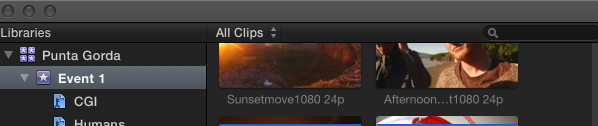
1. Make sure that your View Clip selection is set to show All Clips.
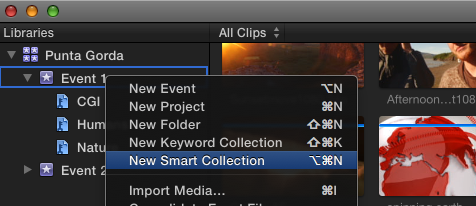
2. Select your Event and create a new Smart Collection. Name the Smart Collection (eg. "Stills").
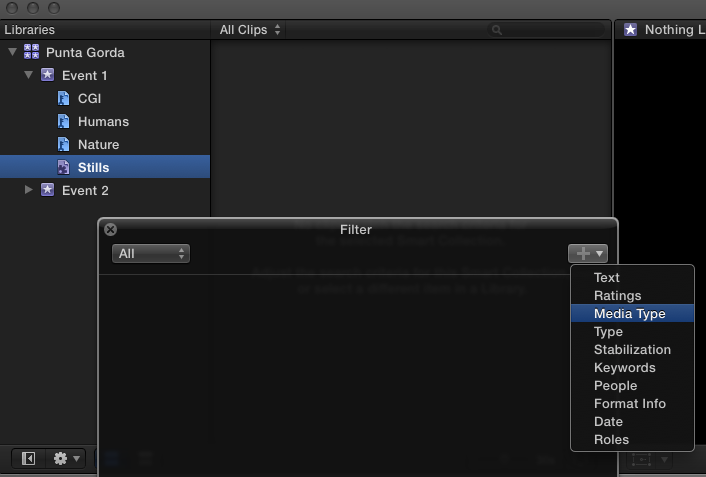
3. Double-click the Stills smart collection to open the Filter window. In the Filter window press the + sign ands select Media Type from the list.
4. Select "Media" - "Is" - "Stills" in the options (see screenshot), then close the Filter window.
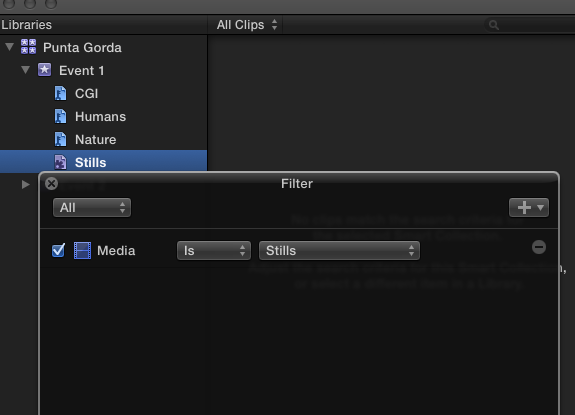
Now any stills you have in the Event should appear in the Stills smart collection. If you see your PSD files there you can replace them, if you don't see them in there you can import the original PSD files into FCPX and they should automatically appear in the Stills smart collection.
- Ronny
Select one of the pixilated PSD files on your timeline and press SHIFT+F. This should reveal the PSD clip in your Event. Does that work?
If it works you can replace the title on your timeline with the original PSD file to see if this eliminates the pixilation.
If the PSD clip does not show up in your Event you can try this:
1. Make sure that your View Clip selection is set to show All Clips.
2. Select your Event and create a new Smart Collection. Name the Smart Collection (eg. "Stills").
3. Double-click the Stills smart collection to open the Filter window. In the Filter window press the + sign ands select Media Type from the list.
4. Select "Media" - "Is" - "Stills" in the options (see screenshot), then close the Filter window.
Now any stills you have in the Event should appear in the Stills smart collection. If you see your PSD files there you can replace them, if you don't see them in there you can import the original PSD files into FCPX and they should automatically appear in the Stills smart collection.
- Ronny
Last edit: 14 Feb 2014 09:03 by ronny courtens.
Please Log in to join the conversation.
- Jonathan Levin
-
Topic Author
- Offline
- Platinum Member
-
Less
More
- Posts: 786
- Thank you received: 21
14 Feb 2014 17:12 #41162
by Jonathan Levin
Replied by Jonathan Levin on topic Can't import photoshop files after 7 to X conversion.
Ronny,
Thanks for spending time with me on this one. Before I go on, I've pretty much come to the conclusion that any pre FCP X film projects will have to be exported from FCP 7 as giant master files and archived for future use (if any). The XML conversion is just way to buggy and time consuming.
With that, today I started from scratch and followed your suggestions. I was finally able to find the PS file in the events folder using Shift-f. which I deleted the clip as well as deleting it from my timeline. I did a re-import and surprise, the file imported into an event folder today. :S
I then dragged the PS file to the timeline placing it above where it should be. Upon closer look at 100% in the viewer, type is still pixel and jagged.
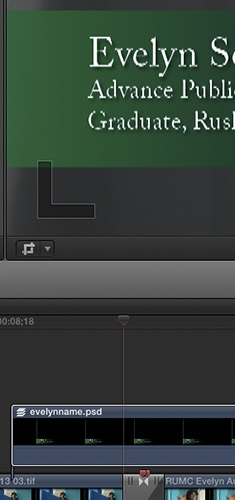
Another thing that I observe is if I select the PS title in the events/clips and zoom 100 % the type looks great!
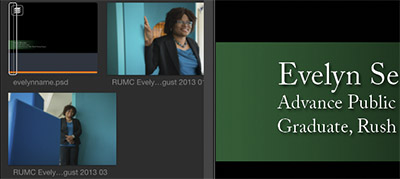
If I go to the timeline and zoom on the title there, it is pixelated. Do I know how to have problems or what?
BTW- I let everything render too.
Thanks for spending time with me on this one. Before I go on, I've pretty much come to the conclusion that any pre FCP X film projects will have to be exported from FCP 7 as giant master files and archived for future use (if any). The XML conversion is just way to buggy and time consuming.
With that, today I started from scratch and followed your suggestions. I was finally able to find the PS file in the events folder using Shift-f. which I deleted the clip as well as deleting it from my timeline. I did a re-import and surprise, the file imported into an event folder today. :S
I then dragged the PS file to the timeline placing it above where it should be. Upon closer look at 100% in the viewer, type is still pixel and jagged.
Another thing that I observe is if I select the PS title in the events/clips and zoom 100 % the type looks great!
If I go to the timeline and zoom on the title there, it is pixelated. Do I know how to have problems or what?
BTW- I let everything render too.
Please Log in to join the conversation.
- Jonathan Levin
-
Topic Author
- Offline
- Platinum Member
-
Less
More
- Posts: 786
- Thank you received: 21
14 Feb 2014 20:17 - 14 Feb 2014 20:18 #41175
by Jonathan Levin
Replied by Jonathan Levin on topic Can't import photoshop files after 7 to X conversion.
Just an update: I ran a test to see how an exported master file would look and the QT file with the PS title file in question looks fine! So it is something that is getting lost when this file is in place on the project.
I also toggled Better Performance with Better Quality, but that also made no difference.
And to again, I am not sure if this is a X to 7 issue or FCP X or both.
I also toggled Better Performance with Better Quality, but that also made no difference.
And to again, I am not sure if this is a X to 7 issue or FCP X or both.
Last edit: 14 Feb 2014 20:18 by Jonathan Levin.
Please Log in to join the conversation.
- ronny courtens
-
- Offline
- Moderator
-
Less
More
- Posts: 4455
- Thank you received: 962
14 Feb 2014 20:20 #41176
by ronny courtens
Replied by ronny courtens on topic Can't import photoshop files after 7 to X conversion.
Hi Jonathan,
Is your project by any chance interlaced? If you add a title to an interlaced timeline you have to select "Show Both Fields" in the Viewer display options.
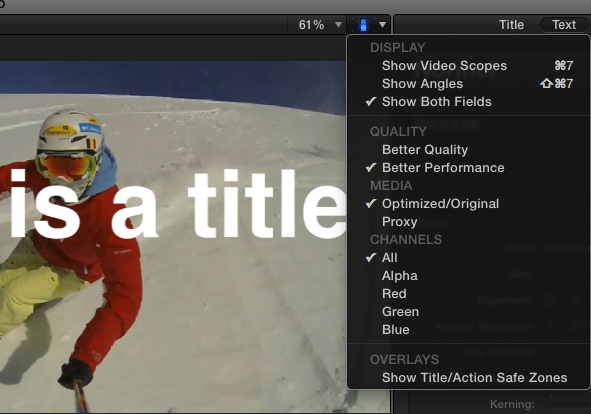
When you export the edit QT player will display both fields when playing back the movie, that's why you don't see the issue in the exported file.
- Ronny
Is your project by any chance interlaced? If you add a title to an interlaced timeline you have to select "Show Both Fields" in the Viewer display options.
When you export the edit QT player will display both fields when playing back the movie, that's why you don't see the issue in the exported file.
- Ronny
Please Log in to join the conversation.
- Jonathan Levin
-
Topic Author
- Offline
- Platinum Member
-
Less
More
- Posts: 786
- Thank you received: 21
14 Feb 2014 20:34 #41177
by Jonathan Levin
Replied by Jonathan Levin on topic Can't import photoshop files after 7 to X conversion.
Oh my god!
Ronny! Yes my project is was 1080i and as soon as I set the show both fields, 100% improvement! Thank you so much!!!!!
So can I just leave that setting to Show Both fields forever, even if I work mostly in Progressive now?
I can't thank you enough!
Jonathan
Ronny! Yes my project is was 1080i and as soon as I set the show both fields, 100% improvement! Thank you so much!!!!!
So can I just leave that setting to Show Both fields forever, even if I work mostly in Progressive now?
I can't thank you enough!
Jonathan
Please Log in to join the conversation.
- ronny courtens
-
- Offline
- Moderator
-
Less
More
- Posts: 4455
- Thank you received: 962
14 Feb 2014 20:56 #41178
by ronny courtens
Replied by ronny courtens on topic Can't import photoshop files after 7 to X conversion.
I was going to say yes, you can do this. But then I wondered if FCPX was going to retain this setting after a restart, so I have tried it and it re-opens the Project with the default setting.
So you will have to remember to set the Viewer to Show Both Fields every time you re-open an interlaced Project.
- Ronny
So you will have to remember to set the Viewer to Show Both Fields every time you re-open an interlaced Project.
- Ronny
Please Log in to join the conversation.
- Jonathan Levin
-
Topic Author
- Offline
- Platinum Member
-
Less
More
- Posts: 786
- Thank you received: 21
14 Feb 2014 21:23 #41179
by Jonathan Levin
Replied by Jonathan Levin on topic Can't import photoshop files after 7 to X conversion.
I owe you many De Konnick beverages. 
Please Log in to join the conversation.
- ronny courtens
-
- Offline
- Moderator
-
Less
More
- Posts: 4455
- Thank you received: 962
14 Feb 2014 21:29 #41181
by ronny courtens
Replied by ronny courtens on topic Can't import photoshop files after 7 to X conversion.
Hahaha, how do you know De Koninck? It's one of Belgium's many great beers!
- Ronny
- Ronny
Please Log in to join the conversation.
- Jonathan Levin
-
Topic Author
- Offline
- Platinum Member
-
Less
More
- Posts: 786
- Thank you received: 21
14 Feb 2014 21:39 #41182
by Jonathan Levin
Replied by Jonathan Levin on topic Can't import photoshop files after 7 to X conversion.
Like I might have mentioned before, if I were to visit Belgium, there is a good chance I might never leave unless I was kicked out! :woohoo:
Are you familiar with Celis? The original Hogartten and Grand Cru. They were my absolute favorites. Years back, Pierre moved his brewing operation to Austin(?) Texas. I think that Miller bought them out, was never the same. But then Pierre was doing some special cave aged stuff that was wonderful.
Sadly he died a few years back, but I hear that his daughter Christine has bought back the Celis name and has some plans for that.
Jonathan
Are you familiar with Celis? The original Hogartten and Grand Cru. They were my absolute favorites. Years back, Pierre moved his brewing operation to Austin(?) Texas. I think that Miller bought them out, was never the same. But then Pierre was doing some special cave aged stuff that was wonderful.
Sadly he died a few years back, but I hear that his daughter Christine has bought back the Celis name and has some plans for that.
Jonathan
Please Log in to join the conversation.
- ronny courtens
-
- Offline
- Moderator
-
Less
More
- Posts: 4455
- Thank you received: 962
15 Feb 2014 09:53 - 15 Feb 2014 09:53 #41193
by ronny courtens
Replied by ronny courtens on topic Can't import photoshop files after 7 to X conversion.
Yes, I know Celis. It's a lovely beer. Celis White is still being brewed in Belgium by the Vansteenberge Brewery. I heard Christine was teaming up with a Japanese guy to also start up the brewing activities in Austin again. Beer is not only big business over here, it's also deeply nested in our family traditions. If you love beer, chocolates or diamonds Belgium is a paradise.
Two years ago we have edited a huge amount of television programs about Belgian beers. If you ever come to Belgium I will take you to a famous pub where you can taste every single beer from our 115 traditional breweries :woohoo:
- Ronny
Two years ago we have edited a huge amount of television programs about Belgian beers. If you ever come to Belgium I will take you to a famous pub where you can taste every single beer from our 115 traditional breweries :woohoo:
- Ronny
Last edit: 15 Feb 2014 09:53 by ronny courtens.
Please Log in to join the conversation.
- jjsanderson
-

- Offline
- Elite Member
-

15 Feb 2014 11:21 #41200
by jjsanderson
Replied by jjsanderson on topic Can't import photoshop files after 7 to X conversion.
Ronny, if you organised an FCPX pub crawl in Brussels, I suspect we'd show the post-production world precisely how 'professional' FCPX users are! I've also a strong suspicion that you wouldn't be buying any of the drinks. 
Please Log in to join the conversation.
- ronny courtens
-
- Offline
- Moderator
-
Less
More
- Posts: 4455
- Thank you received: 962
15 Feb 2014 15:01 #41206
by ronny courtens
Replied by ronny courtens on topic Can't import photoshop files after 7 to X conversion.
Haha, maybe I will just have to do that one day 
- Ronny
- Ronny
Please Log in to join the conversation.
- Jonathan Levin
-
Topic Author
- Offline
- Platinum Member
-
Less
More
- Posts: 786
- Thank you received: 21
15 Feb 2014 15:24 #41208
by Jonathan Levin
Replied by Jonathan Levin on topic Can't import photoshop files after 7 to X conversion.
Count me in!
Please Log in to join the conversation.
