


3 Post Moderation Rule for New Boarders (25 Jan 2021)
New boarders will have their posts moderated - Don't worry if you cannot see your post immediately.
clips disappearing in timeline
- halmasonberg
-
 Topic Author
- Offline
- New Member
-

- "The events in our lives happen in a sequence in time, but in their significance to ourselves, they find their own order... the continuous thread of revelation." -- Eudora Welty Filmmaker, screenwriter, guitar player, atheist Jew. "Shake off all th
Please Log in to join the conversation.
- ronny courtens
-

- Offline
- Moderator
-

- Posts: 4455
- Thank you received: 962
Never heard of this happening before. Can you post a screenshot of your timeline?
- Ronny
Please Log in to join the conversation.
- halmasonberg
-
Topic Author
- Offline
- New Member
-
- "The events in our lives happen in a sequence in time, but in their significance to ourselves, they find their own order... the continuous thread of revelation." -- Eudora Welty Filmmaker, screenwriter, guitar player, atheist Jew. "Shake off all th

Please Log in to join the conversation.
- halmasonberg
-
Topic Author
- Offline
- New Member
-
- "The events in our lives happen in a sequence in time, but in their significance to ourselves, they find their own order... the continuous thread of revelation." -- Eudora Welty Filmmaker, screenwriter, guitar player, atheist Jew. "Shake off all th
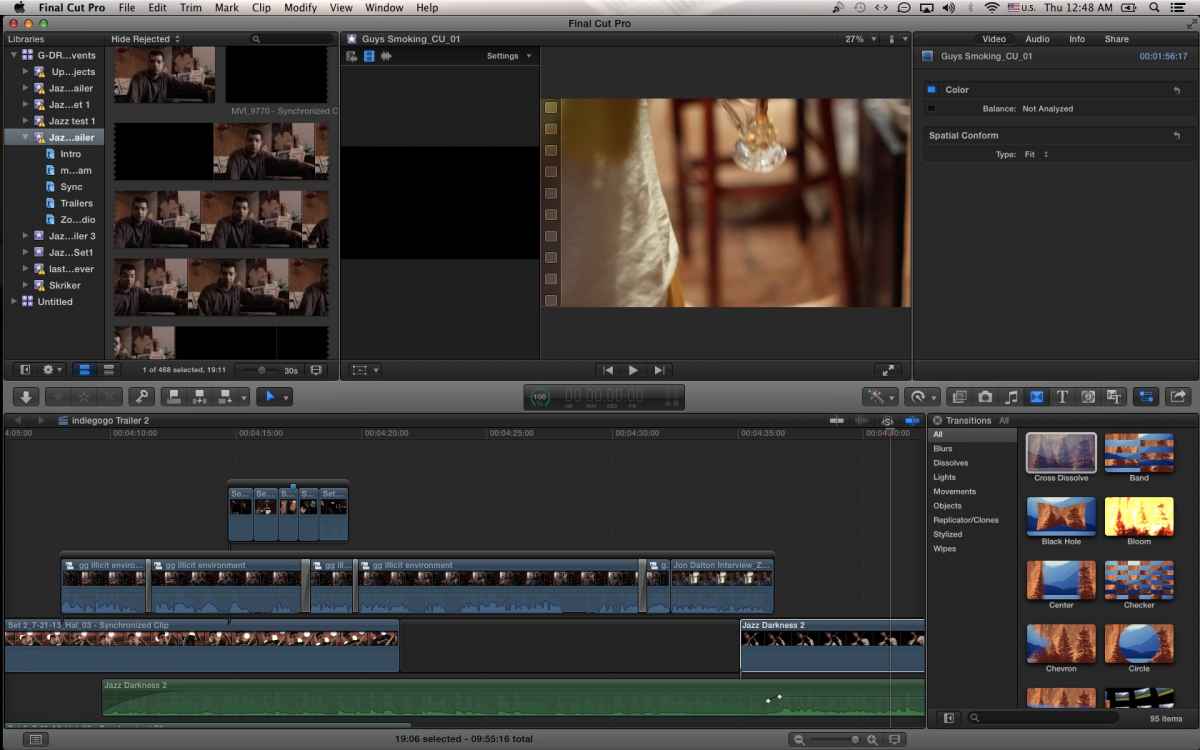
Please Log in to join the conversation.
- ronny courtens
-
- Offline
- Moderator
-
- Posts: 4455
- Thank you received: 962
I cannot see anything wrong on your timeline and I really see no treason why clips could suddenly disappear in this construction. If this keeps happening I would suggest you refresh your FCPX preferences, this is a good procedure when you encounter unexpected behavior like this.
- Ronny
Please Log in to join the conversation.
- halmasonberg
-
Topic Author
- Offline
- New Member
-
- "The events in our lives happen in a sequence in time, but in their significance to ourselves, they find their own order... the continuous thread of revelation." -- Eudora Welty Filmmaker, screenwriter, guitar player, atheist Jew. "Shake off all th
Please Log in to join the conversation.
- ronny courtens
-
- Offline
- Moderator
-
- Posts: 4455
- Thank you received: 962
www.digitalrebellion.com/prefman/
No, there is no danger doing this. In fact it's quite a frequent procedure when troubleshooting unexpected behavior.
- Ronn
Please Log in to join the conversation.
Please Log in to join the conversation.

grisbiz wrote: Thank you for this. I thought I was the only one with "disappearing clips" problem
Very bizzar. I've never heard of this or experienced it.
As far as I understand it FCPX writes every edit made into a "journal" database so to speak, so I could conceivably see how either a HD problem or a nasty bug could make clips disappear. However, like Ronny said I've never heard of this happening before. There has been over the last couple of years instances when "undo" would stop working which in turn meant that edits were not being saved, but as far as I know that has been resolved, but It could have crept back with a different result.
So a few suggestions:
1- Run some HD diagnosis, startup in recover mode (command R) and run repair disk in disk utility. Also open the console and choose "all messages" and then search for "I/O Error".
2- Make a screen recording while you are working. About a year or so ago I was puzzled by finding an "a" at the end of nearly all my titles. I wrote up bug reports and was even making a screencast to sent to Apple. Then when I reviewed my screencast and saw all the keys I was pressing, I was actually typing "a" to return to the main Selection tool. Thusly it was my fault. (I was using ScreenFlow which allow you to display all the keys you have typed during the capture). If you find it is not something you are doing, you would have something good to post here or send off to Apple.
3-Next time it happens, if you don't do number 2, check and see if "undo" is dimmed in the edit menu.
Please Log in to join the conversation.
- aerikson09
-
- Offline
- New Member
-
- Posts: 7
- Thank you received: 0

Please Log in to join the conversation.
Here is an article on submitting good feedback:
www.fcpworks.com/submitting-better-fcpx-feedback-to-apple/
Please Log in to join the conversation.
clips in connected storylines disappear, leaving transitions behind.
maybe we're doing some kind of wrong shortchut command while zoomed.
it normally realize it happened when i restart working in the project, so maybe it's something that happens when i close my project.
Please Log in to join the conversation.
Please Log in to join the conversation.
- aerikson09
-
- Offline
- New Member
-
- Posts: 7
- Thank you received: 0
We use sparse images with a RAID system, opening the sparse images like hard drives to work on projects. Within the sparse image is a raw files folder and the Final Cut X library. Everything is self-contained within each sparse, and we have hundreds of projects that we work on in a season.
At work, our team found out that sometimes random clips are linked to other ones, particularly clips that are storylined or have transitions (they do not and often are not located in the same place - often they're in complete opposite ends of the timeline). We have problems where we'll zoom out and see transitions with nothing else after them. One of my co-workers thinks that sometimes you can delete something, not knowing that it's randomly tied to another clip in the timeline, so to combat this - we've been zooming out of the timeline everytime we delete something to see if it's deleting other clips with it. If so, we hit command + z to undo, and we try again. Sometimes you have to deselect other clips to isolate the one you want to delete.
Today my patience was tried when I went to relink a file, and in doing so, I saw it disappear before my eyes! I was instantly trying to undo it, but nothing worked. When I zoomed out, I saw hours of work gone. At that point I knew it was time to go home, this could not be fixed and now I must re-do almost the entire graphics/generators/image work on Monday.

I could really use some help in figuring out these issues. Our team has a major deadline coming up and we cannot afford to have this happen often. It's weird, because this one project seems to be troublesome, where other projects we open have no issues at all. It's very inconsistent. Here's to hoping we find a pattern.
Please Log in to join the conversation.
Would it be possible for you to work without the sparse disk images and then see if it still happens? Also what is your reason for using sparse disk images? That was widespread pre FCPX 10.1, but I'm not sure the advantage of doing it? Specifically in your case as it doesn't allow for collaborative editing with shared media.
Please Log in to join the conversation.
- aerikson09
-
- Offline
- New Member
-
- Posts: 7
- Thank you received: 0
There are 2 or 3 other people complaining on this forum about these issues... if they use sparse images, then I'll call it a pattern. I had never heard of sparse images before utilizing Small Tree's workflow, so it may not be the case for the others who have complained on here.
Please Log in to join the conversation.
- aerikson09
-
- Offline
- New Member
-
- Posts: 7
- Thank you received: 0
Please Log in to join the conversation.
just found another complaint:
www.fcp.co/forum/4-final-cut-pro-x-fcpx/...lips-changing-length
Please Log in to join the conversation.

Please Log in to join the conversation.
aerikson09 wrote: A sparseimage, when open on one person's computer, cannot be opened by anyone else.
in conjunction with Small Tree, who we bought the RAIDS ...
I think I understand your setup. It sounds like you are accessing your Small Tree RAID over a SMB/AFP or NFS network protocol, and your sparse disk images are on that shared drive. Is that correct?
BTW. The things you are wanting to do with sparse disk images are actually already part of FCP 10.1. You'll get a warning if opening a Library that is already open. And if you use managed media stored in your library (it's what we do in our shop) you'll never have any missing media issues. Especially if your Small Tree RAID is capable of running NFS, I would encourage you to investigate this workflow.
If this is indeed correct, a couple of notes:
1) the combination of the network and accessing the sparse disk images over that network could be contributing to the issue and I believe it is. Take a look at my note above for an explanation: www.fcp.co/forum/4-final-cut-pro-x-fcpx/...ng-in-timeline#47020
Sparse Disk Images over a network have been seen to have less than ideal performance, and the protocol you connect with could be influencing performance and possibly not writing data properly as well. See here:
forums.creativecow.net/thread/335/56461
2) At our shop we saw some significant bugs with Mavricks and accessing NFS shares. Kernal panics, FCPX crashes, etc. Since moving to Yosomite we haven't seen those issues and things are working fine. There are a few notes about NFS issues in recent versions of Mac OS noted on the bottom of this page:
www.bresink.com/osx/NFSManager.html
If would STRONGLY recommend that your IT folks contact Small Tree regarding your sparse image workflow. If you continue to have issues you should consider brining in some FCPX workflow experts. FCPworks.com or www.10dot1.co.uk
Please Log in to join the conversation.
