


- Posts: 66
- Thank you received: 2
3 Post Moderation Rule for New Boarders (25 Jan 2021)
New boarders will have their posts moderated - Don't worry if you cannot see your post immediately.
assign audio channel in multi clip editor or compound clip editor
- KarlSutton
-
 Topic Author
- Offline
- Senior Member
-

Less
More
12 Feb 2014 17:32 #41034
by KarlSutton
Somehow I have audio playing out of ch 3 in my compound clip editor & multi-clip editor & can't figure out how to assign it back to ch 1 and/or 2 ?
Please Log in to join the conversation.
- ronny courtens
-

- Offline
- Moderator
-

Less
More
- Posts: 4455
- Thank you received: 962
12 Feb 2014 19:17 #41035
by ronny courtens
Replied by ronny courtens on topic assign audio channel in multi clip editor or compound clip editor
What do you mean by channel 3? Are you editing in surround?
- Ronny
- Ronny
Please Log in to join the conversation.
- KarlSutton
-
Topic Author
- Offline
- Senior Member
-
Less
More
- Posts: 66
- Thank you received: 2
12 Feb 2014 19:50 #41037
by KarlSutton
Replied by KarlSutton on topic assign audio channel in multi clip editor or compound clip editor
Well that's what I don't understand - it goes from stereo in the main timeline to a surround meter when I open up the various editors. ? ? ?
Please Log in to join the conversation.
- ronny courtens
-
- Offline
- Moderator
-
Less
More
- Posts: 4455
- Thank you received: 962
12 Feb 2014 20:07 - 12 Feb 2014 20:09 #41039
by ronny courtens
Replied by ronny courtens on topic assign audio channel in multi clip editor or compound clip editor
Ah, I see. Select the problematic CC or multiclip in the Library Browser, then in the Inspector > Info tab, under File Information, click the Modify Settings button.
The settings window for your clip will open. In the settings window set "Audio Channels" to Stereo and click OK.
- Ronny
The settings window for your clip will open. In the settings window set "Audio Channels" to Stereo and click OK.
- Ronny
Last edit: 12 Feb 2014 20:09 by ronny courtens.
Please Log in to join the conversation.
- KarlSutton
-
Topic Author
- Offline
- Senior Member
-
Less
More
- Posts: 66
- Thank you received: 2
12 Feb 2014 21:15 #41040
by KarlSutton
Replied by KarlSutton on topic assign audio channel in multi clip editor or compound clip editor
okay when I do that is does indicate that the mutliclip is surround - but when I go to the modify settings the audio is set to automatic and is grayed out
This is concerning me because I will need to send this out to an audio editor via X to Pro.
Any other ideas? Thanks!
This is concerning me because I will need to send this out to an audio editor via X to Pro.
Any other ideas? Thanks!
Please Log in to join the conversation.
- KarlSutton
-
Topic Author
- Offline
- Senior Member
-
Less
More
- Posts: 66
- Thank you received: 2
12 Feb 2014 21:44 #41041
by KarlSutton
Replied by KarlSutton on topic assign audio channel in multi clip editor or compound clip editor
okay that worked for a multi clip but not the compound one
Please Log in to join the conversation.
- ronny courtens
-
- Offline
- Moderator
-
Less
More
- Posts: 4455
- Thank you received: 962
13 Feb 2014 07:29 - 13 Feb 2014 07:31 #41064
by ronny courtens
Replied by ronny courtens on topic assign audio channel in multi clip editor or compound clip editor
Hi Karl,
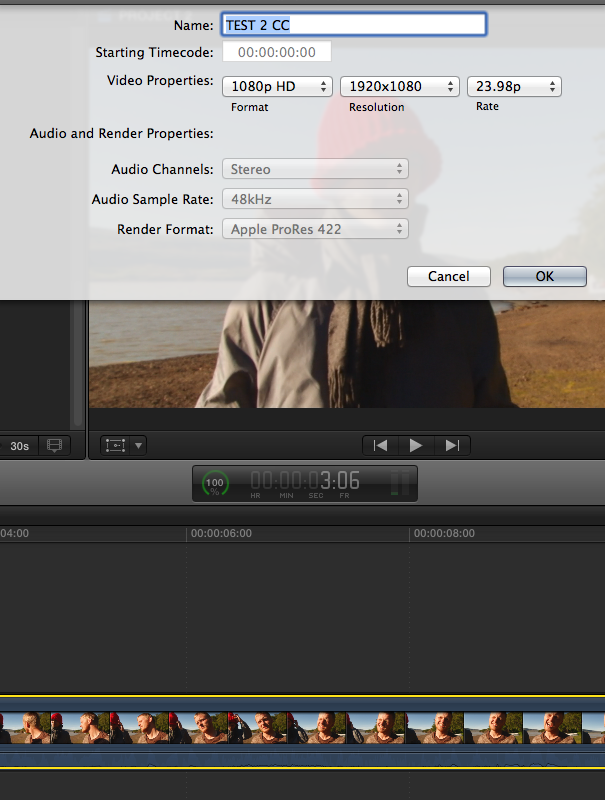
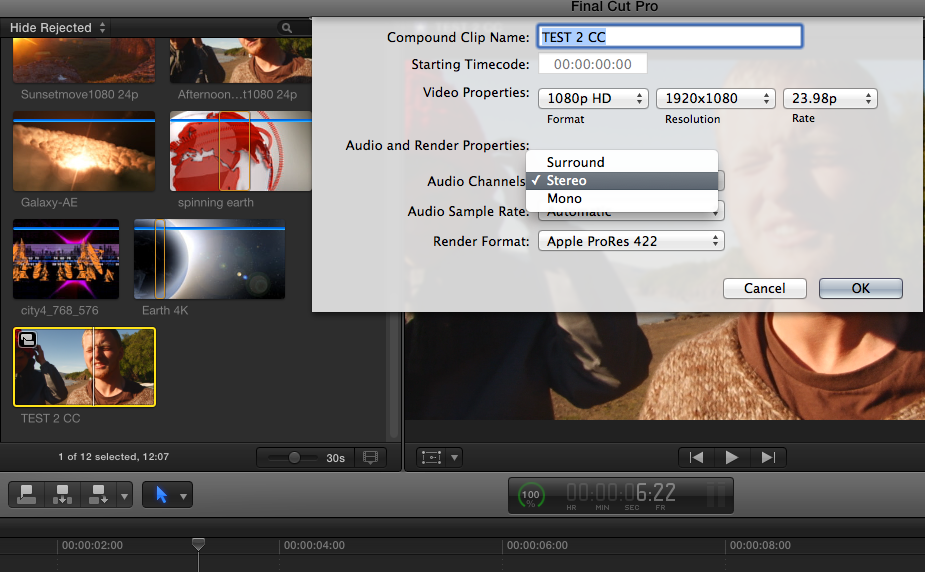
Select the compound clip in the Library Browser, not on the Timeline.
CC selected on Timeline: audio options greyed out
CC selected in Browser: audio options available
- Ronny
Select the compound clip in the Library Browser, not on the Timeline.
CC selected on Timeline: audio options greyed out
CC selected in Browser: audio options available
- Ronny
Last edit: 13 Feb 2014 07:31 by ronny courtens.
Please Log in to join the conversation.
