


- Posts: 3
- Thank you received: 0
3 Post Moderation Rule for New Boarders (25 Jan 2021)
New boarders will have their posts moderated - Don't worry if you cannot see your post immediately.
Inspector hide/show toggle not functioning
- baronvonguillot
-
 Topic Author
- Offline
- New Member
-

Less
More
10 Feb 2014 20:49 #40900
by baronvonguillot
Inspector hide/show toggle not functioning was created by baronvonguillot
In Final Cut Pro 10.1.1, my "show" option in the inspector for transform, crop, etc has disappeared. It has "hide" but not "show." I can't open any of the options to adjust the settings.
The skim tool toggle has also stopped working. It stays on all of the time. Not even the hot key or top menu will turn it off. And audio skimming and snapping won't turn on either.
Any ideas?
I've tried running pref manager, house cleaner, I even deleted the app and reinstalled through the app store.
-JOSH
The skim tool toggle has also stopped working. It stays on all of the time. Not even the hot key or top menu will turn it off. And audio skimming and snapping won't turn on either.
Any ideas?
I've tried running pref manager, house cleaner, I even deleted the app and reinstalled through the app store.
-JOSH
Please Log in to join the conversation.
- ronny courtens
-

- Offline
- Moderator
-

Less
More
- Posts: 4455
- Thank you received: 962
10 Feb 2014 20:58 #40902
by ronny courtens
Replied by ronny courtens on topic Inspector hide/show toggle not functioning
Create a new admin user, launch FCPX and see if everything works with the new user.
- Ronny
- Ronny
Please Log in to join the conversation.
- baronvonguillot
-
Topic Author
- Offline
- New Member
-
Less
More
- Posts: 3
- Thank you received: 0
10 Feb 2014 21:08 #40906
by baronvonguillot
Replied by baronvonguillot on topic Inspector hide/show toggle not functioning
That worked!
Thanks!
Thanks!
Please Log in to join the conversation.
10 Mar 2014 19:13 #42414
by andykay
OK so I have the same problem. My questions is this, is there another way to solve the problem? Although the answer supplied by Ronny works well, creating a new admin user is a pretty unsatisfactory solution as the new user doesn't have any of my personal settings, I can't access my folders etc. Surely there is a way to fix this, and if not is this a bug in 10.1.1?
Replied by andykay on topic Inspector hide/show toggle not functioning
ronny courtens wrote: Create a new admin user, launch FCPX and see if everything works with the new user.
- Ronny
OK so I have the same problem. My questions is this, is there another way to solve the problem? Although the answer supplied by Ronny works well, creating a new admin user is a pretty unsatisfactory solution as the new user doesn't have any of my personal settings, I can't access my folders etc. Surely there is a way to fix this, and if not is this a bug in 10.1.1?
Please Log in to join the conversation.
- StripedShirtMedia
-

- Offline
- New Member
-
Less
More
- Posts: 7
- Thank you received: 0
18 Sep 2014 14:01 #52864
by StripedShirtMedia
Replied by StripedShirtMedia on topic Inspector hide/show toggle not functioning
Hi, I'm running 10.1.3 and now I'm having the same issue. The Show/Hide toggle in the Inspector does not work. In fact after an effect has been added you can't Expand/Collapse via the triangle either. The triangle pivots but nothing happens. Has anyone been able to fix this issue yet? I can't work like this. This is painfully stressful. Thanks!
Please Log in to join the conversation.
- ronny courtens
-
- Offline
- Moderator
-
Less
More
- Posts: 4455
- Thank you received: 962
18 Sep 2014 14:40 #52867
by ronny courtens
Replied by ronny courtens on topic Inspector hide/show toggle not functioning
These UI issues are not a bug in FCP X and they are not related to a specific version of FCP X. They are related to the OS and they are caused by conflicting or corrupt preferences in the user profile. User profiles can become corrupted over time and cause unexpected UI behavior, that's why problems like this can suddenly appear even if everything has worked fine for a long time.
To find out if your problem is related to your user account: create a new admin user and run FCP X under this user. If this solves the UI problem you have a corrupt user account and you should not use the corrupt user anymore. You can manually configure the new admin user account just like you had configured the original one. Do NOT use Migration Assistant to copy the old user configuration into the new one, as this will also copy the problems.
- Ronny
To find out if your problem is related to your user account: create a new admin user and run FCP X under this user. If this solves the UI problem you have a corrupt user account and you should not use the corrupt user anymore. You can manually configure the new admin user account just like you had configured the original one. Do NOT use Migration Assistant to copy the old user configuration into the new one, as this will also copy the problems.
- Ronny
Please Log in to join the conversation.
- StripedShirtMedia
-
- Offline
- New Member
-
Less
More
- Posts: 7
- Thank you received: 0
18 Sep 2014 14:53 #52871
by StripedShirtMedia
Replied by StripedShirtMedia on topic Inspector hide/show toggle not functioning
Hi, thanks for the quick reply Ronny. I apologize, I didn't state that I had already tested another admin user account and it worked fine, but as another member has stated that it is not feasible to switch user accounts. I would have weeks of replicating my current user account. Isn't that true? Or is there some special way to rebuild my current setup under a new user account? I can''t believe that this is the only solution Apple could offer for such an issue, no matter what is causing it, their software is failing and this type of issue should be address don't you think? Thanks!
Please Log in to join the conversation.
- StripedShirtMedia
-
- Offline
- New Member
-
Less
More
- Posts: 7
- Thank you received: 0
18 Sep 2014 15:33 #52872
by StripedShirtMedia
Replied by StripedShirtMedia on topic Inspector hide/show toggle not functioning
And what's really bizarre is that some of the toggles work and some don't, so I would lean towards an FCPX issue also not exclusively a user account UI problem. Wouldn't that be logical?
Please Log in to join the conversation.
- ronny courtens
-
- Offline
- Moderator
-
Less
More
- Posts: 4455
- Thank you received: 962
18 Sep 2014 16:23 - 18 Sep 2014 16:24 #52874
by ronny courtens
Replied by ronny courtens on topic Inspector hide/show toggle not functioning
Nope, this is exactly what you can expect with a corrupted user.
This UI problem is not related to a particular version of FCP X. If this were an FCP X issue the forums would be filled with complaints. Yet I have received only 5 reports about this particular issue in the past 6 months, and although there are over 7000 users on this forum you seem to be only the third one having this problem. What we do see is that people have been reporting different FCP X UI issues since they switched to Mavericks, and not before. Particularly people who have installed Mavericks over the older OS have been experiencing such problems. In all cases, without any exception, creating a new user or doing a clean install of Mavericks have fixed this.
So I'm truly sorry that you have these issues and I'm aware that configuring a new user is a drag. This is not strictly an Apple problem, configuring a new admin user in any OS involves the same amount of work, or even more.
But before doing anything drastic I would suggest to try one thing that may (or may not) fix this problem:
Download and install a free utility called FCS Remover: www.digitalrebellion.com/fcsremover/
This will completely delete FCP X from your system. It does not just trash the app, it also deletes any hidden FCP X files and preferences on the OS level. When you have removed FCP X, re-install it from the App Store. Then update your OS to the latest version of Mavericks if you are running an older version. When everything is properly installed use Disk Utility to perform a Repair Permissions on your system drive.
If the problem is on the top-level of your user account this may also fix the UI issues. If the problem is deeper in your user preferences this will not fix it. But it's worth a try.
- Ronny
This UI problem is not related to a particular version of FCP X. If this were an FCP X issue the forums would be filled with complaints. Yet I have received only 5 reports about this particular issue in the past 6 months, and although there are over 7000 users on this forum you seem to be only the third one having this problem. What we do see is that people have been reporting different FCP X UI issues since they switched to Mavericks, and not before. Particularly people who have installed Mavericks over the older OS have been experiencing such problems. In all cases, without any exception, creating a new user or doing a clean install of Mavericks have fixed this.
So I'm truly sorry that you have these issues and I'm aware that configuring a new user is a drag. This is not strictly an Apple problem, configuring a new admin user in any OS involves the same amount of work, or even more.
But before doing anything drastic I would suggest to try one thing that may (or may not) fix this problem:
Download and install a free utility called FCS Remover: www.digitalrebellion.com/fcsremover/
This will completely delete FCP X from your system. It does not just trash the app, it also deletes any hidden FCP X files and preferences on the OS level. When you have removed FCP X, re-install it from the App Store. Then update your OS to the latest version of Mavericks if you are running an older version. When everything is properly installed use Disk Utility to perform a Repair Permissions on your system drive.
If the problem is on the top-level of your user account this may also fix the UI issues. If the problem is deeper in your user preferences this will not fix it. But it's worth a try.
- Ronny
Last edit: 18 Sep 2014 16:24 by ronny courtens.
Please Log in to join the conversation.
- StripedShirtMedia
-
- Offline
- New Member
-
Less
More
- Posts: 7
- Thank you received: 0
18 Sep 2014 19:30 #52880
by StripedShirtMedia
Replied by StripedShirtMedia on topic Inspector hide/show toggle not functioning
Hi Ronny,
Thanks, but none of that worked, even updated to the brand new 10.9.5 also. I already own the Pro version of Digital Rebellion suite of apps.
I understand your point-of-view, but if Apple's OS is causing UI interface issues with a paid Pro Apple application it should be their responsibility to address it.
This only started happening to me after the last FCPX update. Updates always seem to be the kiss of death.
Just out of curiosity I logged back into the temp admin user account I had made and now it's doing it there as well.
Totally unacceptable. I'm stuck between a rock and a rock. This sucks.
Oh well, thanks for your suggestions my friend.
Thanks, but none of that worked, even updated to the brand new 10.9.5 also. I already own the Pro version of Digital Rebellion suite of apps.
I understand your point-of-view, but if Apple's OS is causing UI interface issues with a paid Pro Apple application it should be their responsibility to address it.
This only started happening to me after the last FCPX update. Updates always seem to be the kiss of death.
Just out of curiosity I logged back into the temp admin user account I had made and now it's doing it there as well.
Totally unacceptable. I'm stuck between a rock and a rock. This sucks.
Oh well, thanks for your suggestions my friend.
Please Log in to join the conversation.
- ronny courtens
-
- Offline
- Moderator
-
Less
More
- Posts: 4455
- Thank you received: 962
18 Sep 2014 19:40 #52881
by ronny courtens
Replied by ronny courtens on topic Inspector hide/show toggle not functioning
Sorry to hear that didn't work and it does surprise me that now you are also having the problem in the new admin user account. I would advise you to report this to Apple asap using the Feedback menu in FCP X. I think there will be another bug fix update before the next feature release, so now is the time.
- Ronny
- Ronny
Please Log in to join the conversation.

26 Mar 2015 21:37 #61956
by rgilman
Replied by rgilman on topic Inspector hide/show toggle not functioning
I ran into this same issue today, found a fix and thought I would pass it along.
Following Ronny's suggestion, I used FCS Remover: www.digitalrebellion.com/fcsremover/ but I used it only partially. FSC Remover allows you to select which files will get removed.
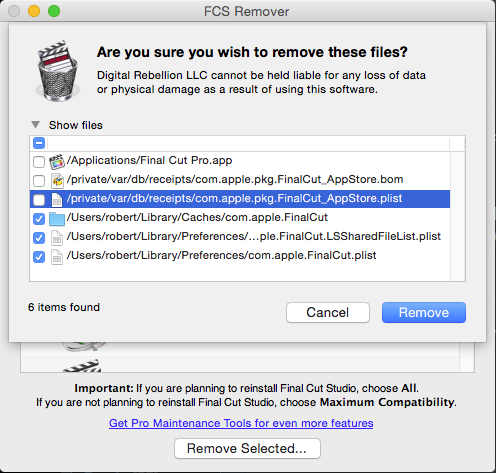
I left the application and receipts and removed the cache and preference files. That meant I needed to reconstruct my FCPX preferences, but that's not a big deal.
Seems to work so far (knock on wood!).
Following Ronny's suggestion, I used FCS Remover: www.digitalrebellion.com/fcsremover/ but I used it only partially. FSC Remover allows you to select which files will get removed.
I left the application and receipts and removed the cache and preference files. That meant I needed to reconstruct my FCPX preferences, but that's not a big deal.
Seems to work so far (knock on wood!).
Please Log in to join the conversation.
