


- Posts: 479
- Thank you received: 5
3 Post Moderation Rule for New Boarders (25 Jan 2021)
New boarders will have their posts moderated - Don't worry if you cannot see your post immediately.
Me yet again - Ken Burns updating madness!
10 Feb 2014 20:24 #40894
by parkerhqj
Me yet again - Ken Burns updating madness! was created by parkerhqj
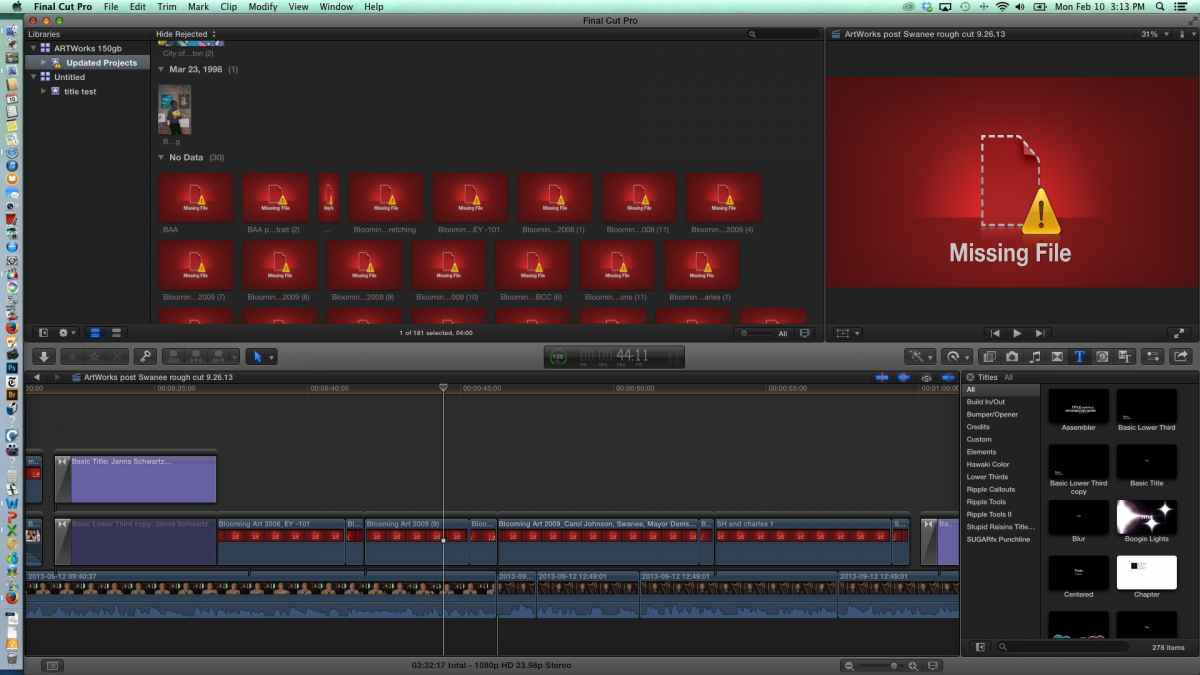
I'm sure you guys are already tuning me out, but you have to indulge me a little longer. Here's a project I updated which left behind my Ken Burns moves on various stills. I moved on them and added a freeze at the end (or the beginning). As you can see, they are in the browser as no data and are listed as missing files. And this is on the same computer I originally edited on. Ideas? thx
Please Log in to join the conversation.
- Tom Wolsky
-

- Offline
- Moderator
-

10 Feb 2014 20:31 #40896
by Tom Wolsky
Replied by Tom Wolsky on topic Me yet again - Ken Burns updating madness!
Did you try to reconnect the media? What happened?
Please Log in to join the conversation.
10 Feb 2014 20:38 #40898
by parkerhqj
Replied by parkerhqj on topic Me yet again - Ken Burns updating madness!
The missing files are are all in the browser above so they're not actually missing. I believe it's listed as No Data because they're moves, not files - even though they're listed as missing files. They should really be listed as missing effects, no? When I try to relink the files, it takes me to the folder with the updated library. I don't think it knows where else to go. thx
Please Log in to join the conversation.
- Tom Wolsky
-
- Offline
- Moderator
-
10 Feb 2014 20:52 #40901
by Tom Wolsky
Replied by Tom Wolsky on topic Me yet again - Ken Burns updating madness!
Ken Burns isn't an effect. It's a crop function. They seem to be missing in the project. Not sure what's happened, but can you reconnect the project files? When you use the show in browser function on a project clip what happens? When you use reveal in Finder on a project clip what happens?
Please Log in to join the conversation.
10 Feb 2014 21:00 - 10 Feb 2014 21:00 #40903
by parkerhqj
Replied by parkerhqj on topic Me yet again - Ken Burns updating madness!
When I use show in browser, it takes me to the No Data section of the browser you see in the JPEG I posted, NOT to the corresponding file that's actually in the browser (and also in the actual library when I open the package contents). As I said, there are no actual missing files. When I then use reveal in finder on that, it takes me nowhere.
Last edit: 10 Feb 2014 21:00 by parkerhqj.
Please Log in to join the conversation.
10 Feb 2014 21:17 #40907
by parkerhqj
Replied by parkerhqj on topic Me yet again - Ken Burns updating madness!
I'm starting to see this as pilot error. Ive opened a back-up that doesn't seem to be having the problem. I'm sorry to wasting your time. This has been a long week that way. I'm going to do us all a favor and swear off asking for help for a while! thx
Please Log in to join the conversation.
- Jonathan Levin
-

- Offline
- Platinum Member
-

Less
More
- Posts: 786
- Thank you received: 21
10 Feb 2014 23:08 #40913
by Jonathan Levin
Replied by Jonathan Levin on topic Me yet again - Ken Burns updating madness!
Hey parkerhqj,
Don't feel bad about asking anything as far as I'm concerned. The only way to learn are to ask ????. If no one asked, there would no answers.
I've had many problems solved from questions that we're not my own.
The thing here is the big thank you I owe to to minds here @ FCP.co
So my question for your question did some media file move/get renamed or something that might be confusing FCP.
Is your media managed by fcp or when set up project are media files referenced?
Jonathan
Don't feel bad about asking anything as far as I'm concerned. The only way to learn are to ask ????. If no one asked, there would no answers.
I've had many problems solved from questions that we're not my own.
The thing here is the big thank you I owe to to minds here @ FCP.co
So my question for your question did some media file move/get renamed or something that might be confusing FCP.
Is your media managed by fcp or when set up project are media files referenced?
Jonathan
Please Log in to join the conversation.
11 Feb 2014 13:20 #40951
by parkerhqj
Replied by parkerhqj on topic Me yet again - Ken Burns updating madness!
Jonathan - these guys have bailed me out so many times I can't even keep track. To say I'm grateful is an understatement. And I'm glad to see my stumbling questions have contributed so much to the fcpx learning community!
Part of my problem is that I have upgraded in the middle of some projects which I don't like doing. Unfortunately, most of my projects are long-term and there is no easy way to wait since the improvements in 10.1 are so important to my work flow. For the most part it has worked smoothly. I have so many projects going on, it only appears that all of them are problematic!
So the short answer to your question is that yes, lots of stuff has been moved around and much of it has been me trying to share attributes between projects. I'm starting to get a handle on where I've made mistakes and what to avoid in the future. All of my problems relate to localized changes related to the Motion Templates , so I am now reviewing Ripple's Media Management - Sharing Motion Templates section! thx
Part of my problem is that I have upgraded in the middle of some projects which I don't like doing. Unfortunately, most of my projects are long-term and there is no easy way to wait since the improvements in 10.1 are so important to my work flow. For the most part it has worked smoothly. I have so many projects going on, it only appears that all of them are problematic!
So the short answer to your question is that yes, lots of stuff has been moved around and much of it has been me trying to share attributes between projects. I'm starting to get a handle on where I've made mistakes and what to avoid in the future. All of my problems relate to localized changes related to the Motion Templates , so I am now reviewing Ripple's Media Management - Sharing Motion Templates section! thx
Please Log in to join the conversation.
