


- Posts: 52
- Thank you received: 2
3 Post Moderation Rule for New Boarders (25 Jan 2021)
New boarders will have their posts moderated - Don't worry if you cannot see your post immediately.
I have a strange playback issue in FCPX
10 Feb 2014 14:38 #40859
by bluefonia
I have a strange playback issue in FCPX was created by bluefonia
After importing footage from my Panasonic G6 camera, the clips are blurred/unsharp when played back. When I stop playback of the clips they are sharp. Playing back the very same clips in Quicktime, the image is sharp both played back or stopped.
When importing footage into FCPX I usually set the import to "create optimized files" (whatever the original footage is AVCHD or MPG4). I have also tried no optimizing for MPG4, but no difference.
The project setting when creating a new project is set to "use first clip".
My setup is: iMac i7, 3,4 GHz, 16 GB ram, NVIDIA GeForce GTX 680MX 2048 MB, FCP vers. 10.1
Wonder if it has anything to do with FCP 10.1. Footage imported before updating to 10.1 plays without these issues.
Any advise will be much appreciated
When importing footage into FCPX I usually set the import to "create optimized files" (whatever the original footage is AVCHD or MPG4). I have also tried no optimizing for MPG4, but no difference.
The project setting when creating a new project is set to "use first clip".
My setup is: iMac i7, 3,4 GHz, 16 GB ram, NVIDIA GeForce GTX 680MX 2048 MB, FCP vers. 10.1
Wonder if it has anything to do with FCP 10.1. Footage imported before updating to 10.1 plays without these issues.
Any advise will be much appreciated
Please Log in to join the conversation.
- Tom Wolsky
-

- Offline
- Moderator
-

10 Feb 2014 14:42 #40860
by Tom Wolsky
Replied by Tom Wolsky on topic I have a strange playback issue in FCPX
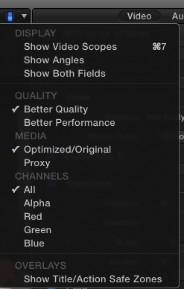
Is playback set to best quality or better performance?
Please Log in to join the conversation.
- ronny courtens
-

- Offline
- Moderator
-
Less
More
- Posts: 4455
- Thank you received: 962
10 Feb 2014 14:50 #40862
by ronny courtens
Replied by ronny courtens on topic I have a strange playback issue in FCPX
Adding to what Tom says: in 10.1 you select the Playback quality in the Viewer, not in the Preferences pane anymore.
- Ronny
- Ronny
Please Log in to join the conversation.
10 Feb 2014 15:09 #40863
by bluefonia
Replied by bluefonia on topic I have a strange playback issue in FCPX
Ah, thanks you so much, - you guys are fast 
@Tom: That did the trick.
I didnt give that setting one thought as I have always had the playback set to "better quality", but it seems updating to 10.1 has reset that setting to "better performance".
@Ronny: I was lookning unde preferences and thought I might had gone crazy as I could not find the settings. Thanks for pointing me to the Viewer.
@Tom: That did the trick.
I didnt give that setting one thought as I have always had the playback set to "better quality", but it seems updating to 10.1 has reset that setting to "better performance".
@Ronny: I was lookning unde preferences and thought I might had gone crazy as I could not find the settings. Thanks for pointing me to the Viewer.
Please Log in to join the conversation.
