


- Posts: 213
- Thank you received: 19
3 Post Moderation Rule for New Boarders (25 Jan 2021)
New boarders will have their posts moderated - Don't worry if you cannot see your post immediately.
Simple Bullet title reverts to default
06 Feb 2014 18:26 #40662
by bobmax48
Simple Bullet title reverts to default was created by bobmax48
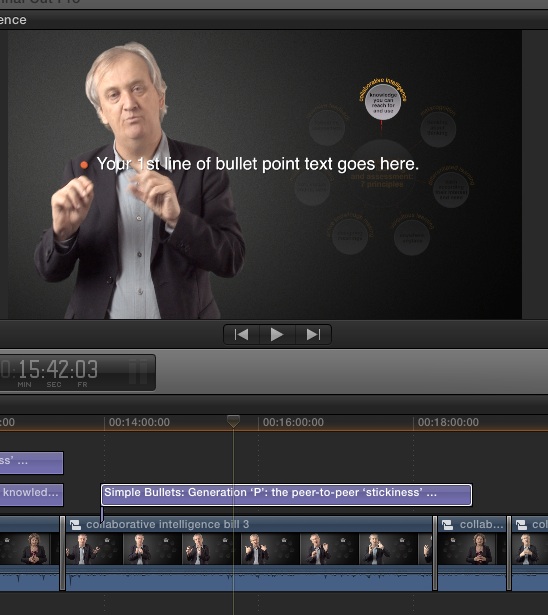
Until today I was able to copy a Simple Bullet title in the timeline by either option drag or copy and paste and retaining the properties of the copied title. Today when I try the type is reset to the default properties and font. But if you look at the copied title in the timeline you see that the previous text is showing on the title info but not in the text box in the inspector or the viewer display. Has anyone else had this problem.
And one other thing, the section of the timeline where you can read the time of the project sometimes disappears and then reappears. Strange behavior.
And one other thing, the section of the timeline where you can read the time of the project sometimes disappears and then reappears. Strange behavior.
Please Log in to join the conversation.
- ronny courtens
-

- Offline
- Moderator
-

Less
More
- Posts: 4455
- Thank you received: 962
06 Feb 2014 19:02 #40665
by ronny courtens
Replied by ronny courtens on topic Simple Bullet title reverts to default
That's unexpected behavior. Try refreshing your FCPX preferences to see if it solves the issue.
If you don't want to do this manually you can use Preference Manager (free) to refries the prefs for you: www.digitalrebellion.com/prefman/
If this doen't help, make a screenshot of the problematic title and post back with your hardware and software details.
- Ronny
If you don't want to do this manually you can use Preference Manager (free) to refries the prefs for you: www.digitalrebellion.com/prefman/
If this doen't help, make a screenshot of the problematic title and post back with your hardware and software details.
- Ronny
Please Log in to join the conversation.
06 Feb 2014 19:26 #40670
by bobmax48
Replied by bobmax48 on topic Simple Bullet title reverts to default
Thank you Ronny. Pref Manager did not help as you can see from the attached photo. I am on a Late 2011 17" MacBook Pro with 10.9.1 OS and FCPX 10.1.1 attached to a Pegasus R6.
Please Log in to join the conversation.
- ronny courtens
-
- Offline
- Moderator
-
Less
More
- Posts: 4455
- Thank you received: 962
06 Feb 2014 19:31 #40671
by ronny courtens
Replied by ronny courtens on topic Simple Bullet title reverts to default
After refreshing the preferences and restarting FCPX, did you try to re-duplicate an existing title once more?
- Ronny
- Ronny
Please Log in to join the conversation.
06 Feb 2014 19:36 #40673
by bobmax48
Replied by bobmax48 on topic Simple Bullet title reverts to default
Yes I did but as you can see the problem still exists. I have not added any plugins or any other apps to the computer. Only thing I did was not to use the laptop for two days.
Please Log in to join the conversation.
- ronny courtens
-
- Offline
- Moderator
-
Less
More
- Posts: 4455
- Thank you received: 962
06 Feb 2014 19:42 #40674
by ronny courtens
Replied by ronny courtens on topic Simple Bullet title reverts to default
Okay, try this: add a new Bullet Point template to your timeline. Modify the text and the font, then option-drag the title to duplicate it. Do you now get the modified text and font in the duplicate or do you just get the defaults again?
- Ronny
- Ronny
Please Log in to join the conversation.
06 Feb 2014 19:50 #40677
by bobmax48
Replied by bobmax48 on topic Simple Bullet title reverts to default
OK I added a new bullet point and option drag it. The title this time defaulted to the default text but kept the formatting of the copied title. I also created another project and had no problems with the option dragging reverting to the default. So maybe there is something about this project that is causing this problem.
Please Log in to join the conversation.
- ronny courtens
-
- Offline
- Moderator
-
Less
More
- Posts: 4455
- Thank you received: 962
06 Feb 2014 19:55 #40678
by ronny courtens
Replied by ronny courtens on topic Simple Bullet title reverts to default
Thank you for the tests. I agree there could be something fishy with your Project. The next thing I was going to suggest was actually to copy the contents of your existing Project into a new one to see if this would solve the issue. I think it will.
- Ronny
- Ronny
Please Log in to join the conversation.
06 Feb 2014 20:03 #40679
by bobmax48
Replied by bobmax48 on topic Simple Bullet title reverts to default
Creating a new project and copy and paste the contents from the old does allow for the titles to retain the properties and text. But all of the titles that did have problems and I corrected them now have defaulted back. So at least I only have a few to replace. Thank you for your help.
Looks like clearing out the prefs did solve my timeline lack of time at the top.
Looks like clearing out the prefs did solve my timeline lack of time at the top.
Please Log in to join the conversation.
- ronny courtens
-
- Offline
- Moderator
-
Less
More
- Posts: 4455
- Thank you received: 962
06 Feb 2014 20:04 #40680
by ronny courtens
Replied by ronny courtens on topic Simple Bullet title reverts to default
This confirms that there was definitely something wrong with your Project. Glad it works now.
- Ronny
- Ronny
Please Log in to join the conversation.
06 Feb 2014 20:23 - 06 Feb 2014 20:30 #40682
by bobmax48
Replied by bobmax48 on topic Simple Bullet title reverts to default
Well I spoke too soon I still have the problem even with a new project and copied over contents. So at least for this project I will have to create each title separately instead of copying one to another place on the timeline. I hope this problem is only on this project.
OK another observation, I think I was still having problems with the old titles that I corrected. Now that I created new titles, so far I have been able to copy them and keep the properties and text.
OK another observation, I think I was still having problems with the old titles that I corrected. Now that I created new titles, so far I have been able to copy them and keep the properties and text.
Last edit: 06 Feb 2014 20:30 by bobmax48.
Please Log in to join the conversation.
- ronny courtens
-
- Offline
- Moderator
-
Less
More
- Posts: 4455
- Thank you received: 962
06 Feb 2014 20:59 #40686
by ronny courtens
Replied by ronny courtens on topic Simple Bullet title reverts to default
Yes that's a bummer. Have you rendered your titles? If so I would suggest deleting your Project render files and try once more, making sure Background rendering is turned off.
- Ronny
- Ronny
Please Log in to join the conversation.
