


- Posts: 50
- Thank you received: 4
3 Post Moderation Rule for New Boarders (25 Jan 2021)
New boarders will have their posts moderated - Don't worry if you cannot see your post immediately.
Have I stumbled upon yet another 10.1.1 bug??
06 Feb 2014 12:55 #40642
by Rvdenmark
Have I stumbled upon yet another 10.1.1 bug?? was created by Rvdenmark
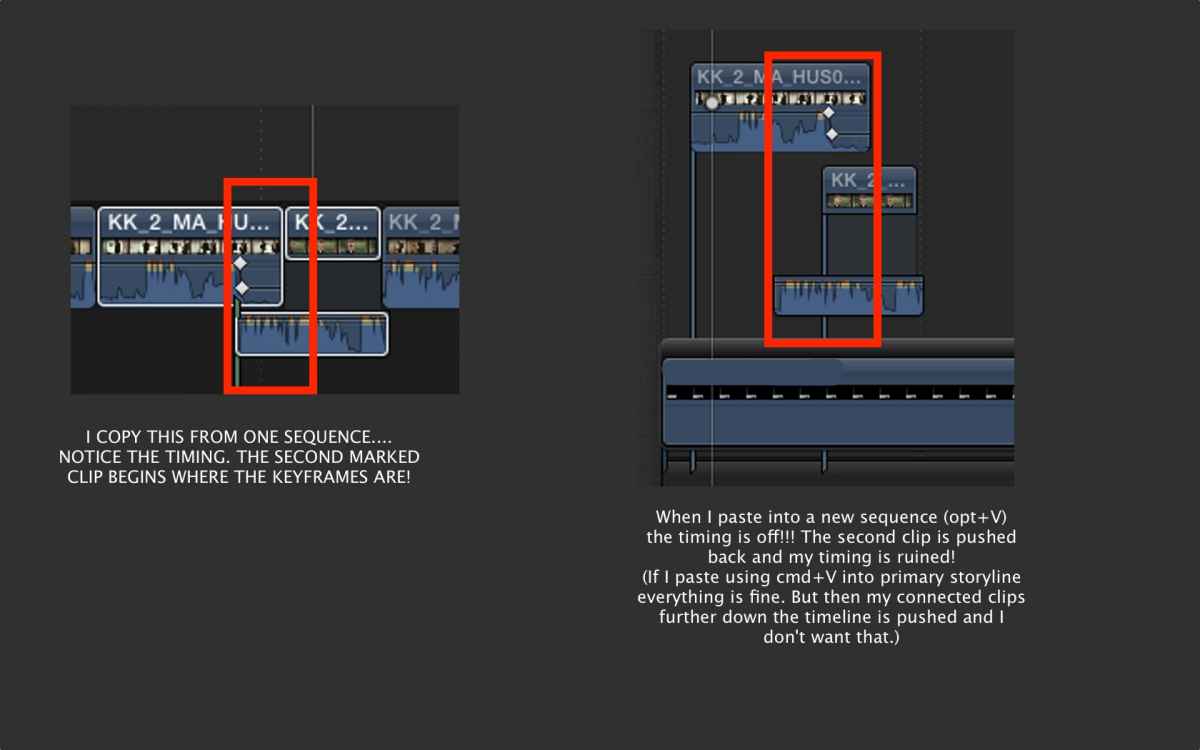
Please see attached image for very odd behaviour which used to work in previous versions.
Please Log in to join the conversation.
- Tom Wolsky
-

- Offline
- Moderator
-

06 Feb 2014 13:04 #40643
by Tom Wolsky
Replied by Tom Wolsky on topic Have I stumbled upon yet another 10.1.1 bug??
Where is the playhead/skimmer when you paste connected?
Please Log in to join the conversation.
- cinemaloha
-

- Offline
- Elite Member
-

Less
More
- Posts: 163
- Thank you received: 36
06 Feb 2014 16:15 #40652
by cinemaloha
Replied by cinemaloha on topic Have I stumbled upon yet another 10.1.1 bug??
What would happen if you highlighted the pasted clips in your second "sequence" and created a secondary storyline?
Opt+V is pasting as connected clips and Cmd+V is pasting to the primary storyline so that may have something to do with it.
Opt+V is pasting as connected clips and Cmd+V is pasting to the primary storyline so that may have something to do with it.
Please Log in to join the conversation.
06 Feb 2014 16:18 #40653
by Rvdenmark
Replied by Rvdenmark on topic Have I stumbled upon yet another 10.1.1 bug??
When I create i secondary storyline from the clips i want to copy and THEN copy the secondary storyline everything works perfect.
But in viersions prior to .1 I used to be able to do this without any problems. So just wondered if anyone else has come across this issue?
But in viersions prior to .1 I used to be able to do this without any problems. So just wondered if anyone else has come across this issue?
Please Log in to join the conversation.
- Tom Wolsky
-
- Offline
- Moderator
-
06 Feb 2014 18:12 #40659
by Tom Wolsky
Replied by Tom Wolsky on topic Have I stumbled upon yet another 10.1.1 bug??
If the playhead is at the end of the clip, it should work correctly.
Please Log in to join the conversation.
06 Feb 2014 21:25 #40687
by Rvdenmark
Replied by Rvdenmark on topic Have I stumbled upon yet another 10.1.1 bug??
Hello Tom
What do you mean? I have tried placing the playhead at the end when I copy and it is still the same. I have just recreated this behaviour in a completely different project and it is still the same. I only maintain timing if I paste into primary timeline or create secondary storyline.
What do you mean? I have tried placing the playhead at the end when I copy and it is still the same. I have just recreated this behaviour in a completely different project and it is still the same. I only maintain timing if I paste into primary timeline or create secondary storyline.
Please Log in to join the conversation.
- Tom Wolsky
-
- Offline
- Moderator
-
06 Feb 2014 21:38 #40690
by Tom Wolsky
Replied by Tom Wolsky on topic Have I stumbled upon yet another 10.1.1 bug??
Yes. In the new version when you lift clips from a storyline they become a secondary. That's the only way now to maintain the timing.
Please Log in to join the conversation.
06 Feb 2014 21:44 #40691
by Rvdenmark
Replied by Rvdenmark on topic Have I stumbled upon yet another 10.1.1 bug??
But they did not start out being secondary storyline clips. They origianlly started out as connected clips and they still have this behavior. So I guess I'll just have to make them secondary to perform this action 
In my opinion that is a major setback. More work for me instead of just selecting+copy+pase I now have to select+make secondary THEN copy and paste. Seems odd.
In my opinion that is a major setback. More work for me instead of just selecting+copy+pase I now have to select+make secondary THEN copy and paste. Seems odd.
Please Log in to join the conversation.
06 Feb 2014 21:46 #40692
by Rvdenmark
Replied by Rvdenmark on topic Have I stumbled upon yet another 10.1.1 bug??
And why is it I automatically make a secondary when I lift from storyline now?? Can anyone explain the logic behind it? I'm willing got work with it of course but I don't see the logic
Please Log in to join the conversation.
- Tom Wolsky
-
- Offline
- Moderator
-
06 Feb 2014 21:52 #40693
by Tom Wolsky
Replied by Tom Wolsky on topic Have I stumbled upon yet another 10.1.1 bug??
It's a feature. Because secondaries allow you to maintain the editing functionality (most of it) that you have in the primary storyline.
Please Log in to join the conversation.
- haysoos123
-
- Offline
- Platinum Member
-

Less
More
- Posts: 402
- Thank you received: 72
07 Feb 2014 01:06 #40697
by haysoos123
Replied by haysoos123 on topic Have I stumbled upon yet another 10.1.1 bug??
I have seen this behavior when copying and pasting connected clips, and I also consider it a bug. How hard is it to track the relative distances between clips in a selected group, and have it replicated when pasted? There's no technical reason I can see why this wouldn't work accurately. Sometimes you want to use secondary storylines, sometimes you want to use connected clips, and sometimes you want to use a combination of the two. It's not a dealbreaker, but it has caused wasted time on my part before.
Please Log in to join the conversation.
- ronny courtens
-

- Offline
- Moderator
-
Less
More
- Posts: 4455
- Thank you received: 962
07 Feb 2014 06:45 - 07 Feb 2014 07:06 #40706
by ronny courtens
Replied by ronny courtens on topic Have I stumbled upon yet another 10.1.1 bug??
When you select multiple clips in the primary storyline and you lift them from the primary they are now put into a secondary. That can be a good thing. You can ripple-trim the lifted clips, you can insert new clips in te secondary, you can overwrite clips... just like you can do in a primary storyline. And then you can add the clips back to the primary without having to lift them from the secondary first. Nice improvements, I agree.
But back to the original question.
When you select multiple clips with overlapping audio in the primary storyline (or connected to the primary storyline) and you copy and option-paste them above another Timeline (or above any other place in the same Timeline), they indeed get screwed up. No matter where your playhead is when you option-paste them.
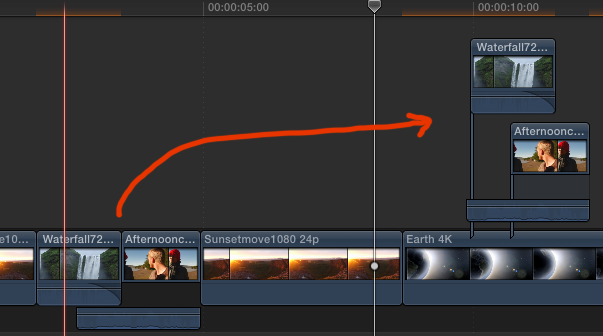
I agree this is a major bug. Having to put the clips in a secondary or in a CC before you can copy/option-paste them without screwing up the timing is a waste of time and unacceptable. My feedback has already been sent.
- Ronny
But back to the original question.
When you select multiple clips with overlapping audio in the primary storyline (or connected to the primary storyline) and you copy and option-paste them above another Timeline (or above any other place in the same Timeline), they indeed get screwed up. No matter where your playhead is when you option-paste them.
I agree this is a major bug. Having to put the clips in a secondary or in a CC before you can copy/option-paste them without screwing up the timing is a waste of time and unacceptable. My feedback has already been sent.
- Ronny
Last edit: 07 Feb 2014 07:06 by ronny courtens.
Please Log in to join the conversation.
07 Feb 2014 07:08 #40707
by plysat
Can't sleep? Try this: fcpxpert.net ;-)
Replied by plysat on topic Have I stumbled upon yet another 10.1.1 bug??
I hope you guys are all sending feedback. Some very odd things occasionally happen when popping clips out of the primary. The bug noted here is one, another is connected clips moving unexpectedly left or right (bad) when the gap redraws after lifting groups of clips from the primary (reported) and other weirdness. So... feedback is a good thing...
Can't sleep? Try this: fcpxpert.net ;-)
Please Log in to join the conversation.
- MadsLarsenNielsen
-
- Offline
- New Member
-

Less
More
- Posts: 14
- Thank you received: 2
07 Feb 2014 07:46 - 07 Feb 2014 07:50 #40709
by MadsLarsenNielsen
Replied by MadsLarsenNielsen on topic Have I stumbled upon yet another 10.1.1 bug??
This a serious bug.
And it gets weirder. Somehow I can only recreate the bug with J-cuts. L-cuts are fine.
And even weirder - it also happens when I Cmd+C a J-cut NOT from the primary storyline but as connected clips on top of the primary and Cmd+V them right next to each other.
So it seems sync is maintained when you paste a J-cut into the primary storyline. But not as connected clips. Using either Option+V or Cmd+V the timing is lost.
I think I discovered a workaround, though:
Instead of pasting as connected clips using Option+V try using Option+Click and simply drag a duplicate of the clips from the primary storyline. Sync now seems to be intact. This also works with connected clips, Option+Click them and drag a duplicate next to them.
And it gets weirder. Somehow I can only recreate the bug with J-cuts. L-cuts are fine.
And even weirder - it also happens when I Cmd+C a J-cut NOT from the primary storyline but as connected clips on top of the primary and Cmd+V them right next to each other.
So it seems sync is maintained when you paste a J-cut into the primary storyline. But not as connected clips. Using either Option+V or Cmd+V the timing is lost.
I think I discovered a workaround, though:
Instead of pasting as connected clips using Option+V try using Option+Click and simply drag a duplicate of the clips from the primary storyline. Sync now seems to be intact. This also works with connected clips, Option+Click them and drag a duplicate next to them.
Last edit: 07 Feb 2014 07:50 by MadsLarsenNielsen.
Please Log in to join the conversation.
- ronny courtens
-
- Offline
- Moderator
-
Less
More
- Posts: 4455
- Thank you received: 962
07 Feb 2014 08:10 #40710
by ronny courtens
Replied by ronny courtens on topic Have I stumbled upon yet another 10.1.1 bug??
Hi Mads,
Yep this works on the same Timeline, but if you want to paste into a different Project it still takes too many extra steps.
And yes it only happens with J-cuts, not with L-cuts.
This is a bug since 10.1.1 On a 10.0.9 system everything works perfectly.
- Ronny
Yep this works on the same Timeline, but if you want to paste into a different Project it still takes too many extra steps.
And yes it only happens with J-cuts, not with L-cuts.
This is a bug since 10.1.1 On a 10.0.9 system everything works perfectly.
- Ronny
Please Log in to join the conversation.
