


- Posts: 263
- Thank you received: 2
3 Post Moderation Rule for New Boarders (25 Jan 2021)
New boarders will have their posts moderated - Don't worry if you cannot see your post immediately.
Facebook 10 yr video - how to get depth of field effect
06 Feb 2014 12:53 #40641
by gaddster
MBP retina 15" 2014
imac 27 i7 2013
G-tech
Panasonic GH4, AC90, Gopro
Facebook 10 yr video - how to get depth of field effect was created by gaddster
Anyone in Facebook will have seen the Facebook 10 yr videos put together.
Just wondering how to get that DOF look (where the blurred sculling images are in the back ground and the foreground picture is nice and sharp etc
Is this something you would do in motion?
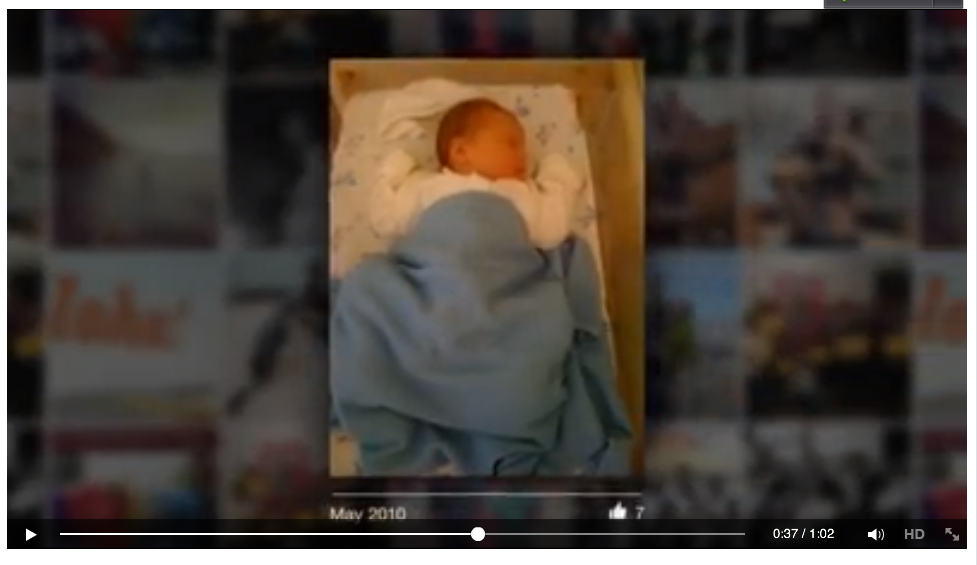
Just wondering how to get that DOF look (where the blurred sculling images are in the back ground and the foreground picture is nice and sharp etc
Is this something you would do in motion?
MBP retina 15" 2014
imac 27 i7 2013
G-tech
Panasonic GH4, AC90, Gopro
Please Log in to join the conversation.
06 Feb 2014 13:17 - 06 Feb 2014 13:18 #40645
by Makki
Replied by Makki on topic Facebook 10 yr video - how to get depth of field effect
You can use SliceEx with pretty good result
www.coremelt.com/videos/slicex-depth-of-field.html
Last edit: 06 Feb 2014 13:18 by Makki.
Please Log in to join the conversation.
06 Feb 2014 14:41 #40646
by gaddster
MBP retina 15" 2014
imac 27 i7 2013
G-tech
Panasonic GH4, AC90, Gopro
Replied by gaddster on topic Facebook 10 yr video - how to get depth of field effect
Actually i found that by adding a 'Gaussian blur' effect to a background image then putting a foreground image and 'key framing' its movement.. then darkening the background image and adding a 'drop shadow' etc
Its not brilliant but its a rough idea of what was required..
PS coremelt plugin looks great, will check it out
Its not brilliant but its a rough idea of what was required..
PS coremelt plugin looks great, will check it out
MBP retina 15" 2014
imac 27 i7 2013
G-tech
Panasonic GH4, AC90, Gopro
Please Log in to join the conversation.
- haysoos123
-

- Offline
- Platinum Member
-

Less
More
- Posts: 402
- Thank you received: 72
06 Feb 2014 20:38 #40684
by haysoos123
Replied by haysoos123 on topic Facebook 10 yr video - how to get depth of field effect
I would do this in After Effects in 3D space, and enable depth of field on the camera. Not only is this faster, it will act more like a simulated camera. Increase the aperture size to make it shallower and adjust to taste. Also, it's easier to position the pictures and then keyframe the camera movements. You could probably manually move things and add blur in FCPX, but it would take more time to get something good unless it was really basic.
Please Log in to join the conversation.

07 Feb 2014 02:25 - 07 Feb 2014 02:26 #40699
by BenB
Replied by BenB on topic Facebook 10 yr video - how to get depth of field effect
I use Motion for this, only when I need camera effects for movement, drop shadows and special lighting. Offers same advantages as AE. Plus, there is the camera's DOF controls that can create nice effects, too.
Last edit: 07 Feb 2014 02:26 by BenB.
Please Log in to join the conversation.
- Karsten Schlüter
-

- Offline
- Moderator
-

Less
More
- Posts: 3790
- Thank you received: 718
07 Feb 2014 07:18 - 07 Feb 2014 07:19 #40708
by Karsten Schlüter
Replied by Karsten Schlüter on topic Facebook 10 yr video - how to get depth of field effect
I'm with gaddster - no DoF, just a plain simple Gaussian:
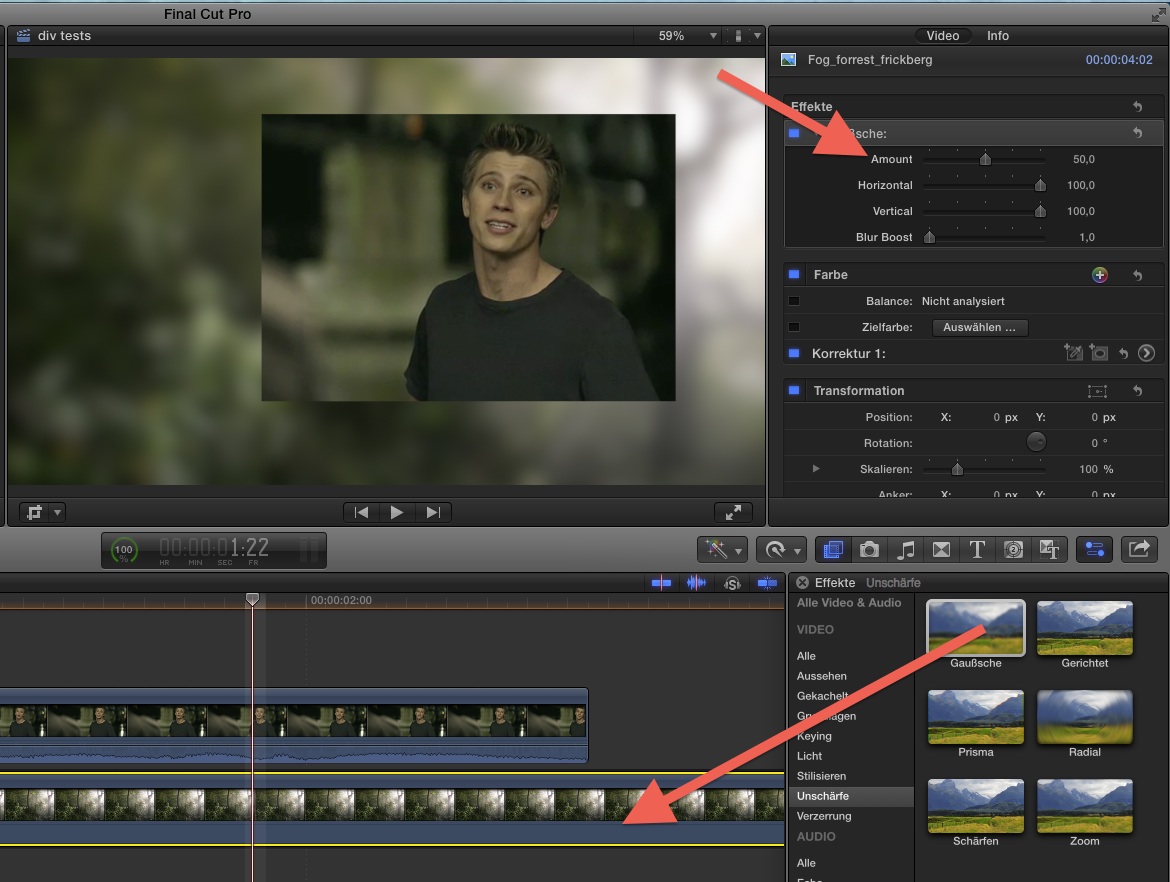
I'm using that constantly, to separate titles and logos from the background; key framing it gives a nice fade-in effect...
I'm using that constantly, to separate titles and logos from the background; key framing it gives a nice fade-in effect...
Last edit: 07 Feb 2014 07:19 by Karsten Schlüter.
Please Log in to join the conversation.
07 Feb 2014 08:58 #40713
by gaddster
MBP retina 15" 2014
imac 27 i7 2013
G-tech
Panasonic GH4, AC90, Gopro
Replied by gaddster on topic Facebook 10 yr video - how to get depth of field effect
Thanks everyone for your input
I have dabbled with AE but I'm no expert.
Benb, that sounds very interesting if you can use Motion, camera DOF controls sounds interesting
I have dabbled with AE but I'm no expert.
Benb, that sounds very interesting if you can use Motion, camera DOF controls sounds interesting
MBP retina 15" 2014
imac 27 i7 2013
G-tech
Panasonic GH4, AC90, Gopro
Please Log in to join the conversation.
- Karsten Schlüter
-
- Offline
- Moderator
-
Less
More
- Posts: 3790
- Thank you received: 718
07 Feb 2014 09:23 #40715
by Karsten Schlüter
explained for examople here:
www.fcp.co/motion/tutorials-for-apple-mo...1-on-macbreak-studio
Replied by Karsten Schlüter on topic Facebook 10 yr video - how to get depth of field effect
gaddster wrote: ... Motion, camera DOF controls sounds interesting
explained for examople here:
www.fcp.co/motion/tutorials-for-apple-mo...1-on-macbreak-studio
Please Log in to join the conversation.
07 Feb 2014 11:11 #40717
by gaddster
MBP retina 15" 2014
imac 27 i7 2013
G-tech
Panasonic GH4, AC90, Gopro
Replied by gaddster on topic Facebook 10 yr video - how to get depth of field effect
Thanks, great link Karsten.. may be worth buying that tutorial if i want to get into this in depth
MBP retina 15" 2014
imac 27 i7 2013
G-tech
Panasonic GH4, AC90, Gopro
Please Log in to join the conversation.
- Karsten Schlüter
-
- Offline
- Moderator
-
Less
More
- Posts: 3790
- Thank you received: 718
07 Feb 2014 11:31 - 07 Feb 2014 11:37 #40719
by Karsten Schlüter
.. but not the one I really meant!
Too 'fixed' on my heros Steve & Mark - my favorites! :lol:
No, what I had in mind is this (free) one:
play.macprovideo.com/motion5107-working-in-3d/11
Following advice given here allowed me to create some very impressive 'effects' (posting examples later, now in the office...)
Replied by Karsten Schlüter on topic Facebook 10 yr video - how to get depth of field effect
gaddster wrote: Thanks, great link Karsten....
.. but not the one I really meant!
Too 'fixed' on my heros Steve & Mark - my favorites! :lol:
No, what I had in mind is this (free) one:
play.macprovideo.com/motion5107-working-in-3d/11
Following advice given here allowed me to create some very impressive 'effects' (posting examples later, now in the office...)
Last edit: 07 Feb 2014 11:37 by Karsten Schlüter.
Please Log in to join the conversation.
07 Feb 2014 11:39 #40720
by gaddster
MBP retina 15" 2014
imac 27 i7 2013
G-tech
Panasonic GH4, AC90, Gopro
Replied by gaddster on topic Facebook 10 yr video - how to get depth of field effect
Thats a very clear tutorial, be interesting to see what examples you have Karsten.

MBP retina 15" 2014
imac 27 i7 2013
G-tech
Panasonic GH4, AC90, Gopro
Please Log in to join the conversation.
07 Feb 2014 13:26 - 07 Feb 2014 14:26 #40729
by BenB
Replied by BenB on topic Facebook 10 yr video - how to get depth of field effect
I've also got this 4 part free tutorial online about Motion camera controls:
www.macprovideo.com/hub/motion/understan...mera-controls-part-1
But honestly, the basic Gaussian blur, 2 layers, inside FCPX works just fine. Don't forget some very subtle drop shadow to enhance the effect is nice. Can work out really well keeping it simple. There are several Picture-in-Picture effects that will make this quick and easy to do inside of FCPX. It's not that complicated.
So I created a custom Effect to do this inside of FCPX. Pretty basic and simple, but effective. I hope to expand it with a 3D camera and publish some controls and behaviors over the weekend.
Click here to download it.
www.macprovideo.com/hub/motion/understan...mera-controls-part-1
But honestly, the basic Gaussian blur, 2 layers, inside FCPX works just fine. Don't forget some very subtle drop shadow to enhance the effect is nice. Can work out really well keeping it simple. There are several Picture-in-Picture effects that will make this quick and easy to do inside of FCPX. It's not that complicated.
So I created a custom Effect to do this inside of FCPX. Pretty basic and simple, but effective. I hope to expand it with a 3D camera and publish some controls and behaviors over the weekend.
Click here to download it.
Last edit: 07 Feb 2014 14:26 by BenB.
Please Log in to join the conversation.
08 Feb 2014 10:12 #40762
by gaddster
MBP retina 15" 2014
imac 27 i7 2013
G-tech
Panasonic GH4, AC90, Gopro
Replied by gaddster on topic Facebook 10 yr video - how to get depth of field effect
Hi BenB, thanks thats great, much appreciated.
So would I animate the movement in motion to the way i want it and save it as a present for FCPX
Not to self: spend some time learning & utilising Motion more
So would I animate the movement in motion to the way i want it and save it as a present for FCPX
Not to self: spend some time learning & utilising Motion more
MBP retina 15" 2014
imac 27 i7 2013
G-tech
Panasonic GH4, AC90, Gopro
Please Log in to join the conversation.
08 Feb 2014 12:31 #40767
by BenB
Replied by BenB on topic Facebook 10 yr video - how to get depth of field effect
You would do ALL of the work in Motion. Export a ProRes file for use in your edit. This would not be an effect template, no.
Please Log in to join the conversation.
08 Feb 2014 22:12 #40797
by gaddster
MBP retina 15" 2014
imac 27 i7 2013
G-tech
Panasonic GH4, AC90, Gopro
Replied by gaddster on topic Facebook 10 yr video - how to get depth of field effect
Thanks BenB
think I need a tutorial now in motion, I have underestimated this app
think I need a tutorial now in motion, I have underestimated this app
MBP retina 15" 2014
imac 27 i7 2013
G-tech
Panasonic GH4, AC90, Gopro
Please Log in to join the conversation.
09 Feb 2014 14:53 #40813
by BenB
Replied by BenB on topic Facebook 10 yr video - how to get depth of field effect
Please Log in to join the conversation.
