


- Posts: 30
- Thank you received: 0
3 Post Moderation Rule for New Boarders (25 Jan 2021)
New boarders will have their posts moderated - Don't worry if you cannot see your post immediately.
Archiving referenced Original Media
05 Feb 2014 14:58 #40590
by sometown
Archiving referenced Original Media was created by sometown
My projects and events, while local, reference original media that lives on a shared server. I watched this Archiving Tutorial Podcast, which was great:
www.fcp.co/final-cut-pro/tutorials/1129-...al-cut-pro-x-project
But...what should my workflow be if I need to archive my h.264 files that are simply referenced by my Original Media folder? Since I didn't copy the original files over on initial import, is there a way to do that before I begin the archiving process, or some other method I'm not thinking of?
My goal is to end up archiving final Projects and Used Clips of Original Media only (No Transcoded Media, No Unused Clips).
Thanks!
But...what should my workflow be if I need to archive my h.264 files that are simply referenced by my Original Media folder? Since I didn't copy the original files over on initial import, is there a way to do that before I begin the archiving process, or some other method I'm not thinking of?
My goal is to end up archiving final Projects and Used Clips of Original Media only (No Transcoded Media, No Unused Clips).
Thanks!
Please Log in to join the conversation.

05 Feb 2014 15:07 #40591
by BenB
Replied by BenB on topic Archiving referenced Original Media
Not sure, but look through the new Consolidate commands. They may help you out.
help.apple.com/finalcutpro/mac/10.1/#ver9c7660349
help.apple.com/finalcutpro/mac/10.1/#ver9c7660349
Please Log in to join the conversation.
- ronny courtens
-

- Offline
- Moderator
-

Less
More
- Posts: 4455
- Thank you received: 962
05 Feb 2014 17:57 - 05 Feb 2014 18:10 #40601
by ronny courtens
Replied by ronny courtens on topic Archiving referenced Original Media
The easiest way to do what you want is to create a new Library (let's call it "Archive Library") and drag your final Project from its current Library into the Archive Library. This will copy the Project with only the media you have used into the Archive Library. No render files will be copied over, and you can choose if you want to include Optimized and/or Proxy media or not.
When the Project is copied over to the Archive Library you just have to use the Consolidate Library Media command to import the external media into the Archive Library, and you have a fully self-contained archive of your Project with only the used media and nothing else.
Let me illustrate this with an example.
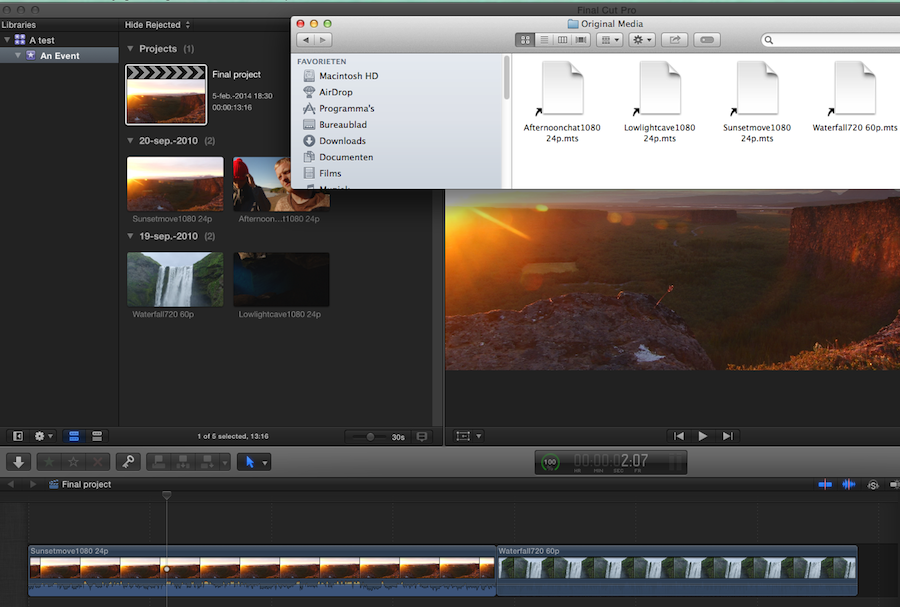
Here you have a Project ("Final Project") that uses only 2 clips from the Event in my Test Library. As you can see in the Original Media folder of the Event the actual media has not been imported into the Library, there only are simlinks:
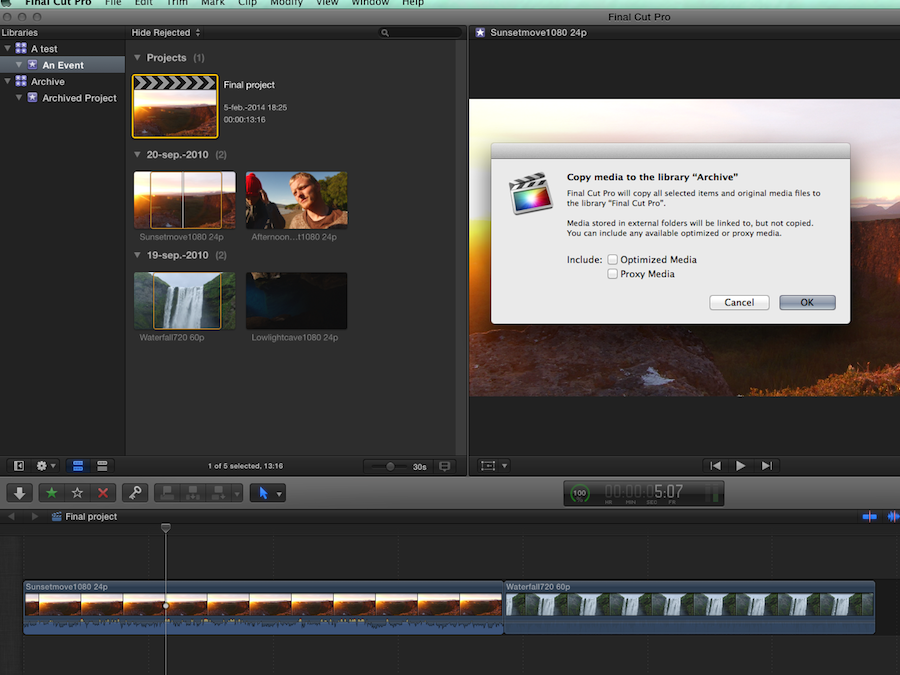
I create a new Library ("Archive Library") on an external drive, then I drag the Project from the Test Library onto the "Archived Project" Event in the Archive Library. When I do this I get a window giving me the option to include Optimized and/or Proxy media in the archive. I choose not to include these:
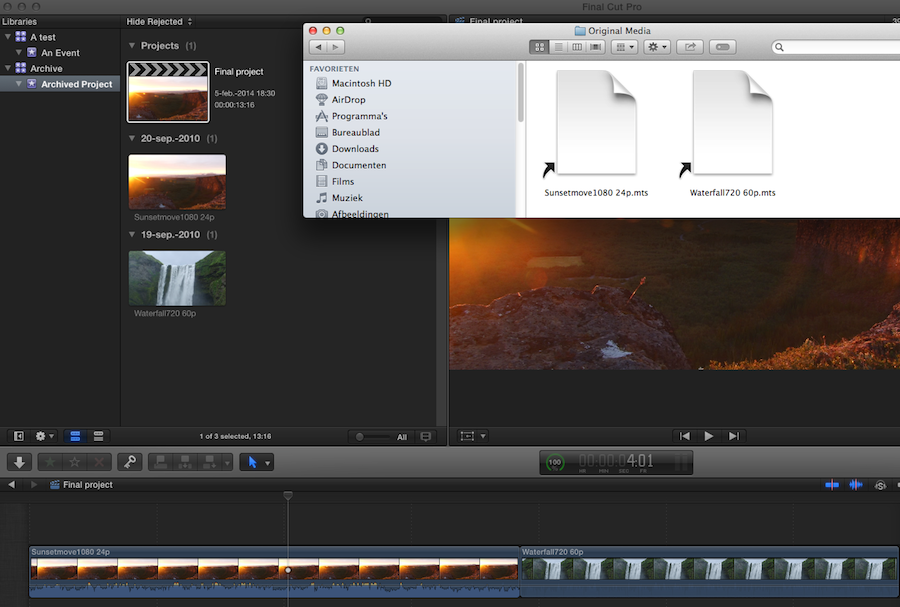
When the Project has been moved I select the copied Project in the Archive Library and I see that only the 2 clips that were used in the Project have been copied into the Archive. The 2 clips have not been physically imported, they still link to the media outside of the Library:
To import the media into the Archive Library I select the Library and choose File > Consolidate Library Files. This gives me the option to decide where I want to import the media. As I want a fully self-contained archive I choose to import the meda into the Archive Library:
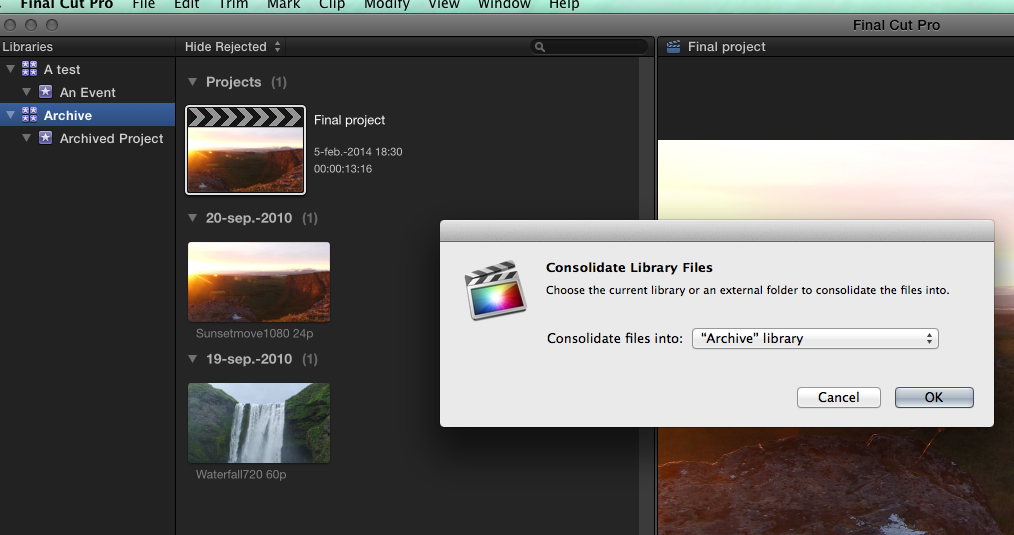
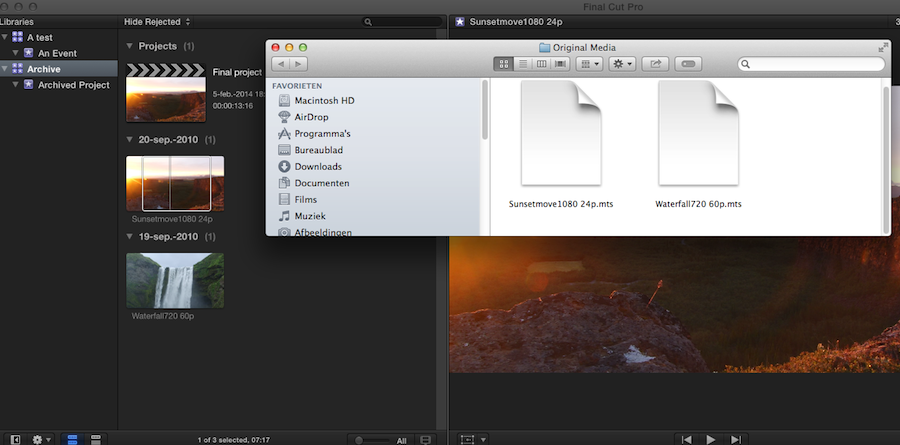
Now when I look into the Archive Library I can see that the Final Project is there with only the media I have used, and the media is physically imported into the Library:
It takes much longer to explain this than to actually do it
- Ronny
When the Project is copied over to the Archive Library you just have to use the Consolidate Library Media command to import the external media into the Archive Library, and you have a fully self-contained archive of your Project with only the used media and nothing else.
Let me illustrate this with an example.
Here you have a Project ("Final Project") that uses only 2 clips from the Event in my Test Library. As you can see in the Original Media folder of the Event the actual media has not been imported into the Library, there only are simlinks:
I create a new Library ("Archive Library") on an external drive, then I drag the Project from the Test Library onto the "Archived Project" Event in the Archive Library. When I do this I get a window giving me the option to include Optimized and/or Proxy media in the archive. I choose not to include these:
When the Project has been moved I select the copied Project in the Archive Library and I see that only the 2 clips that were used in the Project have been copied into the Archive. The 2 clips have not been physically imported, they still link to the media outside of the Library:
To import the media into the Archive Library I select the Library and choose File > Consolidate Library Files. This gives me the option to decide where I want to import the media. As I want a fully self-contained archive I choose to import the meda into the Archive Library:
Now when I look into the Archive Library I can see that the Final Project is there with only the media I have used, and the media is physically imported into the Library:
It takes much longer to explain this than to actually do it
- Ronny
Last edit: 05 Feb 2014 18:10 by ronny courtens.
Please Log in to join the conversation.
05 Feb 2014 18:28 #40607
by sometown
Replied by sometown on topic Archiving referenced Original Media
Fantastic. I had started to figure out a roundabout way of accomplishing this, but this spells it out perfectly. Thanks!
Please Log in to join the conversation.
