


- Posts: 479
- Thank you received: 5
3 Post Moderation Rule for New Boarders (25 Jan 2021)
New boarders will have their posts moderated - Don't worry if you cannot see your post immediately.
lower thirds don't follow with update
04 Feb 2014 22:45 #40553
by parkerhqj
lower thirds don't follow with update was created by parkerhqj
I know I'm asking a ton of questions lately, but I'm updating a few old projects and things keep popping up!
I just updated an older projects and all the lower thirds are missing. Not sure why this is happening as they aren't third party titles. Everything else is there. Are there further steps to take in this regard? I looked in the Motion Template in the Movie folder and there wasn't much there. There was a lower third copy file which I brought over. That could have been from any number of projects though. It didn't help, in any case. thx
I just updated an older projects and all the lower thirds are missing. Not sure why this is happening as they aren't third party titles. Everything else is there. Are there further steps to take in this regard? I looked in the Motion Template in the Movie folder and there wasn't much there. There was a lower third copy file which I brought over. That could have been from any number of projects though. It didn't help, in any case. thx
Please Log in to join the conversation.
- ronny courtens
-

- Offline
- Moderator
-

Less
More
- Posts: 4455
- Thank you received: 962
05 Feb 2014 12:22 #40581
by ronny courtens
Replied by ronny courtens on topic lower thirds don't follow with update
Do you mean you cannot see any of the original title clips on the updated Timeline at all?
- Ronny
- Ronny
Please Log in to join the conversation.
05 Feb 2014 14:08 #40584
by parkerhqj
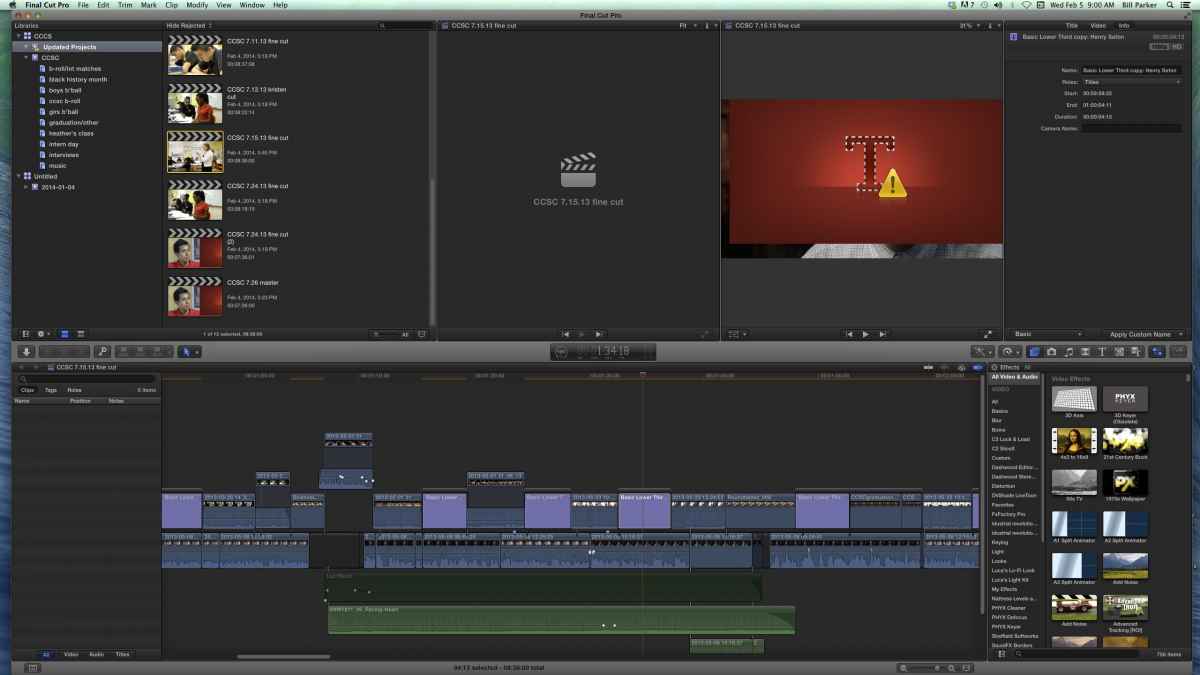
As you can see, the title is there on the timeline but missing (red). I obviously can't relink it because sit isn't media (right?). It may be how I created the title in the first place. I often will use the first lower thirds I create as a template and copy it along the project for later subjects. This timeline may be a duplicate of an earlier project and fcpx just lost track of it. Does that make sense?
Replied by parkerhqj on topic lower thirds don't follow with update
As you can see, the title is there on the timeline but missing (red). I obviously can't relink it because sit isn't media (right?). It may be how I created the title in the first place. I often will use the first lower thirds I create as a template and copy it along the project for later subjects. This timeline may be a duplicate of an earlier project and fcpx just lost track of it. Does that make sense?
Please Log in to join the conversation.
- ronny courtens
-
- Offline
- Moderator
-
Less
More
- Posts: 4455
- Thank you received: 962
05 Feb 2014 14:35 #40586
by ronny courtens
Replied by ronny courtens on topic lower thirds don't follow with update
Nope, you cannot relink titles.
The title you show in the screenshot is an FCPX "Basic Lower Third" title, correct? If it is, I don't see why it would give any problems.
Open the FCPX Title Library and drop the Basic Lower Third template onto the problematic title clip in the Timeline. What happens?
- Ronny
The title you show in the screenshot is an FCPX "Basic Lower Third" title, correct? If it is, I don't see why it would give any problems.
Open the FCPX Title Library and drop the Basic Lower Third template onto the problematic title clip in the Timeline. What happens?
- Ronny
Please Log in to join the conversation.
05 Feb 2014 14:45 #40588
by parkerhqj
Replied by parkerhqj on topic lower thirds don't follow with update
It just wants to replace it with a new one.
I'm wondering if it's a font problem. I had another editor work on this project and she may have used a font that I don't have on my computer. But then it worked fine before I upgraded. I've sent her an e-mail to see if she remembers. thx
I'm wondering if it's a font problem. I had another editor work on this project and she may have used a font that I don't have on my computer. But then it worked fine before I upgraded. I've sent her an e-mail to see if she remembers. thx
Please Log in to join the conversation.
- ronny courtens
-
- Offline
- Moderator
-
Less
More
- Posts: 4455
- Thank you received: 962
05 Feb 2014 16:18 #40595
by ronny courtens
Replied by ronny courtens on topic lower thirds don't follow with update
Yes it will replace it, but when you replace the title does it show the custom text you have written or do you get the default text?
A missing font could indeed be a good explanation. Keep us posted.
- Ronny
A missing font could indeed be a good explanation. Keep us posted.
- Ronny
Please Log in to join the conversation.
05 Feb 2014 16:32 - 05 Feb 2014 16:34 #40598
by parkerhqj
Replied by parkerhqj on topic lower thirds don't follow with update
I get the default text. Just heard back from my other editor. She says she didn't do anything special to the fonts.
I'm having similar issues with the timecode reader. It keeps telling me I have a missing effect (in fact two) when I actually have three timecode readers in my effects folder. Not sure why I have so many - I probably kept trying to provide them from the other computer. To fix this, I have to delete the old tc reader and add a new one. This has happened on other projects as well. I just sort of work around it. thx
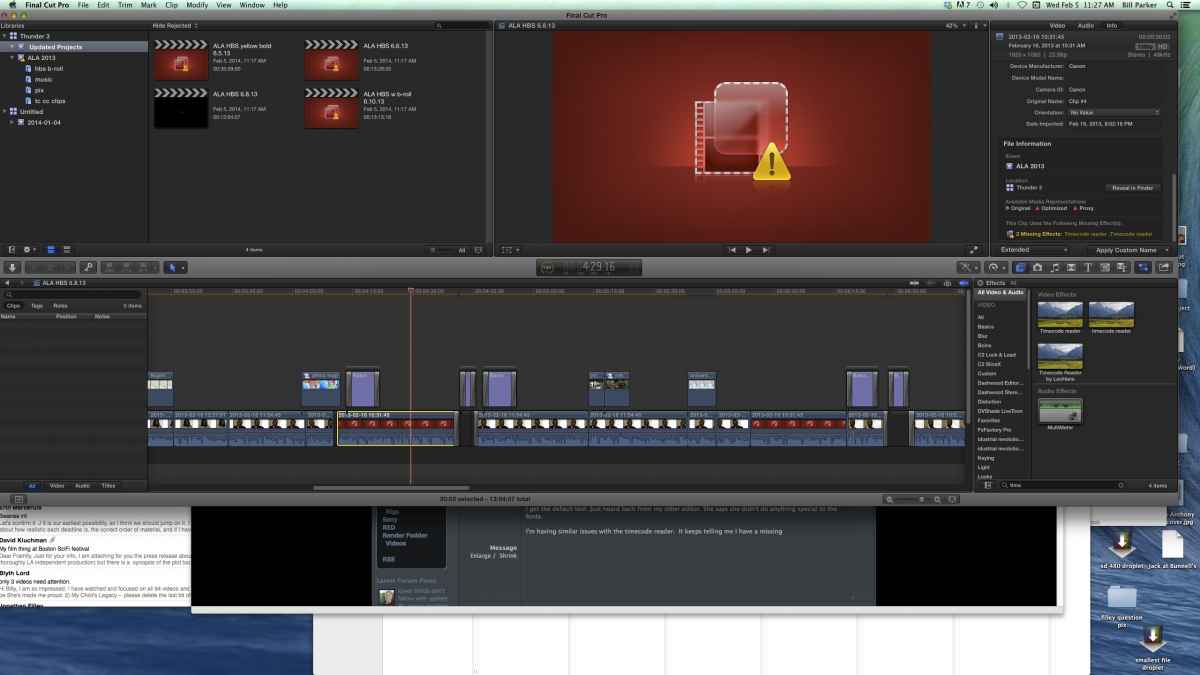
I'm having similar issues with the timecode reader. It keeps telling me I have a missing effect (in fact two) when I actually have three timecode readers in my effects folder. Not sure why I have so many - I probably kept trying to provide them from the other computer. To fix this, I have to delete the old tc reader and add a new one. This has happened on other projects as well. I just sort of work around it. thx
Last edit: 05 Feb 2014 16:34 by parkerhqj.
Please Log in to join the conversation.
- Andreas Kiel
-

- Offline
- Platinum Member
-

Less
More
- Posts: 1077
- Thank you received: 189
05 Feb 2014 18:01 #40602
by Andreas Kiel
Replied by Andreas Kiel on topic lower thirds don't follow with update
Hi parkerhqj,
The TC Reader is broken since a while - at least it's functionality.
Have you tried to use XML?
You can send me the XML off list and I'll have a look - kiel(at)spherico(dot)com.
It might be font problem.
You should file a bug.
-Andreas
The TC Reader is broken since a while - at least it's functionality.
Have you tried to use XML?
You can send me the XML off list and I'll have a look - kiel(at)spherico(dot)com.
It might be font problem.
You should file a bug.
-Andreas
Please Log in to join the conversation.
05 Feb 2014 18:05 - 05 Feb 2014 18:09 #40603
by parkerhqj
Replied by parkerhqj on topic lower thirds don't follow with update
Thanks - will do. Can you actually analyze it without any media?
I didn't realize other people were having problems with the tc reader. I need to use it all the time as I post interviews for selects and send them out for transcriptions as well.
I didn't realize other people were having problems with the tc reader. I need to use it all the time as I post interviews for selects and send them out for transcriptions as well.
Last edit: 05 Feb 2014 18:09 by parkerhqj.
Please Log in to join the conversation.
- Andreas Kiel
-
- Offline
- Platinum Member
-
Less
More
- Posts: 1077
- Thank you received: 189
05 Feb 2014 18:14 #40604
by Andreas Kiel
Replied by Andreas Kiel on topic lower thirds don't follow with update
"Can you actually analyze it without any media?"
At least the basic path things.
The TC reader needs compound clips at the moment.
-Andreas
At least the basic path things.
The TC reader needs compound clips at the moment.
-Andreas
Please Log in to join the conversation.
05 Feb 2014 18:17 #40605
by parkerhqj
Replied by parkerhqj on topic lower thirds don't follow with update
What does it need compound clips for? I apply it to normal clips all the time. Do you mean for sharing?
Please Log in to join the conversation.
- Andreas Kiel
-
- Offline
- Platinum Member
-
Less
More
- Posts: 1077
- Thank you received: 189
05 Feb 2014 18:26 #40606
by Andreas Kiel
Replied by Andreas Kiel on topic lower thirds don't follow with update
Applied to a clip in the timeline at will always start at 00:00:00:00 and not on the TC of the clip.
-Andreas
-Andreas
Please Log in to join the conversation.
05 Feb 2014 18:35 #40608
by parkerhqj
Replied by parkerhqj on topic lower thirds don't follow with update
Got it. I was wondering how to do that. I've never needed that actual tc from the clip for my purposes, but it's nice to know that's an option. My clips can be very long though and I've run into issues with compound clips in the past. I'll look into it. Thanks again.
Please Log in to join the conversation.
- Andreas Kiel
-
- Offline
- Platinum Member
-
Less
More
- Posts: 1077
- Thank you received: 189
06 Feb 2014 09:43 #40628
by Andreas Kiel
Replied by Andreas Kiel on topic lower thirds don't follow with update
Bill,
I had a closer look at the XML.
Finally your Lower Thirds are kind of third party since you used a modified copy of it.
So make sure this copy can be found in your user's library (~/Movies/Motion Templates.localized/Titles.localized/Lower Thirds.localized/Basic Lower Third copy/Basic Lower Third copy.moti)
There are other effects, generators as well which are modified. So the above applies to them as well.
Another note: the Basic Title shouldn't be used with 10.1. In many cases style changes will prevent the title to render - it looks okay in FCPX.
-Andreas
I had a closer look at the XML.
Finally your Lower Thirds are kind of third party since you used a modified copy of it.
So make sure this copy can be found in your user's library (~/Movies/Motion Templates.localized/Titles.localized/Lower Thirds.localized/Basic Lower Third copy/Basic Lower Third copy.moti)
There are other effects, generators as well which are modified. So the above applies to them as well.
Another note: the Basic Title shouldn't be used with 10.1. In many cases style changes will prevent the title to render - it looks okay in FCPX.
-Andreas
Please Log in to join the conversation.
06 Feb 2014 16:31 - 06 Feb 2014 16:37 #40655
by parkerhqj
Replied by parkerhqj on topic lower thirds don't follow with update
Thanks Andreas.
Just to add to the confusion, I've been trying to match the effects from my desktop computer to my laptop and just discovered some missing items that relate to this conversation. On my laptop, in my titles folder in the Movies folder, I have a Lower Thirds folder which is empty and a Basic Lower Third Copy folder which has the Motion file and other stuff that goes with that. On my desktop computer, I have the same Basis Lower Third copy folder with the right material in it and no Lower Third folder at all. I'm assuming the enemy in all this is me as I've tried to move effects back and forth over time, but I'm not getting this. I just ran a test title and send the lower thirds back and forth between the computers with no problem. Can someone with a non-sabotaged computer tell me what I should be seeing in my Titles folder? Is that just where third-party and customized effects go? I'm having a tough time distinguishing between upgrading problems that are not my fault and bone-headed decisions which are. Thanks yet again!
And while we're on the subject, I've watched tutorials for sharing work with fcpx and maybe I missed it, but there should be a third category after sharing project xml files and event xml files - and that is all the various effects, etc that you alter on your local computer that don't follow with either event or project xml files. That's where I seem to get hung up.
Just to add to the confusion, I've been trying to match the effects from my desktop computer to my laptop and just discovered some missing items that relate to this conversation. On my laptop, in my titles folder in the Movies folder, I have a Lower Thirds folder which is empty and a Basic Lower Third Copy folder which has the Motion file and other stuff that goes with that. On my desktop computer, I have the same Basis Lower Third copy folder with the right material in it and no Lower Third folder at all. I'm assuming the enemy in all this is me as I've tried to move effects back and forth over time, but I'm not getting this. I just ran a test title and send the lower thirds back and forth between the computers with no problem. Can someone with a non-sabotaged computer tell me what I should be seeing in my Titles folder? Is that just where third-party and customized effects go? I'm having a tough time distinguishing between upgrading problems that are not my fault and bone-headed decisions which are. Thanks yet again!
And while we're on the subject, I've watched tutorials for sharing work with fcpx and maybe I missed it, but there should be a third category after sharing project xml files and event xml files - and that is all the various effects, etc that you alter on your local computer that don't follow with either event or project xml files. That's where I seem to get hung up.
Last edit: 06 Feb 2014 16:37 by parkerhqj.
Please Log in to join the conversation.
- Andreas Kiel
-
- Offline
- Platinum Member
-
Less
More
- Posts: 1077
- Thank you received: 189
06 Feb 2014 19:44 #40675
by Andreas Kiel
Replied by Andreas Kiel on topic lower thirds don't follow with update
bill,
i'm bit short on time at the moment.
i'll be back with some details tomorrow.
-andreas
i'm bit short on time at the moment.
i'll be back with some details tomorrow.
-andreas
Please Log in to join the conversation.
06 Feb 2014 19:48 #40676
by parkerhqj
Replied by parkerhqj on topic lower thirds don't follow with update
Thanks!
Please Log in to join the conversation.
- Andreas Kiel
-
- Offline
- Platinum Member
-
Less
More
- Posts: 1077
- Thank you received: 189
10 Feb 2014 12:32 #40850
by Andreas Kiel
Replied by Andreas Kiel on topic lower thirds don't follow with update
Bill,
Its a bit complicated.
You have screwed up the two machines FX settings somehow.
Finally you have 2 options:
1) Make a bad FX installation on both machines.
2) Make a clean FX installation on both machines and rebuild the projects.
It depends on the amount and kind of projects you have.
But I strongly would recommend option 2. Otherwise with all the duplicates of templates you may run into the same problem again soon.
Just a note on creating or modifying templates for usage in a collaborative environment (this can be 1 user working on several machines).
It's not good to follow the FCPX/Motion route for saving those files - you easily can run into this trap.
Follow the legacy version's route.
So if you create or modify a template save it, but don't use it. Reveal it in Finder.
In Finder select "/Library/Application Support/Final Cut Pro/Templates/TEMPLATE_TYPE" and move them to the matching location for the the type.
Inside the "type" folders you can create subfolders for better organization upfront.
If the "/Library/Application Support/Final Cut Pro..." path isn't there use the little attached app to create the correct folder setup.
The little app also allows to do a basic check of an XML. The output will show you whether the effect is installed, the type of access, the name and the installation path.
-Andreas
Download:
www.spherico.com/filmtools/X-Files/X-Template%20Tool.dmg
Its a bit complicated.
You have screwed up the two machines FX settings somehow.
Finally you have 2 options:
1) Make a bad FX installation on both machines.
2) Make a clean FX installation on both machines and rebuild the projects.
It depends on the amount and kind of projects you have.
But I strongly would recommend option 2. Otherwise with all the duplicates of templates you may run into the same problem again soon.
Just a note on creating or modifying templates for usage in a collaborative environment (this can be 1 user working on several machines).
It's not good to follow the FCPX/Motion route for saving those files - you easily can run into this trap.
Follow the legacy version's route.
So if you create or modify a template save it, but don't use it. Reveal it in Finder.
In Finder select "/Library/Application Support/Final Cut Pro/Templates/TEMPLATE_TYPE" and move them to the matching location for the the type.
Inside the "type" folders you can create subfolders for better organization upfront.
If the "/Library/Application Support/Final Cut Pro..." path isn't there use the little attached app to create the correct folder setup.
The little app also allows to do a basic check of an XML. The output will show you whether the effect is installed, the type of access, the name and the installation path.
-Andreas
Download:
www.spherico.com/filmtools/X-Files/X-Template%20Tool.dmg
Please Log in to join the conversation.
10 Feb 2014 13:21 #40855
by parkerhqj
Replied by parkerhqj on topic lower thirds don't follow with update
Andreas,
Thanks for this. How do I do a clean FX installation? Do you mean reinstall fcpx? Will doing that somehow affect my other projects? thx
Thanks for this. How do I do a clean FX installation? Do you mean reinstall fcpx? Will doing that somehow affect my other projects? thx
Please Log in to join the conversation.
