


- Posts: 730
- Thank you received: 26
3 Post Moderation Rule for New Boarders (25 Jan 2021)
New boarders will have their posts moderated - Don't worry if you cannot see your post immediately.
Can't Move Event to Library...
- DmitriZigany
-
 Topic Author
- Offline
- Platinum Member
-

Less
More
04 Feb 2014 22:05 #40551
by DmitriZigany
Can't Move Event to Library... was created by DmitriZigany
I imported some clips to a new library on my internal hard drive (never use the internal hard drive for FCPX events normally). Now I try to move it to a different library on an external hard drive. But the option to "Move Event to Library" is grayed out and I can only choose to copy the event to library. Is that normal behaviour when the event is on the internal hard drive, or why is this appening?
Please Log in to join the conversation.

05 Feb 2014 03:53 - 05 Feb 2014 03:54 #40569
by BenB
Replied by BenB on topic Can't Move Event to Library...
That is odd...
Quit FCPX, relaunch, see if it is the same. Both should be available. Unless you have some permissions thing going on.
Quit FCPX, relaunch, see if it is the same. Both should be available. Unless you have some permissions thing going on.
Last edit: 05 Feb 2014 03:54 by BenB.
Please Log in to join the conversation.
05 Feb 2014 09:09 #40577
by Seanus
Sean Lander - Editing since 1982 - AVID 1991 - FCP 1999 - FCPX 2011
Replied by Seanus on topic Can't Move Event to Library...
Yes I thought you could only copy between media devices. Makes since. If your half way through a move and the drive fails you're totally screwed.
So just copy it and then delete it off your internal at Finder level.
So just copy it and then delete it off your internal at Finder level.
Sean Lander - Editing since 1982 - AVID 1991 - FCP 1999 - FCPX 2011
Please Log in to join the conversation.
- ronny courtens
-

- Offline
- Moderator
-

Less
More
- Posts: 4455
- Thank you received: 962
05 Feb 2014 12:16 - 05 Feb 2014 12:28 #40580
by ronny courtens
Replied by ronny courtens on topic Can't Move Event to Library...
I did some tests, and there is indeed something strange going on. The tests were done on the same machine, with all Libraries stored on the system drive. I tested both with Libraries created in 10.1 and Libraries created in 10.1.1. All imported media are managed, i.e. imported into the Events. Preferences were refreshed before doing the tests.
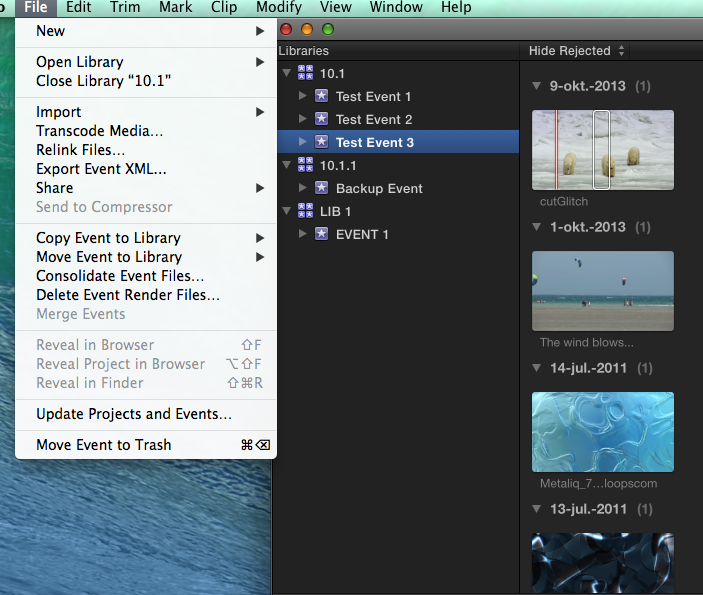
In this 10.1 Library the Test Event 3 can be copied and moved:
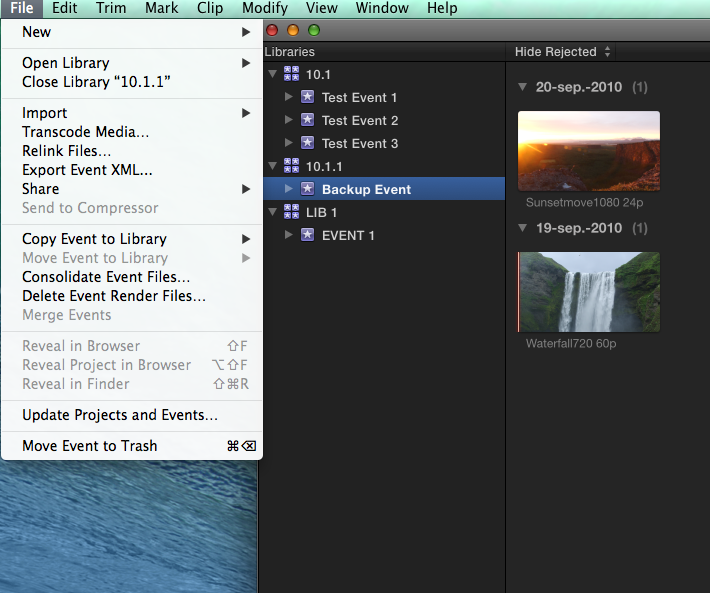
In this 10.1.1 Library the Backup Event can be copied, but not moved:
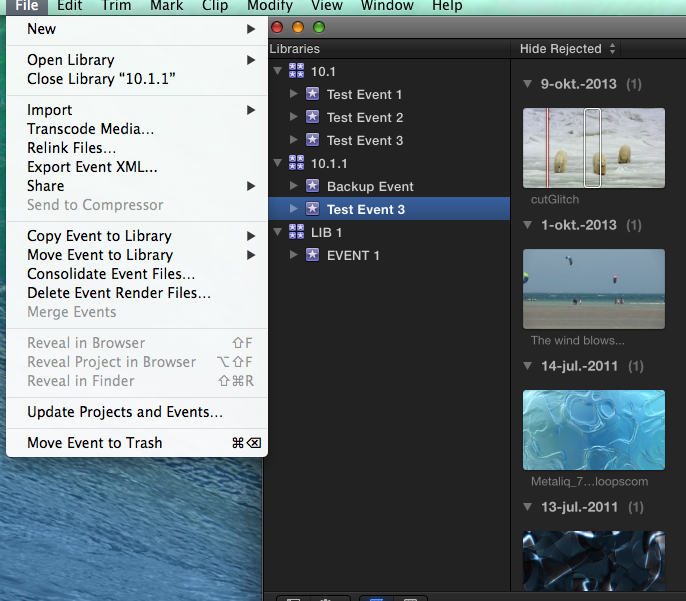
I copy the Test Event 3 from Library 10.1 into Library 10.1.1. The Test Event 3 can be copied and moved:
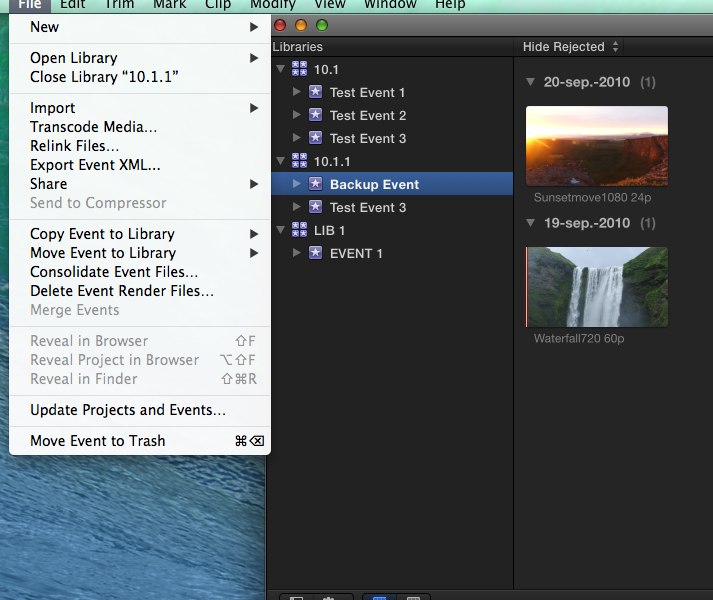
And now, all of a sudden, the Backup Event in Library 10.1.1 can be copied AND moved as well:
This is really odd behavior, so I did another test. I created a new Library (MOV EXTERNAL) on an external Thunderbolt RAID and I selected the Test Event 3 on my internal drive. I still got the options to copy and to move the Event, so I chose to move the Event to the external RAID:
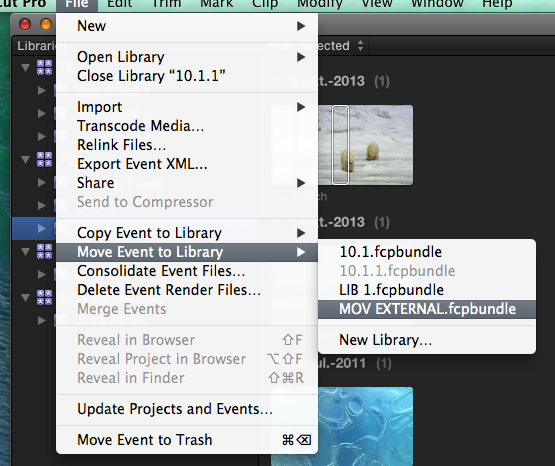
The Event was perfectly moved to the external drive. Only after it was moved did the Event disappear from the 10.1.1 Library on my internal drive. This confirms that since the latest FCPX update the media remain in their original place until everything has been moved correctly, so there is no danger anymore of data loss in case the destination drive fails or the connection gets interrupted.
I then selected the Event in the Library on the external drive and behold: the same Event that could be copied and moved on the internal drive now can be copied, but NOT moved anymore:
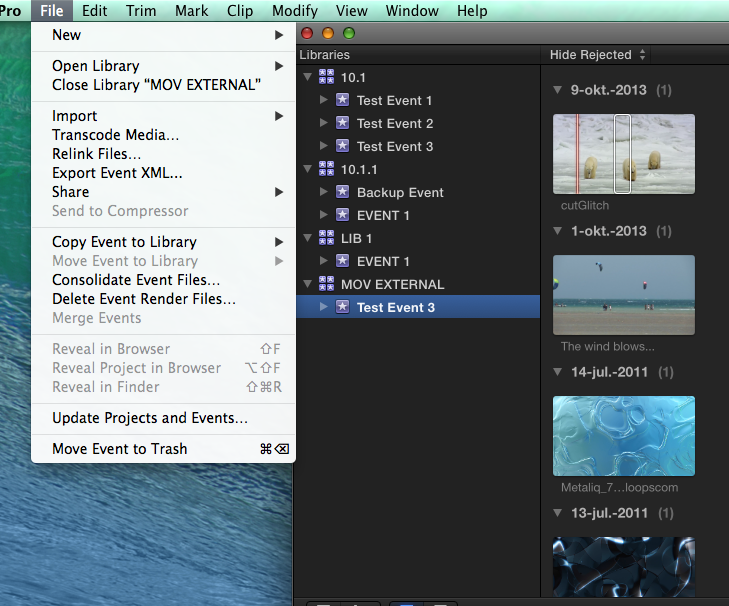
The only thing I can conclude from these few tests is that there is a very odd behavior showing. Events that can be copied but not moved all of a sudden can be copied and moved when you add an entirely different Event to the same Library, and Events that could be copied and moved all of a sudden cannot be moved anymore when you put them in a Library on an external drive. I also have a Library created in 10.1 that has an Event that can be copied but not moved, so it has nothing to do with 10.1 or 10.1.1 Libraries and it has nothing to do with Events stored on the internal drive or on an external drive. As far as I see there is no solid explanation for all this, so I have to consider this as a bug.
- Ronny
In this 10.1 Library the Test Event 3 can be copied and moved:
In this 10.1.1 Library the Backup Event can be copied, but not moved:
I copy the Test Event 3 from Library 10.1 into Library 10.1.1. The Test Event 3 can be copied and moved:
And now, all of a sudden, the Backup Event in Library 10.1.1 can be copied AND moved as well:
This is really odd behavior, so I did another test. I created a new Library (MOV EXTERNAL) on an external Thunderbolt RAID and I selected the Test Event 3 on my internal drive. I still got the options to copy and to move the Event, so I chose to move the Event to the external RAID:
The Event was perfectly moved to the external drive. Only after it was moved did the Event disappear from the 10.1.1 Library on my internal drive. This confirms that since the latest FCPX update the media remain in their original place until everything has been moved correctly, so there is no danger anymore of data loss in case the destination drive fails or the connection gets interrupted.
I then selected the Event in the Library on the external drive and behold: the same Event that could be copied and moved on the internal drive now can be copied, but NOT moved anymore:
The only thing I can conclude from these few tests is that there is a very odd behavior showing. Events that can be copied but not moved all of a sudden can be copied and moved when you add an entirely different Event to the same Library, and Events that could be copied and moved all of a sudden cannot be moved anymore when you put them in a Library on an external drive. I also have a Library created in 10.1 that has an Event that can be copied but not moved, so it has nothing to do with 10.1 or 10.1.1 Libraries and it has nothing to do with Events stored on the internal drive or on an external drive. As far as I see there is no solid explanation for all this, so I have to consider this as a bug.
- Ronny
Last edit: 05 Feb 2014 12:28 by ronny courtens.
Please Log in to join the conversation.
05 Feb 2014 16:10 #40593
by plysat
Can't sleep? Try this: fcpxpert.net ;-)
Replied by plysat on topic Can't Move Event to Library...
Not a bug... a Library must contain at least one Event. So, if there is only one Event in a Library you will not be able to move it out of the Event, only copy it. As you discovered, if you create a second Event, you can move one of them, but not both. 
Can't sleep? Try this: fcpxpert.net ;-)
Please Log in to join the conversation.
- ronny courtens
-
- Offline
- Moderator
-
Less
More
- Posts: 4455
- Thank you received: 962
05 Feb 2014 16:13 #40594
by ronny courtens
Replied by ronny courtens on topic Can't Move Event to Library...
Good thinking, my friend. I humbly bow before your wisdom  That's it, "mystery" solved.
- Ronny
That's it, "mystery" solved.- Ronny
Please Log in to join the conversation.
05 Feb 2014 16:20 #40596
by plysat
lol... no bowing needed Ronny. I have things like this happen to me all the time, that's how I figure this stuff out. 
Can't sleep? Try this: fcpxpert.net ;-)
Replied by plysat on topic Can't Move Event to Library...
ronny courtens wrote: Good thinking, my friend. I humbly bow before your wisdom
- Ronny
lol... no bowing needed Ronny.
I have things like this happen to me all the time, that's how I figure this stuff out. Can't sleep? Try this: fcpxpert.net ;-)
Please Log in to join the conversation.
- ronny courtens
-
- Offline
- Moderator
-
Less
More
- Posts: 4455
- Thank you received: 962
05 Feb 2014 16:30 #40597
by ronny courtens
Replied by ronny courtens on topic Can't Move Event to Library...
I have things like this happen to me all the time, that's how I figure this stuff out.
So do I, but please don't tell anyone...
- Ronny
So do I, but please don't tell anyone...
- Ronny
Please Log in to join the conversation.
05 Feb 2014 16:36 #40599
by plysat
Can't sleep? Try this: fcpxpert.net ;-)
Replied by plysat on topic Can't Move Event to Library...
"So do I, but please don't tell anyone... "
I've fired off whiny emails to Apple about "problems" that turned out to be operator error. That's a great feeling...
"I've fired off whiny emails to Apple about "problems" that turned out to be operator error. That's a great feeling...
Can't sleep? Try this: fcpxpert.net ;-)
Please Log in to join the conversation.
- DmitriZigany
-
Topic Author
- Offline
- Platinum Member
-
Less
More
- Posts: 730
- Thank you received: 26
05 Feb 2014 20:11 #40611
by DmitriZigany
Replied by DmitriZigany on topic Can't Move Event to Library...
Plysat, thanks for solving that issue!
Please Log in to join the conversation.
