


- Posts: 32
- Thank you received: 1
3 Post Moderation Rule for New Boarders (25 Jan 2021)
New boarders will have their posts moderated - Don't worry if you cannot see your post immediately.
Sharing Projects between Editors in 10.1
- Standpoint Media
-
 Topic Author
- Offline
- Junior Member
-

Less
More
04 Feb 2014 13:02 #40516
by Standpoint Media
Sharing Projects between Editors in 10.1 was created by Standpoint Media
Hi,
I'm wondering if theres a way to share projects between editors in 10.1. The method we used was to have a sparse bundle to hold the event and project folders for each client. We each had this sparsebundle. We then only had to email the project to each other and drop it in the projects folder to continue the edit where the other left off.
Can anyone help me?
Thanks,
Declan
I'm wondering if theres a way to share projects between editors in 10.1. The method we used was to have a sparse bundle to hold the event and project folders for each client. We each had this sparsebundle. We then only had to email the project to each other and drop it in the projects folder to continue the edit where the other left off.
Can anyone help me?
Thanks,
Declan
Please Log in to join the conversation.
- ronny courtens
-

- Offline
- Moderator
-

Less
More
- Posts: 4455
- Thank you received: 962
04 Feb 2014 13:15 - 04 Feb 2014 13:16 #40517
by ronny courtens
Replied by ronny courtens on topic Sharing Projects between Editors in 10.1
You can exchange Event and Project XMLs. As long as you both have the same media this will work fine.
But 10.1 offers many more options for collaboration, from working between two editors on different locations to multi-seat collaboration in large facilities with centralized media storage. If you want to learn about these option in detail, here is an excellent article on FCPX 10.1 collaborative workflows:
ww.10dot1.co.uk/content/FCPXInASharedEnvironment_FINAL.pdf
- Ronny
But 10.1 offers many more options for collaboration, from working between two editors on different locations to multi-seat collaboration in large facilities with centralized media storage. If you want to learn about these option in detail, here is an excellent article on FCPX 10.1 collaborative workflows:
ww.10dot1.co.uk/content/FCPXInASharedEnvironment_FINAL.pdf
- Ronny
Last edit: 04 Feb 2014 13:16 by ronny courtens.
Please Log in to join the conversation.
- Standpoint Media
-
Topic Author
- Offline
- Junior Member
-
Less
More
- Posts: 32
- Thank you received: 1
06 Feb 2014 09:11 #40626
by Standpoint Media
Replied by Standpoint Media on topic Sharing Projects between Editors in 10.1
Thanks a million Ronny!
That's certainly a very clear and informative guide.
I think we'll be trying to use one of the XML workflows but I'm terrified of non managed libraries. Seems like going back to FCP7 and trying to relink everything months or occasionally years after the initial edit when the client wants a change. That's why the sparsebundles up to now, to keep all the media locked in one place!
Will the XML method still work if we both have exact replicas of the managed libraries?
Thanks,
Declan
That's certainly a very clear and informative guide.
I think we'll be trying to use one of the XML workflows but I'm terrified of non managed libraries. Seems like going back to FCP7 and trying to relink everything months or occasionally years after the initial edit when the client wants a change. That's why the sparsebundles up to now, to keep all the media locked in one place!
Will the XML method still work if we both have exact replicas of the managed libraries?
Thanks,
Declan
Please Log in to join the conversation.
- Andreas Kiel
-

- Offline
- Platinum Member
-

Less
More
- Posts: 1077
- Thank you received: 189
06 Feb 2014 09:50 #40629
by Andreas Kiel
Replied by Andreas Kiel on topic Sharing Projects between Editors in 10.1
I would be careful with XML.
Apple says:
Important: FCPXML describes certain project data that is useful for exchanging with other applications. It does not describe all possible data, and therefore is not a substitute for the native project file when archiving a project or moving a complete project from one system to another.
-Andreas
Apple says:
Important: FCPXML describes certain project data that is useful for exchanging with other applications. It does not describe all possible data, and therefore is not a substitute for the native project file when archiving a project or moving a complete project from one system to another.
-Andreas
Please Log in to join the conversation.
- ronny courtens
-
- Offline
- Moderator
-
Less
More
- Posts: 4455
- Thank you received: 962
06 Feb 2014 10:12 #40630
by ronny courtens
Replied by ronny courtens on topic Sharing Projects between Editors in 10.1
I knew Andreas would beat me to this 
The managed media workflow is certainly rock-solid. And sharing Event XMLs works perfectly as well.
But, as Andreas says, you have to be aware that FCPXML at this time does not transfer every single detail of a Project. There have been reports that some keyframed effects, some title information and other data don't get transferred in the Project XML. If your collaborative workflow is meant for straight editing (what we used to call "offline" editing) this won't matter, but if both of you will be adding titles, effects, audio filters... you might have issues transferring certain changes in a Project XML.
The external media workflow is much better than in FCP7. FCPX has a wonderful way of keeping track of its media. So I would not be afraid of keeping your media external, especially in a collaborative workflow. And this would allow you to work with Transfer Libraries, which seems to work well.
How you collaborate all depends on your specific workflows and on your specific production. For collaborative offline editing on documentaries or feature films XML exchanging will be fine, for collaborative finishing workflows on effects-heavy videos it won't.
There has also been a decent online discussion about all this some weeks ago, and I think it's also worth reading for you: www.larryjordan.biz/fcp-x-10-1-collaboration/
The article is fine, but certainly scroll down to the comments. Some interesting ideas in there that we also have been discussing over here.
- Ronny
The managed media workflow is certainly rock-solid. And sharing Event XMLs works perfectly as well.
But, as Andreas says, you have to be aware that FCPXML at this time does not transfer every single detail of a Project. There have been reports that some keyframed effects, some title information and other data don't get transferred in the Project XML. If your collaborative workflow is meant for straight editing (what we used to call "offline" editing) this won't matter, but if both of you will be adding titles, effects, audio filters... you might have issues transferring certain changes in a Project XML.
The external media workflow is much better than in FCP7. FCPX has a wonderful way of keeping track of its media. So I would not be afraid of keeping your media external, especially in a collaborative workflow. And this would allow you to work with Transfer Libraries, which seems to work well.
How you collaborate all depends on your specific workflows and on your specific production. For collaborative offline editing on documentaries or feature films XML exchanging will be fine, for collaborative finishing workflows on effects-heavy videos it won't.
There has also been a decent online discussion about all this some weeks ago, and I think it's also worth reading for you: www.larryjordan.biz/fcp-x-10-1-collaboration/
The article is fine, but certainly scroll down to the comments. Some interesting ideas in there that we also have been discussing over here.
- Ronny
Please Log in to join the conversation.
- Andreas Kiel
-
- Offline
- Platinum Member
-
Less
More
- Posts: 1077
- Thank you received: 189
06 Feb 2014 10:25 - 06 Feb 2014 10:26 #40631
by Andreas Kiel
Replied by Andreas Kiel on topic Sharing Projects between Editors in 10.1
I agree with Ronny (as always )
It was just a note to be aware of.
-Andreas
)It was just a note to be aware of.
-Andreas
Last edit: 06 Feb 2014 10:26 by Andreas Kiel.
Please Log in to join the conversation.


06 Feb 2014 15:23 #40647
by smg669
Replied by smg669 on topic Sharing Projects between Editors in 10.1
I have a question... What if you have created a large library which contains events for which the media has been copied into the event? Is it possible after the fact to change your mind and move the media out of the event and have it external?
And regardless of wether the original media is copied into the library on import or left external, isn't the optimized and/or proxy media always going to reside inside the library? So, if you want to share updated Libraries back and forth, how do you do this for projects that require proxies or optimized media without the library sizes being too large - or requiring the re-creation of proxies/optimized media?
And regardless of wether the original media is copied into the library on import or left external, isn't the optimized and/or proxy media always going to reside inside the library? So, if you want to share updated Libraries back and forth, how do you do this for projects that require proxies or optimized media without the library sizes being too large - or requiring the re-creation of proxies/optimized media?
Please Log in to join the conversation.
06 Feb 2014 15:52 #40648
by lichinho
That is easy. Use File->Consolidate Library Files...
You can consolidate to any place you like.
True, optimised and proxy are always "managed media" - that can make moving libraries back and forth more complicated.
Replied by lichinho on topic Sharing Projects between Editors in 10.1
smg669 wrote: I have a question... What if you have created a large library which contains events for which the media has been copied into the event? Is it possible after the fact to change your mind and move the media out of the event and have it external?
That is easy. Use File->Consolidate Library Files...
You can consolidate to any place you like.
And regardless of wether the original media is copied into the library on import or left external, isn't the optimized and/or proxy media always going to reside inside the library? So, if you want to share updated Libraries back and forth, how do you do this for projects that require proxies or optimized media without the library sizes being too large - or requiring the re-creation of proxies/optimized media?
True, optimised and proxy are always "managed media" - that can make moving libraries back and forth more complicated.
Please Log in to join the conversation.
- ronny courtens
-
- Offline
- Moderator
-
Less
More
- Posts: 4455
- Thank you received: 962
06 Feb 2014 15:56 - 06 Feb 2014 15:58 #40649
by ronny courtens
Replied by ronny courtens on topic Sharing Projects between Editors in 10.1
Answer to your first question:
Yes you can move any managed media outside of any Library at any time using the Consolidate command. You can choose to move the media into a folder on any drive you wish, making the media external.
Answer to your second question:
Optimized and/or proxy media indeed always reside within a library. When you want to share updated libraries back and forth you can create a transfer library and copy your updated projects into the transfer library. Project render files will never be copied over, and FCPX will give you the option to include or exclude optimized and/or proxy files. If you choose not to include these your transfer library will be perfectly manageable.
- Ronny
Yes you can move any managed media outside of any Library at any time using the Consolidate command. You can choose to move the media into a folder on any drive you wish, making the media external.
Answer to your second question:
Optimized and/or proxy media indeed always reside within a library. When you want to share updated libraries back and forth you can create a transfer library and copy your updated projects into the transfer library. Project render files will never be copied over, and FCPX will give you the option to include or exclude optimized and/or proxy files. If you choose not to include these your transfer library will be perfectly manageable.
- Ronny
Last edit: 06 Feb 2014 15:58 by ronny courtens.
Please Log in to join the conversation.
06 Feb 2014 16:07 #40651
by smg669
Replied by smg669 on topic Sharing Projects between Editors in 10.1
Thanks lichinho and ronny about the first part. I think i get it - consolidating managed media to another location turns it into external media.
Ronny, the issue with the "transfer library" thing is the requirement to regenerate proxy and optimized media every time the library changes hands. For media with time consuming transcodes (e.g. RED Raw files) this is extremely problematic. I get that you would want to gather all the media and accompanying proxy/optimized files at the outset of a project and then give them to the secondary editor at the outset of a project on a hard drive. But if editor A goes through a massive event in a library and does a bunch of metadata entry (keywords, notes, favourites) and wants to give that updated event to editor B (who is working remotely and has the previous library with all of the requisite media and proxy/optimized media) how does editor A do that without having to ship another hard drive with the revised library which contains yet another copy of the proxy/optimized media?
Ronny, the issue with the "transfer library" thing is the requirement to regenerate proxy and optimized media every time the library changes hands. For media with time consuming transcodes (e.g. RED Raw files) this is extremely problematic. I get that you would want to gather all the media and accompanying proxy/optimized files at the outset of a project and then give them to the secondary editor at the outset of a project on a hard drive. But if editor A goes through a massive event in a library and does a bunch of metadata entry (keywords, notes, favourites) and wants to give that updated event to editor B (who is working remotely and has the previous library with all of the requisite media and proxy/optimized media) how does editor A do that without having to ship another hard drive with the revised library which contains yet another copy of the proxy/optimized media?
Please Log in to join the conversation.
- ronny courtens
-
- Offline
- Moderator
-
Less
More
- Posts: 4455
- Thank you received: 962
06 Feb 2014 16:26 #40654
by ronny courtens
Replied by ronny courtens on topic Sharing Projects between Editors in 10.1
That's where Event XML comes in. I will illustrate this with an example and get back to you.
- Ronny
- Ronny
Please Log in to join the conversation.
06 Feb 2014 17:23 #40656
by smg669
Replied by smg669 on topic Sharing Projects between Editors in 10.1
I gotcha. So, the caveats about FCPX XML are reserved more for project XML than event XML. A basic event with just source footage should be able to be shared with event XML without any worries.
Another question: What happens when I consolidate managed media from multiple events into a single external media folder and there are different media files that share the same filename (e.g. GOPR0062.mp4)?
Another question: What happens when I consolidate managed media from multiple events into a single external media folder and there are different media files that share the same filename (e.g. GOPR0062.mp4)?
Please Log in to join the conversation.
- ronny courtens
-
- Offline
- Moderator
-
Less
More
- Posts: 4455
- Thank you received: 962
06 Feb 2014 18:04 #40658
by ronny courtens
Replied by ronny courtens on topic Sharing Projects between Editors in 10.1
Excellent question.
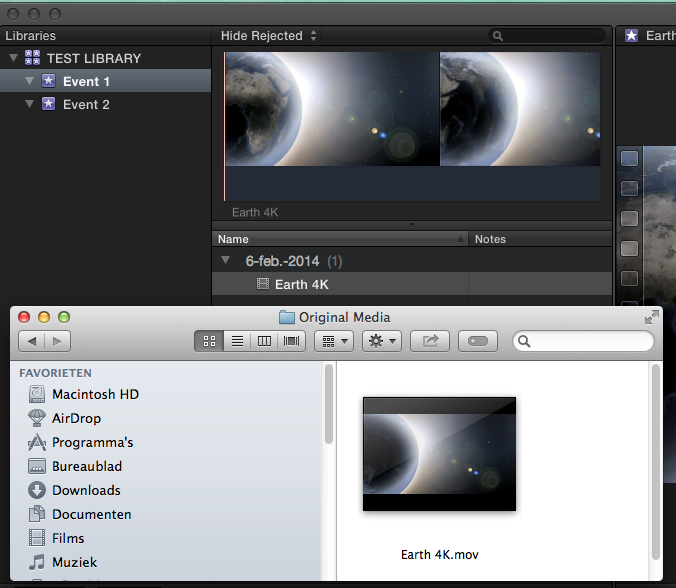
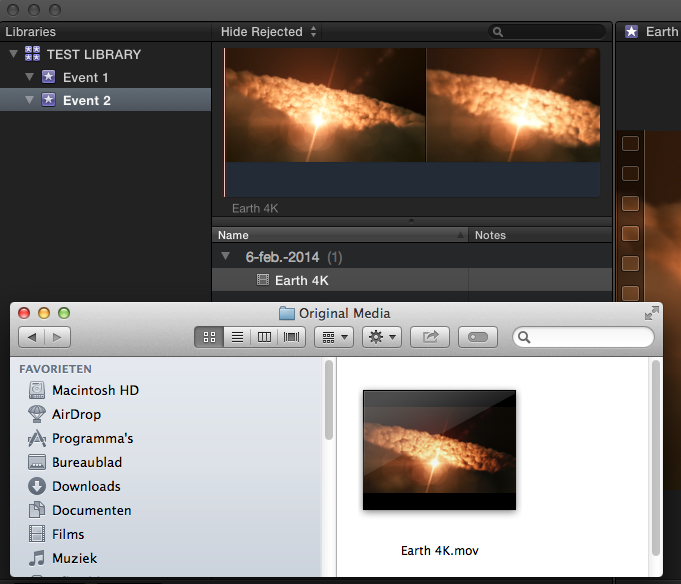
I have created a Library with 2 Events. I have imported 2 different files with exactly the same file name, one into each Event. Both files have been imported into their respective Events (managed media).
Event 1:
Event 2:
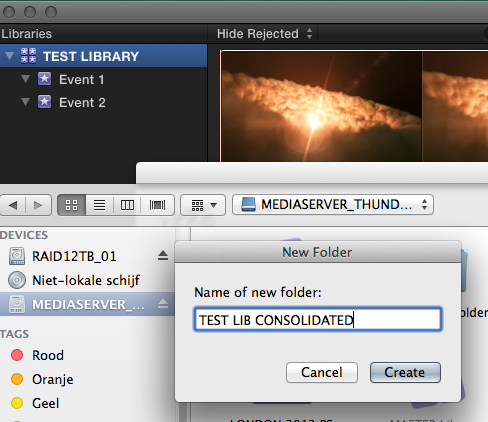
Now I consolidate the Library to my Mediaserver in a folder named "TEST LIB CONSOLIDATED":
The files are placed inside the external folder and FCPX has added "fcp1" to one of the files:
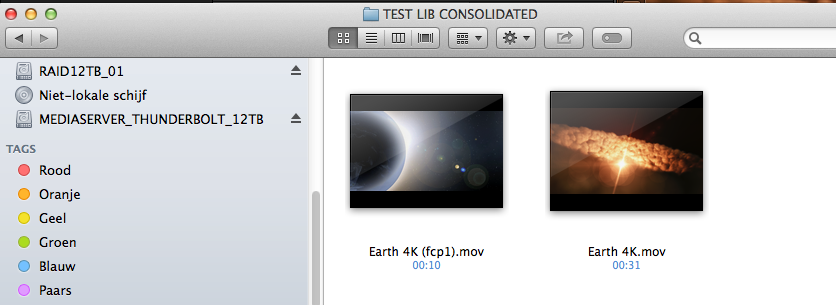
So this works without any issues.
- Ronny
I have created a Library with 2 Events. I have imported 2 different files with exactly the same file name, one into each Event. Both files have been imported into their respective Events (managed media).
Event 1:
Event 2:
Now I consolidate the Library to my Mediaserver in a folder named "TEST LIB CONSOLIDATED":
The files are placed inside the external folder and FCPX has added "fcp1" to one of the files:
So this works without any issues.
- Ronny
Please Log in to join the conversation.
