


- Posts: 11
- Thank you received: 1
3 Post Moderation Rule for New Boarders (25 Jan 2021)
New boarders will have their posts moderated - Don't worry if you cannot see your post immediately.
FCPX 10.1(.1) - Ispector slows editing on storyline
01 Feb 2014 23:46 #40362
by Raadgie
FCPX 10.1(.1) - Ispector slows editing on storyline was created by Raadgie
Anyone noticed that the inspector dramatically slows GUI response?
Please Log in to join the conversation.
- ronny courtens
-

- Offline
- Moderator
-

Less
More
- Posts: 4455
- Thank you received: 962
02 Feb 2014 11:27 #40379
by ronny courtens
Replied by ronny courtens on topic FCPX 10.1(.1) - Ispector slows editing on storyline
We have seen a number of people reporting different cases of UI sluggishness since updating to Mavericks/FCPX 10.1. The vast majority of these issues were due to Mavericks being installed over an older OS and were solved by performing a wipe and clean install of the system drive.
Create a new admin user and see if you still have the problems when working with FCPX under the new user.
- Ronny
Create a new admin user and see if you still have the problems when working with FCPX under the new user.
- Ronny
Please Log in to join the conversation.
02 Feb 2014 12:53 #40386
by Raadgie
Replied by Raadgie on topic FCPX 10.1(.1) - Ispector slows editing on storyline
- I have a clean installation of 10.9.1. (1 month ago)
- the problem persists under a new account
- 10.0.9 works fine
- the problem persists under a new account
- 10.0.9 works fine
Please Log in to join the conversation.
- USAntigoon
-

- Offline
- New Member
-

Less
More
- Posts: 6
- Thank you received: 2
02 Feb 2014 19:36 #40404
by USAntigoon
Replied by USAntigoon on topic FCPX 10.1(.1) - Ispector slows editing on storyline
I have read this before.. All that might work...However it begs the question, why we need to do that.. If you install an update.. (That's how the update is presented on the screen) all that should happen in the background, or special instructions should have been given... I was under the impression that Apple is very user friendly.. I just cannot believe that all these tricks are normal standard operating procedures in today's software environment.. This reminds me to my Linux days.. Something is not right since Maverick is released and there are still some serious interaction bugs between FCPX 10.1.1...I am sure that all these bugs will be resolved in the near future..
Please Log in to join the conversation.
02 Feb 2014 20:38 #40407
by Raadgie
Replied by Raadgie on topic FCPX 10.1(.1) - Ispector slows editing on storyline
I understand what you mean ... things lose their complexity. Apple is changing applications ground base sooner than they caught debug.
To have Inspector closed works but its not a solution.
To have Inspector closed works but its not a solution.
Please Log in to join the conversation.

03 Feb 2014 02:58 #40422
by ddixon
Replied by ddixon on topic FCPX 10.1(.1) - Ispector slows editing on storyline
Well, these tricks are NOT "normal standard operating procedure"
I'm sure that some people have had problems with Mavericks and FCPX 10.1, but the vast majority of us have not. Regardless of how recent the OS installation is, if these problems do crop up, I would first re-install FCPX, and then the OS if needed. I've only had to do a full re-install of the OS once since 2005, and I've done every OS update as a simple install over the old OS. I'm sorry that it's happened, but it's far from typical.
On the sluggishness, on my older MacPro I saw lots of this. It even seemed worse if I had tons of third party plugins installed. But I think this was really just due to a 2008 Mac not having the power, system bus speed, etc. to run such modern software.
I don't see sluggishness on my 2013 iMac.
I'm sure that some people have had problems with Mavericks and FCPX 10.1, but the vast majority of us have not. Regardless of how recent the OS installation is, if these problems do crop up, I would first re-install FCPX, and then the OS if needed. I've only had to do a full re-install of the OS once since 2005, and I've done every OS update as a simple install over the old OS. I'm sorry that it's happened, but it's far from typical.
On the sluggishness, on my older MacPro I saw lots of this. It even seemed worse if I had tons of third party plugins installed. But I think this was really just due to a 2008 Mac not having the power, system bus speed, etc. to run such modern software.
I don't see sluggishness on my 2013 iMac.
Please Log in to join the conversation.
- ronny courtens
-
- Offline
- Moderator
-
Less
More
- Posts: 4455
- Thank you received: 962
03 Feb 2014 08:58 #40434
by ronny courtens
Replied by ronny courtens on topic FCPX 10.1(.1) - Ispector slows editing on storyline
I agree. Taking an exceptional problem to say that this is standard operating procedure is indeed far-stretched. I think the vast majority of Mac users hardly ever do a clean install and have no issues with this. OTOH in facilities like ours regular clean installs (even if there are no updates) are part of a standard maintenance procedure to prevent any kind of downtime. We keep clean system backups for every machine and restoring an entire system from scratch takes less than one hour, while trying to troubleshoot any performance issues can take a lot more time. I can honestly say that by doing this we haven't had any downtimes since 2008.
I also agree that the vast majority of us have no slowdowns at all with 10.1 and Mavericks, but if you have them you are looking for a solution. And if you look at the threads regarding these problems you will see that the first steps you always should take (trashing prefs, updating third-party software, re-installing FCPX...) usually don't solve this specific problem, while wiping the system drive and performing a clean install does help in all cases. That's why a clean install is still the only reliable remedy we can propose for this unusual issue that a few people are having.
Now back to Raadgie.
Your problems does not seem to be related to Mavericks, so I would advise you to do a complete re-install of FCPX. This involves trashing your preference files and re-installing the application. Read this for a correct re-install: support.apple.com/kb/HT5149
If this does not solve the problem: post your system specifications (Mac configuration, drives used...)
- Ronny
I also agree that the vast majority of us have no slowdowns at all with 10.1 and Mavericks, but if you have them you are looking for a solution. And if you look at the threads regarding these problems you will see that the first steps you always should take (trashing prefs, updating third-party software, re-installing FCPX...) usually don't solve this specific problem, while wiping the system drive and performing a clean install does help in all cases. That's why a clean install is still the only reliable remedy we can propose for this unusual issue that a few people are having.
Now back to Raadgie.
Your problems does not seem to be related to Mavericks, so I would advise you to do a complete re-install of FCPX. This involves trashing your preference files and re-installing the application. Read this for a correct re-install: support.apple.com/kb/HT5149
If this does not solve the problem: post your system specifications (Mac configuration, drives used...)
- Ronny
Please Log in to join the conversation.
03 Feb 2014 17:11 #40459
by Raadgie
Thank you
The response of (opened) Inspector window dropped from 3-4 second to aprox. 1 second. I had to store my Commands set only.
My configuration: MBP late 2011, Q-i7/2,4MHz, 16GB/1600 RAM, Vertex 4 SSD
Replied by Raadgie on topic FCPX 10.1(.1) - Ispector slows editing on storyline
ronny courtens wrote:
...
Now back to Raadgie.
Your problems does not seem to be related to Mavericks, so I would advise you to do a complete re-install of FCPX. This involves trashing your preference files and re-installing the application. Read this for a correct re-install: support.apple.com/kb/HT5149
If this does not solve the problem: post your system specifications (Mac configuration, drives used...)
- Ronny
Thank you
The response of (opened) Inspector window dropped from 3-4 second to aprox. 1 second. I had to store my Commands set only.
My configuration: MBP late 2011, Q-i7/2,4MHz, 16GB/1600 RAM, Vertex 4 SSD
Please Log in to join the conversation.
- ronny courtens
-
- Offline
- Moderator
-
Less
More
- Posts: 4455
- Thank you received: 962
03 Feb 2014 17:17 #40460
by ronny courtens
Replied by ronny courtens on topic FCPX 10.1(.1) - Ispector slows editing on storyline
Glad it helped a bit, but that is still too slow. Where do you store your Libraries and your media? On your SSD?
- Ronny
- Ronny
Please Log in to join the conversation.
- ronny courtens
-
- Offline
- Moderator
-
Less
More
- Posts: 4455
- Thank you received: 962
03 Feb 2014 17:20 #40462
by ronny courtens
Replied by ronny courtens on topic FCPX 10.1(.1) - Ispector slows editing on storyline
@shani
If you have a question that is unrelated to the topic it's better to start a new thread. But now that we are here: can you explain your problem a bit better? What do you mean by "I cannot create gaps" in multicam?
- Ronny
If you have a question that is unrelated to the topic it's better to start a new thread. But now that we are here: can you explain your problem a bit better? What do you mean by "I cannot create gaps" in multicam?
- Ronny
Please Log in to join the conversation.
03 Feb 2014 18:19 #40465
by Raadgie
Yes All in One
But I am ok with this results, I never seen fluent UI even I had splitted discs and media.
Similar delays you can see if you will carefully watch any episode of MacBreakStudio how these guys are driving FCPX on their MBs. I think its ok at this moment, FCPX 10.1 is still small baby.
Replied by Raadgie on topic FCPX 10.1(.1) - Ispector slows editing on storyline
ronny courtens wrote: Glad it helped a bit, but that is still too slow. Where do you store your Libraries and your media? On your SSD?
- Ronny
Yes All in One
But I am ok with this results, I never seen fluent UI even I had splitted discs and media.
Similar delays you can see if you will carefully watch any episode of MacBreakStudio how these guys are driving FCPX on their MBs. I think its ok at this moment, FCPX 10.1 is still small baby.
Please Log in to join the conversation.
- ronny courtens
-
- Offline
- Moderator
-
Less
More
- Posts: 4455
- Thank you received: 962
03 Feb 2014 18:23 #40466
by ronny courtens
Replied by ronny courtens on topic FCPX 10.1(.1) - Ispector slows editing on storyline
Okay. But just make sure your system drive doesn't get too full because that will also cause UI slowdowns. Make sure you always have at least 20% of your drive space available.
Happy editing!
- Ronny
Happy editing!
- Ronny
Please Log in to join the conversation.
04 Feb 2014 08:25 #40500
by shani
Replied by shani on topic FCPX 10.1(.1) - Ispector slows editing on storyline
hi thanks for reply
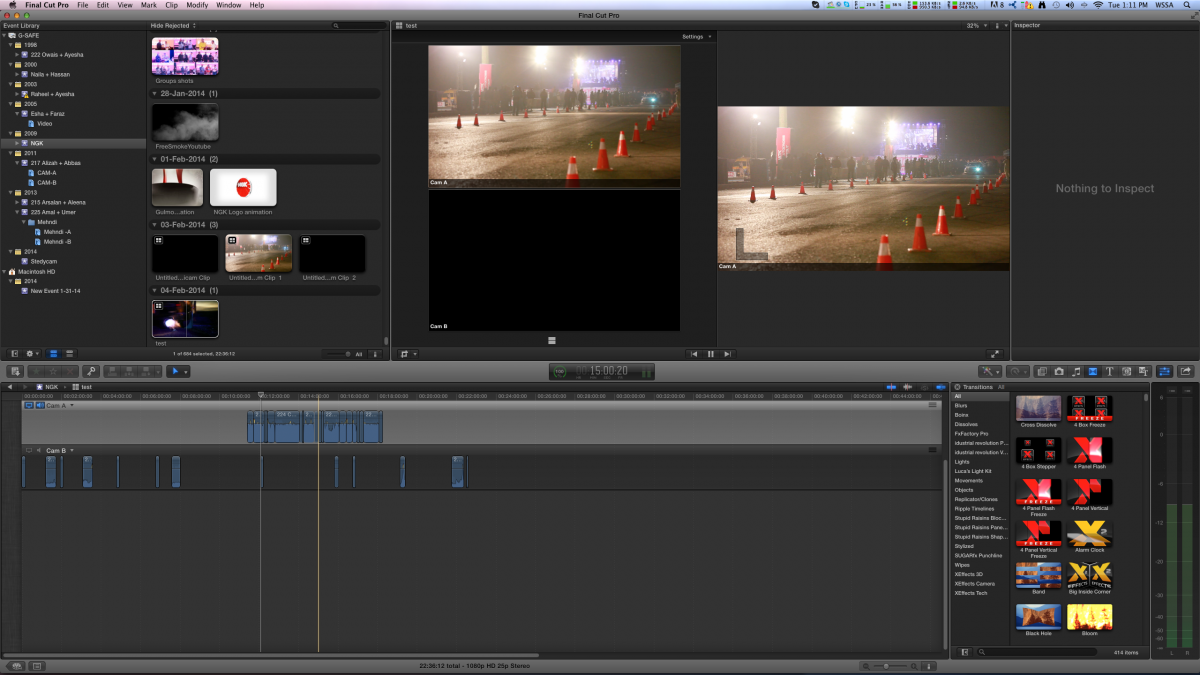
i want to ask that i use multi cam many times but this time i have some issues when i create multi cam it no sync with time and audio as i say its dosent creat gaps between clips i attach some images to describe
im usinf fcpx 10.0.9
i want to ask that i use multi cam many times but this time i have some issues when i create multi cam it no sync with time and audio as i say its dosent creat gaps between clips i attach some images to describe
im usinf fcpx 10.0.9
Please Log in to join the conversation.
04 Feb 2014 08:26 #40501
by shani
Replied by shani on topic FCPX 10.1(.1) - Ispector slows editing on storyline
hi thanks for reply
i want to ask that i use multi cam many times but this time i have some issues when i create multi cam it no sync with time and audio as i say its dosent creat gaps between clips i attach some images to describe
im usinf fcpx 10.0.9 1 time i got this problem
i want to ask that i use multi cam many times but this time i have some issues when i create multi cam it no sync with time and audio as i say its dosent creat gaps between clips i attach some images to describe
im usinf fcpx 10.0.9 1 time i got this problem
Please Log in to join the conversation.
- ronny courtens
-
- Offline
- Moderator
-
Less
More
- Posts: 4455
- Thank you received: 962
04 Feb 2014 09:14 - 04 Feb 2014 09:16 #40502
by ronny courtens
Replied by ronny courtens on topic FCPX 10.1(.1) - Ispector slows editing on storyline
Thank you for the screenshot.
I can see a lot of small clips in the CAM A angle and a lot of small clips in the CAM B angle, and there are more clips in A than in B. So I assume the two cameras have been stopping and starting all the time while recording the scene. That's not very good for audio synching.
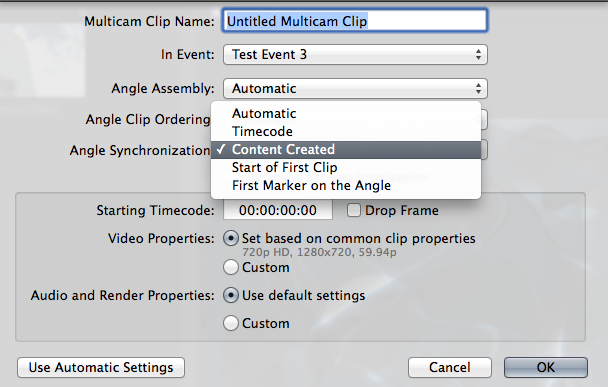
What you can try is to set Angle Synchronization to timecode or content created. If the cameras had their clocks set correctly this may be a better way.
If this doesn't work I would try to synchronize only a few clips at a time. Take the first three or four and see if they synchronize, then the next ones and create different multi clips that you can assemble on your timeline.
- Ronny
I can see a lot of small clips in the CAM A angle and a lot of small clips in the CAM B angle, and there are more clips in A than in B. So I assume the two cameras have been stopping and starting all the time while recording the scene. That's not very good for audio synching.
What you can try is to set Angle Synchronization to timecode or content created. If the cameras had their clocks set correctly this may be a better way.
If this doesn't work I would try to synchronize only a few clips at a time. Take the first three or four and see if they synchronize, then the next ones and create different multi clips that you can assemble on your timeline.
- Ronny
Last edit: 04 Feb 2014 09:16 by ronny courtens.
Please Log in to join the conversation.
04 Feb 2014 09:20 #40503
by shani
Replied by shani on topic FCPX 10.1(.1) - Ispector slows editing on storyline
i m trying to sync with time also in camera time are same 1 time iface this problem
Please Log in to join the conversation.
- ronny courtens
-
- Offline
- Moderator
-
Less
More
- Posts: 4455
- Thank you received: 962
04 Feb 2014 09:24 - 04 Feb 2014 09:24 #40504
by ronny courtens
Replied by ronny courtens on topic FCPX 10.1(.1) - Ispector slows editing on storyline
I understand you have done this before, and I'm not sure why it doesn't work this time.
Please try this:
In the Library Browser select the first three clips from camera A and the first three clips from camera B and create a multi clip just from these clips. Do they synchronize correctly?
- Ronny
Please try this:
In the Library Browser select the first three clips from camera A and the first three clips from camera B and create a multi clip just from these clips. Do they synchronize correctly?
- Ronny
Last edit: 04 Feb 2014 09:24 by ronny courtens.
Please Log in to join the conversation.
04 Feb 2014 09:28 #40505
by shani
Replied by shani on topic FCPX 10.1(.1) - Ispector slows editing on storyline
yes its sync with time
Please Log in to join the conversation.
- ronny courtens
-
- Offline
- Moderator
-
Less
More
- Posts: 4455
- Thank you received: 962
04 Feb 2014 09:32 #40506
by ronny courtens
Replied by ronny courtens on topic FCPX 10.1(.1) - Ispector slows editing on storyline
Okay, that's good. Do all your clips from CAM A and CAM B synch with time now?
- Ronny
- Ronny
Please Log in to join the conversation.
