


- Posts: 786
- Thank you received: 21
3 Post Moderation Rule for New Boarders (25 Jan 2021)
New boarders will have their posts moderated - Don't worry if you cannot see your post immediately.
Good source for key board shortcuts and FCP X?
- Jonathan Levin
-
 Topic Author
- Offline
- Platinum Member
-

Less
More
01 Feb 2014 20:50 #40350
by Jonathan Levin
Good source for key board shortcuts and FCP X? was created by Jonathan Levin
After reading a lot of great stuff in these forums, I've come to the conclusion that learning key board short cuts is not only helpful, but also necessary, since some of the things you can do are not in any menu items. I know many of the basic ones but would like to go further.
So do you have a good place or recommendation on best place to learn and be able to reference these?
Thanks.
Jonathan
So do you have a good place or recommendation on best place to learn and be able to reference these?
Thanks.
Jonathan
Please Log in to join the conversation.
01 Feb 2014 21:50 #40352
by wdevn
LLAP,
James
Taipei, Taiwan
Replied by wdevn on topic Good source for key board shortcuts and FCP X?
I think a good way to teach Key Board shortcuts is to make it a game.
Hmmm, why aren't games being created to teach Key Board shorts cuts?
Hmmm, why aren't games being created to teach Key Board shorts cuts?
LLAP,
James
Taipei, Taiwan
Please Log in to join the conversation.
- cinemaloha
-

- Offline
- Elite Member
-

Less
More
- Posts: 163
- Thank you received: 36
01 Feb 2014 22:29 #40355
by cinemaloha
Replied by cinemaloha on topic Good source for key board shortcuts and FCP X?
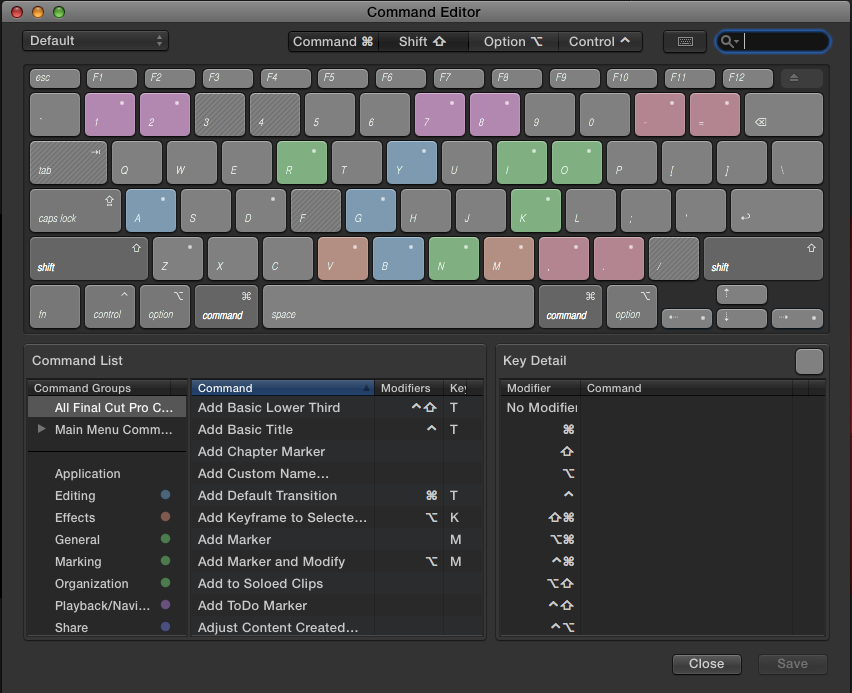
There's no better place to look than the Command Editor (cmd + opt + k) for all the keyboard shortcuts. Plus, you can customize it.
Please Log in to join the conversation.
- Darren Roark
-
- Offline
- Platinum Member
-
01 Feb 2014 22:39 #40357
by Darren Roark
Replied by Darren Roark on topic Good source for key board shortcuts and FCP X?
There are also these thingies:
kbcovers.com/final-cut-pro-x-keyboard-cover/
The one for the Macbook Pro had the added bonus of saving my retina MBP from a minor spill. The only downside is they stretch out over time.
The one for the Macbook Pro had the added bonus of saving my retina MBP from a minor spill. The only downside is they stretch out over time.
Please Log in to join the conversation.
- Jonathan Levin
-
Topic Author
- Offline
- Platinum Member
-
Less
More
- Posts: 786
- Thank you received: 21
01 Feb 2014 23:55 #40364
by Jonathan Levin
Replied by Jonathan Levin on topic Good source for key board shortcuts and FCP X?
Darren and cinemaloha, thank you.
I definitely will look at the command editor. Looks like the short cut viewer thing in FCP7.
Wdevn, always up for a game to keep my almost geriatric brain functioning well.
Jonathan
I definitely will look at the command editor. Looks like the short cut viewer thing in FCP7.
Wdevn, always up for a game to keep my almost geriatric brain functioning well.
Jonathan
Please Log in to join the conversation.
01 Feb 2014 23:59 #40366
by Seanus
Sean Lander - Editing since 1982 - AVID 1991 - FCP 1999 - FCPX 2011
Replied by Seanus on topic Good source for key board shortcuts and FCP X?
Agreed the Command Editor is best and you don't have to leave the application to view it.
Sean Lander - Editing since 1982 - AVID 1991 - FCP 1999 - FCPX 2011
Please Log in to join the conversation.
02 Feb 2014 07:26 - 02 Feb 2014 07:55 #40375
by wdevn
LLAP,
James
Taipei, Taiwan
Replied by wdevn on topic Good source for key board shortcuts and FCP X?
The Command Editor is great for when you already have an idea of the function you want to access. You just have to search for it. How about an app that randomly asks you to issue a keyboard command in a limited amount of time. After, then, the app shows you the correct answers for keyboard commands you've gotten wrong. In fact, the app can have "test ranges." For example, one range could be just testing the keyboard commands related to the timeline and another could be related to audio and video detachment functions...etc.
Hmmmm.
In fact, this type of app keyboard command "Drill Master" could expand to cover keyboard commands of other apps like Compressor, Motion, Logic ...etc.
Hmmmm.
In fact, this type of app keyboard command "Drill Master" could expand to cover keyboard commands of other apps like Compressor, Motion, Logic ...etc.
LLAP,
James
Taipei, Taiwan
Last edit: 02 Feb 2014 07:55 by wdevn. Reason: Added other app possibilities.
Please Log in to join the conversation.
02 Feb 2014 07:42 #40376
by cgbier
Replied by cgbier on topic Good source for key board shortcuts and FCP X?
I did it the olde fashioned way, printing out the relevant pages from the manual and used highlighters to mark them in the same colors as they are in the editor.
Memorized the common ones by practicing. The more esoteric ones I still have to look up some now and then.
Memorized the common ones by practicing. The more esoteric ones I still have to look up some now and then.
Please Log in to join the conversation.
02 Feb 2014 09:05 #40378
by Julian
What if we just had a keyboard shortcut of the day calendar?
Replied by Julian on topic Good source for key board shortcuts and FCP X?
wdevn wrote: I think a good way to teach Key Board shortcuts is to make it a game.
Hmmm, why aren't games being created to teach Key Board shorts cuts?
What if we just had a keyboard shortcut of the day calendar?
Please Log in to join the conversation.
02 Feb 2014 11:32 #40381
by Seanus
Sean Lander - Editing since 1982 - AVID 1991 - FCP 1999 - FCPX 2011
Replied by Seanus on topic Good source for key board shortcuts and FCP X?
Now that's a brilliant idea!
Sean Lander - Editing since 1982 - AVID 1991 - FCP 1999 - FCPX 2011
Please Log in to join the conversation.
02 Feb 2014 12:56 #40387
by wdevn
LLAP,
James
Taipei, Taiwan
Replied by wdevn on topic Good source for key board shortcuts and FCP X?
Great! but....365 days to learn the keyboard short cuts....hmmmm. I have to rethink this.
LLAP,
James
Taipei, Taiwan
Please Log in to join the conversation.
- Jonathan Levin
-
Topic Author
- Offline
- Platinum Member
-
Less
More
- Posts: 786
- Thank you received: 21
02 Feb 2014 21:13 #40409
by Jonathan Levin
Replied by Jonathan Levin on topic Good source for key board shortcuts and FCP X?
Thank you all for your replies.
Off the top of your head, is there a way to print out the list of short cuts, or maybe to answer my own question, go to the manual I guess.
Best to all.
Jonathan
Off the top of your head, is there a way to print out the list of short cuts, or maybe to answer my own question, go to the manual I guess.
Best to all.
Jonathan
Please Log in to join the conversation.
