


- Posts: 3
- Thank you received: 0
3 Post Moderation Rule for New Boarders (25 Jan 2021)
New boarders will have their posts moderated - Don't worry if you cannot see your post immediately.
Mystery device(s)
- Thunderball
-
 Topic Author
- Offline
- New Member
-

Less
More
01 Feb 2014 08:09 #40304
by Thunderball
Mystery device(s) was created by Thunderball
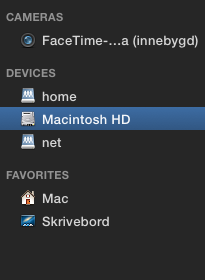
I have no devices attached; still, when the import window open, these 2 shows up. Any idea what they are, and what function they have
Please Log in to join the conversation.
- Thunderball
-
Topic Author
- Offline
- New Member
-
Less
More
- Posts: 3
- Thank you received: 0
01 Feb 2014 14:55 #40323
by Thunderball
Replied by Thunderball on topic Mystery device(s)
Speculate ..
Please Log in to join the conversation.
- Tom Wolsky
-

- Offline
- Moderator
-

01 Feb 2014 15:27 #40325
by Tom Wolsky
Replied by Tom Wolsky on topic Mystery device(s)
They're network connections.
Please Log in to join the conversation.
- Tommy Campbell
-
- Offline
- Junior Member
-

Less
More
- Posts: 24
- Thank you received: 2
01 Feb 2014 15:30 #40326
by Tommy Campbell
Replied by Tommy Campbell on topic Mystery device(s)
its part of the OS X auto mounting system. Its mostly used for networked computers that mount a users home directory from a file server or other machines. They are normally hidden from view.
Please Log in to join the conversation.
- ronny courtens
-

- Offline
- Moderator
-
Less
More
- Posts: 4455
- Thank you received: 962
01 Feb 2014 15:30 - 01 Feb 2014 15:31 #40327
by ronny courtens
Replied by ronny courtens on topic Mystery device(s)
No speculation needed 
Home and net are root-level Unix folders that normally don't show at Finder level unless you have "show hidden files" activated. They are the root directories commonly used when you connect your Mac to an NFS network. Users' home directories are usually mounted under /home, and other shared filesystems under /net.
FCPX goes very deep in the OS, and sometimes it can show these folders in the Import window although they are not useful to you. I wouldn't bother about them. Sometimes they show, sometimes they don't. If you see them appear in Finder you can hide them with a Terminal command. But if you are not familiar with the Terminal it's not worth the trouble.
- Ronny
Home and net are root-level Unix folders that normally don't show at Finder level unless you have "show hidden files" activated. They are the root directories commonly used when you connect your Mac to an NFS network. Users' home directories are usually mounted under /home, and other shared filesystems under /net.
FCPX goes very deep in the OS, and sometimes it can show these folders in the Import window although they are not useful to you. I wouldn't bother about them. Sometimes they show, sometimes they don't. If you see them appear in Finder you can hide them with a Terminal command. But if you are not familiar with the Terminal it's not worth the trouble.
- Ronny
Last edit: 01 Feb 2014 15:31 by ronny courtens.
Please Log in to join the conversation.
- Thunderball
-
Topic Author
- Offline
- New Member
-
Less
More
- Posts: 3
- Thank you received: 0
01 Feb 2014 15:41 #40329
by Thunderball
Replied by Thunderball on topic Mystery device(s)
ok thanks guys  Mystery solved
Mystery solved Please Log in to join the conversation.
