


- Posts: 786
- Thank you received: 21
3 Post Moderation Rule for New Boarders (25 Jan 2021)
New boarders will have their posts moderated - Don't worry if you cannot see your post immediately.
Copy and paste into Event?
- Jonathan Levin
-
 Topic Author
- Offline
- Platinum Member
-

Less
More
30 Jan 2014 17:39 #40185
by Jonathan Levin
Copy and paste into Event? was created by Jonathan Levin
Hi all.
Is there some way to select a range of a storyline video (or audio) clip, copy that, and then somehow paste that into an event, so that it is an independent clip. The only way I've been able to do this is by creating a compound clip and then saving that into the event. Or is this the way to do it?
Thanks.
JL
Is there some way to select a range of a storyline video (or audio) clip, copy that, and then somehow paste that into an event, so that it is an independent clip. The only way I've been able to do this is by creating a compound clip and then saving that into the event. Or is this the way to do it?
Thanks.
JL
Please Log in to join the conversation.

30 Jan 2014 17:56 #40189
by lichinho
Yes, or alternatively you may export just that section as a master file (by setting an IN and OUT in the timeline), and then import that to your event.
Replied by lichinho on topic Copy and paste into Event?
Jonathan Levin wrote: Hi all.
Is there some way to select a range of a storyline video (or audio) clip, copy that, and then somehow paste that into an event, so that it is an independent clip. The only way I've been able to do this is by creating a compound clip and then saving that into the event. Or is this the way to do it?
Thanks.
JL
Yes, or alternatively you may export just that section as a master file (by setting an IN and OUT in the timeline), and then import that to your event.
Please Log in to join the conversation.
- Jonathan Levin
-
Topic Author
- Offline
- Platinum Member
-
Less
More
- Posts: 786
- Thank you received: 21
30 Jan 2014 18:32 #40192
by Jonathan Levin
lichinho,
How do you do this?
Thanks.
Jonathasn
Replied by Jonathan Levin on topic Copy and paste into Event?
Yes, or alternatively you may export just that section as a master file (by setting an IN and OUT in the timeline), and then import that to your event.
lichinho,
How do you do this?
Thanks.
Jonathasn
Please Log in to join the conversation.
30 Jan 2014 18:44 #40195
by lichinho
Replied by lichinho on topic Copy and paste into Event?
Move the playhead to where the section you want begins, and press I to set an IN point, go to where it ends and press O to set an OUT point. Then export normally (File->Share-Master File...).
Even though only the clips in the primary storyline may appear to be selected, the whole section will be exported.
In the picture, I set an IN point at 20 seconds and and OUT at 40 seconds, so only that portion will be exported.
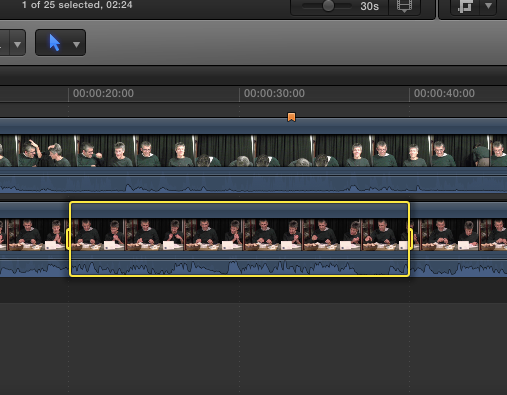
Even though only the clips in the primary storyline may appear to be selected, the whole section will be exported.
In the picture, I set an IN point at 20 seconds and and OUT at 40 seconds, so only that portion will be exported.
Please Log in to join the conversation.
- Jonathan Levin
-
Topic Author
- Offline
- Platinum Member
-
Less
More
- Posts: 786
- Thank you received: 21
30 Jan 2014 18:49 #40196
by Jonathan Levin
Replied by Jonathan Levin on topic Copy and paste into Event?
OK. Got it. And then you import that file into the event you want it in. Thanks.
It would be nice if there was a way to simply copy that section and paste (symlink) into an event rather than go through all that. But hey, that works.
It would be nice if there was a way to simply copy that section and paste (symlink) into an event rather than go through all that. But hey, that works.
Please Log in to join the conversation.
